1. ບົດແນະນຳ
This manual provides instructions for the use and care of your new generic replacement remote control. This remote is designed to operate various functions of compatible Pioneer AVH-P series car audio/video receivers, specifically models AVH-P5000DVD, AVH-P5100DVD, AVH-P5150DVD, and AVH-P5200DVD. Please read this manual thoroughly before use to ensure proper operation.
Note: As a replacement remote, some advanced or specific functions of your original unit's remote may not be supported or may operate differently. This is not indicative of a product defect.
2. ຜະລິດຕະພັນເກີນview
The remote control features a compact and ergonomic design for comfortable handling. It includes essential buttons for controlling your compatible Pioneer car audio/video receiver.
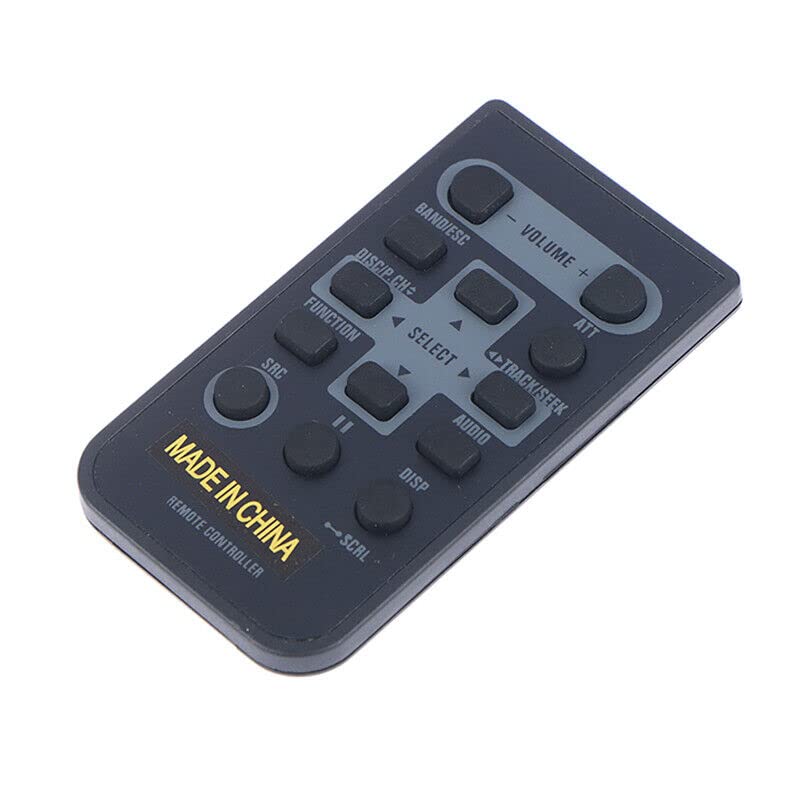
ຮູບພາບ 2.1: ດ້ານຫນ້າ view of the generic replacement remote control. The remote is dark gray with light gray button labels. Key buttons include Volume, Band/ESC, ATT, Disc/P.CH, Track/Seek, Select, Function, Audio, SRC, Disp, and SCAL. The bottom of the remote has 'MADE IN CHINA' and 'REMOTE CONTROLLER' printed on it.
ຟັງຊັນປຸ່ມ:
- ປະລິມານ +/-: ປັບລະດັບສຽງອອກ.
- BAND/ESC: Changes radio bands or exits a menu/function.
- ATT (ຫຼຸດຜ່ອນ): Mutes or reduces audio volume temporarily.
- DISC/P.CH: Selects disc or program channel.
- TRACK/SEEK (◀/▶): Skips tracks/chapters or seeks radio stations.
- SELECT (Up/Down/Left/Right/Center): ນຳທາງຜ່ານເມນູ ແລະຢືນຢັນການເລືອກ.
- ຟັງຊັນ: Accesses various function settings.
- ສຽງ: ເຂົ້າເຖິງການຕັ້ງຄ່າສຽງ.
- SRC (ແຫຼ່ງຂໍ້ມູນ): Changes the input source (e.g., Radio, CD, USB).
- ຈໍສະແດງຜົນ (DISP): Changes display information or mode.
- SCAL (Scroll): Scrolls through lists or text.
3. ຕັ້ງຄ່າ
ການຕິດຕັ້ງຫມໍ້ໄຟ:
- ຊອກຫາຊ່ອງໃສ່ຫມໍ້ໄຟຢູ່ດ້ານຫຼັງຂອງການຄວບຄຸມໄລຍະໄກ.
- ເລື່ອນເປີດcoverາປົກຊ່ອງຂອງbatteryໍ້ໄຟ.
- ໃສ່ໝໍ້ໄຟ AAA ສອງ (2) ໜ່ວຍ, ຮັບປະກັນຄວາມຂົ້ວທີ່ຖືກຕ້ອງ (+ ແລະ -) ຕາມທີ່ລະບຸໄວ້ພາຍໃນຊ່ອງ.
- ປິດຝາປິດຊ່ອງໃສ່ຫມໍ້ໄຟຢ່າງປອດໄພ.
Important: Do not mix old and new batteries, or different types of batteries. Remove batteries if the remote will not be used for an extended period.
4. ຄໍາແນະນໍາການດໍາເນີນງານ
To operate your Pioneer AVH-P series receiver with this remote control, point the remote directly at the infrared sensor on your receiver. Ensure there are no obstructions between the remote and the receiver.
ການດໍາເນີນງານພື້ນຖານ:
- ເປີດ/ປິດ: The remote typically does not have a dedicated power button for the main unit. Use the power button on your Pioneer receiver to turn it on or off.
- ການຄວບຄຸມລະດັບສຽງ: ກົດ ປະລິມານ + to increase volume, and ປະລິມານ - ຫຼຸດລົງປະລິມານ.
- ການຄັດເລືອກແຫຼ່ງ: ກົດ SRC button to cycle through available input sources (e.g., Radio, CD, DVD, USB, AUX).
- Track/Chapter Navigation: When playing media, use the TRACK/SEEK ◀ or ▶ buttons to skip to the previous or next track/chapter.
- ການປັບວິທະຍຸ: In radio mode, use TRACK/SEEK ◀ or ▶ to seek for stations. Use ແຖບ/ESC to change radio bands (FM1, FM2, AM).
- ເມນູນໍາທາງ: ໃຊ້ ເລືອກ directional arrows (Up, Down, Left, Right) to navigate through on-screen menus. Press the center ເລືອກ ເພື່ອຢືນຢັນການເລືອກ.
- Mute/Attenuate: ກົດ ເອທີ button to temporarily mute or reduce the audio volume. Press it again to restore.
- ຂໍ້ມູນສະແດງ: ກົດ DISP button to change the information shown on the receiver's display.
5. ບໍາລຸງຮັກສາ
ທໍາຄວາມສະອາດ:
ເຊັດຣີໂໝດຄວບຄຸມດ້ວຍຜ້າອ່ອນໆແລະແຫ້ງ. ສຳລັບຝຸ່ນທີ່ຝັງແໜ້ນ, ໃຫ້ເຊັດເບົາໆampen the cloth with water or a mild cleaning solution, then wipe dry immediately. Do not use abrasive cleaners, alcohol, or solvents, as these can damage the remote's surface or labels.
ການດູແລຫມໍ້ໄຟ:
Replace batteries when the remote's range decreases or it becomes unresponsive. Always replace both batteries at the same time. Dispose of used batteries according to local regulations.
6. ການແກ້ໄຂບັນຫາ
- ໄລຍະໄກບໍ່ຕອບສະໜອງ:
- ໃຫ້ແນ່ໃຈວ່າໄດ້ຕິດຕັ້ງແບັດເຕີຣີ AAA ໃໝ່ຢ່າງຖືກຕ້ອງ.
- Check for any obstructions between the remote and the receiver's IR sensor.
- Ensure you are within the effective operating range and pointing the remote directly at the receiver.
- ບາງໜ້າທີ່ບໍ່ເຮັດວຽກ:
- This is a generic replacement remote. It may not support all functions of your original Pioneer remote. This is normal for replacement units.
- Verify that the function you are trying to use is available on your specific Pioneer AVH-P model.
7. ຂໍ້ມູນຈໍາເພາະ
| ຍີ່ຫໍ້ | ທົ່ວໄປ |
| ຜູ້ຜະລິດ | ການຄວບຄຸມໄລຍະໄກອີເລັກໂທຣນິກ |
| Compatible Pioneer Models | AVH-P5000DVD, AVH-P5100DVD, AVH-P5150DVD, AVH-P5200DVD |
| ອຸປະກອນທີ່ເຂົ້າກັນໄດ້ | DVD/Blu-ray Player, Home Theater, Set Top Box, Stereo System, Television (when connected to compatible Pioneer unit) |
| ຕ້ອງໃຊ້ແບັດເຕີຣີ | 2 x ຫມໍ້ໄຟ AAA |
| ຄຸນນະສົມບັດພິເສດ | ການອອກແບບ Ergonomic |
| ສີ | Black or white (color may vary) |
| ຈຳນວນສູງສຸດຂອງອຸປະກອນທີ່ຮອງຮັບ | 1 (the specific Pioneer unit) |
8. ການຮັບປະກັນແລະການສະຫນັບສະຫນູນ
As a generic replacement product, this remote control typically does not come with a separate manufacturer's warranty. For any issues or returns, please refer to the retailer's return policy where the product was purchased. For purchases made on Amazon, a 30-day return policy is generally applicable.
For further assistance regarding your Pioneer AVH-P series receiver, please consult the original manual for your specific unit or contact Pioneer customer support.


