
LFF LWC150
LFF Atomic Clock User Manual
Model: LWC150
ຍີ່ຫໍ້: LFF
1. ບົດແນະນຳ
The LFF Atomic Clock (Model LWC150) is a versatile digital wall or desk clock designed for accurate timekeeping and environmental monitoring. It automatically synchronizes with the WWVB radio broadcast for precise time and features a large, easy-to-read LCD display showing time, date, day of the week, alarm status, and both indoor and outdoor temperature and humidity.
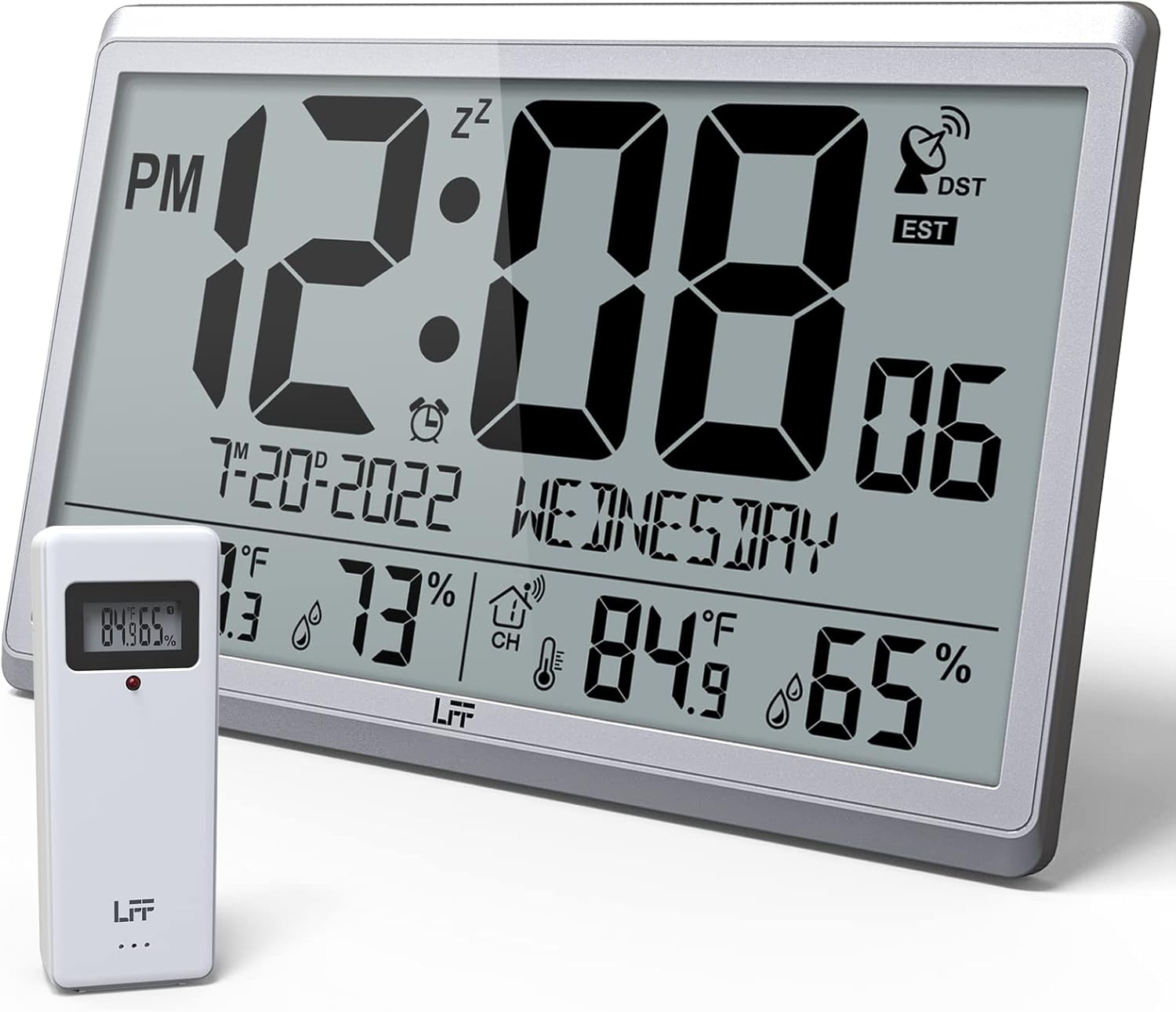
Figure 1.1: LFF Atomic Clock with its wireless outdoor sensor.
2. ຄຸນສົມບັດ
- Accurate Atomic Clock: Built-in receiver automatically synchronizes with the WWVB radio broadcast from NIST in Fort Collins, Colorado, ensuring precise time and calendar adjustments.
- Large LCD High-Definition Display: 9.4-inch tall display with large numbers for easy readability. Displays time (12/24H), calendar, day of the week, alarm, indoor/outdoor temperature (°C/°F), and humidity simultaneously.
- ເຊັນເຊີກາງແຈ້ງໄຮ້ສາຍ: Transmits accurate outdoor temperature and humidity measurements up to 328 feet (100 meters). The sensor has an IPX4 splash-proof rating.
- ແບັດເຕີຣີເຮັດວຽກ: Main clock requires 4 AA batteries (not included), and the outdoor sensor requires 2 AAA batteries (not included). No backlight display.
- ຫຼາຍເຂດເວລາ: Supports 8 time zones including EST, CST, MST, PST, AKT, HST, AST, NST.
- ການຈັດວາງແບບຍືດຫຍຸ່ນ: Can be used as a wall clock (3 hanging holes) or a desk clock (integrated bracket).
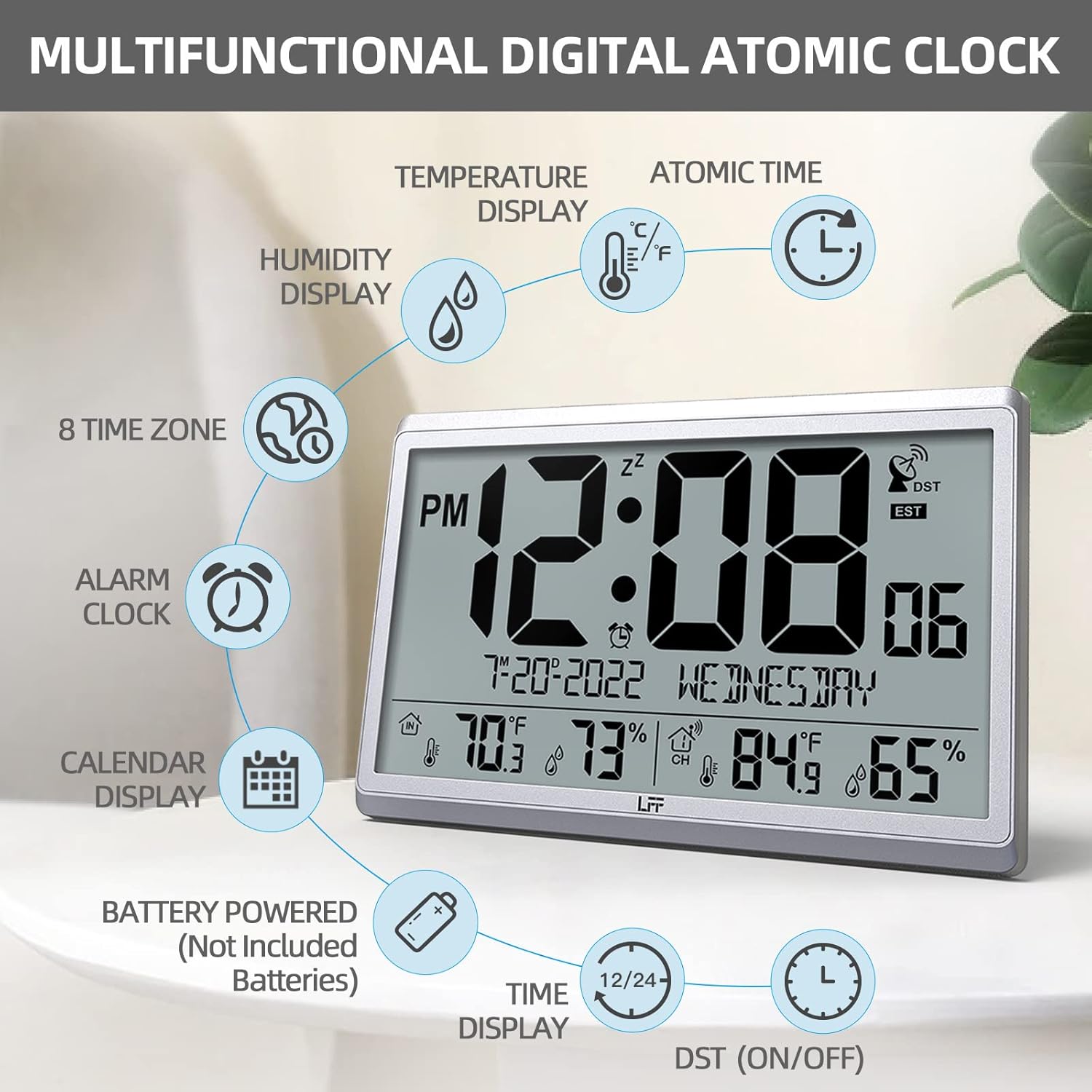
ຮູບ 2.1: ເກີນview of the clock's multifunctional display and features.
3. ເນື້ອໃນຊຸດ
ກະລຸນາກວດເບິ່ງເນື້ອໃນຂອງແພັກເກັດໃນເວລາທີ່ unboxing ເພື່ອຮັບປະກັນວ່າລາຍການທັງຫມົດແມ່ນມີຢູ່:
- 1 x LFF Atomic Clock (Main Unit)
- 1 x ເຊັນເຊີກາງແຈ້ງໄຮ້ສາຍ
- 1 x ຄູ່ມືຜູ້ໃຊ້
4. ຕັ້ງຄ່າ
4.1 ການຕິດຕັ້ງຫມໍ້ໄຟ
The main clock unit and the outdoor sensor are battery-powered. Batteries are not included.
- For the Main Clock Unit: Open the battery compartment on the back of the clock. Insert 4 new AA batteries, ensuring correct polarity (+/-).
- ສຳລັບເຊັນເຊີໄຮ້ສາຍພາຍນອກ: Open the battery compartment on the back of the sensor. Insert 2 new AAA batteries, ensuring correct polarity (+/-).

Figure 4.1: Battery installation and button layout on the main clock unit.
4.2 Outdoor Sensor Placement
For accurate temperature and humidity readings, place the outdoor sensor in a location that is:
- Out of direct sunlight and rain.
- Away from any heat sources (e.g., vents, exhaust fans) or extreme cold sources.
- Within the wireless transmission range of 328 feet (100 meters) from the main clock unit.

Figure 4.2: Optimal placement for the wireless outdoor sensor.
4.3 ການປະສານເວລາຂອງອະຕອມເບື້ອງຕົ້ນ
After battery installation, the clock will automatically attempt to synchronize with the WWVB atomic time signal. This process may take several minutes to several hours, depending on your location and signal strength. Ensure the clock is placed in an area where it can receive a clear signal, ideally near a window and away from electronic interference.

Figure 4.3: The clock synchronizes with the atomic time signal broadcast from Fort Collins, Colorado.
5. ຄໍາແນະນໍາການດໍາເນີນງານ
5.1 ການກໍານົດເວລາແລະວັນທີຄູ່ມື
While the clock primarily relies on atomic synchronization, you can manually set the time and date if needed (e.g., during initial setup before signal acquisition or in areas with poor reception).
- ກົດຄ້າງໄວ້ SET button on the back of the clock until the display flashes.
- ໃຊ້ UP or DOWN/RCC ປຸ່ມເພື່ອປັບຄ່າກະພິບ (ເຊັ່ນ: ຊົ່ວໂມງ, ນາທີ, ປີ, ເດືອນ, ມື້).
- ກົດ SET again to confirm the setting and move to the next value.
- Repeat until all desired settings are configured.
5.2 Time Zone Selection
The clock supports 8 time zones. After atomic synchronization, you may need to select your local time zone.
- ກົດ SET button repeatedly until the time zone setting flashes.
- ໃຊ້ UP or DOWN/RCC buttons to cycle through the available time zones (EST, CST, MST, PST, AKT, HST, AST, NST).
- ກົດ SET ເພື່ອຢືນຢັນການເລືອກຂອງທ່ານ.
5.3 ການເລືອກຫົວໜ່ວຍອຸນຫະພູມ (°C/°F)
To switch between Celsius and Fahrenheit for temperature display:
- ຫຍໍ້ໆ ກົດເຂົ້າ DOWN/RCC button. The temperature unit will toggle between °C and °F.
5.4 ຟັງຊັນໂມງປຸກ
The clock includes an alarm function.
- ກົດ ປຸກ ປຸ່ມ view ເວລາປຸກປັດຈຸບັນ.
- ກົດຄ້າງໄວ້ ປຸກ ກົດປຸ່ມຈົນກ່ວາເວລາປຸກກະພິບ.
- ໃຊ້ UP or DOWN/RCC ເພື່ອຕັ້ງຊົ່ວໂມງ ແລະ ນາທີປຸກທີ່ຕ້ອງການ.
- ກົດ ປຸກ ເພື່ອຢືນຢັນການຕັ້ງຄ່າແຕ່ລະອັນ.
- ເພື່ອເປີດໃຊ້/ປິດການປຸກ, ໃຫ້ກົດປຸ່ມສັ້ນໆ ປຸກ button when the alarm time is displayed. An alarm icon will appear/disappear on the screen.
5.5 ຂໍ້ມູນການສະແດງ
The large LCD display provides comprehensive information at a glance:
- ພາກສ່ວນເທິງ: Current time (with AM/PM indicator), atomic signal strength, DST indicator, and time zone.
- ພາກກາງ: Date (Month-Day-Year) and Day of the Week.
- ພາກສ່ວນລຸ່ມ: Indoor temperature and humidity, and outdoor temperature and humidity (from wireless sensor).

Figure 5.1: The LFF Atomic Clock can be placed on a desk or mounted on a wall.
6. ບໍາລຸງຮັກສາ
6.1 ການທົດແທນຫມໍ້ໄຟ
Replace batteries in both the main unit and the outdoor sensor when the display becomes dim or readings become erratic. Always replace all batteries at the same time with new ones of the same type. For temperatures below -4°F, lithium batteries are recommended for the outdoor sensor.
6.2 ການທໍາຄວາມສະອາດ
Wipe the clock and sensor with a soft, dry cloth. Do not use abrasive cleaners or solvents, as they may damage the display or casing. Avoid getting moisture into the battery compartments or electronic components.
6.3 ການດູແລເຊັນເຊີ
Periodically check the outdoor sensor for any debris or obstructions that might affect its readings. Ensure it remains in a sheltered location to protect it from extreme weather conditions, despite its splash-proof design.
7. ການແກ້ໄຂບັນຫາ
| ບັນຫາ | ສາເຫດທີ່ເປັນໄປໄດ້ | ການແກ້ໄຂ |
|---|---|---|
| ໂມງບໍ່ກົງກັບເວລາຂອງອະຕອມ. | Weak signal, interference, incorrect time zone. | Relocate the clock closer to a window or away from electronic devices. Ensure correct time zone is selected. Allow up to 24 hours for initial synchronization. |
| ບໍ່ໄດ້ສະແດງອຸນຫະພູມ/ຄວາມຊຸ່ມຊື່ນພາຍນອກ ຫຼື ບໍ່ຖືກຕ້ອງ. | Sensor out of range, low sensor batteries, sensor exposed to direct elements. | Ensure sensor is within 328 feet of the main unit. Replace sensor batteries. Reposition sensor in a shaded, dry area. Press the ຊ່ອງ button on the main unit to re-establish connection. |
| ຈໍສະແດງຜົນແມ່ນມືດ ຫຼືຫວ່າງເປົ່າ. | ແບັດເຕີຣີຕໍ່າໃນຕົວເຄື່ອງຫຼັກ. | Replace all 4 AA batteries in the main clock unit. |
| Time is incorrect after synchronization. | ເລືອກເຂດເວລາບໍ່ຖືກຕ້ອງ. | Verify and adjust the time zone setting as described in Section 5.2. |
8. ຂໍ້ມູນຈໍາເພາະ
| ຄຸນສົມບັດ | ລາຍລະອຽດ |
|---|---|
| ໝາຍເລກຕົວແບບ | LWC150 |
| ປະເພດການສະແດງ | Digital LCD |
| ຂະໜາດສິນຄ້າ | 14.2"W x 9.4"H x 1.2"D |
| ແຫຼ່ງພະລັງງານ (ຫນ່ວຍງານຫຼັກ) | 4 x AA ຫມໍ້ໄຟ (ບໍ່ລວມ) |
| ແຫຼ່ງພະລັງງານ (ເຊັນເຊີກາງແຈ້ງ) | 2 x ຫມໍ້ໄຟ AAA (ບໍ່ລວມ) |
| ຊ່ວງອຸນຫະພູມພາຍໃນ | 14.1°F ຫາ 122.0°F (-9.9°C ຫາ 50.0°C) |
| ຊ່ວງອຸນຫະພູມກາງແຈ້ງ | -58.0°F ຫາ 158.0°F (-50.0°C ຫາ 70.0°C) |
| ຊ່ວງຄວາມຊຸ່ມຊື່ນພາຍໃນ | 1% ຫາ 99% |
| ຊ່ວງຄວາມຊຸ່ມຊື່ນກາງແຈ້ງ | 1% ຫາ 99% |
| ໄລຍະການສົ່ງຜ່ານໄຮ້ສາຍ | ສູງເຖິງ 328 ຟຸດ (100 ແມັດ) ໃນພື້ນທີ່ເປີດ |
| Outdoor Sensor Waterproof Rating | IPX4 (ກັນນໍ້າແຕກ) |
| ວັດສະດຸ | Plastic (Acrylonitrile Butadiene Styrene frame) |
| ນ້ໍາຫນັກລາຍການ | 2.7 ປອນ (1.23 ກິໂລກຣາມ) |
9. ການຮັບປະກັນແລະການສະຫນັບສະຫນູນ
LFF products are designed for reliability and performance. For any questions, technical support, or warranty claims, please contact LFF customer service through the retailer's platform or the official LFF webເວັບໄຊ. ກະລຸນາຮັກສາຫຼັກຖານການຊື້ຂອງທ່ານໄວ້ເພື່ອຈຸດປະສົງການຮັບປະກັນ.
Ask a question about this manual
Ask about setup, troubleshooting, compatibility, parts, safety, or missing instructions. Manuals+ will review the question and use this page’s manual context to help answer it.