
ແນະນຳ
Welcome to your new TechniSat Viola CD-1. This portable stereo CD player offers versatile audio playback options including CD, FM radio, and Bluetooth streaming. Its compact design and battery operation make it suitable for both home and on-the-go use. This manual provides essential information for setting up, operating, and maintaining your device.
ຂໍ້ມູນຄວາມປອດໄພທີ່ສໍາຄັນ
- Read all instructions thoroughly before using the device.
- ຮັກສາຄູ່ມືນີ້ໄວ້ສໍາລັບການອ້າງອີງໃນອະນາຄົດ.
- ຫ້າມບໍ່ໃຫ້ອຸປະກອນຖືກຝົນ, ຄວາມຊຸ່ມຊື່ນ, ຫຼືຄວາມຊຸ່ມຊື່ນຫຼາຍເກີນໄປ.
- Ensure that ventilation openings are not blocked to prevent overheating.
- ໃຊ້ພຽງແຕ່ໄຟລ໌ແນບແລະອຸປະກອນເສີມທີ່ລະບຸໂດຍຜູ້ຜະລິດ.
- ອ້າງອີງການບໍລິການທັງໝົດໃຫ້ກັບພະນັກງານບໍລິການທີ່ມີຄຸນວຸດທິ.
ສິນຄ້າເກີນview
Familiarize yourself with the main components and controls of your Viola CD-1.

ດ້ານໜ້າ view of the TechniSat Viola CD-1, highlighting its main controls and central display.

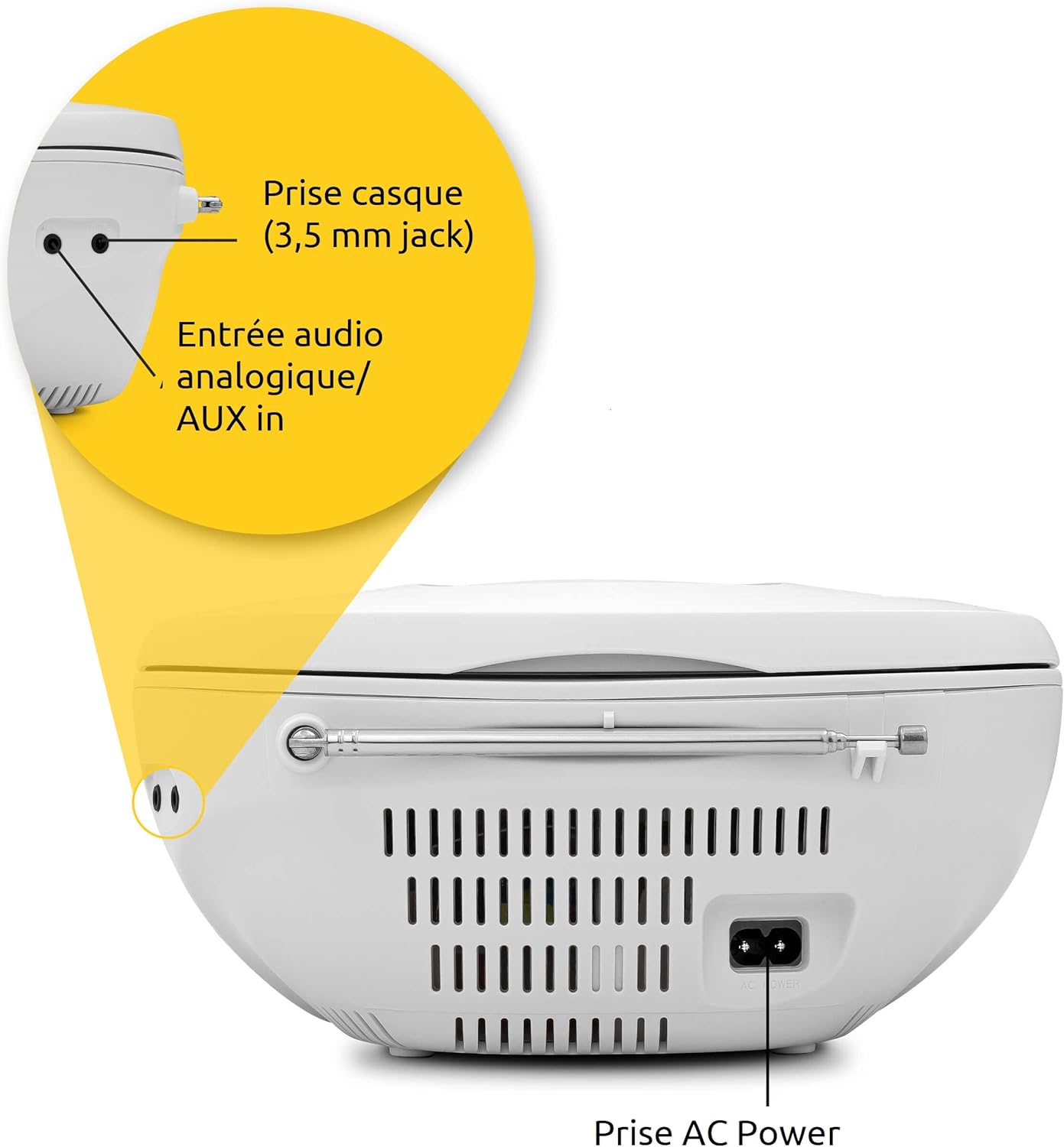
The rear panel of the Viola CD-1 features the AC power input, a 3.5mm AUX in port for external devices, and a 3.5mm headphone jack.
Key Controls and Features:
- ປຸ່ມເປີດປິດ: ເປີດ ຫຼືປິດເຄື່ອງ.
- ປຸ່ມໂໝດ: Switches between CD, FM, Bluetooth, and AUX input modes.
- ລະດັບສຽງ +/- ປຸ່ມ: ປັບລະດັບສຽງອອກ.
- ປຸ່ມຫຼິ້ນ/ຢຸດຊົ່ວຄາວ: Starts or pauses playback in CD and Bluetooth modes.
- ປຸ່ມຂ້າມ/ປັບແຕ່ງ: Navigates tracks on a CD or tunes radio stations.
- ປຸ່ມສະແກນ: Initiates automatic station search in FM mode.
- ປຸ່ມອະລະບ້ຳ: For MP3 CDs, navigates between folders.
- ເສົາອາກາດ Telescopic: ສໍາລັບການຮັບວິທະຍຸ FM.
- ມືຈັບ: ສໍາລັບການພົກພາງ່າຍ.
ຕັ້ງຄ່າ
ການສະຫນອງພະລັງງານ
The Viola CD-1 can be powered by either AC mains or batteries.
- ໄຟຟ້າ AC: Connect the provided power cable to the AC power input on the rear of the unit and then to a standard wall outlet (230V).
- ພະລັງງານຫມໍ້ໄຟ: For portable use, open the battery compartment located on the bottom of the unit. Insert 6 x 1.5V C-type batteries (R14), ensuring correct polarity (+/-). Close the compartment securely.
ການຕັ້ງຄ່າເສົາອາກາດ
ສຳລັບການຮັບວິທະຍຸ FM ທີ່ດີທີ່ສຸດ, ໃຫ້ຍືດເສົາອາກາດແບບຍືດໄດ້ອອກຈົນສຸດ.
ຄໍາແນະນໍາການດໍາເນີນງານ
ການຫຼິ້ນ CD
- Open the CD compartment lid located on the top of the unit.
- Carefully place a CD (standard audio CD or MP3 CD) onto the spindle with the label side facing up.
- ປິດຝາຊ່ອງ CD ຢ່າງປອດໄພ.
- ກົດ ໂໝດ button repeatedly until "CD" appears on the display.
- ກົດ ຫຼິ້ນ/ຢຸດຊົ່ວຄາວ ປຸ່ມເພື່ອເລີ່ມຕົ້ນການຫຼິ້ນ.
- ໃຊ້ ຂ້າມ buttons (forward/backward) to navigate between tracks.
- If playing an MP3 CD with multiple folders, use the ອະລະບໍ້າ ເພື່ອສະຫຼັບລະຫວ່າງໂຟນເດີຕ່າງໆ.

To insert a CD, lift the compartment lid as shown and place the disc with the label facing upwards.

The integrated CD player supports standard audio CDs, CD-R, CD-RW, and MP3 CDs.
ການດໍາເນີນງານວິທະຍຸ FM
- Fully extend the telescopic antenna for best reception.
- ກົດ ໂໝດ ກົດປຸ່ມຊ້ໍາໆຈົນກ່ວາ "FM" ປາກົດຢູ່ໃນຈໍສະແດງຜົນ.
- ກົດຄ້າງໄວ້ ສະແກນ ປຸ່ມເພື່ອຄົ້ນຫາ ແລະເກັບຮັກສາສະຖານີ FM ທີ່ມີຢູ່ໂດຍອັດຕະໂນມັດ.
- ໃຊ້ ຂ້າມ buttons (forward/backward) to select a stored station.
The Viola CD-1 features an FM radio tuner, allowing reception of various regional radio stations. Extend the telescopic antenna for best reception.
ກະແສສຽງຂອງ Bluetooth
- ກົດ ໂໝດ button repeatedly until "BT" appears on the display. The "BT" indicator will flash, signifying that the unit is in pairing mode.
- On your smartphone or other Bluetooth-enabled mobile device, enable Bluetooth and search for available devices.
- Select "TechniSat Viola CD-1" from the list of devices to initiate pairing.
- Once successfully paired, the "BT" indicator will stop flashing, and you can stream audio wirelessly from your device to the Viola CD-1.

Wirelessly stream music from your smartphone or tablet to the Viola CD-1 via Bluetooth.
ການປ້ອນຂໍ້ມູນ AUX
- ເຊື່ອມຕໍ່ອຸປະກອນສຽງພາຍນອກ (ເຊັ່ນ: ຜູ້ນ MP3, ໂທລະສັບສະຫຼາດ) ກັບ AUX ໃນ jack on the rear of the unit using a 3.5mm audio cable.
- ກົດ ໂໝດ ກົດປຸ່ມຊ້ຳໆຈົນກວ່າ "AUX" ຈະປາກົດຢູ່ເທິງຈໍສະແດງຜົນ.
- Control audio playback and volume directly from your external device.
ການໃຊ້ຫູຟັງ
Connect headphones with a 3.5mm jack to the headphone output on the rear of the unit for private listening. When headphones are connected, sound from the speakers will be muted.

The practical carry handle makes transporting the boombox comfortable and easy.

Integrated stereo speakers provide clear audio with a total output of 2 x 1 Watt.
ບໍາລຸງຮັກສາ
ທໍາຄວາມສະອາດ
- Wipe the exterior of the unit with a soft, dry cloth. Do not use abrasive cleaners, solvents, or chemical sprays, as these can damage the finish.
- For cleaning the CD lens, use a specialized CD lens cleaner disc according to its instructions.
ການປ່ຽນແບັດ
When using battery power, replace all 6 C-type batteries when the unit's performance (e.g., sound quality, volume) begins to degrade. Always replace all batteries at once with new ones of the same type.
ການແກ້ໄຂບັນຫາ
If you encounter issues with your Viola CD-1, refer to the table below for common problems and solutions.
| ບັນຫາ | ສາເຫດທີ່ເປັນໄປໄດ້ | ການແກ້ໄຂ |
|---|---|---|
| ຫນ່ວຍບໍລິການບໍ່ເປີດ. | No power supply or dead batteries. | Check AC power connection or replace all batteries. |
| ຊີດີຫຼິ້ນບໍ່ໄດ້. | CD inserted incorrectly, dirty, scratched, or unsupported format. | Ensure CD is inserted correctly (label side up). Clean the CD. Try a different CD. Ensure it's an audio CD or MP3 CD. |
| ການຮັບວິທະຍຸ FM ບໍ່ດີ. | ເສົາອາກາດບໍ່ໄດ້ຂະຫຍາຍ ຫຼືສັນຍານອ່ອນ. | Fully extend the telescopic antenna. Try repositioning the unit for better signal. |
| ອຸປະກອນ Bluetooth ບໍ່ສາມາດຈັບຄູ່ໄດ້. | Unit not in pairing mode, device too far, or previously paired. | Ensure Viola CD-1 is in Bluetooth pairing mode (BT flashing). Move devices closer. On your device, forget/unpair the Viola CD-1 and try pairing again. |
| ບໍ່ມີສຽງຈາກລຳໂພງ. | Volume too low, headphones connected, or incorrect mode selected. | Increase volume. Disconnect headphones. Press the ໂໝດ button to select the correct input source. |
ຂໍ້ມູນຈໍາເພາະ
Detailed technical specifications for the TechniSat Viola CD-1.
| ຄຸນສົມບັດ | ລາຍລະອຽດ |
|---|---|
| ຍີ່ຫໍ້ | TechniSat |
| ໝາຍເລກຕົວແບບ | 0001/2980 |
| ສີ | ສີຂາວ |
| ເຕັກໂນໂລຊີການເຊື່ອມຕໍ່ | Auxiliary, Bluetooth (reception) |
| ຄຸນນະສົມບັດພິເສດ | AC and Battery operation, MP3 CD Player, Convenient carry handle, Bluetooth audio streaming (reception) |
| ອຸປະກອນທີ່ເຂົ້າກັນໄດ້ | ຫູຟັງ |
| ແຫຼ່ງພະລັງງານ | AC and Battery operation |
| ປະເພດລຳໂພງ | ສະເຕຣິໂອ |
| ພະລັງງານຜົນຜະລິດ | 2 x 1 ວັດ RMS |
| ຂະໜາດ (LxWxH) | 21.5 x 21.5 x 10 cm |
| ນ້ໍາຫນັກລາຍການ | 828 ກຣາມ |
| ຄວາມຕ້ອງການຫມໍ້ໄຟ | 6 x 1.5V C-type batteries (R14) |
ການຮັບປະກັນແລະການສະຫນັບສະຫນູນ
ຂໍ້ມູນການຮັບປະກັນ
This product comes with a manufacturer's warranty. Please refer to the warranty card included in the product packaging for specific terms, conditions, and duration of the warranty. (Note: Specific warranty details were not available in the provided product data.)
ການຊ່ວຍເຫຼືອລູກຄ້າ
For technical assistance, troubleshooting beyond this manual, or service inquiries, please visit the official TechniSat website ຫຼືຕິດຕໍ່ສະຫນັບສະຫນູນລູກຄ້າຂອງເຂົາເຈົ້າໂດຍກົງ.
ທາງການ Webເວັບໄຊ: www.technisat.com