
1. ບົດແນະນຳ
ຂອບໃຈສໍາລັບການຊື້asing the LFF LDR113-EU Kitchen Radio. This manual provides essential information for the safe and efficient operation of your device. Please read it thoroughly before use and retain it for future reference.
The LFF LDR113-EU is a versatile kitchen radio featuring DAB+, FM, and Bluetooth connectivity. It includes dual alarms, a sleep timer, and 60 station presets, designed for both tabletop use and under-cabinet mounting.
2. ຂໍ້ມູນຄວາມປອດໄພ
- ແຫຼ່ງພະລັງງານ: ໃຊ້ພຽງແຕ່ອະແດບເຕີໄຟຟ້າທີ່ສະໜອງໃຫ້ເທົ່ານັ້ນ. ໃຫ້ແນ່ໃຈວ່າລະດັບສຽງtage ກົງກັບການສະຫນອງພະລັງງານໃນທ້ອງຖິ່ນຂອງທ່ານ.
- ນ້ໍາແລະຄວາມຊຸ່ມ: Do not expose the device to water, rain, or excessive moisture. Avoid placing liquids near the radio.
- ການລະບາຍອາກາດ: ຮັບປະກັນການລະບາຍອາກາດຢ່າງພຽງພໍອ້ອມຮອບອຸປະກອນ. ຢ່າປິດກັ້ນຊ່ອງລະບາຍອາກາດ.
- ຄວາມຮ້ອນ: ເກັບຮັກສາອຸປະກອນໃຫ້ຫ່າງຈາກແຫຼ່ງຄວາມຮ້ອນ ເຊັ່ນ: ໝໍ້ນ້ຳ, ເຄື່ອງບັນທຶກຄວາມຮ້ອນ, ເຕົາໄຟ ຫຼື ເຄື່ອງໃຊ້ໄຟຟ້າທີ່ຜະລິດຄວາມຮ້ອນອື່ນໆ.
- ທໍາຄວາມສະອາດ: ຕັດການເຊື່ອມຕໍ່ໄຟຟ້າກ່ອນທຳຄວາມສະອາດ. ໃຊ້ຜ້າອ່ອນແລະແຫ້ງ. ຢ່າໃຊ້ນໍ້າຢາທຳຄວາມສະອາດ ຫຼື ນໍ້າຢາທຳຄວາມສະອາດແບບສີດ.
- ການບໍລິການ: ຢ່າພະຍາຍາມບໍລິການຜະລິດຕະພັນນີ້ດ້ວຍຕົນເອງ. ອ້າງເຖິງການບໍລິການທັງtoົດໃຫ້ກັບພະນັກງານບໍລິການທີ່ມີຄຸນວຸດທິ.
- ການຈັດວາງ: Place the radio on a stable, level surface or mount it securely according to the instructions.
3. ເນື້ອໃນຊຸດ
ກະລຸນາກວດເບິ່ງວ່າລາຍການທັງໝົດມີຢູ່ໃນຊຸດ:
- LFF LDR113-EU Kitchen Radio
- Power Adapter
- Mounting Kit (screws, spacers, mounting template)
- ຄູ່ມືຜູ້ໃຊ້ (ເອກະສານນີ້)
4. ຜະລິດຕະພັນເກີນview
ຄຸ້ນເຄີຍກັບອົງປະກອບ ແລະການຄວບຄຸມຂອງວິທະຍຸ.

ຮູບທີ 4.1: ດ້ານໜ້າ view of the LFF LDR113-EU Kitchen Radio, showing the LCD display on the left, control buttons in the center, and a large rotary knob on the right. The buttons include power, mode, menu, info, preset, timer/sleep, and navigation arrows. The rotary knob is for volume and selection.

ຮູບທີ 4.2: Diagram illustrating the key features of the LFF Kitchen Radio, including DAB/DAB+ radio, FM radio, two alarms, sleep timer, Bluetooth connectivity, and 60 station presets.
4.1. ການຄວບຄຸມແລະການສະແດງ
- ຈໍ LCD ສີ: Shows current mode, station information, time, and settings.
- ປຸ່ມເປີດປິດ: ເປີດ/ປິດວິທະຍຸ.
- ປຸ່ມໂໝດ: ສະຫຼັບລະຫວ່າງໂໝດ DAB+, FM ແລະ Bluetooth.
- ປຸ່ມເມນູ/ຂໍ້ມູນ: Accesses menu options or displays station information.
- ປຸ່ມທີ່ຕັ້ງໄວ້ລ່ວງໜ້າ (1-5): Quick access to saved stations.
- Timer/Sleep Button: Sets sleep timer or alarm functions.
- ປຸ່ມນຳທາງ (ຂຶ້ນ/ລົງ/ຊ້າຍ/ຂວາ): Navigates through menus and station lists.
- Rotary Knob (Volume/Enter): Adjusts volume, scrolls through options, and confirms selections.
5. ຕັ້ງຄ່າ
5.1. ການເຊື່ອມຕໍ່ພະລັງງານ
- Connect the power adapter to the DC IN port on the back of the radio.
- ສຽບອະແດບເຕີໄຟໃສ່ກັບປລັກສຽບໃສ່ຝາ.
- ວິທະຍຸຈະເປີດ ຫຼື ເຂົ້າສູ່ໂໝດສະແຕນບາຍ.
5.2. Initial Scan (DAB+ and FM)
Upon first power-on, the radio will typically perform an automatic scan for DAB+ and FM stations. If not, follow these steps:
- ກົດ ໂໝດ button to select DAB+ or FM mode.
- For DAB+, the radio will usually initiate a full scan automatically. If not, navigate to the 'Full Scan' option in the DAB+ menu and press the rotary knob to confirm.
- For FM, navigate to the 'Auto Scan' option in the FM menu and press the rotary knob to confirm.
- The radio will search for available stations and store them.

ຮູບທີ 5.1: The LFF Kitchen Radio's LCD color screen displaying the main menu with icons for Digital Radio (DAB+), FM Radio, and Bluetooth, indicating available modes.
6. ຄໍາແນະນໍາການດໍາເນີນງານ
6.1. ເປີດ/ປິດ
ກົດ ພະລັງງານ ປຸ່ມເພື່ອເປີດ ຫຼື ປິດວິທະຍຸ (ໂໝດສະແຕນບາຍ).
6.2. ການເລືອກແບບ
ກົດ ໂໝດ button repeatedly to cycle through DAB+, FM, and Bluetooth modes.
6.3. ການດໍາເນີນງານວິທະຍຸ DAB+
- In DAB+ mode, use the ຂຶ້ນ/ລົງ navigation buttons or the rotary knob to browse available stations.
- Press the rotary knob to select a station.
- ກົດ ເມນູ/ຂໍ້ມູນ ກັບ view ຂໍ້ມູນສະຖານີ (ຕົວຢ່າງ, ປະເພດໂປຣແກຣມ, ຄວາມແຮງຂອງສັນຍານ).
6.4. ການດໍາເນີນງານວິທະຍຸ FM
- ໃນໂຫມດ FM, ໃຊ້ປຸ່ມ ຂຶ້ນ/ລົງ navigation buttons to tune to stations manually.
- ກົດຄ້າງໄວ້ ຂຶ້ນ/ລົງ buttons for automatic station seeking.
- ກົດ ເມນູ/ຂໍ້ມູນ ກັບ view ຂໍ້ມູນສະຖານີ.
6.5. ການເຊື່ອມຕໍ່ Bluetooth
Connect your smartphone or other Bluetooth-enabled device to the radio.
- ກົດ ໂໝດ ປຸ່ມເພື່ອເລືອກໂໝດ Bluetooth. ຈໍສະແດງຜົນຈະສະແດງ 'Bluetooth Pairing'.
- ໃນອຸປະກອນມືຖືຂອງທ່ານ, ເປີດໃຊ້ Bluetooth ແລະຊອກຫາອຸປະກອນທີ່ມີຢູ່.
- Select 'LFF LDR113-EU' from the list of devices.
- Once connected, the radio display will show 'Bluetooth Connected'. You can now play audio from your device through the radio.
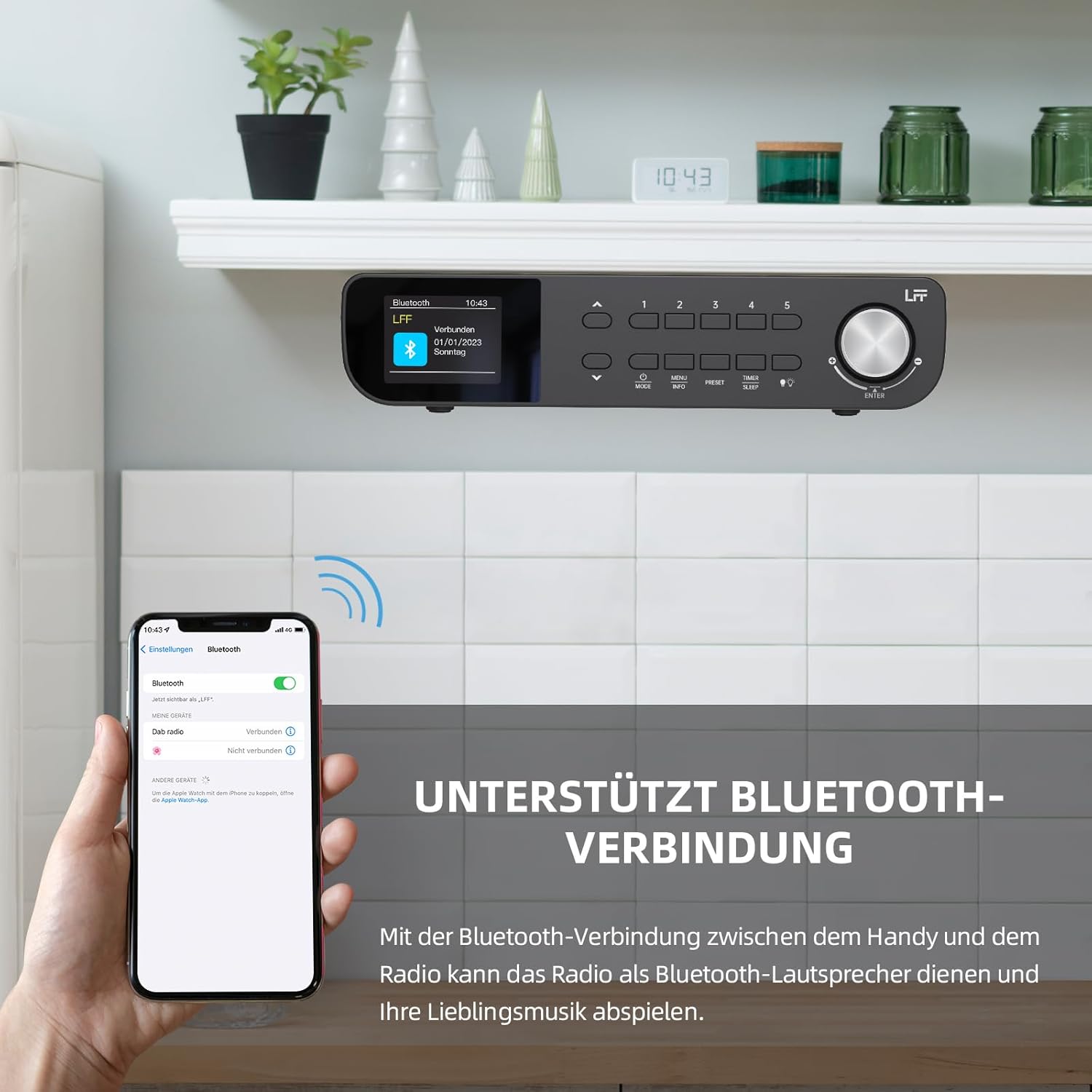
ຮູບທີ 6.1: The LFF Kitchen Radio displaying a successful Bluetooth connection, with a smartphone screen showing the radio as a connected device.

ຮູບທີ 6.2: ໃກ້ຊິດ view of the radio's display indicating 'LFF' and 'Connected' under the Bluetooth menu, confirming a successful pairing.
6.6. ຕັ້ງໂມງປຸກ
The radio features two independent alarms.
- ກົດ ໂມງຈັບເວລາ/ນອນ button repeatedly until 'Alarm 1' or 'Alarm 2' appears.
- Use the navigation buttons and rotary knob to set the alarm time, source (DAB+, FM, or Buzzer), and frequency (daily, weekdays, weekends, once).
- Confirm settings by pressing the rotary knob.

ຮູບທີ 6.3: Close-up of the radio's display showing the current time and options to activate or deactivate Alarm 1 and Alarm 2.
6.7. ເຄື່ອງຈັບເວລານອນ
ໂມງຈັບເວລາປິດເຄື່ອງຊ່ວຍໃຫ້ວິທະຍຸປິດໂດຍອັດຕະໂນມັດຫຼັງຈາກໄລຍະເວລາທີ່ກຳນົດໄວ້.
- ກົດ ໂມງຈັບເວລາ/ນອນ button repeatedly until 'Sleep Timer' appears.
- Use the navigation buttons or rotary knob to select the desired sleep duration (e.g., 15, 30, 60 minutes).
- ຢືນຢັນໂດຍການກົດປຸ່ມ rotary.

ຮູບທີ 6.4: Close-up of the radio's display showing the 'Sleep Timer' setting, with an option to set the duration, for example, to 30 minutes.
6.8. presets
Save up to 60 favorite stations for quick access.
- ເພື່ອບັນທຶກ Preset: Tune to the desired station. Press and hold one of the ຄ່າລ່ວງໜ້າ (1-5) buttons until 'Preset Saved' appears. For additional presets, use the 'Preset Store' option in the menu.
- ເພື່ອຈື່ຈໍາໄວ້ລ່ວງຫນ້າໄດ້: ຫຍໍ້ໆກົດອັນໜຶ່ງຂອງ ຄ່າລ່ວງໜ້າ (1-5) buttons. For other presets, navigate to 'Preset Recall' in the menu.
6.9. ໄຟ LED
The radio includes an integrated LED light, useful for illuminating the area below if mounted under a cabinet.
- ກົດ ແສງສະຫວ່າງ button (if available, or navigate through menu) to turn the LED light on or off.

ຮູບທີ 6.5: The LFF Kitchen Radio mounted under a kitchen cabinet, with its integrated LED light providing illumination to the countertop below.
6.10. ສະແດງຄວາມສະຫວ່າງ
Adjust the display backlight brightness to suit your environment.
- Access the 'Display' or 'Settings' menu.
- Select 'Brightness' and choose from High, Medium, or Low settings.

ຮູບທີ 6.6: A visual comparison of the LFF Kitchen Radio's display at three different backlight brightness levels: High, Medium, and Low, demonstrating the adjustable visibility.
7. ຄຳ ແນະ ນຳ ກ່ຽວກັບການຕິດຕັ້ງ
The LFF LDR113-EU Kitchen Radio offers flexible placement options: tabletop or under-cabinet mounting.
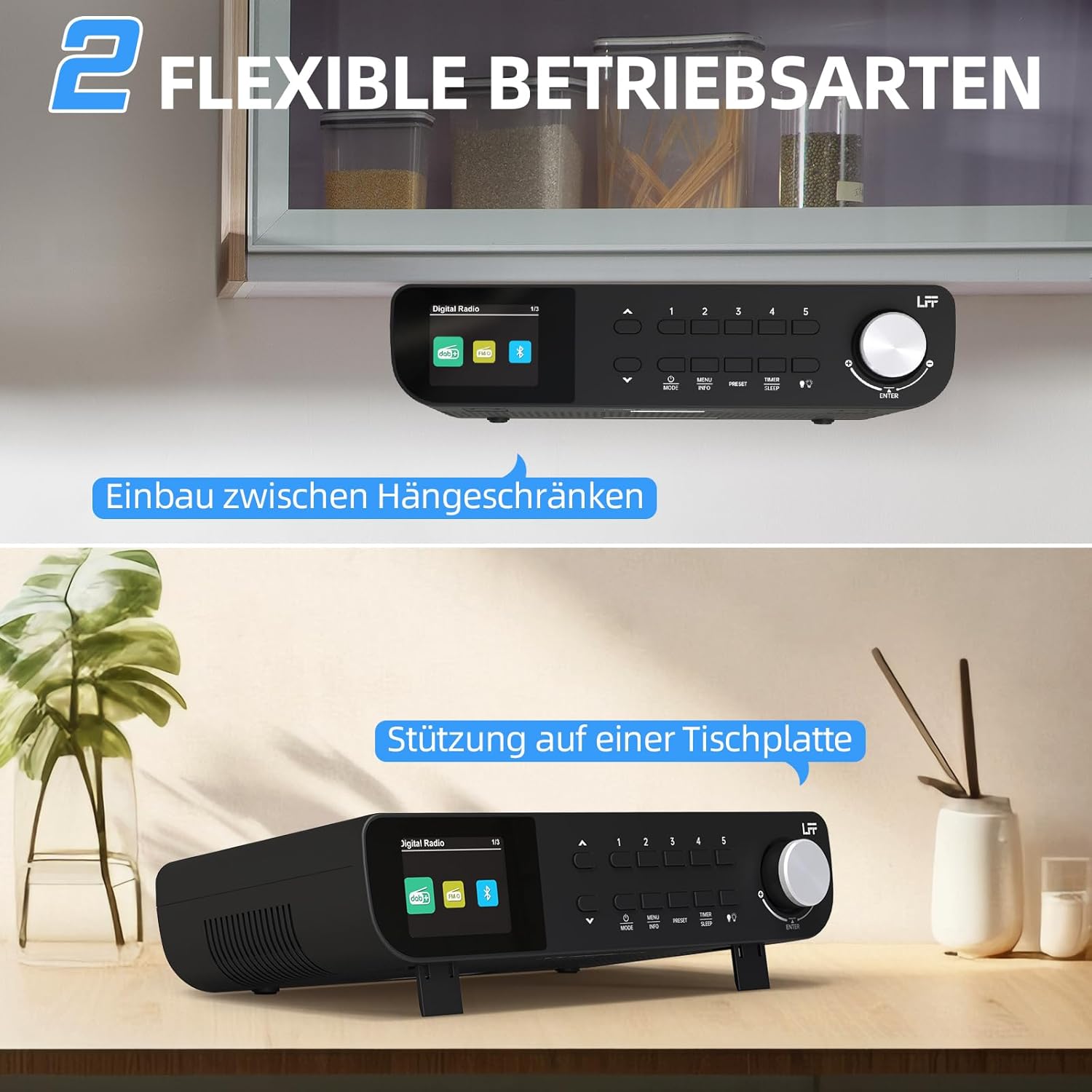
ຮູບທີ 7.1: The LFF Kitchen Radio displayed in two common installation scenarios: mounted underneath a kitchen cabinet and placed freestanding on a tabletop.
7.1. ຕຳແໜ່ງໂຕະ
Simply place the radio on a stable, flat surface. Ensure it is not near the edge to prevent accidental falls.
7.2. Under-Cabinet Mounting
For under-cabinet installation, use the provided mounting kit.
- ກະກຽມສະຖານທີ່: Choose a suitable location under a kitchen cabinet, ensuring there is enough space and access to a power outlet.
- Mark Drill Holes: Use the provided mounting template to mark the drill holes on the underside of the cabinet.
- Drill Pilot Holes: ເຈາະຮູນັກບິນຢູ່ທີ່ຕໍາແໜ່ງທີ່ໝາຍໄວ້.
- Attach Mounting Plate (if applicable): Some models may include a separate mounting plate. Attach this to the cabinet using the screws.
- Secure the Radio: Align the radio with the mounting holes or plate and secure it using the provided screws. Ensure it is firmly attached.
- ເຊື່ອມຕໍ່ພະລັງງານ: ສຽບໃສ່ອະແດບເຕີພະລັງງານ.

ຮູບທີ 7.2: Detailed diagram showing the steps for under-cabinet mounting, including measuring distances (e.g., 58mm) and securing the radio with screws.
8. ບໍາລຸງຮັກສາ
- ທໍາຄວາມສະອາດ: To clean the radio, disconnect it from the power supply. Use a soft, dry, lint-free cloth. Do not use abrasive cleaners, waxes, or solvents.
- ເສົາອາກາດ: Ensure the antenna is extended for optimal reception in DAB+ and FM modes. Handle it gently to avoid damage.
- ການເກັບຮັກສາ: If storing the radio for an extended period, disconnect it from power and store it in a cool, dry place.
9. ການແກ້ໄຂບັນຫາ
| ບັນຫາ | ສາເຫດທີ່ເປັນໄປໄດ້ | ການແກ້ໄຂ |
|---|---|---|
| ບໍ່ມີພະລັງງານ | ອະແດບເຕີໄຟບໍ່ໄດ້ເຊື່ອມຕໍ່ ຫຼືປລັກສຽບເກີດຄວາມຜິດພາດ. | ກວດເບິ່ງການເຊື່ອມຕໍ່ພະລັງງານ. ລອງຮ້ານອື່ນ. |
| ການຮັບສັນຍານ DAB+/FM ບໍ່ດີ | ແອນເຕນນາບໍ່ໄດ້ຍືດອອກ, ສັນຍານອ່ອນ, ຫຼື ລົບກວນ. | Fully extend the antenna. Reposition the radio. Perform a full scan. |
| Bluetooth ບໍ່ເຊື່ອມຕໍ່ | Radio not in pairing mode, device too far, or already connected to another device. | ໃຫ້ແນ່ໃຈວ່າວິທະຍຸຢູ່ໃນໂໝດ Bluetooth. ຍ້າຍອຸປະກອນໃຫ້ໃກ້ຂຶ້ນ. ຕັດການເຊື່ອມຕໍ່ຈາກອຸປະກອນອື່ນ. |
| ບໍ່ມີສຽງ | Volume too low, mute activated, or incorrect mode. | Increase volume. Check if mute is active. Ensure correct mode (DAB+, FM, Bluetooth). |
| ຈໍສະແດງຜົນບໍ່ເຮັດວຽກ | Brightness too low or device malfunction. | Adjust display brightness. If problem persists, contact support. |
10. ຂໍ້ມູນຈໍາເພາະ

ຮູບທີ 10.1: Diagram showing the dimensions of the LFF Kitchen Radio: 250mm length, 146mm width, and 55mm height.
| ຄຸນສົມບັດ | ລາຍລະອຽດ |
|---|---|
| ຍີ່ຫໍ້ | ການຂະຫຍາຍ LFF |
| ໝາຍເລກຕົວແບບ | LDR113-EU |
| ສີ | ດຳ |
| ການເຊື່ອມຕໍ່ | Bluetooth |
| ເທັກໂນໂລຍີ Tuning | DAB Plus, FM |
| ແຫຼ່ງພະລັງງານ | ສາຍໄຟຟ້າ |
| ຄວາມຖີ່ | 108 MHz (FM max) |
| ຂະໜາດ (L x W x H) | 250mm x 146mm x 55mm |
| ກຳນົດລ່ວງໜ້າ | 60 |
| ຈໍສະແດງຜົນ | LCD Color Screen |
| ຄຸນນະສົມບັດພິເສດ | Dual Alarms, Sleep Timer, Under-cabinet mounting option, LED Light |
11. ການຮັບປະກັນແລະການສະຫນັບສະຫນູນ
This product comes with a standard manufacturer's warranty. Please refer to the warranty card included in your package for specific terms and conditions. For technical support, troubleshooting assistance, or warranty claims, please contact your retailer or the LFF customer service department.