
1. ບົດແນະນຳ
This manual provides detailed instructions for the ENDORFY Thock Wireless Mechanical Keyboard, model EY5A078. It covers setup, operation, maintenance, and troubleshooting to ensure optimal performance and longevity of your device. Please read this manual thoroughly before using the keyboard.

Image 1.1: The ENDORFY Thock Wireless Mechanical Keyboard EY5A078. This image displays the full QWERTY layout with illuminated keys, showcasing the keyboard's design and RGB capabilities.
2. ເນື້ອໃນຊຸດ
ກວດສອບວ່າລາຍການທັງຫມົດແມ່ນມີຢູ່ໃນຊຸດ:
- ENDORFY Thock Wireless Mechanical Keyboard EY5A078
- USB-C to USB-A Cable (detachable)
- ຕົວຮັບ USB 2.4 GHz
- ຕົວດຶງກະແຈ
- ສະຫຼັບຕົວດຶງ
- ຄູ່ມືຜູ້ໃຊ້ (ເອກະສານນີ້)
3. ການຕິດຕັ້ງແລະການເຊື່ອມຕໍ່
The ENDORFY Thock Wireless Mechanical Keyboard offers three connection modes: wired, 2.4 GHz wireless, and Bluetooth.
3.1. ການເຊື່ອມຕໍ່ສາຍ
- Locate the USB-C port on the keyboard (typically on the back or top edge).
- Connect the provided USB-C to USB-A cable to the keyboard.
- ເຊື່ອມຕໍ່ປາຍສາຍ USB-A ເຂົ້າກັບພອດ USB ທີ່ມີຢູ່ໃນຄອມພິວເຕີຂອງທ່ານ.
- ແປ້ນພິມຈະຖືກກວດພົບໂດຍອັດຕະໂນມັດ ແລະພ້ອມນຳໃຊ້.
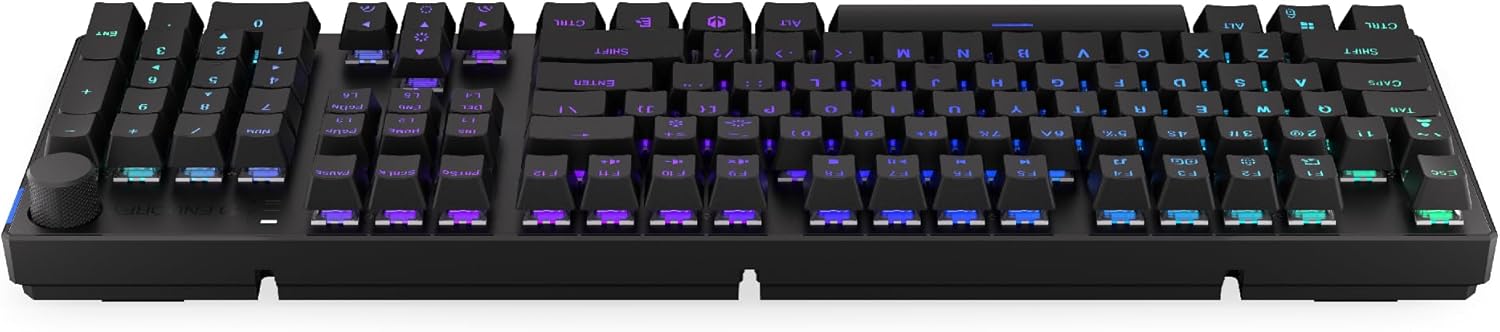
ຮູບພາບ 3.1: ຂ້າງ view of the keyboard, highlighting the USB-C port for wired connection and charging.
3.2. ການເຊື່ອມຕໍ່ໄຮ້ສາຍ 2.4 GHz
- Locate the 2.4 GHz USB receiver. It may be stored in a compartment on the underside of the keyboard.
- Plug the 2.4 GHz USB receiver into an available USB port on your computer.
- On the keyboard, locate the mode switch (usually on the back or side) and set it to the 2.4 GHz wireless mode (often indicated by a specific icon or "2.4G").
- The keyboard should automatically connect. An indicator light may confirm the connection.

Image 3.2: Underside of the keyboard, showing the compartment for storing the 2.4 GHz USB receiver and adjustable feet.
3.3. ການເຊື່ອມຕໍ່ບູທູດ
- On the keyboard, set the mode switch to Bluetooth mode (often indicated by a Bluetooth icon or "BT").
- The keyboard may have multiple Bluetooth profiles (e.g., BT1, BT2, BT3). Select one by pressing Fn + 1, Fn + 2, or Fn + 3. The corresponding indicator light will flash.
- ໃນຄອມພິວເຕີ ຫຼືອຸປະກອນຂອງທ່ານ, ເປີດການຕັ້ງຄ່າ Bluetooth ແລະຊອກຫາອຸປະກອນໃໝ່.
- Select "ENDORFY Thock Wireless" (or similar name) from the list of available devices.
- ປະຕິບັດຕາມການກະຕຸ້ນໃນຫນ້າຈໍໃດຫນຶ່ງເພື່ອສໍາເລັດຂະບວນການການຈັບຄູ່.
- ເມື່ອຈັບຄູ່ແລ້ວ, ໄຟຕົວຊີ້ວັດເທິງແປ້ນພິມຈະຢຸດກະພິບ ແລະຍັງຄົງແຂງຢູ່.
4. ການດໍາເນີນງານ
4.1. Key Functions and Shortcuts
The keyboard features various function key combinations (Fn + Key) for multimedia control, lighting adjustments, and other settings.
- Fn + F1-F12: Multimedia and system functions (e.g., volume control, media playback, calculator). Refer to the keycap legends for specific functions.
- Fn + ປຸ່ມລູກສອນ: Adjust RGB lighting effects (e.g., brightness, speed, direction).
- Fn + 1/2/3: ສະຫຼັບລະຫວ່າງ Bluetooth profiles.
- Fn + 4: Switch to 2.4 GHz wireless mode.
- Fn + 5: ສະຫຼັບໄປໂໝດມີສາຍ.
4.2. ການຄວບຄຸມໄຟ RGB
The ENDORFY Thock keyboard features programmable RGB backlighting. Use the following combinations to customize the lighting:
- Fn + ລູກສອນຂວາ: Change lighting effect.
- Fn + ລູກສອນຊ້າຍ: ປ່ຽນທິດທາງຜົນກະທົບຂອງແສງ.
- Fn + ລູກສອນຂຶ້ນ: ເພີ່ມຄວາມສະຫວ່າງ.
- Fn + ລູກສອນລົງ: ຫຼຸດຄວາມສະຫວ່າງ.
- Fn + Ins: ປ່ຽນສີ.
- Fn + Del: Adjust effect speed.
4.3. Knob ບໍລິມາດ
The dedicated volume knob located on the top right of the keyboard allows for quick audio adjustments.
- ໝຸນຕາມເຂັມໂມງ: ເພີ່ມປະລິມານ.
- ໝຸນຕາມເຂັມໂມງ: ຫຼຸດສຽງລົງ.
- ກົດລົງ: ປິດສຽງ/ປິດສຽງ.

Image 4.1: Detail of the volume knob and status indicator lights, located on the upper right side of the keyboard.
4.4. ສະວິດທີ່ສາມາດແລກປ່ຽນໄດ້ດ້ວຍຄວາມຮ້ອນ
The ENDORFY Thock keyboard features hot-swappable switches, allowing you to change mechanical switches without soldering. This enables customization of typing feel.
- ເອົາ Keycap ອອກ: ໃຊ້ຕົວດຶງປຸ່ມກົດທີ່ໃຫ້ມາເພື່ອຖອດປຸ່ມກົດທີ່ຕ້ອງການອອກຢ່າງຄ່ອຍໆ.
- ລຶບສະວິດອອກ: ໃຊ້ຕົວດຶງສະວິດທີ່ສະໜອງໃຫ້ເພື່ອຈັບຄລິບດ້ານເທິງ ແລະ ດ້ານລຸ່ມຂອງສະວິດຢ່າງລະມັດລະວັງ ແລະ ດຶງມັນຂຶ້ນຊື່ໆ.
- ໃສ່ສະວິດໃໝ່: ຈັດຮຽງ pins ຂອງສະວິດໃຫມ່ກັບຮູຢູ່ໃນ PCB ໄດ້. ກົດສະວິດໃຫ້ແຫນ້ນຈົນກ່ວາມັນກົດເຂົ້າໄປໃນສະຖານທີ່. ໃຫ້ແນ່ໃຈວ່າເຂັມບໍ່ໂກງ.
- ແທນທີ່ Keycap: ວາງຝາປິດປຸ່ມກົດກັບຄືນໃສ່ກ້ານສະວິດໃໝ່.

ຮູບພາບທີ 4.2: ເປັນການປິດ view of the Kailh Box Brown mechanical switches, demonstrating the hot-swappable design.
5. ບໍາລຸງຮັກສາ
5.1. ການເຮັດຄວາມສະອາດແປ້ນພິມ
ການທໍາຄວາມສະອາດເປັນປົກກະຕິຊ່ວຍຮັກສາປະສິດທິພາບແລະຮູບລັກສະນະຂອງແປ້ນພິມ.
- ຕັດການເຊື່ອມຕໍ່ແປ້ນພິມຈາກຄອມພິວເຕີຂອງທ່ານກ່ອນທີ່ຈະທໍາຄວາມສະອາດ.
- ໃຊ້ຕົວດຶງປຸ່ມກົດເພື່ອເອົາປຸ່ມກົດອອກເພື່ອທໍາຄວາມສະອາດຢ່າງລະອຽດ.
- ໃຊ້ອາກາດບີບອັດເພື່ອເອົາຂີ້ຝຸ່ນ ແລະສິ່ງເສດເຫຼືອອອກຈາກລະຫວ່າງກະແຈ.
- ເຊັດຄີບອດ ແລະ ພື້ນຜິວແປ້ນພິມດ້ວຍຜ້າອ່ອນ, ງamp ຜ້າ. ຫຼີກເວັ້ນການສານເຄມີທີ່ຮຸນແຮງ.
- ໃຫ້ແນ່ໃຈວ່າແປ້ນພິມແຫ້ງໝົດກ່ອນເຊື່ອມຕໍ່ຄືນໃໝ່.
5.2. Keycap ແລະ Switch ປ່ຽນແທນ
Refer to Section 4.4 for detailed instructions on replacing keycaps and switches. Use only compatible keycaps and switches to avoid damage.
6. ການແກ້ໄຂບັນຫາ
| ບັນຫາ | ສາເຫດທີ່ເປັນໄປໄດ້ | ການແກ້ໄຂ |
|---|---|---|
| ແປ້ນພິມບໍ່ຕອບສະໜອງ (ມີສາຍ) | ການເຊື່ອມຕໍ່ສາຍໄຟວ່າງ, ພອດ USB ມີບັນຫາ. | Ensure USB-C cable is securely connected. Try a different USB port or cable. |
| ແປ້ນພິມບໍ່ຕອບສະໜອງ (ໄຮ້ສາຍ) | Low battery, incorrect mode, receiver not plugged in, pairing issue. | Charge the keyboard. Ensure mode switch is set correctly (2.4G or BT). Re-pair Bluetooth or re-insert 2.4 GHz receiver. |
| ແສງ RGB ບໍ່ເຮັດວຽກ | Lighting turned off, low battery, software issue. | Check lighting controls (Fn + Arrow keys). Charge the keyboard. Restart computer. |
| ກົດປຸ່ມພິມສອງຄັ້ງ ຫຼືບໍ່ໄດ້ລົງທະບຽນ | Dust/debris under switch, faulty switch. | Clean under keycaps with compressed air. If issue persists, replace the switch (refer to Section 4.4). |
7. ຂໍ້ມູນຈໍາເພາະ
- ຕົວແບບ: EY5A078
- ຍີ່ຫໍ້: ENDORFY
- ການເຊື່ອມຕໍ່: ມີສາຍ (USB-C), ໄຮ້ສາຍ 2.4 GHz, Bluetooth
- ປະເພດສະຫຼັບ: Kailh Box Brown (Hot-swappable)
- Keycaps: PBT ຍິງສອງເທົ່າ
- ໂຄງຮ່າງ: Full-size QWERTY
- Backlighting: ໂປຣແກມ RGB
- ລະບົບປະຕິບັດການ: Linux, Mac OS X 10.12 Sierra, Windows 10
- ສີ: ດຳ
- ວັດສະດຸ: Polybutylene terephthalate (PBT)
- ຄຸນນະສົມບັດພິເສດ: Detachable cable, Volume knob with mute, Hot-swappable switches
- ແບັດເຕີຣີ: ລິທຽມໄອອອນ (ລວມຢູ່)
8. ການຮັບປະກັນແລະການສະຫນັບສະຫນູນ
ENDORFY products are covered by a manufacturer's warranty. For detailed warranty information, please refer to the warranty card included with your product or visit the official ENDORFY website. For technical support, product inquiries, or service requests, please contact ENDORFY customer support through their official channels.
ທາງການ Webເວັບໄຊ: www.endorfy.com
9. ຂໍ້ມູນຄວາມປອດໄພ
- ຮັກສາແປ້ນພິມໄວ້ຫ່າງຈາກຂອງແຫຼວ ແລະ ຄວາມຊຸ່ມຊື່ນຫຼາຍເກີນໄປ.
- ຫຼີກເວັ້ນການເປີດເຜີຍແປ້ນພິມຢູ່ໃນອຸນຫະພູມທີ່ຮຸນແຮງ.
- Do not attempt to disassemble or modify the keyboard beyond hot-swapping switches and keycaps, as this may void the warranty and cause damage.
- Use only the provided or recommended charging cable.
- ກຳຈັດແບັດເຕີຣີ ແລະ ສ່ວນປະກອບເອເລັກໂຕຣນິກຢ່າງມີຄວາມຮັບຜິດຊອບຕາມລະບຽບຂອງທ້ອງຖິ່ນ.