
ແນະນຳ
This manual provides essential information for the safe and efficient use of your ONN 42-Inch Full HD LED Smart TV, Model 100018254. Please read these instructions thoroughly before operating your television and retain them for future reference.
ແມ່ນຫຍັງຢູ່ໃນກ່ອງ
ກວດສອບວ່າມີອົງປະກອບທັງຫມົດກ່ອນທີ່ຈະສືບຕໍ່ການຕັ້ງຄ່າ.
- ONN 42-Inch Full HD LED Smart TV
- ການຄວບຄຸມໄລຍະໄກ
- ຂາຕັ້ງໂທລະທັດ (2 ໜ່ວຍ)
- screws ສໍາລັບຂາຕັ້ງໂທລະທັດ
- ສາຍໄຟ
- ຄູ່ມືເລີ່ມຕົ້ນດ່ວນ (ບໍ່ລວມຢູ່ໃນຄູ່ມືນີ້)

ຮູບພາບ: ທາງຫນ້າ view of the ONN 42-inch Smart TV displaying the Roku TV home screen with various streaming app icons like Netflix, Disney+, Apple TV, Hulu, Peacock, and Roku Channel. The TV is black with slim bezels and two stand feet.
ຕັ້ງຄ່າ
1. ຕິດຂາຕັ້ງໂທລະທັດ
- ວາງໜ້າຈໍໂທລະທັດລົງເທິງພື້ນຜິວທີ່ສະອາດ ແລະ ອ່ອນໆ ເພື່ອປ້ອງກັນຄວາມເສຍຫາຍ.
- ຈັດວາງແຕ່ລະແຜ່ນຕັ້ງດ້ວຍຮູສະກູທີ່ສອດຄ້ອງກັນຢູ່ດ້ານລຸ່ມຂອງໂທລະພາບ.
- ຮັບປະກັນແຕ່ລະຊິ້ນສ່ວນຂາຕັ້ງດ້ວຍສະກູທີ່ໃຫ້ໄວ້. ໃຫ້ແນ່ໃຈວ່າພວກມັນຖືກຮັດແຫນ້ນຢ່າງແຫນ້ນຫນາ.

Image: A diagram illustrating the dimensions of the ONN 42-inch TV, showing its width as 43 inches and height as 37 inches when placed on its stand.
2. ການຕິດຝາ (ທາງເລືອກ)
This TV is compatible with VESA standard wall mounts. Refer to your wall mount's instructions for proper installation. Ensure the wall mount can support the weight of the television.

ຮູບພາບ: ດ້ານຫລັງ view of the ONN 42-inch TV, highlighting the VESA mounting screw holes in a square pattern and various input ports on the side and bottom right.
3. ອຸປະກອນເຊື່ອມຕໍ່
Connect your external devices such as cable boxes, gaming consoles, or Blu-ray players to the TV's input ports.
- HDMI: For high-definition audio and video. Use an HDMI cable to connect devices like set-top boxes, game consoles, or streaming sticks.
- USB: ສໍາລັບການເຊື່ອມຕໍ່ອຸປະກອນເກັບຮັກສາ USB ເພື່ອຫຼິ້ນສື່ files.
- Wi-Fi: For internet connectivity to access smart TV features and streaming services.
4. ເປີດເຄື່ອງເລີ່ມຕົ້ນ ແລະຕົວຊ່ວຍສ້າງການຕັ້ງຄ່າ
- ສຽບສາຍໄຟໃສ່ໂທລະທັດ ແລະຈາກນັ້ນເຂົ້າໄປໃນປລັກສຽບໃສ່ຝາ.
- ກົດປຸ່ມເປີດປິດໃນການຄວບຄຸມໄລຍະໄກຫຼືໃນໂທລະພາບຂອງມັນເອງ.
- Follow the on-screen instructions to complete the initial setup, including language selection, network connection (Wi-Fi), channel scanning, and linking to your Roku account (if applicable).
ປະຕິບັດການໂທລະພາບ
1. ການຄວບຄຸມໄລຍະໄກview
ການຄວບຄຸມຫ່າງໄກສອກຫຼີກອະນຸຍາດໃຫ້ທ່ານເພື່ອນໍາທາງການໂຕ້ຕອບຂອງໂທລະພາບແລະການຄວບຄຸມຫນ້າທີ່ຕ່າງໆ.
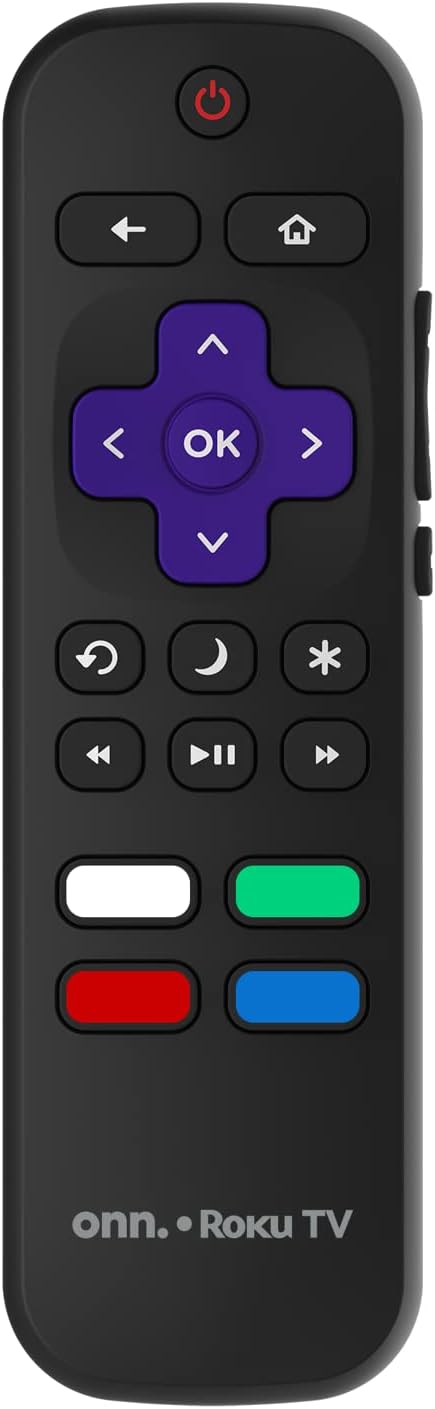
Image: The ONN Roku TV remote control, featuring a power button, directional pad, OK button, home button, back button, volume controls, and dedicated buttons for popular streaming services.
- ປຸ່ມເປີດປິດ: ເປີດ ຫຼືປິດໂທລະພາບ.
- Directional Pad (D-Pad) & OK: ນຳທາງເມນູ ແລະຢືນຢັນການເລືອກ.
- ປຸ່ມຫນ້າທໍາອິດ: ກັບຄືນໄປຫາໜ້າຈໍຫຼັກ Roku TV.
- ປຸ່ມກັບຄືນ: ກັບຄືນໄປຫາໜ້າຈໍ ຫຼືເມນູກ່ອນໜ້າ.
- ປະລິມານຂຶ້ນ/ລົງ: ປັບລະດັບສຽງ.
- ປິດສຽງ: ປິດສຽງ ຫຼືປິດສຽງ.
- ຊ່ອງຂຶ້ນ/ລົງ: Changes channels (for antenna/cable inputs).
- ປຸ່ມແອັບສະເພາະ: Quick access to popular streaming services like Netflix, Hulu, etc.
2. ຄຸນສົມບັດໂທລະທັດ Smart
Your ONN Smart TV provides access to a wide range of streaming content and smart functionalities.
- ບໍລິການຖ່າຍທອດ: Access pre-installed apps like Netflix, YouTube, and many more through the Roku Channel Store.
- ການຄວບຄຸມດ້ວຍສຽງ: Compatible with Alexa and Google Assistant for hands-free control (requires a separate compatible voice assistant device).
- ການອັບເດດຊອບແວອັດຕະໂນມັດ: The TV will automatically update its software when connected to the internet, ensuring you have the latest features and security.
3. ການເລືອກຂາເຂົ້າ
To switch between connected devices (e.g., cable box, game console), use the ປ້ອນຂໍ້ມູນ button on your remote or select the desired input from the Roku TV home screen.
4. ການຕັ້ງຄ່າຮູບພາບ ແລະສຽງ
Access the TV's settings menu to customize picture and sound preferences. Navigate to Settings > TV picture settings or ການຕັ້ງຄ່າ> ສຽງ to adjust options like brightness, contrast, color, sound mode, and equalizer settings.
ບໍາລຸງຮັກສາ
1. ການທໍາຄວາມສະອາດຫນ້າຈໍ
- Always turn off the TV and unplug it before cleaning.
- ໃຊ້ຜ້າແພທີ່ອ່ອນໆ, ບໍ່ມີເສັ້ນດ່າງ, dampສໍາເລັດດ້ວຍນ້ໍາຫຼືເຄື່ອງເຮັດຄວາມສະອາດຫນ້າຈໍພິເສດ.
- ຢ່າສີດນໍ້າສະອາດໃສ່ໜ້າຈໍໂດຍກົງ. ທາໃສ່ຜ້າກ່ອນ.
- ຫຼີກເວັ້ນການໃຊ້ເຄື່ອງເຮັດຄວາມສະອາດຂັດ, ເຫຼົ້າ, benzene, ຫຼືບາງໆ, ເພາະວ່າສິ່ງເຫຼົ່ານີ້ສາມາດທໍາລາຍຫນ້າຈໍໄດ້.
2. ການປັບປຸງຊອບແວ
Ensure your TV is connected to the internet to receive automatic software updates. These updates improve performance, add features, and enhance security. You can manually check for updates in the ການຕັ້ງຄ່າ > ລະບົບ > ການປັບປຸງລະບົບ ເມນູ.
ການແກ້ໄຂບັນຫາ
ຖ້າຫາກທ່ານພົບບັນຫາກັບໂທລະພາບຂອງທ່ານ, ເບິ່ງວິທີແກ້ໄຂທົ່ວໄປດັ່ງຕໍ່ໄປນີ້:
ບໍ່ມີພະລັງງານ
- ກວດເບິ່ງວ່າສາຍໄຟຖືກສຽບຢ່າງປອດໄພກັບໂທລະທັດ ແລະປລັກສຽບໄຟຫຼືບໍ່.
- ກວດສອບວ່າເຕົ້າສຽບຝາເຮັດວຽກໂດຍການສຽບອຸປະກອນອື່ນ.
- ລອງກົດປຸ່ມເປີດເຄື່ອງຢູ່ໂທລະທັດເອງ, ບໍ່ພຽງແຕ່ຣີໂມດເທົ່ານັ້ນ.
ບໍ່ມີຮູບ / ຮູບທີ່ບິດເບືອນ
- ໃຫ້ແນ່ໃຈວ່າເລືອກແຫຼ່ງປ້ອນຂໍ້ມູນທີ່ຖືກຕ້ອງ (ເຊັ່ນ: HDMI 1, HDMI 2).
- ກວດເບິ່ງການເຊື່ອມຕໍ່ສາຍທັງໝົດລະຫວ່າງໂທລະທັດ ແລະອຸປະກອນພາຍນອກ.
- ລອງໃຊ້ສາຍ HDMI ອື່ນຖ້າເປັນໄປໄດ້.
- Adjust picture settings (brightness, contrast) in the TV menu.
ບໍ່ມີສຽງ / ສຽງຕ່ໍາ
- Check if the TV is muted or if the volume is turned down.
- Ensure external audio devices (soundbars, receivers) are properly connected and powered on.
- ກວດສອບການຕັ້ງຄ່າສຽງໃນເມນູໂທລະພາບ.
ບັນຫາການເຊື່ອມຕໍ່ເຄືອຂ່າຍ
- Verify your Wi-Fi router is powered on and functioning.
- ຣີສະຕາດເຣົາເຕີ ແລະໂມເດັມຂອງທ່ານ.
- ໄປທີ່ ການຕັ້ງຄ່າ > ເຄືອຂ່າຍ > ກວດສອບການເຊື່ອມຕໍ່ ໃນໂທລະພາບຂອງທ່ານເພື່ອກວດຫາບັນຫາ.
- ໃຫ້ແນ່ໃຈວ່າທ່ານກໍາລັງໃສ່ລະຫັດຜ່ານ Wi-Fi ທີ່ຖືກຕ້ອງ.
ຂໍ້ມູນຈໍາເພາະ
| ຄຸນສົມບັດ | ລາຍລະອຽດ |
|---|---|
| ໝາຍເລກຕົວແບບ | 100018254 |
| ຂະໜາດໜ້າຈໍ | 42 ນິ້ວ |
| ເຕັກໂນໂລຊີການສະແດງ | LED |
| ຄວາມລະອຽດ | 1080p (Full HD) |
| ອັດຕາການໂຫຼດຂໍ້ມູນຄືນໃໝ່ | 60 Hz |
| ການເຊື່ອມຕໍ່ | USB, Wi-Fi |
| ບໍລິການອິນເຕີເນັດທີ່ຮອງຮັບ | Netflix, YouTube (and others via Roku platform) |
| ວິທີການຄວບຄຸມ | Voice (via Alexa & Google Assistant compatible devices), Remote Control |
| ປະເພດການຕິດຕັ້ງ | ຕິດຝາ (ເຂົ້າກັນໄດ້ VESA) |
| ສີ | ດຳ |
| UPC | 671227025567 |

Image: Energy Guide label for Television Model 100018254, indicating an estimated yearly energy cost of $11 based on 12 cents per kWh and 5 hours use per day.
ການຮັບປະກັນແລະການສະຫນັບສະຫນູນ
For warranty information and technical support, please refer to the documentation included with your purchase or visit the official ONN support webເວັບໄຊ. ຮັກສາໃບຮັບເງິນການຊື້ຂອງທ່ານສໍາລັບການຮ້ອງຂໍການຮັບປະກັນ.