
1. ການຕິດຕັ້ງແລະການຕິດຕັ້ງ
1.1 ລາຍການກວດກ່ອນການຕິດຕັ້ງ
- ຄວາມເຂົ້າກັນໄດ້ຂອງລະບົບ: Ensure your motherboard has an available PCI Express 4.0 x16 slot.
- ການສະຫນອງພະລັງງານ: ກວດສອບວ່າໜ່ວຍສະໜອງພະລັງງານ (PSU) ຂອງທ່ານຕອບສະໜອງຄ່າວັດຂັ້ນຕ່ຳtage requirements for the RTX 3060 Ti and has the necessary PCIe power connectors. Consult your PSU manual for details.
- ການເກັບກູ້: Confirm your PC case has adequate space for the graphics card dimensions.
- ຄົນຂັບລົດ: ດາວໂຫລດໄດເວີ NVIDIA ຫຼ້າສຸດຈາກ NVIDIA ຢ່າງເປັນທາງການ webເວັບໄຊກ່ອນການຕິດຕັ້ງ.
1.2 ການຕິດຕັ້ງທາງດ້ານຮ່າງກາຍ
- ປິດພະລັງງານ: Shut down your computer completely and disconnect the power cable.
- ເປີດກໍລະນີ: ເປີດກໍລະນີຄອມພິວເຕີຂອງທ່ານເພື່ອເຂົ້າເຖິງເມນບອດ.
- ຊອກຫາສະລັອດຕິງ PCIe: Identify an available PCI Express 4.0 x16 slot. Remove any expansion slot covers if necessary.
- ໃສ່ບັດກາຟິກ: Carefully align the graphics card with the PCIe slot and press down firmly until it is securely seated. You should hear a click from the slot's retention clip.
- ບັດທີ່ປອດໄພ: Fasten the graphics card to the case using the screw or latch mechanism.
- ເຊື່ອມຕໍ່ພະລັງງານ: Connect the appropriate PCIe power cables from your PSU to the graphics card. The PNY GeForce RTX 3060 Ti typically requires one 8-pin PCIe power connector. Ensure all pins are fully seated.
- ປິດກໍລະນີ: ປິດເຄສຄອມພິວເຕີຂອງທ່ານແລ້ວເຊື່ອມຕໍ່ສາຍໄຟຄືນໃໝ່.
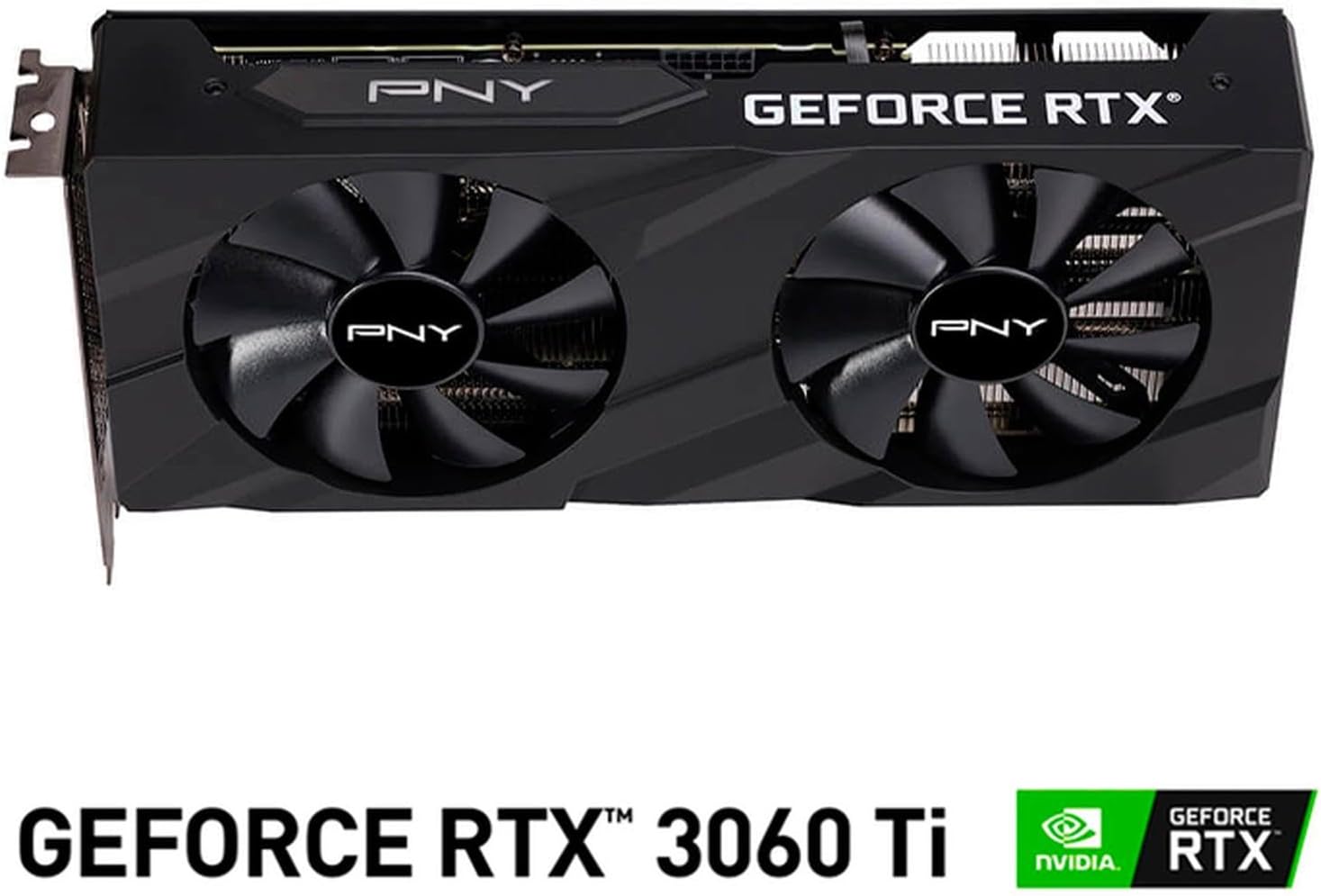
ຮູບພາບ: ທາງຫນ້າ view of the PNY GeForce RTX 3060 Ti Verto Dual Fan Graphics Card, showing the dual fans and PNY branding.
1.3 ການຕິດຕັ້ງໄດເວີ
- ລະບົບ Boot: Power on your computer. It may boot into a lower resolution or use generic display drivers initially.
- ຕິດຕັ້ງໄດເວີ: Run the NVIDIA driver installer downloaded earlier. Follow the on-screen prompts to complete the installation. A restart may be required.
- ຢືນຢັນການຕິດຕັ້ງ: After restarting, open NVIDIA GeForce Experience or the NVIDIA Control Panel to confirm the graphics card is recognized and drivers are up to date.
2. ການດໍາເນີນງານ
2.1 ການເຊື່ອມຕໍ່ຈໍສະແດງຜົນ
The PNY GeForce RTX 3060 Ti features multiple video output interfaces for connecting displays:
- ພອດສະແດງຜົນ 1.4a: ສຳລັບຈໍພາບທີ່ມີຄວາມລະອຽດສູງ ແລະ ອັດຕາການໂຫຼດໜ້າຈໍຄືນໃໝ່ສູງ.
- HDMI2.1: For connecting to TVs or monitors supporting 4K at higher refresh rates.
Connect your display cables to the appropriate ports on the graphics card. The card supports a maximum display resolution of 7680 x 4320 @60Hz.

ຮູບພາບ: ມຸມ view of the PNY GeForce RTX 3060 Ti Verto Dual Fan Graphics Card, highlighting the cooling solution and overall design.
2.2 NVIDIA GeForce Experience
NVIDIA GeForce Experience is a companion application for your graphics card. It allows you to:
- Optimize Game Settings: Automatically configure game settings for the best experience.
- Keep Drivers Up to Date: Receive notifications and easily install the latest NVIDIA Game Ready Drivers.
- Capture & Share: Record gameplay, take screenshots, and livestream with friends using features like ShadowPlay.
2.3 ປະສິດທິພາບເກີນview
The GeForce RTX 3060 Ti is built on NVIDIA’s 2nd generation RTX architecture (Ampere), featuring enhanced Ray Tracing Cores and Tensor Cores for advanced graphics and AI acceleration. Key performance specifications include:
- ໂມງຫຼັກ: 1410MHz
- ໂມງປຸກ: 1665MHz
- ໜ່ວຍຄວາມຈຳ: 8GB GDDR6X (256-bit) with up to 608GB/sec bandwidth.
- CUDA Cores: 4864
3. ບໍາລຸງຮັກສາ
3.1 Cleaning Your Graphics Card
Regular cleaning helps maintain optimal performance and extends the lifespan of your graphics card. Always power off your computer and disconnect the power cable before cleaning.
- ການກຳຈັດຂີ້ຝຸ່ນ: ໃຊ້ອາກາດບີບອັດເພື່ອເປົ່າຝຸ່ນອອກຈາກພັດລົມ ແລະ ຄີບລະບາຍຄວາມຮ້ອນຢ່າງຄ່ອຍໆ. ຈັບພັດລົມໄວ້ເພື່ອປ້ອງກັນບໍ່ໃຫ້ພວກມັນໝຸນໄວໃນລະຫວ່າງການທຳຄວາມສະອາດ.
- ການອະນາໄມພື້ນຜິວ: Wipe the exterior surfaces with a soft, dry, lint-free cloth. Avoid using liquid cleaners directly on the card.
3.2 ອັບເດດໄດເວີ
Keep your graphics drivers updated to ensure compatibility with the latest games and applications, and to benefit from performance improvements and bug fixes. Use NVIDIA GeForce Experience or visit the official NVIDIA webເວັບໄຊທ໌ເພື່ອດາວໂຫລດແລະຕິດຕັ້ງໄດເວີຫລ້າສຸດ.
4. ການແກ້ໄຂບັນຫາ
4.1 ບັນຫາທົ່ວໄປ ແລະການແກ້ໄຂ
- ບໍ່ມີການສະແດງຜົນອອກ:
- ໃຫ້ແນ່ໃຈວ່າສາຍຈໍສະແດງຜົນໄດ້ເຊື່ອມຕໍ່ກັບທັງກາດກຣາບຟິກ ແລະ ຈໍພາບຢ່າງແໜ້ນໜາແລ້ວ.
- Verify the graphics card is fully seated in the PCIe slot and all power connectors are attached.
- ທົດສອບດ້ວຍສາຍສະແດງຜົນອື່ນ ຫຼືຈໍພາບຖ້າເປັນໄປໄດ້.
- ຄວາມບໍ່ໝັ້ນຄົງຂອງລະບົບ ຫຼື ການຂັດຂ້ອງ:
- ໃຫ້ແນ່ໃຈວ່າການສະໜອງພະລັງງານຂອງທ່ານຕອບສະໜອງນ້ຳໜັກທີ່ແນະນຳtage.
- Check for overheating. Monitor GPU temperatures using software like MSI Afterburner or HWMonitor.
- ປະຕິບັດການຕິດຕັ້ງໄດຣເວີກຣາບຟິກລຸ້ນລ້າສຸດທີ່ສະອາດ.
- ປະສິດທິພາບທີ່ບໍ່ດີໃນເກມ:
- ໃຫ້ແນ່ໃຈວ່າທ່ານໄດ້ຕິດຕັ້ງໄດຣເວີກຣາບຟິກລຸ້ນລ້າສຸດແລ້ວ.
- Check in-game settings; reduce resolution or graphics quality if necessary.
- Verify that your system is not bottlenecked by other components (CPU, RAM).

ຮູບພາບ: ຂ້າງ view of the PNY GeForce RTX 3060 Ti Verto Dual Fan Graphics Card, showing the heatsink fins and power connectors.
5. ຂໍ້ມູນຈໍາເພາະ
Below are the detailed technical specifications for the PNY GeForce RTX 3060 Ti 8GB GDDR6X Verto Dual Fan Graphics Card:
| ຄຸນສົມບັດ | ຂໍ້ມູນຈໍາເພາະ |
|---|---|
| Graphics Coprocessor | NVIDIA GeForce RTX 3060 Ti |
| ຍີ່ຫໍ້ | PNY |
| ຂະຫນາດ RAM ຮູບພາບ | 8 GB |
| ປະເພດກາຟິກ RAM | GDDR6X |
| ຄວາມໄວໂມງ GPU | 1410 MHz |
| ຄວາມໄວໂມງຄວາມຈຳ | 1410 MHz (Effective 19000 MHz) |
| ການໂຕ້ຕອບຜົນຜະລິດວິດີໂອ | DisplayPort, HDMI |
| ການໂຕ້ຕອບບັດກາຟິກ | PCI-Express x16 |
| ຈຳ ນວນແຟນ | 2 |
| ການສະແດງຄວາມລະອຽດສູງສຸດ | ຂະ ໜາດ 7680 x 4320 @ 60Hz |
| ອຸປະກອນທີ່ເຂົ້າກັນໄດ້ | ເດັສທັອບ |
| ຊື່ຕົວແບບ | VERTO Dual Fan |
| ໝາຍເລກຕົວແບບ | VCG3061T8LDFBPB1 |
| UPC | 751492767314 |
| ນ້ໍາຫນັກລາຍການ | 1 ກິໂລກຣາມ |

ຮູບພາບ: ກັບຄືນໄປບ່ອນ view of the PNY GeForce RTX 3060 Ti Verto Dual Fan Graphics Card, showing the backplate and PCB.
6. ການຮັບປະກັນແລະການສະຫນັບສະຫນູນ
6.1 ການຮັບປະກັນຜະລິດຕະພັນ
This PNY GeForce RTX 3060 Ti Graphics Card comes with a ຮັບປະກັນ 3 ປີ. For specific terms and conditions, please refer to the warranty documentation included with your product or visit the official PNY webເວັບໄຊ.
6.2 ສະຫນັບສະຫນູນດ້ານວິຊາການ
If you encounter any issues not covered in this manual or require further assistance, please contact PNY Technical Support. You can typically find support contact information, FAQs, and driver downloads on the official PNY webເວັບໄຊ: