
Be Cool BC121TU2201F
Be Cool 121 cm Tower Fan User Manual
Model: BC121TU2201F
ແນະນຳ
Thank you for choosing the Be Cool 121 cm Tower Fan. This manual provides important information regarding the safe operation, assembly, maintenance, and troubleshooting of your new appliance. Please read this manual thoroughly before use and keep it for future reference.

ຮູບພາບ: ທາງຫນ້າ view of the Be Cool 121 cm Tower Fan in white, showcasing its sleek design and tall profile.
ຂໍ້ມູນຄວາມປອດໄພທີ່ສໍາຄັນ
- ໃຫ້ແນ່ໃຈວ່າພັດລົມຖືກວາງຢູ່ເທິງພື້ນຜິວທີ່ຄົງທີ່, ຮາບພຽງເພື່ອປ້ອງກັນການບິດ.
- Do not insert fingers or any objects into the fan grilles.
- ຖອດພັດລົມອອກຈາກປລັກສຽບໄຟກ່ອນທີ່ຈະທໍາຄວາມສະອາດຫຼືດໍາເນີນການບໍາລຸງຮັກສາໃດໆ.
- Keep the fan away from water and high humidity environments.
- ຢ່າໃຊ້ພັດລົມໃນຂະນະທີ່ສາຍໄຟ ຫຼື ປລັກໄຟເສຍຫາຍ. ຕິດຕໍ່ພະນັກງານບໍລິການທີ່ມີຄຸນວຸດທິເພື່ອສ້ອມແປງ.
- ເຄື່ອງໃຊ້ນີ້ແມ່ນໃຊ້ໃນເຮືອນເທົ່ານັ້ນ.
ເນື້ອໃນຊຸດ
ກະລຸນາກວດເບິ່ງເນື້ອໃນຂອງແພັກເກັດເມື່ອເປີດເພື່ອຮັບປະກັນວ່າລາຍການທັງໝົດມີຢູ່ ແລະ ບໍ່ເສຍຫາຍ:
- Be Cool 121 cm Tower Fan Unit
- Base (two halves)
- ການຄວບຄຸມໄລຍະໄກ (ມີຫມໍ້ໄຟ 1 CR2430 ລວມ)
- ຄູ່ມືຜູ້ໃຊ້
- ສະກູຕິດຕັ້ງສຳລັບຖານ
ການຕິດຕັ້ງແລະການປະກອບ
Follow these steps to assemble your Be Cool Tower Fan:
- Carefully remove all packaging materials from the fan unit and its components.
- Take the two halves of the base and align them. They should snap together or fit snugly.
- Place the main fan unit onto the assembled base, ensuring the alignment tabs or slots match.
- Secure the fan unit to the base using the provided screws. Typically, these are tightened from the underside of the base.
- ວາງພັດລົມທີ່ປະກອບໄວ້ເທິງພື້ນຜິວທີ່ແຫນ້ນຫນາ, ລະດັບ.
- Insert the CR2430 battery into the remote control if not already pre-installed.
- Plug the power cord into a standard electrical outlet (220V).

ຮູບພາບ: ຂ້າງ view of the Be Cool Tower Fan, illustrating its slim profile and stable circular base.
ຄໍາແນະນໍາການດໍາເນີນງານ
Your Be Cool Tower Fan can be operated using the touch control panel on top of the unit or the included remote control.
ແຜງຄວບຄຸມແລະຈໍ LED
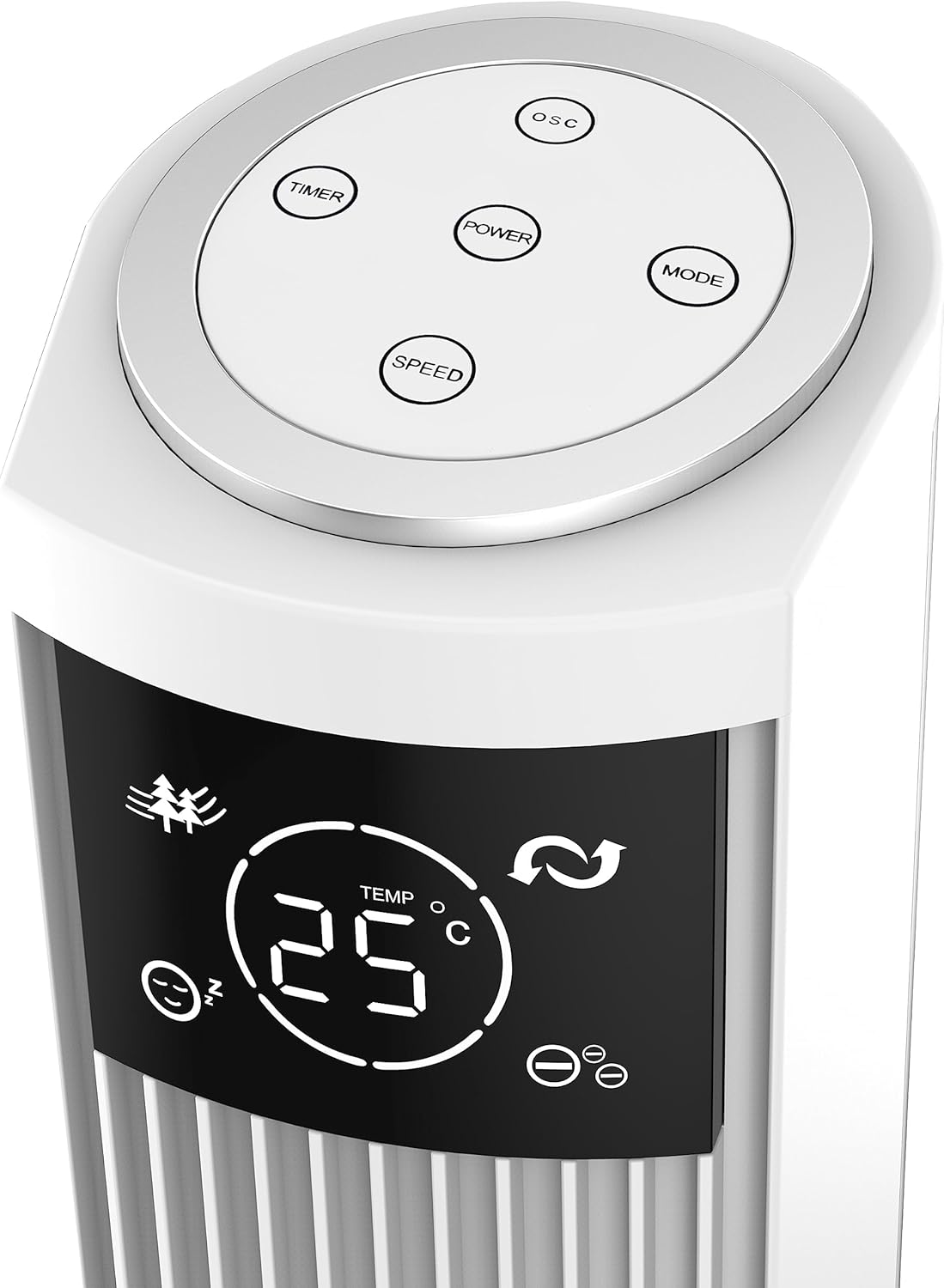
Image: Close-up of the fan's top control panel, showing the touch buttons for Power, Speed, Timer, Oscillation, and Mode.
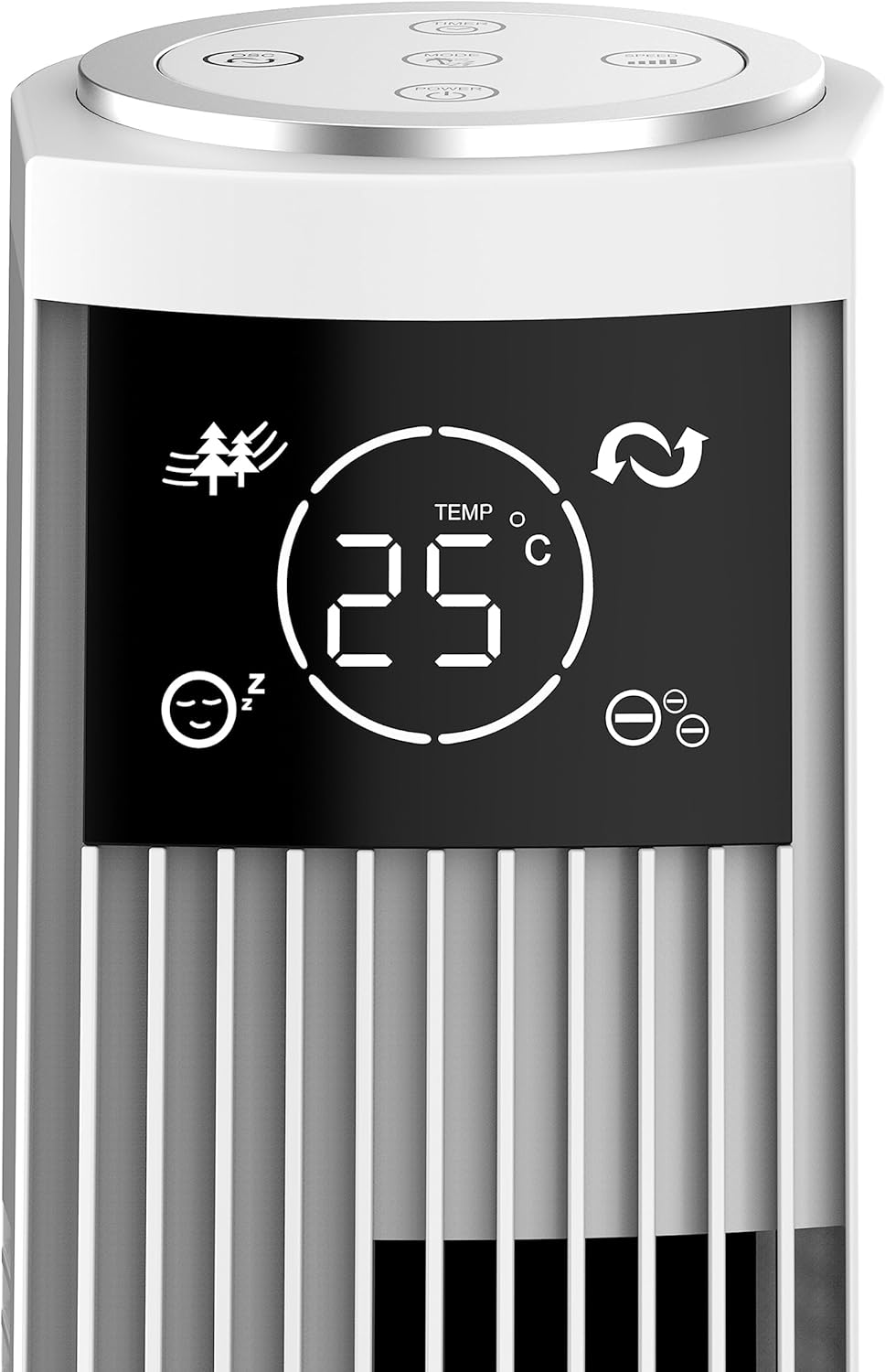
ຮູບພາບ: ລາຍລະອຽດ view of the fan's LED display, showing temperature, mode icons (Nature, Sleep), and oscillation indicator.
The LED display shows the current room temperature and active settings. The touch-sensitive buttons allow for easy control of all functions.
ການຄວບຄຸມໄລຍະໄກ

Image: The remote control for the Be Cool Tower Fan, featuring buttons for Power, Speed, Oscillation, Ionizer, Timer, and Mode.
ການຄວບຄຸມຫ່າງໄກສອກຫຼີກສະຫນອງການເຂົ້າເຖິງສະດວກຕໍ່ກັບການທໍາງານຂອງພັດລົມທັງຫມົດຈາກໄລຍະໄກ.
- ພະລັງງານ: ເປີດ ຫຼື ປິດພັດລົມ.
- ຄວາມໄວ: ຮອບວຽນຜ່ານຄວາມໄວພັດລົມ: ຕໍ່າ, ປານກາງ, ສູງ.
- OSC (ການສັ່ນ): Activates or deactivates the oscillating function, allowing the fan to rotate from side to side to distribute air.
- ION (Ionizer): Turns the ionizer function On or Off. The ionizer helps to purify the air by releasing ໄອອອນລົບ.
- ໂມງຈັບເວລາ: Sets the automatic shut-off timer. Press repeatedly to cycle through 1-hour increments, up to 12 hours.
- ແບບ: Cycles through different wind modes:
- ໂໝດປົກກະຕິ: ກະແສລົມຄົງທີ່ໃນຄວາມໄວທີ່ເລືອກ.
- ໂໝດທຳມະຊາດ: ຈຳລອງສາຍລົມທຳມະຊາດໂດຍການປ່ຽນຄວາມໄວພັດລົມ.
- ຮູບແບບການນອນ: Gradually decreases fan speed over time for quiet operation during sleep.
ບໍາລຸງຮັກສາ
ການບໍາລຸງຮັກສາເປັນປົກກະຕິຮັບປະກັນປະສິດທິພາບທີ່ດີທີ່ສຸດແລະອາຍຸຍືນຂອງພັດລົມຂອງທ່ານ.
ທໍາຄວາມສະອາດ
- ຖອດພັດລົມອອກສະເໝີກ່ອນທຳຄວາມສະອາດ.
- ໃຊ້ອ່ອນ, ງamp ຜ້າເຊັດຜິວດ້ານນອກຂອງພັດລົມ. ຢ່າໃຊ້ເຄື່ອງເຮັດຄວາມສະອາດຂັດຫຼືສານລະລາຍ.
- ໃຊ້ເຄື່ອງດູດຝຸ່ນທີ່ມີຢາງຕິດຂັດເພື່ອເຮັດຄວາມສະອາດຂີ້ຝຸ່ນອອກຈາກຊ່ອງສຽບລົມ ແລະເຕົາປ່ຽງ.
- ຫ້າມເອົາພັດລົມລົງໃນນ້ຳ ຫຼືປ່ອຍໃຫ້ນ້ຳໄຫລເຂົ້າໄປໃນເຮືອນຈັກ.
ການເກັບຮັກສາ
ເມື່ອບໍ່ໄດ້ໃຊ້ເປັນເວລາດົນ, ໃຫ້ເກັບຮັກສາພັດລົມໄວ້ໃນບ່ອນທີ່ເຢັນ, ແຫ້ງ, ດີກວ່າຢູ່ໃນການຫຸ້ມຫໍ່ຕົ້ນສະບັບຂອງມັນ, ເພື່ອປົກປ້ອງມັນຈາກຝຸ່ນແລະຄວາມເສຍຫາຍ.
ການແກ້ໄຂບັນຫາ
ຖ້າເຈົ້າພົບບັນຫາກັບພັດລົມຂອງເຈົ້າ, ກະລຸນາເບິ່ງບັນຫາ ແລະວິທີແກ້ໄຂບັນຫາທົ່ວໄປຕໍ່ໄປນີ້:
| ບັນຫາ | ສາເຫດທີ່ເປັນໄປໄດ້ | ການແກ້ໄຂ |
|---|---|---|
| ພັດລົມບໍ່ເປີດ. | ບໍ່ມີແຫຼ່ງຈ່າຍໄຟ; ບໍ່ໄດ້ສຽບສາຍໄຟ; ປລັກໄຟມີບັນຫາ. | Ensure the fan is properly plugged into a working electrical outlet. Check the circuit breaker. |
| ກະແສລົມອ່ອນແອ. | Fan speed set too low; air inlets/outlets blocked by dust. | Increase the fan speed. Clean the air grilles as per maintenance instructions. |
| ພັດລົມເຮັດໃຫ້ສຽງຜິດປົກກະຕິ. | Fan not on a stable surface; foreign object inside; internal component issue. | Place the fan on a stable, flat surface. Unplug and check for any obstructions. If noise persists, contact customer support. |
| ການຄວບຄຸມໄລຍະໄກບໍ່ເຮັດວຽກ. | ແບັດເຕີຣີໝົດ ຫຼື ໃສ່ບໍ່ຖືກຕ້ອງ; ຣີໂໝດຢູ່ນອກຂອບເຂດສັນຍານ. | Replace the battery (CR2430). Ensure the remote is pointed towards the fan's receiver and within range. |
If the problem persists after trying these solutions, please contact Be Cool customer support for assistance.
ຂໍ້ມູນຈໍາເພາະ
| ຄຸນສົມບັດ | ລາຍລະອຽດ |
|---|---|
| ຍີ່ຫໍ້ | ເຢັນ |
| ໝາຍເລກຕົວແບບ | BC121TU2201F |
| ສີ | ສີຂາວ |
| ຂະ ໜາດ (ຜະລິດຕະພັນ) | 31.5D x 31.5W x 121H ຊມ |
| ນ້ຳໜັກ | 3.5 ກິໂລກຣາມ |
| ພະລັງງານ | 45 ວັດ |
| ສະບັບtage | 220V |
| ວັດສະດຸ | ພາດສະຕິກ |
| ຈໍານວນຄວາມໄວ | 3 (ຕໍ່າ, ກາງ, ສູງ) |
| ຄຸນນະສົມບັດພິເສດ | Ionizer, LED Display, Oscillation, Timer (up to 12h), Remote Control |
| ປະເພດການຄວບຄຸມ | Remote Control, Touch Panel |
| ແຫຼ່ງພະລັງງານ | ພະລັງງານຫຼັກ |
ການຮັບປະກັນແລະການສະຫນັບສະຫນູນ
Your Be Cool Tower Fan comes with a manufacturer's warranty. Please refer to the warranty card included with your product for specific terms and conditions. For technical support, spare parts, or any inquiries not covered in this manual, please contact Be Cool customer service through their official website or the contact information provided on your purchase receipt.
Ask a question about this manual
Ask about setup, troubleshooting, compatibility, parts, safety, or missing instructions. Manuals+ will review the question and use this page’s manual context to help answer it.