
IK Multimedia TONEX Pedal
ຄູ່ມືການໃຊ້ງານ IK Multimedia TONEX Pedal
Model: TONEX Pedal
ຍີ່ຫໍ້: IK ມັລຕິມີເດຍ
1. ບົດແນະນຳ
The IK Multimedia TONEX Pedal is a stereo multi-effects guitar and bass pedal designed to bring ultra-realistic amp and pedal tones to your live performance or studio setup. Utilizing breakthrough AI Machine Modeling technology, it offers a vast library of authentic tone models, along with a comprehensive suite of built-in effects. This manual provides essential information for setting up, operating, maintaining, and troubleshooting your TONEX Pedal.
2. ຂໍ້ມູນຄວາມປອດໄພ
- ການສະຫນອງພະລັງງານ: Use only the provided 9V DC power supply. Ensure the correct voltage ແລະ ຂົ້ວເພື່ອປ້ອງກັນຄວາມເສຍຫາຍ.
- ນ້ໍາແລະຄວາມຊຸ່ມ: Do not expose the unit to water, rain, or excessive moisture. Avoid operating in damp ສະພາບແວດລ້ອມ.
- ແຫຼ່ງຄວາມຮ້ອນ: ຮັກສາເຄື່ອງໃຫ້ຫ່າງຈາກແຫຼ່ງຄວາມຮ້ອນເຊັ່ນ: ລັງສີ, ເຄື່ອງບັນທຶກຄວາມຮ້ອນ, ເຕົາ ຫຼືອຸປະກອນອື່ນໆທີ່ຜະລິດຄວາມຮ້ອນ.
- ການລະບາຍອາກາດ: ຮັບປະກັນການລະບາຍອາກາດທີ່ເຫມາະສົມ. ຫ້າມປິດຊ່ອງລະບາຍອາກາດໃດໆ.
- ທໍາຄວາມສະອາດ: ເຮັດຄວາມສະອາດພຽງແຕ່ດ້ວຍຜ້າແຫ້ງ. ຢ່າໃຊ້ເຄື່ອງເຮັດຄວາມສະອາດຂອງແຫຼວຫຼືເຄື່ອງເຮັດຄວາມສະອາດ aerosol.
- ການບໍລິການ: ອ້າງອີງການບໍລິການທັງໝົດໃຫ້ກັບພະນັກງານບໍລິການທີ່ມີຄຸນວຸດທິ. ຢ່າພະຍາຍາມໃຫ້ບໍລິການຜະລິດຕະພັນນີ້ຕົວທ່ານເອງ.
3. ເນື້ອໃນຊຸດ
- IK Multimedia TONEX Pedal
- ການສະ ໜອງ ພະລັງງານ 9V DC
- ສາຍ USB
- Registration Card/Software Download Instructions
4. ຜະລິດຕະພັນເກີນview
The TONEX Pedal features a robust anodized aluminum chassis designed for durability. Its intuitive layout provides quick access to essential controls and versatile connectivity options.
4.1. ແຜງຄວບຄຸມດ້ານໜ້າ
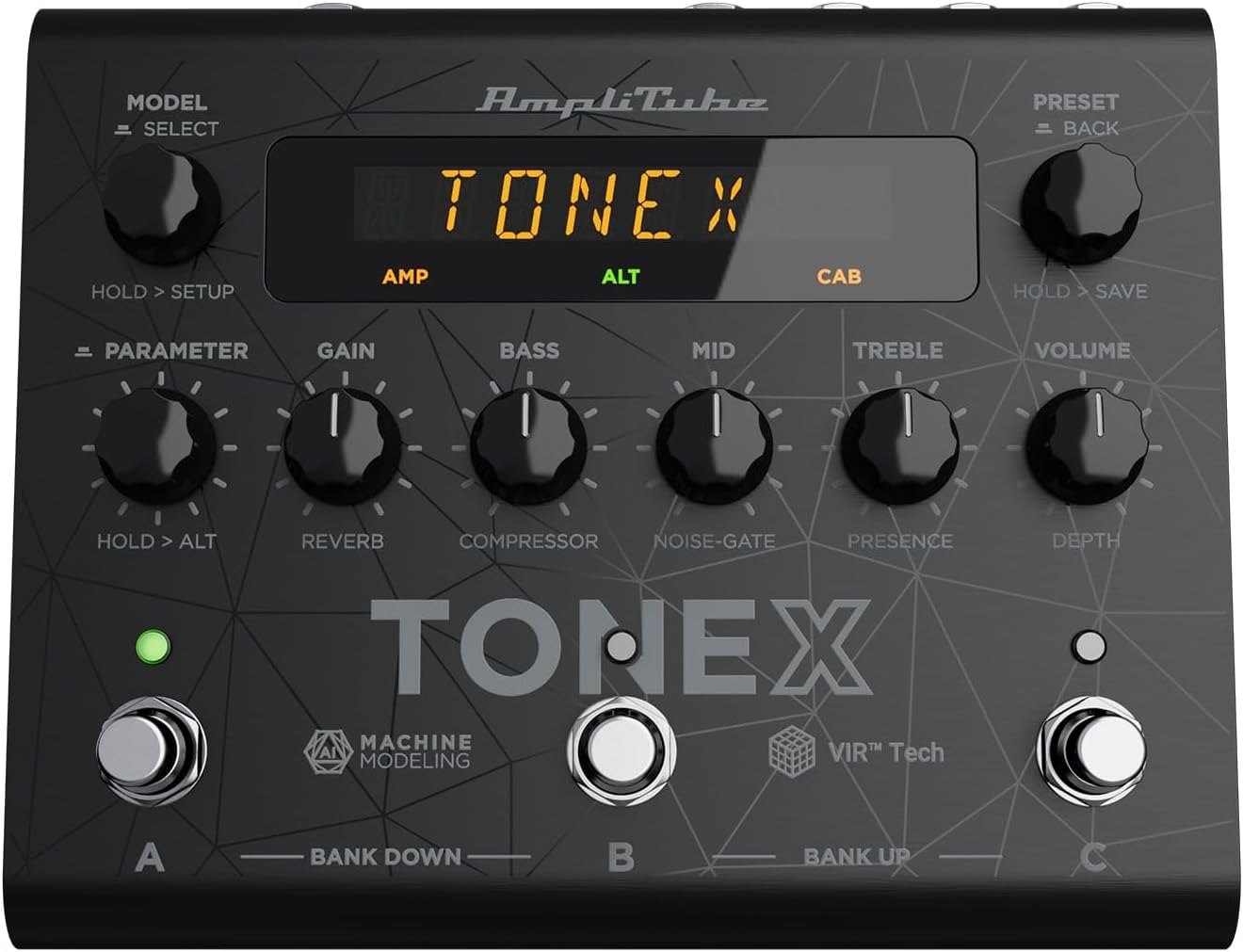
Figure 1: TONEX Pedal Front Panel
ຮູບພາບນີ້ສະແດງຢູ່ເທິງສຸດ view of the TONEX Pedal, highlighting its compact design and the arrangement of knobs, footswitches, and the digital display. Key controls such as 'Model/Select', 'Preset/Back', 'Parameter', 'Gain', 'Bass', 'Mid', 'Treble', and 'Volume' are visible, along with the three footswitches labeled A, B, and C.
- MODEL / SELECT Knob: Used to select tone models and navigate menus. Press and hold for Setup menu.
- PRESET / BACK Knob: Used to select presets and go back in menus. Press and hold to save presets.
- ປຸ່ມພາຣາມີເຕີ: Adjusts various parameters. Press and hold for alternative parameters.
- ປຸ່ມເພີ່ມ: Controls the input gain of the tone model.
- ບິດເບສ: ປັບການຕອບສະໜອງຄວາມຖີ່ຕໍ່າ.
- ປຸ່ມ MID: ປັບການຕອບສະໜອງຄວາມຖີ່ກາງ.
- ລູກບິດ TREBLE: ປັບການຕອບສະໜອງຄວາມຖີ່ສູງ.
- ປຸ່ມລະດັບສຽງ: ຄວບຄຸມປະລິມານຜົນຜະລິດໂດຍລວມ.
- ສະວິດຕີນ A, B, C: Select presets within a bank. Also used for bank up/down (A+B, B+C) and bypass.
- ຈໍສະແດງຜົນ: Shows current preset, parameter values, and menu options.
4.2. ການເຊື່ອມຕໍ່ແຜງດ້ານຫລັງ
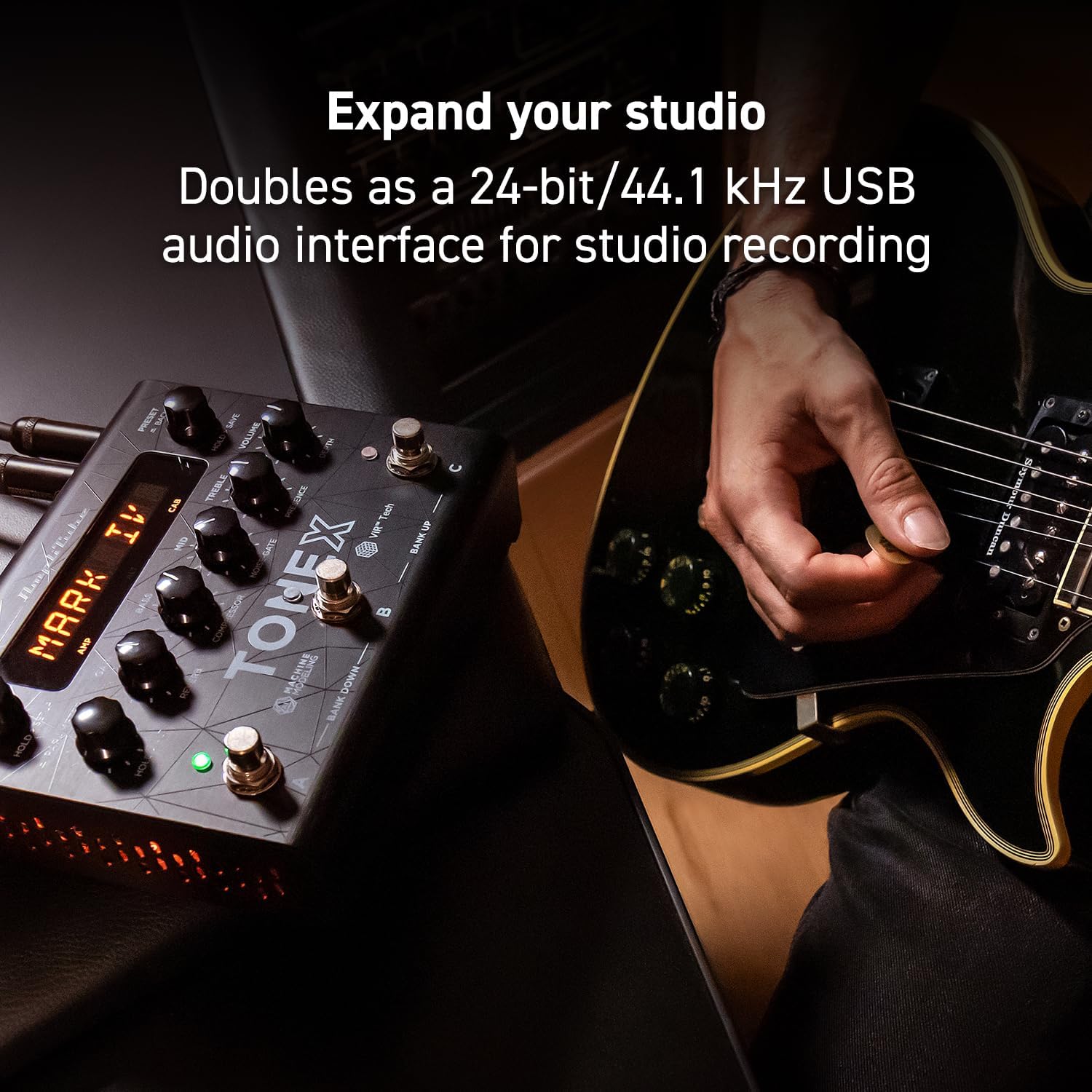
Figure 2: TONEX Pedal Rear Panel Connections
This image shows the rear panel of the TONEX Pedal, detailing its various input and output connections. Visible ports include the instrument input, left and right outputs (mono), headphone output, MIDI In/Out, external control input, USB port, and the 9V DC power input. This panel facilitates integration into various audio setups, from live rigs to studio environments.
- ການປ້ອນຂໍ້ມູນ: 1/4" mono input for your guitar or bass.
- OUTPUT L/R (MONO): 1/4" stereo outputs for connecting to a PA system, power amp, or audio interface. Use the L output for mono operation.
- ຫູຟັງ: ຜົນຜະລິດສະເຕີລິໂອ 1/4" ສຳລັບການຝຶກຊ້ອມທີ່ງຽບສະຫງົບ.
- ກາງ/ອອກ: 5-pin DIN connectors for MIDI control and integration with other MIDI devices.
- EXT. CONTROL: 1/4" input for an external expression pedal or footswitch.
- USB: USB-B port for connecting to a computer (PC/Mac) for software control, preset management, and using the pedal as an audio interface.
- POWER 9V DC: Input for the included 9V DC power supply.
5. ຕັ້ງຄ່າ
5.1. ການເຊື່ອມຕໍ່ເບື້ອງຕົ້ນ
- ເຊື່ອມຕໍ່ເຄື່ອງມືຂອງທ່ານກັບ ປ້ອນຂໍ້ມູນ jack ໃນແຜງດ້ານຫລັງ.
- ເຊື່ອມຕໍ່ ອອກ L (ແລະ R for stereo) to your amplifier, PA system, or audio interface.
- If desired, connect headphones to the ຫູຟັງ jack.
- ເຊື່ອມຕໍ່ແຫຼ່ງຈ່າຍໄຟ DC 9V ທີ່ມາພ້ອມກັບເຄື່ອງ ພະລັງງານ 9V DC input and plug it into a power outlet. The pedal will power on automatically.
5.2. ການຕິດຕັ້ງຊອບແວ
To unlock the full potential of your TONEX Pedal, including access to ToneNET and advanced editing features, install the TONEX Editor software on your computer.
- Visit the IK Multimedia website and register your product using the provided registration card.
- Download and install the TONEX Editor software for your operating system (Windows 10 or later, macOS 10.15 or later).
- Connect the TONEX Pedal to your computer via the USB port. The pedal can function as a 24-bit/44.1 kHz USB audio interface for studio recording.
- Follow the on-screen instructions in the software to update firmware and manage your tone models and presets.
6. ຄໍາແນະນໍາການດໍາເນີນງານ
6.1. Navigating Presets
The TONEX Pedal comes preloaded with 150 gig-ready presets, organized into 50 banks of three presets each.
- ເລືອກ Presets: ໝຸນ PRESET / BACK knob to quickly scroll through and audition available presets.
- Using Footswitches: Tap footswitches A, B, ຫຼື C to load different presets within the current bank.
- Changing Banks: Simultaneously press footswitches A ແລະ B to move down a bank, or B ແລະ C to move up a bank.
- Bypass Tone Model: Once a preset is loaded, tapping its corresponding footswitch a second time will bypass the tone model, allowing for a clean signal.
6.2. ການປັບຕົວກໍານົດການ
The TONEX Pedal offers five main and five alternative parameters on the front panel for tone shaping.
- ພາລາມິເຕີຫຼັກ: Directly adjust ໄດ້ຮັບ, ເບສ, ກາງ, ຄວບຄຸມ, ແລະ ປະລິມານ using their respective knobs.
- Alternative Parameters: ຖືລົງ PARAMETER encoder to access alternative parameters: Reverb Level, Compressor Threshold, Noise Gate Threshold, Presence, and Depth. Rotate the corresponding knobs to adjust these.
- ຕົວກໍານົດການເພີ່ມເຕີມ: ກົດ PARAMETER encoder once to access further parameters for fine-tuning your sound.
6.3. ກຳລັງບັນທຶກການຕັ້ງຄ່າໄວ້ລ່ວງໜ້າ
- Saving with Renaming/Relocation: ຖື PRESET / BACK encoder. You can then rotate the ຕັ້ງໄວ້ລ່ວງໜ້າ knob to edit characters for renaming, and rotate the ຮູບແບບ knob to move the cursor or change the bank location. Press the ຕັ້ງໄວ້ລ່ວງໜ້າ knob again to confirm and save.
- Quick Save: To quickly save a preset with the same name in the same location, press the ຮູບແບບ ແລະ ຕັ້ງໄວ້ລ່ວງໜ້າ encoders simultaneously. The display will show "SAVED".
6.4. Cab Emulation
If connecting to a standard guitar or bass amp with its own speaker cabinet, you may wish to turn off the TONEX Pedal's internal cab emulation to avoid redundant processing. This can be done via the Setup menu (hold MODEL / SELECT ລູກບິດ).
6.5. Official Product Video: TONEX Pedal Main Features
ວິດີໂອທີ 1: ຈົບແລ້ວview of the IK Multimedia TONEX Pedal's main features, including its controls, connectivity, and basic operation. This video demonstrates how to navigate presets, adjust parameters, and utilize the pedal's various functions for live and studio use.
7. ບໍາລຸງຮັກສາ
- ທໍາຄວາມສະອາດ: Regularly wipe the pedal with a soft, dry cloth to remove dust and grime. Avoid abrasive cleaners.
- ການເກັບຮັກສາ: Store the pedal in a cool, dry place when not in use. Protect it from extreme temperatures and humidity.
- ການຄຸ້ມຄອງສາຍໄຟ: ໃຫ້ແນ່ໃຈວ່າສາຍໄຟບໍ່ບິດງໍ ຫຼື ເຄັ່ງຕຶງເພື່ອປ້ອງກັນຄວາມເສຍຫາຍຕໍ່ຕົວເຊື່ອມຕໍ່ ແລະ ພອດ.
8. ການແກ້ໄຂບັນຫາ
- ບໍ່ມີພະລັງງານ: Ensure the 9V DC power supply is correctly connected to the pedal and a working power outlet.
- ບໍ່ມີສຽງ: Check all audio cable connections (instrument input, outputs to amp/PA, headphones). Verify volume levels on the pedal and connected devices. Ensure the tone model is not bypassed.
- Unexpected Behavior/Glitches: Try performing a factory reset (refer to the full online manual for specific steps). Ensure your firmware is up to date via the TONEX Editor software.
- ບັນຫາການເຊື່ອມຕໍ່ຊອບແວ: Ensure the USB cable is securely connected. Try a different USB port or cable. Restart both the pedal and your computer.
9. ຂໍ້ມູນຈໍາເພາະ
| ຄຸນສົມບັດ | ຂໍ້ມູນຈໍາເພາະ |
|---|---|
| ໝາຍເລກຕົວແບບ | TONEX Pedal |
| ຂະໜາດ (L x W x H) | 6.93 x 5.59 x 2.17 ນິ້ວ (ປະມານ 17.6 x 14.2 x 5.5 ຊມ) |
| ນ້ໍາຫນັກລາຍການ | 2.86 ປອນ (ປະມານ 1.3 ກິໂລ) |
| ສີ | ດຳ |
| ແຫຼ່ງພະລັງງານ | 9V DC (ໄຟຟ້າມີສາຍ) |
| ການໂຕ້ຕອບຮາດແວ | USB |
| ຮູບແບບສັນຍານ | ດິຈິຕອລ |
| ຄວາມເຂົ້າກັນໄດ້ຂອງລະບົບປະຕິບັດການ | Windows® 10 or later, macOS® 10.15 or later (macOS® 11 Big Sur required for Modeler) |
| ການຕອບສະໜອງຄວາມຖີ່ | 5 Hz - 24 kHz |
| ຊ່ວງໄດນາມິກ | 123 dB |
10. ການຮັບປະກັນແລະການສະຫນັບສະຫນູນ
IK Multimedia products are covered by a limited warranty. For detailed warranty information, product registration, and technical support, please visit the official IK Multimedia webເວັບໄຊ ຫຼືຕິດຕໍ່ບໍລິການລູກຄ້າຂອງເຂົາເຈົ້າ. ຮັກສາຫຼັກຖານການຊື້ຂອງທ່ານສໍາລັບການຮ້ອງຂໍການຮັບປະກັນ.
Webເວັບໄຊ: www.ikmultimedia.com
Ask a question about this manual
Ask about setup, troubleshooting, compatibility, parts, safety, or missing instructions. Manuals+ will review the question and use this page’s manual context to help answer it.