
1. ການແນະນໍາ ແລະຫຼາຍກວ່າview
The Calix GigaCenter 844E-1 is a high-performance wireless router and modem designed to provide robust and reliable internet connectivity for home and small office environments. It supports dual-band Wi-Fi (2.4GHz and 5GHz) for optimal wireless performance and includes multiple Ethernet ports for wired connections. This manual provides detailed instructions for setting up, operating, maintaining, and troubleshooting your GigaCenter 844E-1 device.
2. ຄຸນລັກສະນະຂອງຜະລິດຕະພັນ
- Dual-Band Wi-Fi: Supports 2.4GHz and 5GHz frequencies for flexible and high-speed wireless connections (802.11ac, 802.11n, 802.11a/g/b compatible).
- High LAN Data Rate: Capable of up to 1000 Mbps for fast wired connections.
- ຫຼາຍພອດ: Includes Ethernet (RJ-45) ports (4 LAN ports), USB 2.0, and RJ-11 ports for versatile connectivity.
- Integrated Modem: Functions as both a router and a modem, simplifying network setup.
- ການອອກແບບກະທັດຮັດ: Designed for efficient space utilization.
3. ເນື້ອໃນຊຸດ
ກະລຸນາກວດສອບວ່າລາຍການທັງໝົດມີຢູ່ໃນຊຸດຂອງທ່ານ:
- Calix GigaCenter 844E-1 Wireless Router Modem
- AC Adapter ການສະຫນອງພະລັງງານ
- (Optional: Ethernet Cable, Phone Cable - may vary by package)
4. ຄູ່ມືການຕິດຕັ້ງ
Follow these steps to set up your Calix GigaCenter 844E-1:
- ການຈັດວາງອຸປະກອນ: Place the GigaCenter 844E-1 in a central location in your home, away from obstructions and sources of interference (e.g., microwaves, cordless phones). Ensure adequate ventilation.
- ເຊື່ອມຕໍ່ພະລັງງານ: Connect the provided AC Adapter Power Supply to the "POWER" port on the back of the GigaCenter 844E-1 and then plug the adapter into a standard electrical outlet. The Power indicator light on the front panel should illuminate.

ຮູບ 4.1: ດ້ານຫນ້າ view of the Calix GigaCenter 844E-1 showing indicator lights and the included power adapter.
- ເຊື່ອມຕໍ່ກັບແຫຼ່ງຂໍ້ມູນອິນເຕີເນັດ: Connect your internet service provider's (ISP) cable or fiber optic line to the appropriate WAN/Broadband port on the GigaCenter 844E-1. This port is typically labeled "ETH-WAN" or "Broadband". The Broadband indicator light should turn solid green once a connection is established.

ຮູບ 4.2: ຂ້າງ view of the GigaCenter 844E-1 highlighting the ETH-WAN, Power, and Phone ports.
- ເຊື່ອມຕໍ່ອຸປະກອນແບບມີສາຍ (ທາງເລືອກ): Use standard Ethernet cables to connect computers, gaming consoles, or other network devices to the "ETHERNET 1-4" ports on the back of the GigaCenter 844E-1. The corresponding Ethernet indicator light will illuminate when a device is connected and active.

Figure 4.3: Top/back view of the GigaCenter 844E-1 displaying the USB, Reset, Ethernet (LAN), and Phone ports.
- Connect Phone Devices (Optional): If your service includes voice, connect analog phones to the "PHONE 1" or "PHONE 2" ports using RJ-11 cables.
- ການເຊື່ອມຕໍ່ Wi-Fi ເບື້ອງຕົ້ນ:
- Locate the Wi-Fi Network Name (SSID) and Password (WPA Key) on the label usually found on the bottom or back of your GigaCenter 844E-1.
- ໃນອຸປະກອນໄຮ້ສາຍຂອງທ່ານ (ແລັບທັອບ, ສະມາດໂຟນ, ແທັບເລັດ), ຄົ້ນຫາເຄືອຂ່າຍ Wi-Fi ທີ່ມີຢູ່.
- Select your GigaCenter's SSID and enter the WPA Key when prompted.
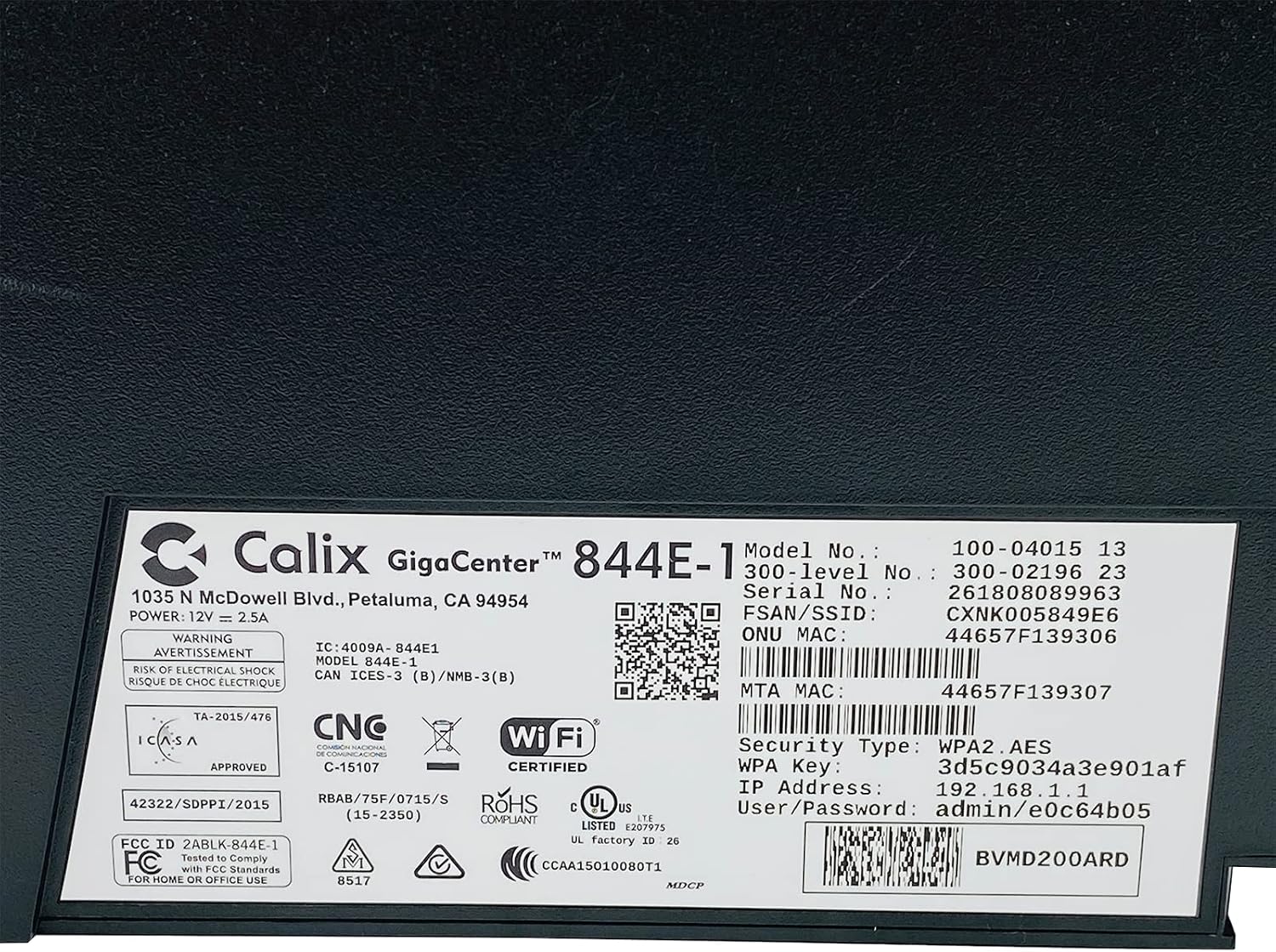
ຮູບທີ 4.4: ລາຍລະອຽດ view of the bottom label, providing essential information such as model number, serial number, Wi-Fi SSID, and WPA Key for network access.
- ຢືນຢັນການເຊື່ອມຕໍ່: ເມື່ອເຊື່ອມຕໍ່ແລ້ວ, ເປີດ a web ໂປຣແກຣມທ່ອງເວັບ ແລະ ພະຍາຍາມເຂົ້າເຖິງ webເວັບໄຊ (ເຊັ່ນ: www.google.com). If successful, your GigaCenter 844E-1 is set up and ready for use.
5. ຄໍາແນະນໍາການດໍາເນີນງານ
5.1 ແສງຕົວຊີ້ວັດ
The front panel of the GigaCenter 844E-1 features several indicator lights that provide status information:
| ແສງສະຫວ່າງ | ສະຖານະ | ລາຍລະອຽດ |
|---|---|---|
| ພະລັງງານ | ສີຂຽວແຂງ | ອຸປະກອນເປີດຢູ່. |
| BROADBAND | ສີຂຽວແຂງ | ການເຊື່ອມຕໍ່ອິນເຕີເນັດເປີດຢູ່. |
| ການບໍລິການ | ສີຂຽວແຂງ | Service is active and provisioned. |
| WIFI 2.4GHz | ສີຂຽວເຂັ້ມ/ກະພິບ | 2.4 GHz Wi-Fi is active/data transfer. |
| WIFI 5GHz | ສີຂຽວເຂັ້ມ/ກະພິບ | 5 GHz Wi-Fi is active/data transfer. |
| ອີເທີເນັດ 1-4 | ສີຂຽວເຂັ້ມ/ກະພິບ | Wired connection active/data transfer. |
| PHONE 1-2 | ສີຂຽວເຂັ້ມ/ກະພິບ | Phone service active/in use. |
| USB | ສີຂຽວເຂັ້ມ/ກະພິບ | USB device connected/data transfer. |
| WPS | ກະພິບ | ການຈັບຄູ່ WPS ພວມດຳເນີນຢູ່. |
5.2 ການເຂົ້າເຖິງ Web ການໂຕ້ຕອບ
To configure advanced settings, you can access the GigaCenter's web ການໂຕ້ຕອບ:
- Ensure your device is connected to the GigaCenter via Wi-Fi or Ethernet.
- ເປີດ ກ web browser and enter the IP Address (e.g., 192.168.1.1) found on the product label into the address bar.
- Enter the User/Password (e.g., admin/e0c64b05) from the product label when prompted.
- You can now configure settings such as Wi-Fi name, password, port forwarding, and parental controls.
6. ບໍາລຸງຮັກສາ
- ທໍາຄວາມສະອາດ: ໃຊ້ຜ້າປຽກແຫ້ງເພື່ອເຮັດຄວາມສະອາດດ້ານນອກຂອງອຸປະກອນ. ຢ່າໃຊ້ເຄື່ອງເຮັດຄວາມສະອາດຂອງແຫຼວຫຼື aerosols.
- ການລະບາຍອາກາດ: ໃຫ້ແນ່ໃຈວ່າຊ່ອງລະບາຍອາກາດຂອງອຸປະກອນບໍ່ຖືກອຸດຕັນເພື່ອປ້ອງກັນຄວາມຮ້ອນເກີນໄປ.
- ການອັບເດດເຟີມແວ: Periodically check with your Internet Service Provider (ISP) for available firmware updates to ensure optimal performance and security.
- ການປິດເປີດຄືນໃ່: If you experience connectivity issues, try restarting the device by unplugging the power adapter for 10 seconds and then plugging it back in.
7. ການແກ້ໄຂບັນຫາ
ພາກສ່ວນນີ້ແກ້ໄຂບັນຫາທົ່ວໄປທີ່ທ່ານອາດຈະພົບ:
7.1 ບໍ່ມີການເຊື່ອມຕໍ່ອິນເຕີເນັດ
- ກວດສອບສາຍ: Ensure all cables (power, internet source, Ethernet) are securely connected.
- ແສງຕົວຊີ້ວັດ: Verify that the POWER, BROADBAND, and SERVICE lights are solid green. If not, refer to Section 5.1 or contact your ISP.
- ຣີສະຕາດອຸປະກອນ: Power cycle the GigaCenter 844E-1 by unplugging it for 10 seconds and plugging it back in.
- ຜູ້ໃຫ້ບໍລິການອິນເຕີເນັດ Outage: ກວດສອບກັບຜູ້ໃຫ້ບໍລິການອິນເຕີເນັດຂອງທ່ານສຳລັບການບໍລິການໃດໆtagຢູ່ໃນພື້ນທີ່ຂອງເຈົ້າ.
7.2 Wi-Fi Not Working or Slow
- Wi-Fi Lights: Ensure the WIFI 2.4 GHz and/or WIFI 5 GHz lights are solid green.
- ລະຫັດຜ່ານ: Double-check that you are entering the correct Wi-Fi password (WPA Key).
- ຄວາມແຮງຂອງສັນຍານ: Move closer to the GigaCenter 844E-1 to improve signal strength.
- ແຊກແຊງ: ຫຼຸດຜ່ອນການລົບກວນຈາກອຸປະກອນເອເລັກໂຕຣນິກອື່ນໆ.
- ການເພີ່ມປະສິດທິພາບຊ່ອງ: ເຂົ້າເຖິງ web interface to change Wi-Fi channels if experiencing congestion.
7.3 ບໍ່ສາມາດເຂົ້າເຖິງໄດ້ Web ການໂຕ້ຕອບ
- ທີ່ຢູ່ IP: Confirm you are using the correct IP Address (e.g., 192.168.1.1).
- ການເຊື່ອມຕໍ່: Ensure your device is connected to the GigaCenter's network.
- ຂໍ້ມູນປະຈຳຕົວ: Verify the User/Password from the product label.
- Firewall/Antivirus: ປິດໃຊ້ງານ firewall ຫຼື ຊອບແວ antivirus ໃນຄອມພິວເຕີຂອງທ່ານຊົ່ວຄາວທີ່ອາດຈະບລັອກການເຂົ້າເຖິງ.
7.4 ໜ້າທີ່ຂອງ WPS
The WPS (Wi-Fi Protected Setup) button allows for easy connection of WPS-compatible devices without manually entering the password. Press the WPS button on the GigaCenter 844E-1 and then activate WPS on your client device within two minutes. The WPS light will flash during the pairing process.
8. ຂໍ້ມູນຈໍາເພາະ
| ຄຸນສົມບັດ | ລາຍລະອຽດ |
|---|---|
| ຕົວແບບ | GigaCenter 844E-1 (100-04015 13) |
| ຍີ່ຫໍ້ | Calix |
| ເຕັກໂນໂລຊີການເຊື່ອມຕໍ່ | Wireless-Wi-Fi 802.11ac, Ethernet (RJ-45) Hub/Switch, 5G |
| ມາດຕະຖານໄຮ້ສາຍ | 802.11ac, 802.11n, 802.11a/g/b |
| ຫ້ອງຮຽນແຖບຄວາມຖີ່ | Dual-Band (2.4 GHz, 5 GHz) |
| Maximum LAN Data Rate | 1000 Mbps |
| ທ່າເຮືອ | 4 x Ethernet (RJ-45), 1 x USB 2.0, 2 x RJ-11 (Phone) |
| ອຸປະກອນທີ່ເຂົ້າກັນໄດ້ | Personal Computer, Network Devices |
| ການນໍາໃຊ້ທີ່ແນະນໍາ | ບ້ານ |
| ອົງປະກອບລວມ | ການສະຫນອງພະລັງງານ |
| ນ້ໍາຫນັກລາຍການ | 3 ປອນ |
9. ຂໍ້ມູນຄວາມປອດໄພ
- ຢ່າປ່ອຍໃຫ້ອຸປະກອນຖືກນ້ໍາຫຼືຄວາມຊຸ່ມຊື່ນ.
- ຢ່າເປີດອຸປະກອນ casing. ອ້າງອີງການບໍລິການທັງໝົດໃຫ້ກັບບຸກຄະລາກອນທີ່ມີຄຸນວຸດທິ.
- ໃຊ້ພຽງແຕ່ອະແດັບເຕີໄຟທີ່ໃຫ້ມາ.
- ຮັກສາອຸປະກອນໃຫ້ຫ່າງຈາກແຫຼ່ງຄວາມຮ້ອນ ແລະແສງແດດໂດຍກົງ.
- ຮັບປະກັນການລະບາຍອາກາດທີ່ເຫມາະສົມເພື່ອປ້ອງກັນຄວາມຮ້ອນເກີນ.
10. ການຮັບປະກັນແລະການສະຫນັບສະຫນູນ
For warranty information and technical support, please contact your Internet Service Provider (ISP) or the vendor from whom you purchased this device. The Calix GigaCenter 844E-1 is typically provided and supported by your ISP as part of your internet service package.
For general inquiries or to find more information about Calix products, you may visit the official Calix website (if available, search online for "Calix official webສະຖານທີ່").