
1. ບົດແນະນຳ
This manual provides detailed instructions for the amazon basics Wired Gaming Mouse, Model ABIM03. This mouse is designed to enhance your gaming and computing experience with its adjustable DPI, customizable RGB lighting, and programmable buttons. Please read this manual thoroughly before use to ensure proper operation and longevity of your device.
2. ຄຸນລັກສະນະຂອງຜະລິດຕະພັນ
- DPI ທີ່ສາມາດປັບໄດ້: Up to 6400 DPI for precise cursor control and quick movements.
- ໄຟ RGB ປັບແຕ່ງໄດ້: Personalize your mouse with various RGB lighting modes and driver customization options for PC.
- ປຸ່ມທີ່ຕັ້ງໂປຣແກຣມໄດ້: Equipped with multiple programmable buttons for assigning custom functions or macros.
- Gaming-Grade Sensor: Ensures accurate tracking and rapid response for gaming.
- ການອອກແບບທົນທານ: Features extra durable switches and enhanced build quality for extended use.
- Honeycomb Grip: Ergonomic honeycomb design provides a comfortable and secure grip.

Image: The amazon basics Wired Gaming Mouse highlighting its adjustable DPI settings, ranging from 1200 to 7200 (though product states up to 6400).
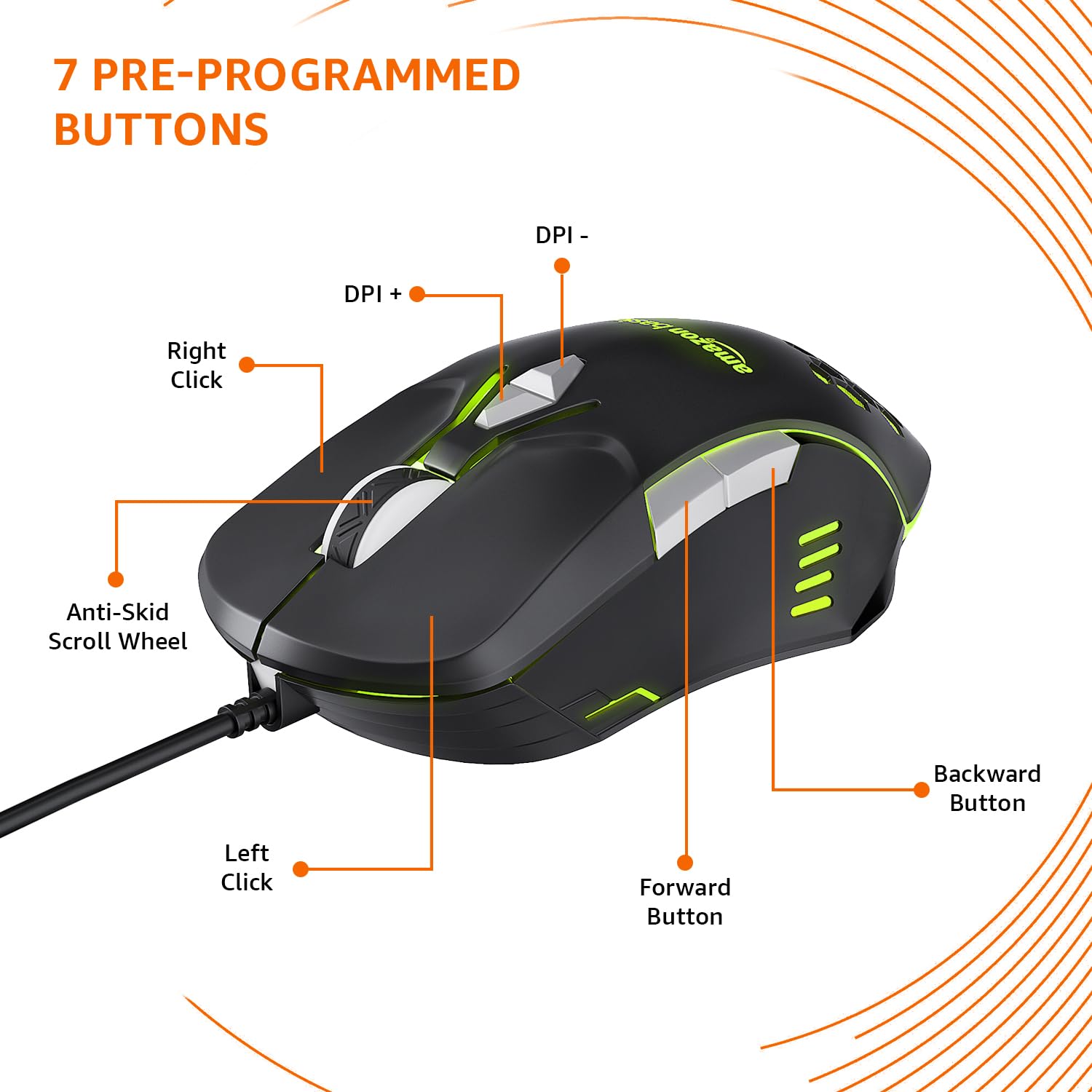
Image: The amazon basics Wired Gaming Mouse showing its 7 pre-programmed buttons, including Left Click, Right Click, Anti-Skid Scroll Wheel, DPI+, DPI-, Forward Button, and Backward Button.

ຮູບພາບ: ເທິງລົງລຸ່ມ view of the amazon basics Wired Gaming Mouse, emphasizing its honeycomb-designed surface for improved grip and airflow.

Image: The amazon basics Wired Gaming Mouse illuminated with red RGB lighting, showcasing its light and comfortable design.
3. ຄໍາແນະນໍາການຕິດຕັ້ງ
- Unpack ຫນູ: Carefully remove the gaming mouse from its packaging.
- ເຊື່ອມຕໍ່ກັບ PC: ສຽບຕົວເຊື່ອມຕໍ່ USB ຂອງເມົາສ໌ເຂົ້າໄປໃນພອດ USB ທີ່ມີຢູ່ໃນຄອມພິວເຕີຂອງທ່ານ.
- ການຕິດຕັ້ງໄດເວີ: Your operating system (Windows, Linux) should automatically detect and install the necessary drivers. If prompted, follow the on-screen instructions. For advanced customization of RGB and programmable keys, refer to the manufacturer's webເວັບໄຊທ໌ສຳລັບຊອບແວໄດຣເວີສະເພາະ.
- ການຈັດວາງ: ວາງເມົາສ໌ໄວ້ເທິງພື້ນຜິວທີ່ຮາບພຽງ ແລະ ສະອາດ ຫຼື ແຜ່ນຮອງເມົາສ໌ເພື່ອປະສິດທິພາບສູງສຸດ.
4. ຄໍາແນະນໍາການດໍາເນີນງານ
4.1 ການທໍາງານພື້ນຖານ
- ຄລິກຊ້າຍ: ການປະຕິບັດຂັ້ນຕົ້ນ, ການຄັດເລືອກ.
- ກົດຂວາ: ການກະທຳສຳຮອງ, ເມນູສະພາບການ.
- ລໍ້ເລື່ອນ: Scroll up/down pages. Pressing the scroll wheel often acts as a middle click.
- ປຸ່ມໄປໜ້າ/ກັບຫຼັງ: ປົກກະຕິແລ້ວໃຊ້ສໍາລັບການນໍາທາງໃນ web ຕົວທ່ອງເວັບຫຼື file ນັກສຳຫຼວດ.
4.2 Adjusting DPI (Dots Per Inch)
The mouse features dedicated DPI adjustment buttons (DPI+ and DPI-) to change cursor sensitivity on the fly. Press these buttons to cycle through different DPI levels up to 6400. A higher DPI setting results in faster cursor movement across the screen with less physical mouse movement.
4.3 Customizing RGB Lighting
The mouse includes customizable RGB lighting. Specific lighting modes can often be cycled through using a dedicated button (if present) or through the optional driver software. Refer to the driver software for advanced customization options, including color selection, effects, and brightness.
4.4 Programming Buttons
The mouse is equipped with programmable buttons. To assign custom functions, macros, or key combinations to these buttons, you will need to install and use the specific driver software provided by the manufacturer. This software typically allows you to create profileສຳລັບແອັບພລິເຄຊັນ ຫຼື ເກມທີ່ແຕກຕ່າງກັນ.
Video: A short product highlight video demonstrating the key features of the amazon basics Wired Gaming Mouse, including adjustable DPI, RGB lighting, programmable buttons, and durable design.
5. ບໍາລຸງຮັກສາ
- ທໍາຄວາມສະອາດ: ໃຊ້ຜ້າແຫ້ງທີ່ອ່ອນໆເພື່ອເຮັດຄວາມສະອາດດ້ານນອກຂອງຫນູ. ສໍາລັບຝຸ່ນ stubborn, a ເລັກນ້ອຍ damp ສາມາດໃຊ້ຜ້າໄດ້, ເພື່ອຮັບປະກັນວ່າບໍ່ມີຂອງແຫຼວເຂົ້າໄປໃນໜູ.
- ການອະນາໄມເຊັນເຊີ: ບາງຄັ້ງຄາວ, ໃຫ້ໃຊ້ສຳລີເຊັດເບົາໆ.ampened with isopropyl alcohol to gently clean the optical sensor on the underside of the mouse. Ensure the mouse is disconnected before cleaning.
- ຫຼີກລ້ຽງການຂອງແຫຼວ: Do not immerse the mouse in water or any cleaning solutions.
- ການເກັບຮັກສາ: ເກັບຮັກສາໜູໄວ້ໃນບ່ອນທີ່ເຢັນ, ແຫ້ງ ແລະ ຫ່າງຈາກແສງແດດໂດຍກົງ ແລະ ອຸນຫະພູມທີ່ຮຸນແຮງ.
6. ການແກ້ໄຂບັນຫາ
| ບັນຫາ | ການແກ້ໄຂ |
|---|---|
| ເມົ້າບໍ່ຕອບສະໜອງ. |
|
| ການເຄື່ອນໄຫວຕົວກະພິບແມ່ນຜິດພາດ ຫຼືກະພິບ. |
|
| Programmable buttons are not working. |
|
| ໄຟ RGB ບໍ່ເຮັດວຽກ ຫຼື ຕິດຂັດ. |
|
7. ຂໍ້ມູນຈໍາເພາະ
| ຄຸນສົມບັດ | ລາຍລະອຽດ |
|---|---|
| ຍີ່ຫໍ້ | ພື້ນຖານ Amazon |
| ໝາຍເລກຕົວແບບ | ABIM03 |
| ເຕັກໂນໂລຊີການເຊື່ອມຕໍ່ | ສາຍ (USB) |
| ເຕັກໂນໂລຍີກວດຈັບການເຄື່ອນໄຫວ | Optical |
| ຊ່ວງ DPI | ເຖິງ 6400 DPI |
| ລະຫັດໂປຣແກຣມ | 4 (in addition to standard left/right click and scroll) |
| ແສງໄຟ | RGB |
| ສີ | ດຳ |
| ນ້ໍາຫນັກລາຍການ | 145 g |
| ຂະໜາດສິນຄ້າ (LxWxH) | 15.8 x 10.4 x 5.4 cm |
| ເວທີຮາດແວ | PC |
| ຄວາມເຂົ້າກັນໄດ້ຂອງລະບົບປະຕິບັດການ | Linux, Windows 7 and above |
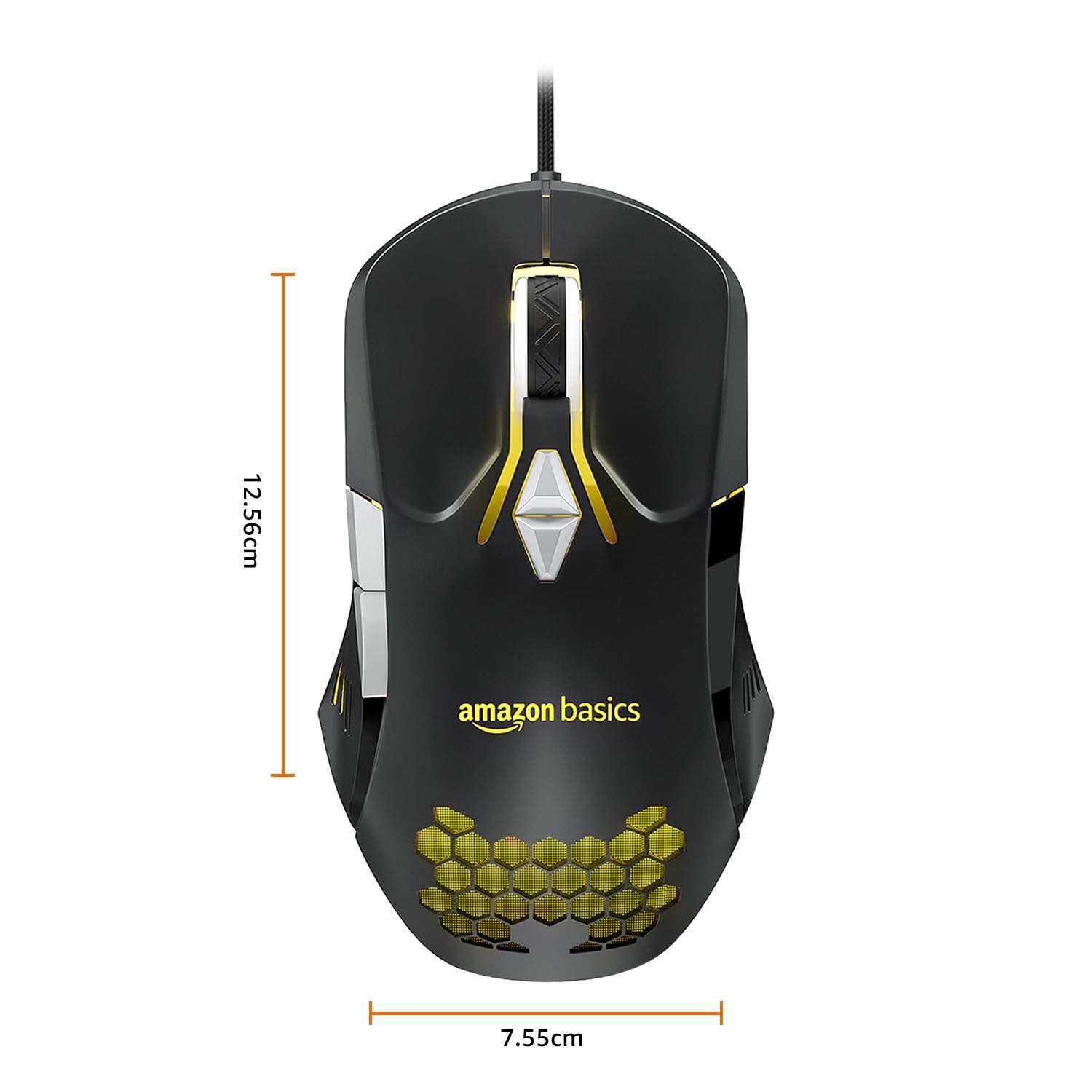
Image: The amazon basics Wired Gaming Mouse with its length (12.56cm) and width (7.55cm) dimensions indicated.
8. ຂໍ້ມູນການຮັບປະກັນ
This amazon basics Wired Gaming Mouse comes with a ຮັບປະກັນ 1 ປີ from the date of purchase. This warranty covers manufacturing defects and issues arising from normal use. It does not cover damage caused by misuse, accidents, unauthorized modifications, or normal wear and tear. Please retain your proof of purchase for warranty claims.
9. ສະຫນັບສະຫນູນ
For further assistance, technical support, or warranty claims, please visit the official amazon basics support page or contact customer service through your purchase platform. Ensure you have your product model number (ABIM03) and proof of purchase ready when contacting support.
ຊັບພະຍາກອນອອນໄລນ໌:
- ຫນ້າຜະລິດຕະພັນ: amazon.in/dp/B0BTD2YN6Y
- amazon basics Store: amazon basics Store