
United LED24HS82A11
UNITED LED24HS82A11 24-inch HD Ready Smart Android TV User Manual
Model: LED24HS82A11
ແນະນຳ
This user manual provides comprehensive instructions for the setup, operation, maintenance, and troubleshooting of your UNITED LED24HS82A11 24-inch HD Ready Smart Android TV. Please read this manual thoroughly before using your television to ensure proper and safe operation.
The UNITED LED24HS82A11 is a versatile 24-inch HD Ready Smart TV powered by Android 11, offering a wide range of entertainment options. It features pre-installed applications, built-in Chromecast and Airplay for seamless content streaming, and full internet connectivity via Wi-Fi and Ethernet. It also supports DVB/T2/S2/C, MPEG-4, and HEVC Main 10 for various broadcasting standards.
ຂໍ້ມູນຄວາມປອດໄພ
ປະຕິບັດຕາມຄວາມລະມັດລະວັງດ້ານຄວາມປອດໄພຕໍ່ໄປນີ້ສະເໝີເພື່ອປ້ອງກັນໄຟໄໝ້, ໄຟຟ້າຊອດ, ຫຼືບາດເຈັບ:
- ຢ່າເຮັດໃຫ້ໂທລະທັດຖືກຝົນຫຼືຄວາມຊຸ່ມຊື່ນ.
- ຫ້າມກີດຂວາງການເປີດລະບາຍອາກາດ.
- ກວດໃຫ້ແນ່ໃຈວ່າສາຍໄຟບໍ່ໄດ້ດັກ ຫຼື ຍ່າງຕໍ່.
- ຖອດສາຍໂທລະທັດໃນເວລາມີພາຍຸຟ້າຜ່າ ຫຼືເມື່ອບໍ່ໄດ້ໃຊ້ເປັນເວລາດົນນານ.
- ອ້າງອີງການບໍລິການທັງໝົດໃຫ້ກັບພະນັກງານບໍລິການທີ່ມີຄຸນວຸດທິ.
ຕັ້ງຄ່າ
1. Unpacking ແລະການຕິດຕັ້ງ Stand
Carefully remove the TV and all accessories from the packaging. Place the TV face down on a soft, clean surface to prevent screen damage.
Attach the two stand feet to the bottom of the TV using the provided screws. Ensure they are securely fastened.

ຮູບ 1: ຂ້າງ view of the UNITED LED24HS82A11 TV, illustrating its slim profile and potential port locations.
2. ສາຍເຊື່ອມຕໍ່
- ພະລັງງານ: ເຊື່ອມຕໍ່ສາຍໄຟກັບອິນພຸດໄຟຂອງໂທລະທັດ ແລະຈາກນັ້ນໄປຫາປລັກສຽບໄຟ.
- ເສົາອາກາດ/ສາຍ: Connect your antenna or cable TV coaxial cable to the "RF In" port.
- ອຸປະກອນ HDMI: ເຊື່ອມຕໍ່ອຸປະກອນພາຍນອກເຊັ່ນ: ເຄື່ອງຫຼິ້ນ Blu-ray, ເຄື່ອງຫຼິ້ນເກມ ຫຼື ກ່ອງ set-top ກັບພອດ HDMI.
- ອີເທີເນັດ (ທາງເລືອກ): For a wired internet connection, connect an Ethernet cable from your router to the TV's LAN port.
3. ຕົວຊ່ວຍສ້າງການຕິດຕັ້ງເບື້ອງຕົ້ນ
Once powered on, the TV will guide you through the initial setup process. Follow the on-screen prompts to:
- ເລືອກພາສາທີ່ທ່ານຕ້ອງການ.
- Connect to your Wi-Fi network (if not using Ethernet).
- Sign in with your Google account (optional, but recommended for full Smart TV features).
- ສະແກນຫາຊ່ອງໂທລະພາບທີ່ມີຢູ່ (ເສົາອາກາດ/ສາຍເຄເບີ້ນ).
ປະຕິບັດການ
ການຄວບຄຸມໄລຍະໄກview
Familiarize yourself with the buttons on the remote control for easy navigation and control of your TV's functions.
ຟັງຊັນໂທລະພາບພື້ນຖານ
- ເປີດ/ປິດ: ກົດປຸ່ມເປີດປິດຢູ່ຣີໂໝດ ຫຼືໂທລະພາບ.
- ການຄວບຄຸມລະດັບສຽງ: ໃຊ້ປຸ່ມລະດັບສຽງຂຶ້ນ/ລົງ.
- ການເລືອກຊ່ອງ: ໃຊ້ປຸ່ມຂຶ້ນ/ລົງຊ່ອງ ຫຼືແຜ່ນຕົວເລກ.
- ແຫຼ່ງປ້ອນຂໍ້ມູນ: Press the "Source" or "Input" button to switch between HDMI, TV, and other inputs.
ຄຸນສົມບັດໂທລະທັດອັດສະລິຍະ (Android 11)
Your TV runs on Android 11, providing access to a vast ecosystem of apps and services.

Figure 2: The UNITED LED24HS82A11 TV showcasing its Android TV home screen, featuring popular streaming applications like YouTube, Prime Video, and Netflix.
- ໜ້າຈໍຫຼັກ: Navigate the home screen to access pre-installed apps (Netflix, YouTube, Prime Video), recommended content, and settings.
- Google Play Store: Download additional apps, games, and content from the Google Play Store.
- Chromecast ໃນຕົວ: Cast content directly from your compatible smartphone, tablet, or computer to the TV. Look for the Cast icon in supported apps.
- ການຫຼິ້ນທາງອາກາດ: For Apple devices, use Airplay to stream videos, photos, and music from your iPhone, iPad, or Mac to the TV.
- ການເຊື່ອມຕໍ່ອິນເຕີເນັດ:
- Wi-Fi: Go to Settings > Network & Internet to connect to your wireless network.
- ອີເທີເນັດ: If an Ethernet cable is connected, the TV will automatically use the wired connection.
ບໍາລຸງຮັກສາ
ທໍາຄວາມສະອາດໂທລະພາບ
- ຖອດປລັກໂທລະທັດທຸກຄັ້ງກ່ອນທຳຄວາມສະອາດ.
- ໃຊ້ຜ້າທີ່ອ່ອນນຸ່ມ, ບໍ່ມີສານດ່າງເພື່ອເຊັດໜ້າຈໍຢ່າງຄ່ອຍໆ. ສໍາລັບຮອຍແຂງ, ງampen the cloth slightly with water or a screen cleaner specifically designed for electronics.
- ເຊັດໂທລະພາບ ຄasing ດ້ວຍຜ້າອ່ອນ, ແຫ້ງ. ຫຼີກເວັ້ນການນໍາໃຊ້ເຄື່ອງເຮັດຄວາມສະອາດຂັດຫຼືສານລະລາຍ.
ອັບເດດຊອບແວ
Your TV may receive software updates to improve performance and add new features. You can check for updates via Settings > Device Preferences > About > System update.
ການແກ້ໄຂບັນຫາ
ຖ້າຫາກທ່ານພົບບັນຫາກັບໂທລະພາບຂອງທ່ານ, ເບິ່ງບັນຫາທົ່ວໄປດັ່ງຕໍ່ໄປນີ້ແລະການແກ້ໄຂ:
| ບັນຫາ | ສາເຫດ / ການແກ້ໄຂທີ່ເປັນໄປໄດ້ |
|---|---|
| ບໍ່ມີພະລັງງານ | ກວດເບິ່ງວ່າສາຍໄຟຖືກສຽບໃສ່ໂທລະທັດ ແລະປລັກສຽບໃສ່ຝາຢ່າງປອດໄພຫຼືບໍ່. ລອງຮ້ານອື່ນ. |
| ບໍ່ມີຮູບພາບ / ບໍ່ມີສຽງ | Ensure the correct input source is selected (e.g., HDMI 1, TV). Check cable connections. For TV channels, perform a channel scan. |
| ບໍ່ສາມາດເຊື່ອມຕໍ່ກັບ Wi-Fi ໄດ້ | ຢືນຢັນລະຫັດຜ່ານ Wi-Fi ຂອງທ່ານ. ປິດເປີດເຣົາເຕີ ແລະ ໂທລະພາບຂອງທ່ານຄືນໃໝ່. ໃຫ້ແນ່ໃຈວ່າໂທລະພາບຢູ່ໃນຂອບເຂດສັນຍານ Wi-Fi ຂອງທ່ານ. |
| ການຄວບຄຸມໄລຍະໄກບໍ່ເຮັດວຽກ | ກວດເບິ່ງແລະປ່ຽນແບັດ. ກວດໃຫ້ແນ່ໃຈວ່າບໍ່ມີສິ່ງກີດຂວາງລະຫວ່າງຣີໂໝດ ແລະເຊັນເຊີ IR ຂອງໂທລະທັດ. |
| ແອັບບໍ່ໂຫຼດ/ປະສິດທິພາບຊ້າ | Check your internet connection speed. Clear app cache (Settings > Apps > [App Name] > Clear cache). Restart the TV. |
ຂໍ້ມູນຈໍາເພາະ
Below are the technical specifications for the UNITED LED24HS82A11 TV:
| ຄຸນສົມບັດ | ຂໍ້ມູນຈໍາເພາະ |
|---|---|
| ຍີ່ຫໍ້ | ສະຫະປະຊາ |
| ໝາຍເລກຕົວແບບ | LED24HS82A11 |
| ຂະໜາດໜ້າຈໍ | 24 ນິ້ວ |
| ເຕັກໂນໂລຊີການສະແດງ | LED |
| ຄວາມລະອຽດ | 768p (1366 x 768 ພິກເຊລ) |
| ອັດຕາການໂຫຼດຂໍ້ມູນຄືນໃໝ່ | 60 Hz |
| ລະບົບປະຕິບັດການ | Android 11 |
| ການເຊື່ອມຕໍ່ | Wi-Fi, Ethernet, HDMI, RF, USB |
| ຄຸນນະສົມບັດພິເສດ | Flat Screen, Chromecast Built-in, Airplay, Pre-installed Apps (Netflix, YouTube, Prime Video) |
| ອັດຕາສ່ວນ | 16:9 |
| ຂະໜາດສິນຄ້າ (L x W x H) | 12D x 60.5W x 43.2H ຊັງຕີແມັດ |
| ອົງປະກອບລວມ | 1 mini AV adapter cable, 1 remote control with 2 AAA 1.5V batteries |
| ຫ້ອງຮຽນປະສິດທິພາບພະລັງງານ | F |
| ການບໍລິໂພກພະລັງງານ (SDR) | 21.0 ວ |
| ການບໍລິໂພກພະລັງງານ (HDR) | 21.0 ວ |
| ການຊົມໃຊ້ພະລັງງານ (ສະແຕນບາຍ) | 0.3 ວ |

Figure 3: The energy efficiency label for the UNITED LED24HS82A11 TV, indicating an 'F' energy class rating and 21 kWh per 1000 hours of operation.
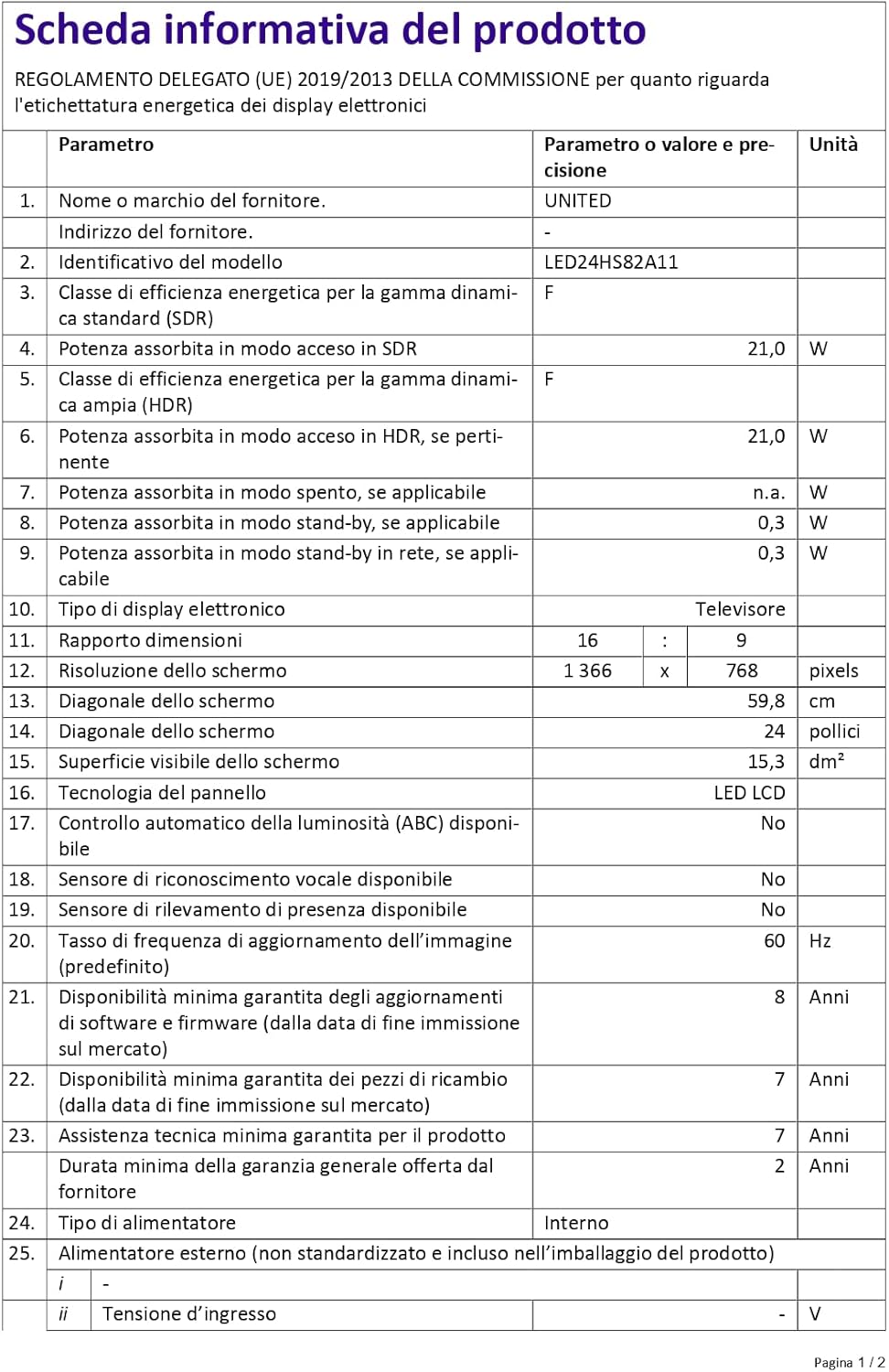
Figure 4: A detailed product information sheet for the UNITED LED24HS82A11 TV, providing comprehensive technical specifications and compliance details.
For more detailed information, please refer to the official EPREL database: https://eprel.ec.europa.eu/qr/1087921
ການຮັບປະກັນແລະການສະຫນັບສະຫນູນ
Your UNITED LED24HS82A11 TV comes with the following support and warranty provisions:
- Minimum General Warranty: 2 ປີ
- ການມີການຊ່ວຍເຫຼືອດ້ານວິຊາການ: 7 ປີ
- ການອັບເດດຊອບແວຮັບປະກັນຈົນກ່ວາ: 8 Years from market placement date
- ຄວາມພ້ອມຂອງອາໄຫຼ່: 7 Years from market placement date
For technical support or warranty claims, please contact your retailer or the manufacturer's authorized service center. Keep your proof of purchase for warranty validation.
Ask a question about this manual
Ask about setup, troubleshooting, compatibility, parts, safety, or missing instructions. Manuals+ will review the question and use this page’s manual context to help answer it.