

1. ບົດແນະນຳ
This manual provides essential information for the safe and efficient operation of your Sygonix Built-in Thermostat SY-5044424. This device is designed as a built-in solution for regulating and monitoring heat generators within heating, climate, and ventilation technology systems. Please read these instructions thoroughly before installation and use, and retain them for future reference.
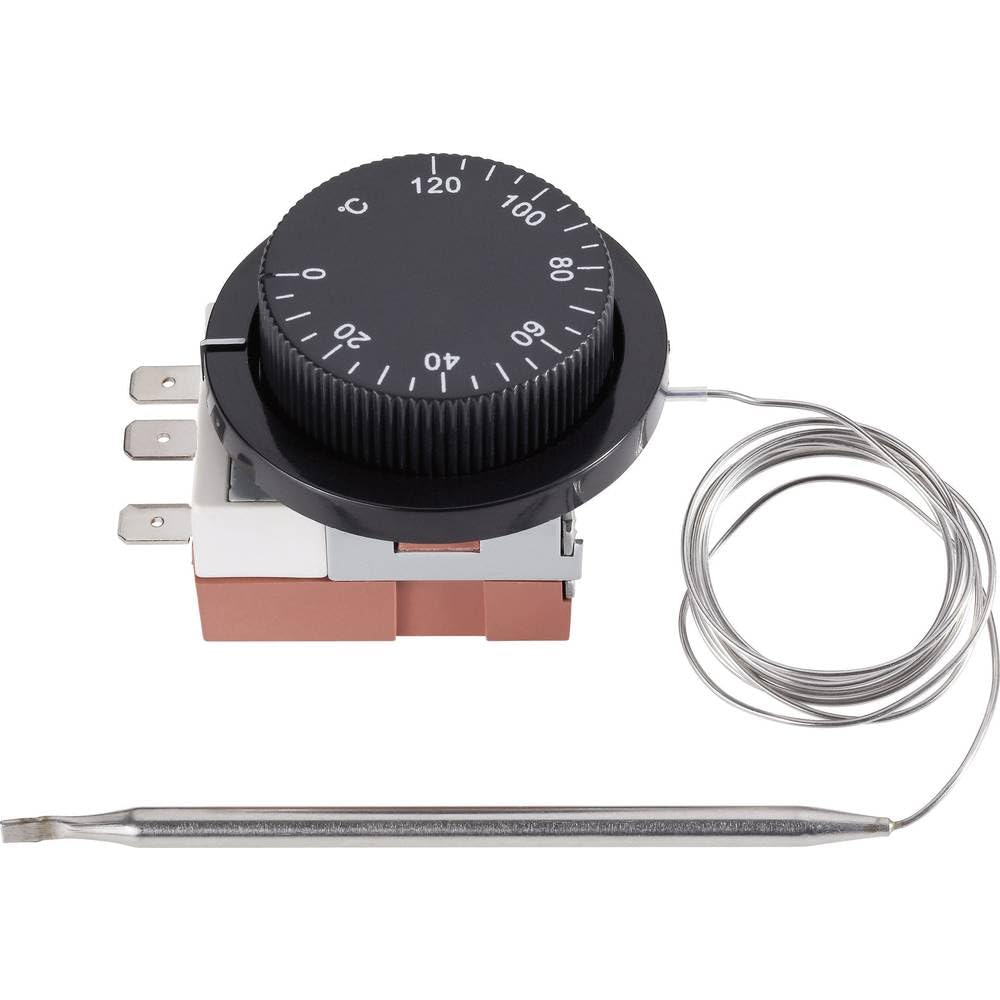
Image 1.1: The Sygonix Built-in Thermostat SY-5044424. This image shows the compact design of the thermostat, ready for integration into a control panel or wall unit.
2. ຄໍາແນະນໍາຄວາມປອດໄພ
ຄຳເຕືອນ: Failure to follow these safety instructions may result in fire, electric shock, injury, or damage to the product or property.
- ການຕິດຕັ້ງຕ້ອງໄດ້ຮັບການປະຕິບັດໂດຍຊ່າງໄຟຟ້າທີ່ມີຄຸນວຸດທິຕາມລະຫັດໄຟຟ້າທ້ອງຖິ່ນແລະແຫ່ງຊາດທັງຫມົດ.
- Ensure the power supply is disconnected before installation, maintenance, or troubleshooting.
- ຢ່າເຮັດໃຫ້ອຸປະກອນຖືກຄວາມຊຸ່ມຊື່ນ, ອຸນຫະພູມສູງສຸດ, ຫຼືແສງແດດໂດຍກົງ.
- ຢ່າພະຍາຍາມດັດແປງ ຫຼື ສ້ອມແປງອຸປະກອນດ້ວຍຕົວທ່ານເອງ. ຕິດຕໍ່ພະນັກງານບໍລິການທີ່ມີຄຸນວຸດທິ.
- ຮັກສາອຸປະກອນການຫຸ້ມຫໍ່ຢູ່ຫ່າງຈາກເດັກນ້ອຍ.
3. ຄຸນລັກສະນະຂອງຜະລິດຕະພັນ
- Setting range: 0 - 120 °C
- Switching differential: 3 ± 1.5 °C
- ການອອກແບບໃນຕົວສໍາລັບການລວມ seamless
- Suitable for heating, climate, and ventilation systems
- Remote control capability (via RF connectivity)
4. ການຕິດຕັ້ງແລະການຕິດຕັ້ງ
The Sygonix Built-in Thermostat is designed for integration into existing control systems or panels. Professional installation is highly recommended.
4.1. ການກວດສອບການຕິດຕັ້ງກ່ອນ
- Verify that the power supply matches the thermostat's requirements (230V).
- Ensure the installation location is free from excessive vibration, moisture, and direct heat sources.
- Confirm that all necessary mounting hardware is available.
4.2. ສາຍໄຟ
- ຕັດການເຊື່ອມຕໍ່ພະລັງງານ: Turn off the main power supply to the circuit where the thermostat will be installed. Use a voltage tester to confirm that power is off.
- ການຕິດຕັ້ງ: Secure the thermostat in its designated built-in location using the provided mounting hardware.
- ເຊື່ອມຕໍ່ສາຍ: Follow the wiring diagram provided with the product packaging. Connect the power input, load output, and sensor wires to the appropriate terminals. Ensure all connections are secure.
- ການຈັດວາງເຊັນເຊີ: Position the temperature sensor in an area that accurately reflects the ambient temperature to be controlled, away from drafts or direct heat sources.
- ຟື້ນຟູພະລັງງານ: ເມື່ອການເຊື່ອມຕໍ່ທັງຫມົດແມ່ນປອດໄພແລະກວດສອບ, ຟື້ນຟູພະລັງງານໃຫ້ກັບວົງຈອນ.
5. ຄໍາແນະນໍາການດໍາເນີນງານ
The Sygonix Built-in Thermostat is designed for straightforward temperature control. Specific operation details may vary based on the integrated system and any connected remote control unit.
5.1. ການເປີດເຄື່ອງເບື້ອງຕົ້ນ
- Upon first power-on, the thermostat may display a default temperature or enter a calibration mode. Refer to the specific display indicators in your product packaging.
5.2. ການຕັ້ງຄ່າອຸນຫະພູມ
- Use the integrated controls (if any) or a compatible remote control unit to adjust the desired temperature. The setting range is 0 to 120 °C.
- The thermostat will activate or deactivate the connected heating/cooling device to maintain the set temperature within the specified switching differential.
5.3. ການທໍາງານຂອງການຄວບຄຸມໄລຍະໄກ
- The thermostat supports RF connectivity for remote control. Pair your compatible remote control or smart system according to its specific instructions.
- Ensure the remote control unit is within the effective range and has fresh batteries (if applicable).
6. ບໍາລຸງຮັກສາ
The Sygonix Built-in Thermostat requires minimal maintenance.
- ທໍາຄວາມສະອາດ: Gently wipe the surface of the thermostat with a soft, dry cloth. Do not use abrasive cleaners, solvents, or excessive moisture.
- ກວດກາປົກກະຕິ: Periodically inspect the wiring connections for any signs of wear or damage. Ensure the temperature sensor is clean and unobstructed.
- ວົງຈອນພະລັງງານ: If the device behaves unexpectedly, try disconnecting and reconnecting the power supply for a few minutes.
7. ການແກ້ໄຂບັນຫາ
ຖ້າທ່ານພົບບັນຫາກັບເຄື່ອງຄວບຄຸມອຸນຫະພູມຂອງທ່ານ, ໃຫ້ອ້າງອີງເຖິງບັນຫາ ແລະວິທີແກ້ໄຂບັນຫາທົ່ວໄປຕໍ່ໄປນີ້:
| ບັນຫາ | ສາເຫດທີ່ເປັນໄປໄດ້ | ການແກ້ໄຂ |
|---|---|---|
| ເຄື່ອງຄວບຄຸມອຸນຫະພູມບໍ່ເປີດ | ບໍ່ມີແຫຼ່ງຈ່າຍໄຟ; ສາຍໄຟບໍ່ຖືກຕ້ອງ | Check circuit breaker; verify wiring connections (ensure power is off first). |
| ການອ່ານອຸນຫະພູມບໍ່ຖືກຕ້ອງ | Sensor obstructed or misplaced; faulty sensor | Ensure sensor is clean and in an appropriate location; contact support if suspected faulty. |
| Heating/cooling device not responding | Incorrect wiring; thermostat setting issue; device malfunction | Verify wiring; check thermostat settings; test the heating/cooling device independently. |
| ການຄວບຄຸມໄລຍະໄກບໍ່ເຮັດວຽກ | Remote not paired; batteries low; out of range | Pair remote as per its instructions; replace batteries; ensure remote is within RF range. |
ຖ້າບັນຫາຍັງຄົງຢູ່ຫຼັງຈາກພະຍາຍາມແກ້ໄຂເຫຼົ່ານີ້, ກະລຸນາຕິດຕໍ່ຝ່າຍຊ່ວຍເຫຼືອລູກຄ້າ.
8. ຂໍ້ມູນຈໍາເພາະ
| ຄຸນສົມບັດ | ລາຍລະອຽດ |
|---|---|
| ຍີ່ຫໍ້ | ຊິດໂກນິກ |
| ໝາຍເລກຕົວແບບ | SY-5044424 |
| ສີ | ດຳ |
| ຂະໜາດສິນຄ້າ | 7 x 5 x 18 cm; 14 kg (or 17D x 6W x 5H cm) |
| ຄວາມອາດສາມາດ | 10 ລິດ |
| ພະລັງງານ/Voltage | 280 |
| ສະບັບtage | 230 ວ |
| ລະດັບສຽງ | 1 ເດຊີເບວ |
| ຄຸນນະສົມບັດພິເສດ | ການຄວບຄຸມໄລຍະໄກ |
| ຜູ້ຜະລິດ | ຊິດໂກນິກ |
| ໝາຍເລກລາຍການ | SY-5044424 |
| ASIN | B0BPX282HB |
| ປະເພດການຄວບຄຸມ | ຕົວຄວບຄຸມມືຖື |
| ການນໍາໃຊ້ຜະລິດຕະພັນສະເພາະ | Building heating and air conditioning |
| ປະເພດການຄວບຄຸມອຸນຫະພູມ | Smart/Remote Control |
| ເຕັກໂນໂລຊີການເຊື່ອມຕໍ່ | RF |
| ອົງປະກອບລວມ | ຮາດແວຕິດຕັ້ງ |
| ໄລຍະການຕັ້ງຄ່າ | 0 - 120 ອົງສາ |
| ການປ່ຽນຄວາມແຕກຕ່າງ | 3 ± 1.5 °C |
9. ການຮັບປະກັນແລະການສະຫນັບສະຫນູນ
For warranty information and technical support, please refer to the documentation included with your purchase or visit the official Sygonix webເວັບໄຊ. ຮັກສາຫຼັກຖານການຊື້ຂອງທ່ານສໍາລັບການຮ້ອງຂໍການຮັບປະກັນ.