
KIMILAR TTYZJ1209
KIMILAR 2024 Anti-Theft Video Doorbell Mount Instruction Manual
ແນະນຳ
This manual provides comprehensive instructions for the installation and use of your KIMILAR 2024 Anti-Theft Video Doorbell Mount. This product is designed to securely hold your video doorbell on inward-opening doors without requiring drilling, offering enhanced security and convenience for various settings including homes, rentals, and offices.
ເນື້ອໃນຊຸດ
- 1 x Anti-Theft Video Doorbell Mount Shell
- 1 x ຕົວຍຶດຕິດທີ່ປັບໄດ້
- 1 x Handle Screw
- 1 x Alloy Gasket
- 1 x screwdriver
- 4 x screws
- 1 x Pad (for doorbell cushioning)
- 1 x ຄູ່ມືການຕິດຕັ້ງ
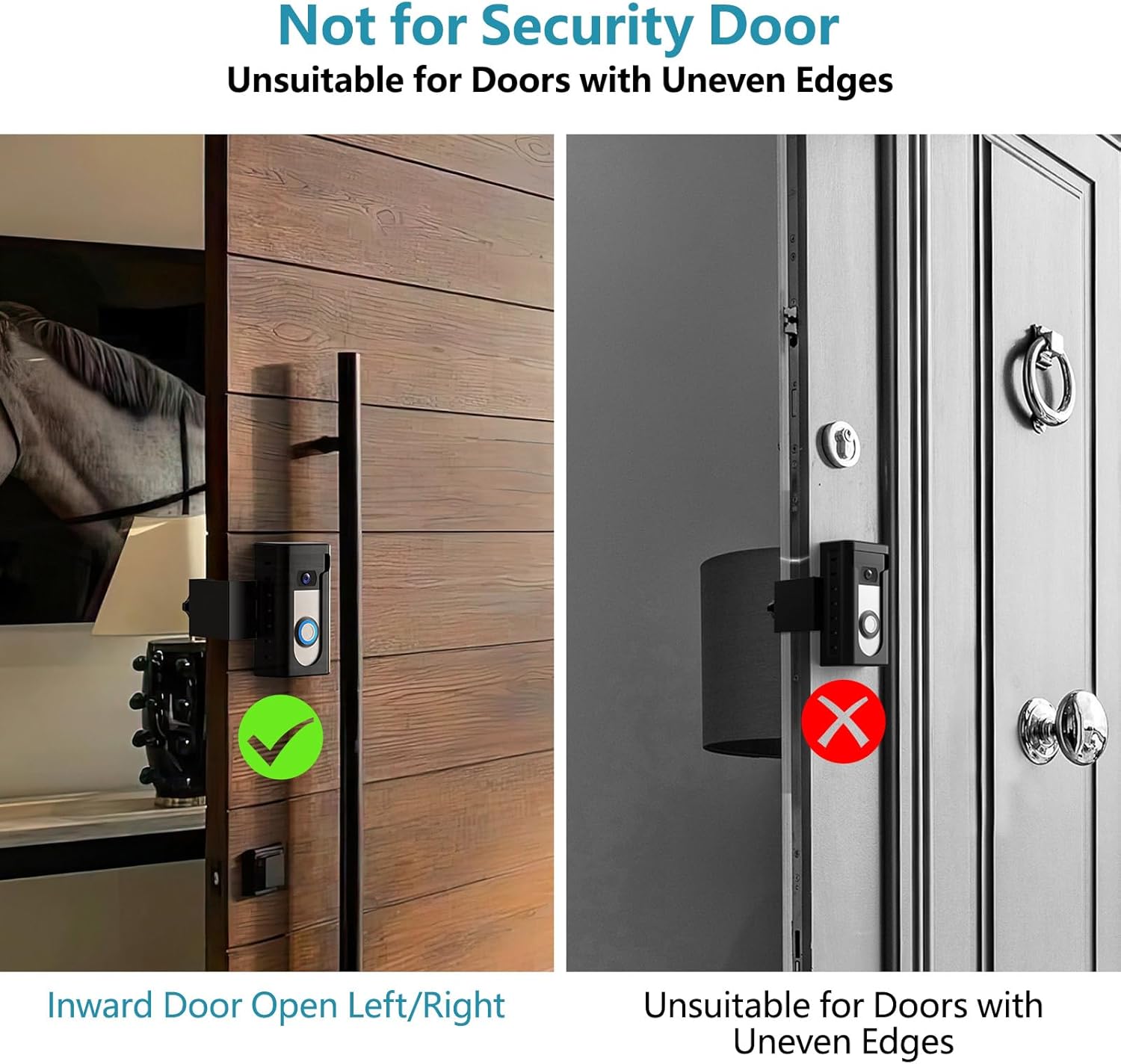
Image: All components included in the KIMILAR Anti-Theft Video Doorbell Mount package.
ຄວາມເຂົ້າກັນໄດ້
Compatible Doorbells:
The mount is compatible with most video doorbells, including Video Doorbell /2 /3 /3 Plus /4 /(2020 Release)/ Battery Doorbell Plus. It is ບໍ່ເຂົ້າກັນໄດ້ with Video Doorbell Pro/Pro 2 and Blink 2025 version.
The maximum size of the doorbell that can be placed inside the mount is 2.55 inches Wide x 5.11 inches High x 1.14 inches Depth.
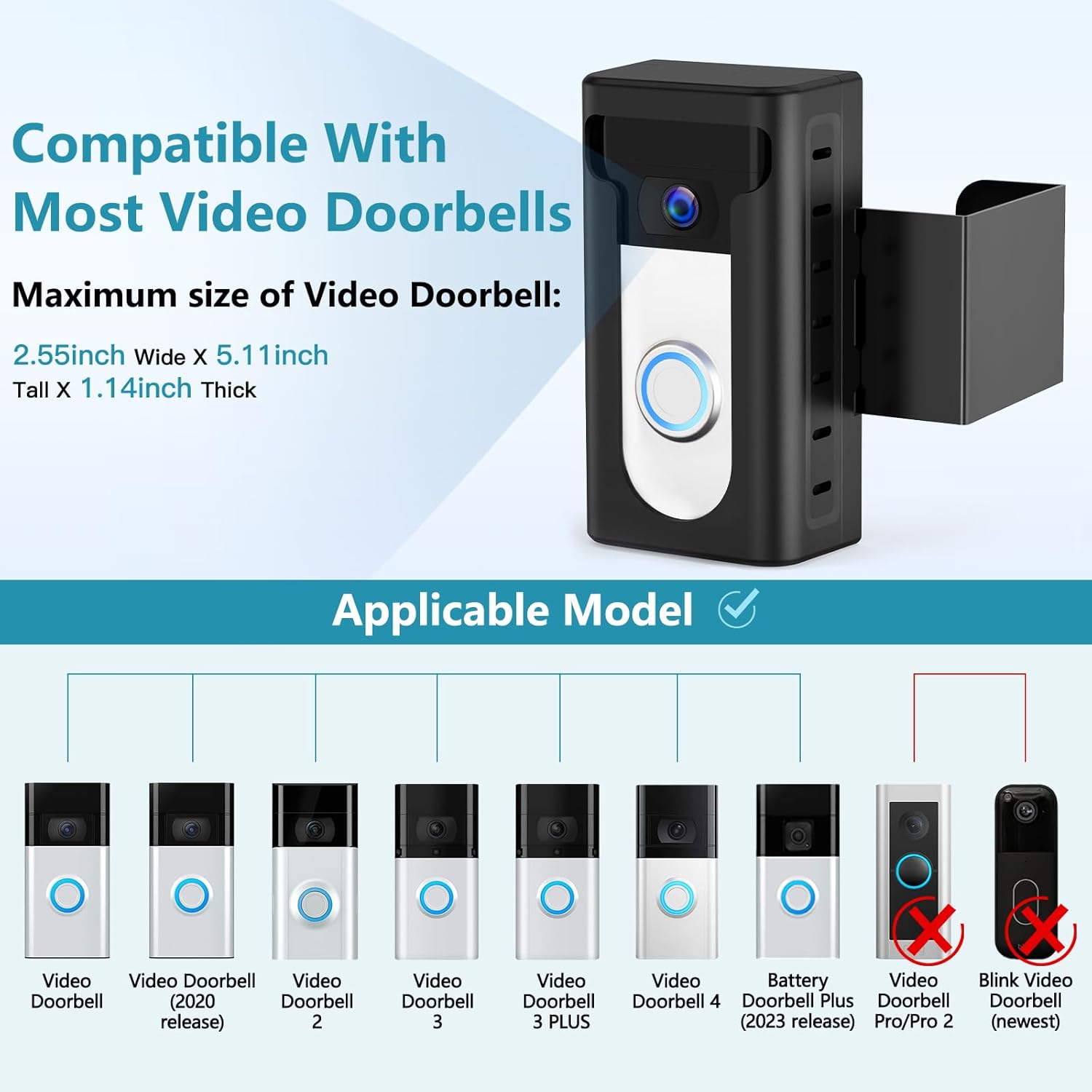
Image: Visual guide to compatible video doorbell models and size limitations.
ປະຕູເຂົ້າກັນໄດ້:
- Suitable for most inward-opening doors.
- Door thickness must be between 0.59 inches and 2.36 inches.
- Door gap width must be more than 0.06 inches.
- The edge of the door must be flat.
- Not suitable for security doors or doors with uneven edges.

Image: Illustrations detailing door thickness and gap width for proper installation.
ຮູບພາບ: Examples of doors that are compatible and incompatible with the mount.
ການຕິດຕັ້ງແລະການຕິດຕັ້ງ
Follow these steps to install your KIMILAR Anti-Theft Video Doorbell Mount. No drilling is required.
ວິດີໂອຄູ່ມືການຕິດຕັ້ງ:
Video: Official installation guide for the KIMILAR Anti-Theft Video Doorbell Mount, demonstrating each step.
- Prepare the Mount Shell: If your doorbell is loose inside the shell, cut the provided pad into small pieces and glue them onto the back cover of the mount to ensure a snug fit.

Image: Visual steps for preparing the mount and inserting the doorbell.
- Insert the Video Doorbell: Place your video doorbell into the mount shell. Ensure it fits securely.
- Secure the Back Cover: Align the two ends of the connector on the back cover and snap-lock them together. Use the provided screws and screwdriver to fix the security screw at the bottom of the shell. Ensure the doorbell is securely fastened.
- ຄັດຕິດຕົວຍຶດຕິດ: Insert the metal bracket into the back of the doorbell shell.
- Mount on the Door: Position the assembled mount on the edge of your inward-opening door.
- ປັບແລະຄວາມປອດໄພ: Install the M5*50 thumb screw and alloy gasket. Adjust the handle screw to secure the doorbell mount firmly to the door. Do not overtighten the screws, as this may prevent the door from closing normally.

Image: Illustration of the adjustable feature for optimal positioning on the door.
ຄຸນນະສົມບັດແລະຜົນປະໂຫຍດ
- ການອອກແບບຕ້ານການລັກ: The updated 2024 design provides full protection for your doorbell, making it difficult to remove without authorization.
- No Motion Sensor Blockage: Features a T-shaped opening design that ensures the doorbell's motion sensor remains unobstructed.
- ການຕິດຕັ້ງແບບບໍ່ເຈາະ: Ideal for renters or those who prefer not to drill holes, preserving the integrity of your door.
- ປັບໄດ້ພໍດີ: The mount can be adjusted to fit various door thicknesses and positions, ensuring optimal camera view.

Image: Key features of the mount, including anti-theft and unobstructed sensor design.
ບໍາລຸງຮັກສາ
To ensure the longevity and optimal performance of your doorbell mount, regular maintenance is recommended:
- ທໍາຄວາມສະອາດ: ເຊັດຕົວຍຶດເປັນໄລຍະໆດ້ວຍຜ້າອ່ອນໆ, ເຊັດໃຫ້ແຫ້ງ.amp ຜ້າເຊັດເພື່ອກຳຈັດຝຸ່ນ ແລະ ສິ່ງສົກກະປົກ. ຫຼີກລ່ຽງນໍ້າຢາທຳຄວາມສະອາດທີ່ມີສີແຂງ.
- ກວດສອບຄວາມແຫນ້ນຫນາ: Periodically check the handle screw to ensure it remains securely tightened. Adjust if necessary to maintain stability.
- ກວດສອບການສວມໃສ່: Examine the mount for any signs of wear or damage. If any components are compromised, contact customer support for assistance.
ການແກ້ໄຂບັນຫາ
| ບັນຫາ | ສາເຫດທີ່ເປັນໄປໄດ້ | ການແກ້ໄຂ |
|---|---|---|
| Door does not close properly after installation. | The handle screw is overtightened, or the door gap is too small. | Loosen the handle screw slightly. Ensure your door gap is greater than 0.06 inches before installation. |
| Doorbell is loose inside the mount. | Insufficient padding for the doorbell. | Use the provided pads (cut into smaller pieces if needed) to create a snug fit for your doorbell inside the shell. |
| Mount feels unstable on the door. | Handle screw is not tightened enough, or door edges are uneven. | Tighten the handle screw until the mount is firm. This mount is not suitable for doors with uneven edges. |
| Motion sensor is blocked. | Doorbell is not correctly positioned within the T-shaped opening. | Ensure the doorbell's sensor area aligns with the T-shaped opening of the mount. |
ຂໍ້ມູນຈໍາເພາະ
- ຊື່ຕົວແບບ: KIMILAR
- ໝາຍເລກຕົວແບບ: TTYZJ1209
- ສີ: ດຳ
- ປະເພດການຕິດຕັ້ງ: Door Mount (No-Drill)
- ຄວາມໜາຂອງປະຕູເຂົ້າກັນໄດ້: 0.59 - 2.36 ນິ້ວ
- Minimum Door Gap Width: > 0.06 ນິ້ວ
- Max Doorbell Dimensions: 2.55" (W) x 5.11" (H) x 1.14" (D)
- ວັດສະດຸ: Not specified (typically durable plastic/metal)
- ນ້ໍາຫນັກລາຍການ: 10.8 ອອນສ໌ (0.31 ກິໂລກຣາມ)
- ຂະໜາດແພັກເກດ: 13.86 x 5.43 x 3.23 ນິ້ວ
ການຮັບປະກັນແລະການສະຫນັບສະຫນູນ
For any problems or inquiries regarding your KIMILAR Anti-Theft Video Doorbell Mount, please contact us via the "Contact Seller" entrance on Amazon. We are committed to providing customer satisfaction.
ຜູ້ຜະລິດ: KIMILAR
ວັນທີທໍາອິດທີ່ມີ: ວັນທີ 12 ທັນວາ 2022
Ask a question about this manual
Ask about setup, troubleshooting, compatibility, parts, safety, or missing instructions. Manuals+ will review the question and use this page’s manual context to help answer it.