
ແນະນຳ
ຂອບໃຈສໍາລັບການຊື້asing the Andoer D2 Handheld RGB LED Video Light Wand. This manual provides detailed instructions for the safe and effective use of your new light wand. Please read this manual thoroughly before operation and retain it for future reference.
ຂໍ້ມູນຄວາມປອດໄພ
- ຢ່າປ່ອຍໃຫ້ອຸປະກອນຖືກນ້ໍາຫຼືຄວາມຊຸ່ມຊື່ນສູງ.
- ຫຼີກເວັ້ນການສໍາຜັດກັບຕາໂດຍກົງກັບແຫຼ່ງແສງສະຫວ່າງ.
- ຫ້າມຖອດປະກອບ ຫຼື ດັດແປງອຸປະກອນ. ການສ້ອມແປງຄວນປະຕິບັດໂດຍພະນັກງານທີ່ໄດ້ຮັບອະນຸຍາດເທົ່ານັ້ນ.
- ຮັກສາໃຫ້ໄກຈາກເດັກນ້ອຍ.
- ໃຊ້ພຽງແຕ່ສາຍສາກທີ່ສະໜອງໃຫ້ ຫຼືໄດ້ຮັບການຮັບຮອງເທົ່ານັ້ນ.
- Do not operate in environments with flammable gases or liquids.
ເນື້ອໃນຊຸດ
ກະລຸນາກວດເບິ່ງເນື້ອໃນຂອງແພັກເກດເມື່ອເປີດ. ຖ້າລາຍການໃດຂາດຫາຍໄປ ຫຼືເສຍຫາຍ, ໃຫ້ຕິດຕໍ່ຮ້ານຂາຍຍ່ອຍຂອງເຈົ້າ.
- Andoer D2 Handheld RGB LED Video Light Wand
- ສາຍສາກໄຟ USB Type-C
- ຄູ່ມືຜູ້ໃຊ້ (ເອກະສານນີ້)
ສິນຄ້າເກີນview
Familiarize yourself with the components and controls of the Andoer D2 light wand.
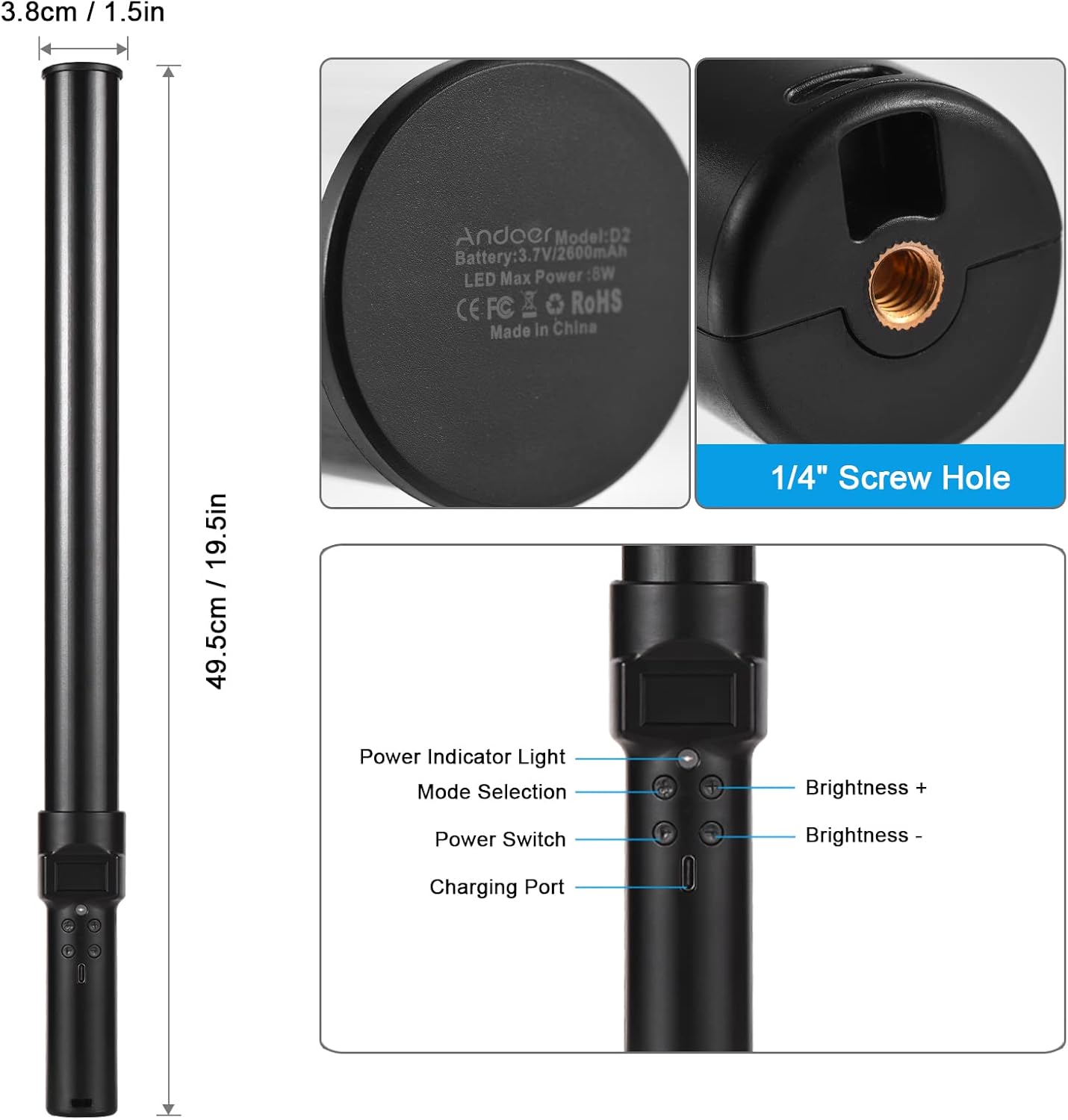
ຮູບພາບ: ເກີນview of the Andoer D2 light wand, showing its dimensions (approximately 49.5cm / 19.5in long and 3.8cm / 1.5in diameter) and control panel. The control panel includes a Power Indicator Light, Mode Selection button, Power Switch, Brightness + button, Brightness - button, and a Charging Port.
ຟັງຊັນແຜງຄວບຄຸມ:
- ສັບປ່ຽນພະລັງງານ: Turns the light wand on or off.
- ການເລືອກໂໝດ: Cycles through different lighting modes (e.g., CCT mode, RGB color effects).
- ຄວາມສະຫວ່າງ +: Increases the light brightness.
- ຄວາມສະຫວ່າງ -: Decreases the light brightness.
- ແສງສະຫວ່າງຕົວຊີ້ວັດພະລັງງານ: Shows the power status and charging status.
- ຊ່ອງສາກໄຟ (Type-C): ໃຊ້ເພື່ອສາກແບັດເຕີຣີພາຍໃນ.
ຕັ້ງຄ່າ
ຄ່າ ທຳ ນຽມ:
Before first use, fully charge the light wand. Connect the provided USB Type-C cable to the charging port on the device and the other end to a USB power adapter (not included) or a computer USB port. The power indicator light will show charging status.

ຮູບພາບ: ໃກ້ຊິດ view of the Type-C charging port, indicating where to connect the charging cable.

ຮູບພາບ: The Andoer D2 light wand shown alongside its USB Type-C charging cable, illustrating the charging setup.
ຕົວເລືອກການຕິດຕັ້ງ:
The Andoer D2 light wand can be used handheld for flexible lighting or mounted for stable positioning. It features a standard 1/4-inch screw hole at the bottom.

ຮູບພາບ: ລາຍລະອຽດ view of the 1/4-inch screw hole located at the base of the light wand, demonstrating how it can be attached to a light stand or tripod for stable use. Note that the light stand/tripod is sold separately.
- ການນໍາໃຊ້ມືຖື: Simply hold the light wand to direct light as needed.
- Tripod/Light Stand Mounting: Screw the 1/4-inch thread at the bottom of the light wand onto a compatible tripod or light stand. Ensure it is securely fastened before use.
ຄໍາແນະນໍາການດໍາເນີນງານ
ເປີດ/ປິດ:
ກົດຄ້າງໄວ້ ສະວິດໄຟ ປຸ່ມເພື່ອເປີດ ຫຼືປິດດອກໄຟ.
ການປັບຄວາມສະຫວ່າງ:
The light wand offers 12 levels of adjustable brightness. Use the ຄວາມສະຫວ່າງ + ປຸ່ມເພື່ອເພີ່ມຄວາມສະຫວ່າງແລະ ຄວາມສະຫວ່າງ - ປຸ່ມເພື່ອຫຼຸດມັນ.

ຮູບພາບ: Illustration of the 12 levels of adjustable brightness, demonstrating the range from dim to bright light output.
ການປັບອຸນຫະພູມສີ (ໂໝດ CCT):
In CCT mode, you can adjust the color temperature between 2500K (warm light), 5500K (neutral/daylight), and 8500K (cold light). Press the ການເລືອກໂໝດ button to cycle to CCT mode, then use the ຄວາມສະຫວ່າງ + ແລະ ຄວາມສະຫວ່າງ - buttons to adjust the color temperature.

ຮູບພາບ: Visual representation of the adjustable color temperatures, ranging from warm (2500K) to neutral (5500K) to cool (8500K) light.
Activating Colorful Light Effects (RGB Mode):
The light wand features 7 colorful light effects: red, green, blue, orange, purple, light blue, and red & blue flash. Press the ການເລືອກໂໝດ button to cycle through these RGB effects. Brightness can still be adjusted in these modes using the ຄວາມສະຫວ່າງ + ແລະ ຄວາມສະຫວ່າງ - ປຸ່ມ.
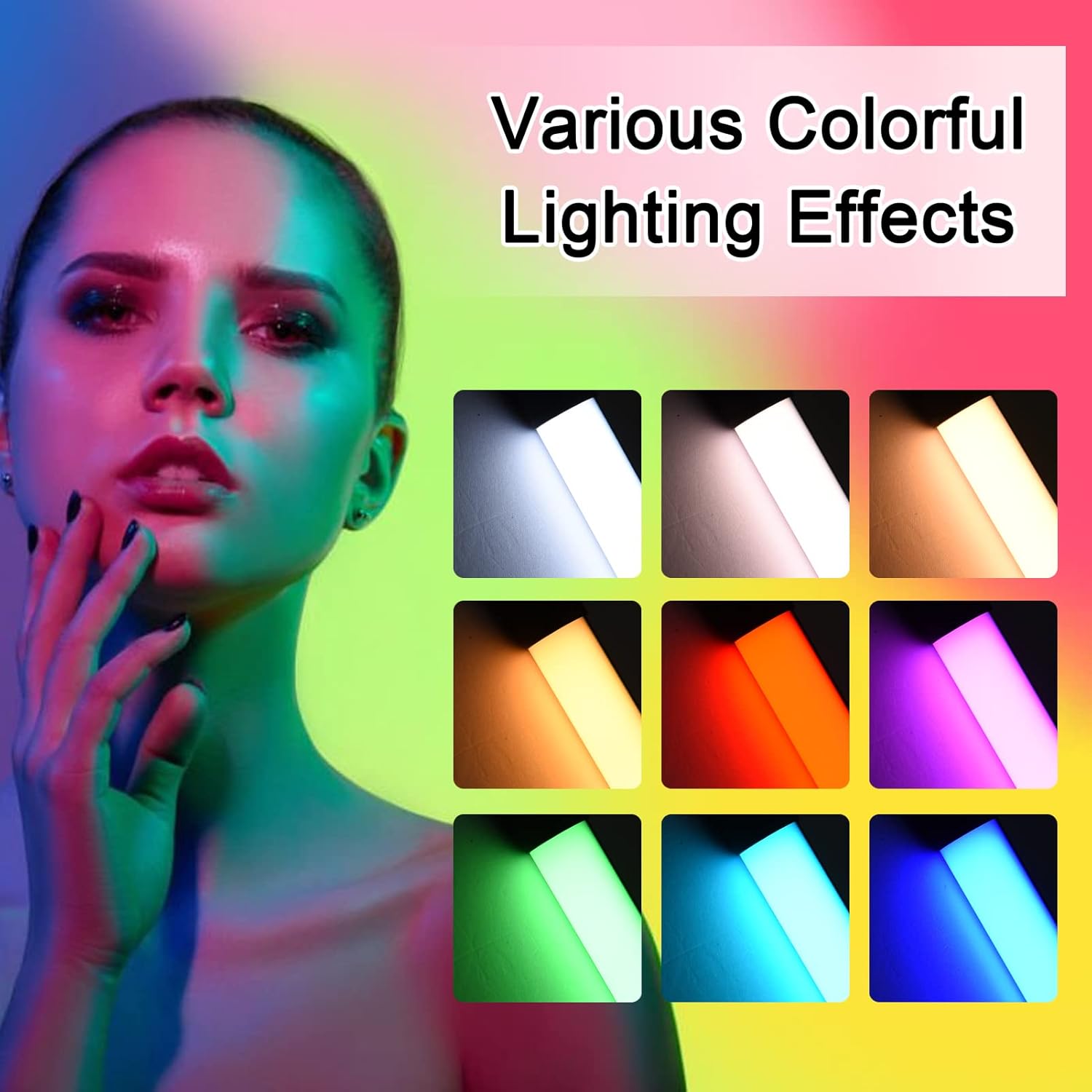
ຮູບພາບ: A visual guide to the 7 colorful light effects available, showcasing the vibrant range of colors the light wand can produce.
ກຳລັງສາກໄຟ
The Andoer D2 light wand has a built-in 2600mAh rechargeable lithium battery. When the battery is low, the power indicator light will signal. To charge:
- Connect the small end of the USB Type-C charging cable to the charging port on the light wand.
- Connect the standard USB end of the cable to a USB power source (e.g., wall adapter, power bank, computer USB port).
- The power indicator light will illuminate or change color to indicate charging. It will change again or turn off when fully charged.
A full charge provides approximately 2.5 hours of continuous use at maximum brightness.
ບໍາລຸງຮັກສາ
- Clean the light wand with a soft, dry cloth. Do not use abrasive cleaners or solvents.
- ເກັບຮັກສາອຸປະກອນໄວ້ໃນບ່ອນທີ່ເຢັນ, ແຫ້ງ, ຫ່າງຈາກແສງແດດໂດຍກົງ ແລະອຸນຫະພູມທີ່ຮ້າຍກາດ.
- If not used for extended periods, charge the battery every 3 months to maintain battery health.
ການແກ້ໄຂບັນຫາ
| ບັນຫາ | ສາເຫດທີ່ເປັນໄປໄດ້ | ການແກ້ໄຂ |
|---|---|---|
| ແສງບໍ່ໄດ້ເປີດ. | ແບັດເຕີຣີໝົດ. | Charge the light wand using the provided USB Type-C cable. |
| ແສງສະຫວ່າງອ່ອນໆຫຼື flickers. | ແບັດເຕີຣີຕໍ່າ. | ຕື່ມຂໍ້ມູນໃສ່ອຸປະກອນ. |
| Cannot change color or mode. | Incorrect button press or temporary software glitch. | Ensure you are pressing the Mode Selection button. Try turning the device off and on again. |
| ອຸປະກອນບໍ່ໄດ້ສາກໄຟ. | Faulty cable, power adapter, or charging port. | Try a different USB Type-C cable or power adapter. Ensure the cable is fully inserted. |
ຂໍ້ມູນຈໍາເພາະ
| ຄຸນສົມບັດ | ລາຍລະອຽດ |
|---|---|
| ຕົວແບບ | D2 (SJI3033515989406YA) |
| ຍີ່ຫໍ້ | ອັນໂດເອີ |
| ອຸນຫະພູມສີ | 2500K / 5500K / 8500K (ປັບໄດ້) |
| ລະດັບຄວາມສະຫວ່າງ | 12 ລະດັບ |
| ຜົນກະທົບແສງສີ | 7 effects (Red, Green, Blue, Orange, Purple, Light Blue, Red & Blue Flash) |
| ຄວາມອາດສາມາດຫມໍ້ໄຟ | ແບດເຕີຣີ້ມາດຕະຖານ Lithium 2600mAh |
| ພອດສາກໄຟ | USB Type-C |
| ອາຍຸການໃຊ້ງານແບັດເຕີຣີ (ຄວາມສະຫວ່າງສູງສຸດ) | ປະມານ. 2.5 ຊົ່ວໂມງ |
| ການຕິດຕັ້ງ | 1/4-inch screw hole |
| ຂະໜາດ | Approx. 49.5cm (19.5in) length, 3.8cm (1.5in) diameter |
ການຮັບປະກັນແລະການສະຫນັບສະຫນູນ
Andoer products are designed and manufactured to the highest quality standards. For warranty information or technical support, please refer to the warranty card included with your purchase or visit the official Andoer webເວັບໄຊ. ກະລຸນາຮັກສາຫຼັກຖານການຊື້ຂອງທ່ານສໍາລັບການຮຽກຮ້ອງການຮັບປະກັນ.
ເຈົ້າໜ້າທີ່ Andoer Webເວັບໄຊ: ຮ້ານ Andoer ໃນ Amazon