
1. ບົດແນະນຳ
This manual provides essential instructions for the safe and efficient operation of your Rigol DHO1074 Digital Oscilloscope. The DHO1074 is a 4-channel, 70 MHz digital oscilloscope featuring a 12-bit resolution and a 2 GSa/s real-time sample rate, designed for precise signal analysis in various applications. Please read this manual thoroughly before using the device to ensure proper functionality and to prevent damage.
2. ຂໍ້ມູນຄວາມປອດໄພ
Observe the following safety precautions to prevent injury and damage to the instrument:
- Use only the power cord specified for this instrument.
- ໃຫ້ແນ່ໃຈວ່າເຄື່ອງມືໄດ້ຖືກຕໍ່ສາຍດິນຢ່າງຖືກຕ້ອງເພື່ອປ້ອງກັນໄຟຟ້າຊັອດ.
- Do not operate the instrument in wet or damp ເງື່ອນໄຂ.
- ຫຼີກເວັ້ນການປະຕິບັດງານໃນບັນຍາກາດລະເບີດ.
- Do not remove the instrument cover. Refer servicing to qualified personnel.
- Use appropriate probes and accessories.
- ຕັດການເຊື່ອມຕໍ່ໄຟຟ້າກ່ອນທີ່ຈະທໍາຄວາມສະອາດ.
3. ເນື້ອໃນຊຸດ
ກວດສອບວ່າລາຍການທັງຫມົດທີ່ລະບຸໄວ້ຂ້າງລຸ່ມນີ້ແມ່ນລວມຢູ່ໃນຊຸດຂອງທ່ານ:
- Rigol DHO1074 Digital Oscilloscope (1 unit)
- ສາຍໄຟ (1 ໜ່ວຍ)
- Passive Probes (4 units, one for each channel)
- ສາຍ USB (1 ໜ່ວຍ)
- ຄູ່ມືດ່ວນ (1 ໜ່ວຍ)
- Resource CD (1 unit)
4. ຕັ້ງຄ່າ
4.1 ການເຊື່ອມຕໍ່ພະລັງງານ
- Ensure the oscilloscope's power switch is in the OFF position.
- Connect the provided power cord to the AC power input on the rear panel of the oscilloscope.
- ສຽບປາຍອີກດ້ານໜຶ່ງຂອງສາຍໄຟເຂົ້າກັບປລັກໄຟ AC ທີ່ມີສາຍດິນ.
4.2 ການເຊື່ອມຕໍ່ Probes
- Connect the BNC connector of a passive probe to one of the input channels (CH1, CH2, CH3, or CH4) on the front panel.
- Attach the probe ground clip to a common ground point in your circuit.
- ເຊື່ອມຕໍ່ປາຍໂພຣບເຂົ້າກັບຈຸດທົດສອບໃນວົງຈອນຂອງທ່ານ.
- For accurate measurements, compensate the probe before use. Refer to the "Probe Compensation" section in the full user manual for detailed instructions.
4.3 ການເປີດເຄື່ອງເບື້ອງຕົ້ນ
- Press the power switch on the front panel to turn on the oscilloscope.
- The instrument will perform a self-test and display the startup screen.
- Once the main interface appears, the oscilloscope is ready for use.
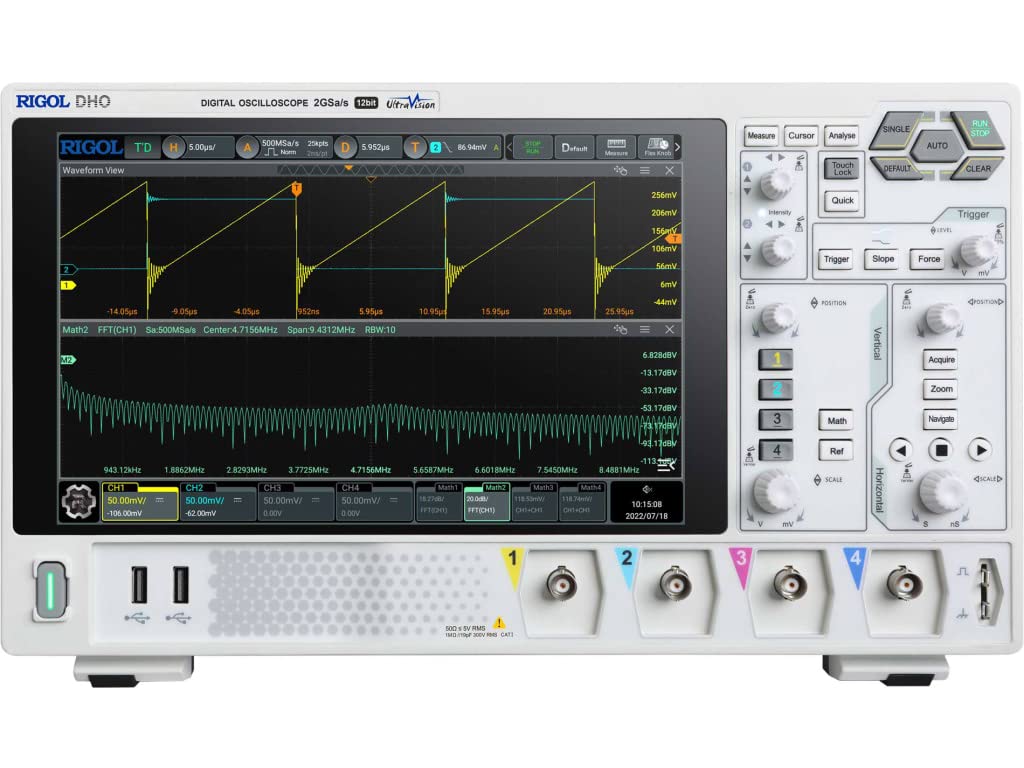
ຮູບ 4.1: ດ້ານຫນ້າ view of the Rigol DHO1074 Digital Oscilloscope, showing the display, control panel, and input channels.
5. ປະຕິບັດການ Oscilloscope
The Rigol DHO1074 offers a user-friendly interface for capturing and analyzing waveforms. Key features include 4 analog channels, 70 MHz bandwidth, and a 12-bit vertical resolution for enhanced signal fidelity.
5.1 Basic Waveform Acquisition
- ເປີດ: Ensure the oscilloscope is powered on as described in Section 4.3.
- Connect Signal: Connect your signal source to an input channel using a compensated probe.
- ຕັ້ງຄ່າອັດຕະໂນມັດ: ກົດ ອັດຕະໂນມັດ button on the front panel. The oscilloscope will automatically adjust vertical, horizontal, and trigger settings to display a stable waveform.
- ການປັບດ້ວຍມື:
- ໃຊ້ ສັດຕະວະແພດ knobs (VOLTS/DIV) to adjust the vertical scale (voltage per division) for each channel.
- ໃຊ້ ລວງນອນ knob (SEC/DIV) to adjust the horizontal scale (time per division).
- ໃຊ້ TRIGGER controls to set the trigger level and mode for stable waveform capture.
5.2 ຄຸນສົມບັດຂັ້ນສູງ
- ຄວາມລະອຽດສູງ: Benefit from the 12-bit vertical resolution, providing 16 times more quantization levels than standard 8-bit oscilloscopes, which improves measurement accuracy and reduces quantization noise.
- Deep Memory: The DHO1074 features a 50 Mpts maximum memory depth (expandable to 100 Mpts with option DHO1000-RLU-01), allowing for longer waveform captures at high sampອັດຕາດອກເບ້ຍ.
- Serial Decoding: Standard serial decoding capabilities include SPI, I2C, RS232/UART, CAN, and LIN, simplifying the analysis of common serial bus communications.
- ຟັງຊັນການວັດແທກ: Access various automatic measurement functions (e.g., Vpp, Vrms, Frequency, Period) via the ມາດຕະການ ເມນູ.
- ຟັງຊັນຄະນິດສາດ: Utilize built-in math functions (e.g., Add, Subtract, Multiply, Divide, FFT) to perform waveform analysis.
6. ບໍາລຸງຮັກສາ
6.1 ການທໍາຄວາມສະອາດເຄື່ອງມື
- ຄວນຖອດສາຍໄຟກ່ອນທຳຄວາມສະອາດທຸກຄັ້ງ.
- ໃຊ້ຜ້າອ່ອນ ງampened with a mild detergent solution to clean the exterior surfaces.
- Do not use abrasive cleaners or solvents that could damage the plastic parts.
- Avoid spraying liquids directly onto the instrument.
6.2 ການເກັບຮັກສາ
- Store the oscilloscope in a clean, dry environment, away from direct sunlight and extreme temperatures.
- ປົກປ້ອງໜ້າຈໍຈາກຮອຍຂີດຂ່ວນ.
6.3 ການປັບທຽບ
For optimal performance and measurement accuracy, periodic calibration by qualified service personnel is recommended. Refer to Rigol's official support channels for calibration services.
7. ການແກ້ໄຂບັນຫາ
| ບັນຫາ | ສາເຫດທີ່ເປັນໄປໄດ້ | ການແກ້ໄຂ |
|---|---|---|
| No power when turned on. | Power cord not connected; power outlet faulty; instrument fuse blown. | Check power cord connection; test power outlet; contact service for fuse replacement. |
| ບໍ່ມີຮູບແບບຄື້ນສະແດງ. | Probe not connected; signal source off; vertical/horizontal scale incorrect; trigger not set correctly. | Verify probe connection; check signal source; adjust VOLTS/DIV and SEC/DIV; adjust trigger level or use AUTO button. |
| ຮູບແບບຄື້ນບໍ່ສະຖຽນ. | Trigger settings incorrect; noisy signal. | Adjust trigger mode, source, and level; ensure proper grounding of the probe. |
| ການວັດແທກບໍ່ຖືກຕ້ອງ. | Probe compensation incorrect; wrong measurement settings. | Compensate probes; verify measurement parameters. |
If the problem persists after attempting these solutions, please contact Rigol customer support.
8. ຂໍ້ມູນຈໍາເພາະ
| ພາລາມິເຕີ | ມູນຄ່າ |
|---|---|
| ຕົວແບບ | DHO1074 |
| ແບນວິດ | 70 MHz |
| ຊ່ອງອະນາລັອກ | 4 |
| ຄວາມລະອຽດຂອງແນວຕັ້ງ | 12-ບິດ |
| ສູງສຸດ Sampອັດຕາ le | 2 GSa/s (real-time) |
| ຄວາມເລິກຂອງຫນ່ວຍຄວາມຈໍາ | 50 Mpts (100 Mpts with DHO1000-RLU-01 option) |
| Serial Decoding | SPI, I2C, RS232/UART, CAN, LIN |
| ຂະໜາດສິນຄ້າ | 18 x 11 x 12 ນິ້ວ |
| ນ້ໍາຫນັກລາຍການ | 12 ປອນ |
| ຜູ້ຜະລິດ | RIGOL TECHNOLOGIES USA INC |
9. ການຮັບປະກັນແລະການສະຫນັບສະຫນູນ
Rigol products are designed for reliability and performance. This instrument is covered by a standard manufacturer's warranty. For specific warranty terms and conditions, please refer to the warranty card included with your product or visit the official Rigol webເວັບໄຊ.
For technical support, service, or inquiries regarding your Rigol DHO1074 Digital Oscilloscope, please contact Rigol Technologies USA Inc. customer service through their official webເວັບໄຊ ຫຼືຂໍ້ມູນຕິດຕໍ່ທີ່ສະໜອງໃຫ້ຢູ່ໃນເອກະສານຜະລິດຕະພັນຂອງທ່ານ.
Online resources and additional documentation may be available on the Rigol webເວັບໄຊ.