
MEGA MOTION HY-A03
MEGA MOTION Hoverboard Go Kart User Manual
ຮູບແບບ: HY-A03
ແນະນຳ
Welcome to the MEGA MOTION Hoverboard Go Kart user manual. This guide provides essential information for the safe operation, setup, maintenance, and troubleshooting of your new self-balancing scooter and kart attachment. Please read this manual thoroughly before first use to ensure optimal performance and safety.

Image: The MEGA MOTION Hoverboard in blue, featuring LED lights on the wheels, paired with its adjustable blue Go Kart attachment. This image showcases the complete product package.
ຂໍ້ມູນຄວາມປອດໄພ
WARNING: Always wear appropriate safety gear, including a helmet, knee pads, and elbow pads, when operating the hoverboard or kart. Adult supervision is recommended for children.
- ຈຳກັດນ້ຳໜັກ: The hoverboard supports a load-bearing capacity of 20-100kg. Do not exceed the maximum weight limit.
- ຈຳກັດຄວາມໄວ: The speed limit is 15 km/hr (9 mph). Avoid excessive speed, especially in crowded areas.
- ຄວາມປອດໄພຫມໍ້ໄຟ: The product features a built-in battery overload protection system. Charge the device once a month to maintain battery life, even during periods of non-use.
- ເງື່ອນໄຂສິ່ງແວດລ້ອມ: Use the hoverboard on flat, dry surfaces. Avoid wet conditions, uneven terrain, or steep inclines.
- ການກວດກາກ່ອນການນໍາໃຊ້: Always check the status of the hoverboard before each use to ensure all components are secure and functioning correctly.
- ການປົກປ້ອງອັດສະລິຍະ: The device includes intelligent fault detection, low battery reminder, intelligent weight sensing, balance assist, explosion-proof tires, and overspeed warning functions.

Image: Two children, fully equipped with helmets and protective pads, are seen enjoying their hoverboards. One child is on a pink hoverboard, and the other is on a green one, demonstrating safe and fun usage.
ສິນຄ້າເກີນview ແລະອົງປະກອບ
The MEGA MOTION Hoverboard Go Kart system consists of two primary components: the self-balancing hoverboard and the adjustable hoverkart attachment.
Hoverboard Features:
- ວັດສະດຸ: High-quality ABS+PC material for durability.
- ລໍ້: 6.5-inch aluminum alloy wheels with unique non-slip pedals.
- ມໍເຕີ: Dual 250W motors for full power and stable performance.
- ແສງ: Bright LED headlights for enhanced visibility and safety during night riding.
- ສຽງ: ລຳໂພງ Bluetooth ປະສົມປະສານສຳລັບການຫຼິ້ນເພງ.

Image: A blue MEGA MOTION Hoverboard with vibrant LED lights on its wheels and front. A smartphone icon indicates Bluetooth connectivity, highlighting its integrated speaker feature.
Hoverkart Features:
- ຄວາມຍາວທີ່ສາມາດປັບໄດ້: The frame length can be adjusted from 31-44.5 inches (78.7-113 cm) using a telescopic button, accommodating various user heights.
- ການຄວບຄຸມ: Allows control of the hoverboard from a seated position.
- ໄຟລ໌ແນບ: Easily attaches to the hoverboard with included straps.

Image: A blue Hoverkart attachment, demonstrating its adjustable length feature with arrows indicating extension and retraction. The image highlights the telescopic mechanism for user comfort.
ຕັ້ງຄ່າ
Hoverboard Initial Setup:
- ການຫຸ້ມຫໍ່: ເອົາສ່ວນປະກອບທັງຫມົດອອກຈາກການຫຸ້ມຫໍ່ຢ່າງລະມັດລະວັງ.
- ຄ່າ ທຳ ນຽມ: Before first use, fully charge the hoverboard battery. Connect the charger to the charging port and plug it into a power outlet. The indicator light on the charger will change when fully charged.
- ເປີດ: ກົດປຸ່ມເປີດປິດເພື່ອເປີດ hoverboard.
Attaching the Hoverkart:
- Assemble Kart Frame: If not pre-assembled, connect the kart frame components according to the included assembly instructions.
- ປັບຄວາມຍາວ: Adjust the length of the hoverkart frame to suit the rider's height by rotating the telescopic button and securing it.
- Attach to Hoverboard: Position the hoverkart over the hoverboard. Use the provided straps to securely fasten the hoverkart's attachment points to the hoverboard's footpads. Ensure the straps are tight and the kart is stable.

ຮູບພາບ: A close-up view of a hand adjusting the length of the Hoverkart's frame using a knob, illustrating the ease of customization for different users.
ຄໍາແນະນໍາການດໍາເນີນງານ
Operating the Hoverboard (Standing):
- ການຕິດຕັ້ງ: Place one foot on a footpad, then quickly place the other foot on the second footpad. Maintain balance by keeping your body upright.
- ການເຄື່ອນໄຫວ: Lean slightly forward to move forward, and lean backward to slow down or move in reverse. To turn, apply more pressure to the footpad on the side opposite the desired turning direction.
- ການຖອນການຕິດຕັ້ງ: Step off the hoverboard one foot at a time, preferably backward.

Image: A child confidently riding a pink hoverboard, showcasing the self-balancing technology and ease of use for young riders.
Operating with the Hoverkart (Seated):
- ບ່ອນນັ່ງ: Sit comfortably in the kart seat with your feet on the footrests.
- ປຸ່ມຄວບຄຸມ: Use the two control levers to steer and accelerate. Push both levers forward to move forward, pull both back to brake or reverse. Push one lever forward and pull the other back to turn.
- ເສັ້ນໂຄ້ງການຮຽນຮູ້: Users can master the hoverboard and kart controls within minutes due to intuitive design.
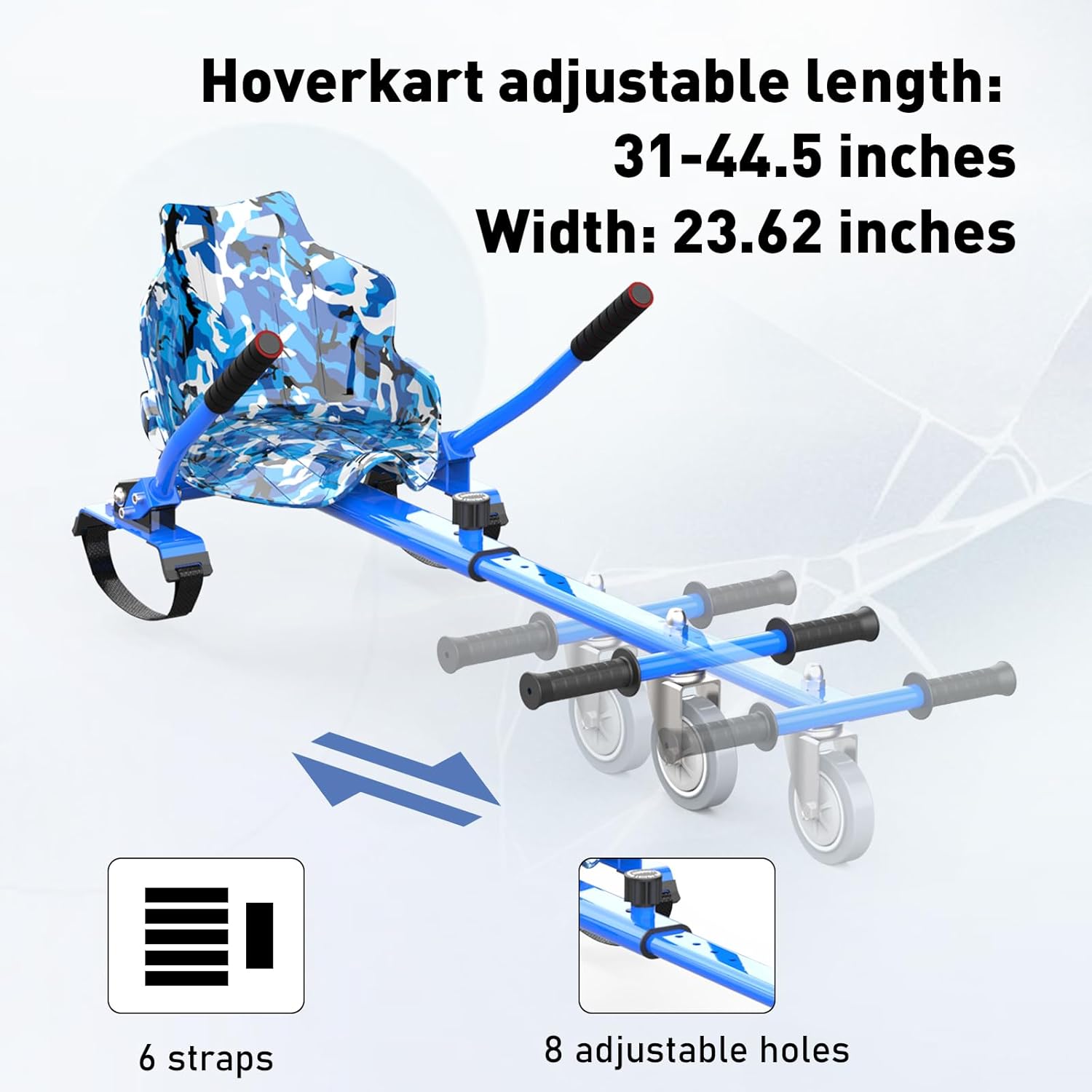
Image: A child happily riding the hoverboard with the kart attachment, demonstrating the seated operation and the fun experience it provides.
ຄຸນສົມບັດຂອງລຳໂພງ Bluetooth:
- ການຈັບຄູ່: Turn on the hoverboard. Enable Bluetooth on your mobile device and search for "MEGA MOTION" or a similar device name. Select to pair.
- ການຫຼິ້ນເພງ: Once paired, you can play music through the hoverboard's built-in speaker.
ບໍາລຸງຮັກສາ
- ທໍາຄວາມສະອາດ: Wipe the hoverboard and kart with a damp cloth. Do not use harsh chemicals or abrasive cleaners. Ensure the device is dry before charging or storing.
- ການດູແລຫມໍ້ໄຟ: Charge the battery regularly, even if not in use, to prevent deep discharge and prolong battery life. Store in a cool, dry place.
- ການກວດກາຢາງລົດ: ກວດສອບຢາງລົດເປັນໄລຍະສໍາລັບການສວມໃສ່ແລະ tear. ໃຫ້ແນ່ໃຈວ່າພວກມັນບໍ່ມີຮອຍແຕກຫຼືຄວາມເສຍຫາຍ.
- ການເກັບຮັກສາ: Store the hoverboard and kart in a dry, temperature-controlled environment away from direct sunlight and moisture.
ການແກ້ໄຂບັນຫາ
| ບັນຫາ | ສາເຫດທີ່ເປັນໄປໄດ້ | ການແກ້ໄຂ |
|---|---|---|
| Hoverboard not turning on. | Low battery or power button issue. | Charge the hoverboard fully. Ensure the power button is pressed firmly. |
| Hoverboard not balancing correctly. | Calibration needed or sensor issue. | Refer to the full product manual for calibration steps. Ensure you are on a flat surface. |
| Bluetooth ບໍ່ເຊື່ອມຕໍ່. | Hoverboard not in pairing mode or device too far. | Ensure hoverboard is on. Move your device closer. Restart both devices and try pairing again. |
| ຫຼຸດອາຍຸແບັດເຕີຣີ. | ແບັດເຕີຣີເສື່ອມສະພາບ ຫຼື ການສາກໄຟທີ່ບໍ່ຖືກຕ້ອງ. | Ensure regular charging as per maintenance guidelines. Avoid over-discharging. |
| Kart attachment feels loose. | Straps not tightened sufficiently. | Re-tighten all straps connecting the kart to the hoverboard. Check for wear on straps. |
ສໍາລັບບັນຫາທີ່ສັບສົນຫຼາຍ, ກະລຸນາຕິດຕໍ່ຝ່າຍຊ່ວຍເຫຼືອລູກຄ້າ.
ຂໍ້ມູນຈໍາເພາະ
| ຄຸນສົມບັດ | ລາຍລະອຽດ |
|---|---|
| ຊື່ຕົວແບບ | HY-A03 |
| ຍີ່ຫໍ້ | MEGA MOTION |
| ສີ | Blue - Blue |
| ຊ່ວງອາຍຸ | ເດັກນ້ອຍ |
| ຄວາມອາດສາມາດນ້ໍາຫນັກສູງສຸດ | 100 ກິໂລກຣາມ |
| ພະລັງງານມໍເຕີ | 250W (Dual Motors) |
| ຈຳກັດຄວາມໄວ | 15 ກິໂລແມັດ/ຊົ່ວໂມງ (9 mph) |
| ຂະໜາດລໍ້ | 6.5 ນິ້ວ |
| ປະເພດຫມໍ້ໄຟ | Lithium Polymer (4AH) |
| ເວລາສາກໄຟ | ປະມານ 2-3 ຊົ່ວໂມງ |
| ວັດສະດຸກອບ | ອາລູມີນຽມ |
| ອົງປະກອບລວມ | Hoverboard, Hoverkart |
| ຂະໜາດແພັກເກັດ | 61 x 56 x 22 cm |
| ນ້ໍາຫນັກລາຍການ | 13.4 ກິໂລ |
ການຮັບປະກັນແລະການສະຫນັບສະຫນູນ
MEGA MOTION products are manufactured with quality and performance in mind. For any questions or support, please refer to the following contact information:
- ຜູ້ຜະລິດ: YONGKANG CHIC
- ຜູ້ຕາງໜ້າ EU: Lead Speed B.V. (support@megamotion.eu)
- ຜູ້ຕາງໜ້າອັງກິດ: BOOSTERE COMMERCE SOLUTION LIMITED (boosteremm@outlook.com)
- ກະລຸນາຮັກສາຫຼັກຖານການຊື້ຂອງທ່ານສໍາລັບການຮຽກຮ້ອງການຮັບປະກັນ.
Ask a question about this manual
Ask about setup, troubleshooting, compatibility, parts, safety, or missing instructions. Manuals+ will review the question and use this page’s manual context to help answer it.