
ແນະນຳ
This manual provides detailed instructions for the installation, operation, and maintenance of your EZoneTronics PCD001 Portable Wireless Car Stereo. Please read this manual thoroughly before using the device to ensure proper functionality and to prevent damage.
ສິນຄ້າເກີນview
ຄຸນນະສົມບັດທີ່ສໍາຄັນ
- 7-Inch Touchscreen Display: Provides a clear and responsive interface for navigation and media control.
- Apple CarPlay ແບບໄຮ້ສາຍ ແລະ Android Auto: Seamlessly integrates with Apple and Android smartphones for navigation, music, and communication.
- ເຄື່ອງສົ່ງສັນຍານ FM: Connects to your vehicle's original radio system via AUX Out or FM Out for audio output.
- ການຕິດຕັ້ງ Plug and Play: Designed for easy setup without modifying existing car equipment.
- ຕົວເລືອກການຕິດຕັ້ງແບບອະເນກປະສົງ: Can be mounted on the dashboard or windshield using a suction cup holder.
- ຟັງຊັນເພີ່ມເຕີມ: Supports Bluetooth connectivity, hands-free calling, voice control (Siri/Google Assistant), video playback, and music streaming.
- ຄວາມເຂົ້າກັນໄດ້ຂອງສື່: Supports SD card and USB devices for media playback.
ແມ່ນຫຍັງຢູ່ໃນກ່ອງ
ກວດສອບວ່າອົງປະກອບທັງຫມົດແມ່ນມີຢູ່ໃນການຍົກເລີກການຫຸ້ມຫໍ່:
- 1 x EZoneTronics PCD001 Portable Wireless Car Stereo Unit
- 1 x Mounting Bracket (for dash or windshield)
- 1 x Car Charger (power adapter)
- 1 x Driving Recorder (if included in your package)
- 1 x SD Card (if included in your package)
- 1 x Webcam (if included in your package)
Note: The inclusion of the Driving Recorder, SD Card, and Webcam may vary by package.
ການຕິດຕັ້ງແລະການຕິດຕັ້ງ
ການຕິດຕັ້ງອຸປະກອນ
The device can be mounted on your car's dashboard or windshield. Choose a location that does not obstruct your view ຫຼືແຊກແຊງການຄວບຄຸມຍານພາຫະນະ.
- ອະນາໄມພື້ນຜິວ: ໃຫ້ແນ່ໃຈວ່າພື້ນຜິວຕິດຕັ້ງທີ່ເລືອກ (ແຜງໜ້າປັດ ຫຼື ກະຈົກໜ້າລົດ) ແມ່ນສະອາດ ແລະ ແຫ້ງ.
- ຄັດຕິດຈອກດູດ: Press the suction cup firmly onto the surface and engage the locking mechanism to secure it.
- ປັບມຸມ: Use the adjustable arm and swivel joint to position the screen for optimal viewing. The mount allows for 360-degree rotation and 180-degree angle adjustment.
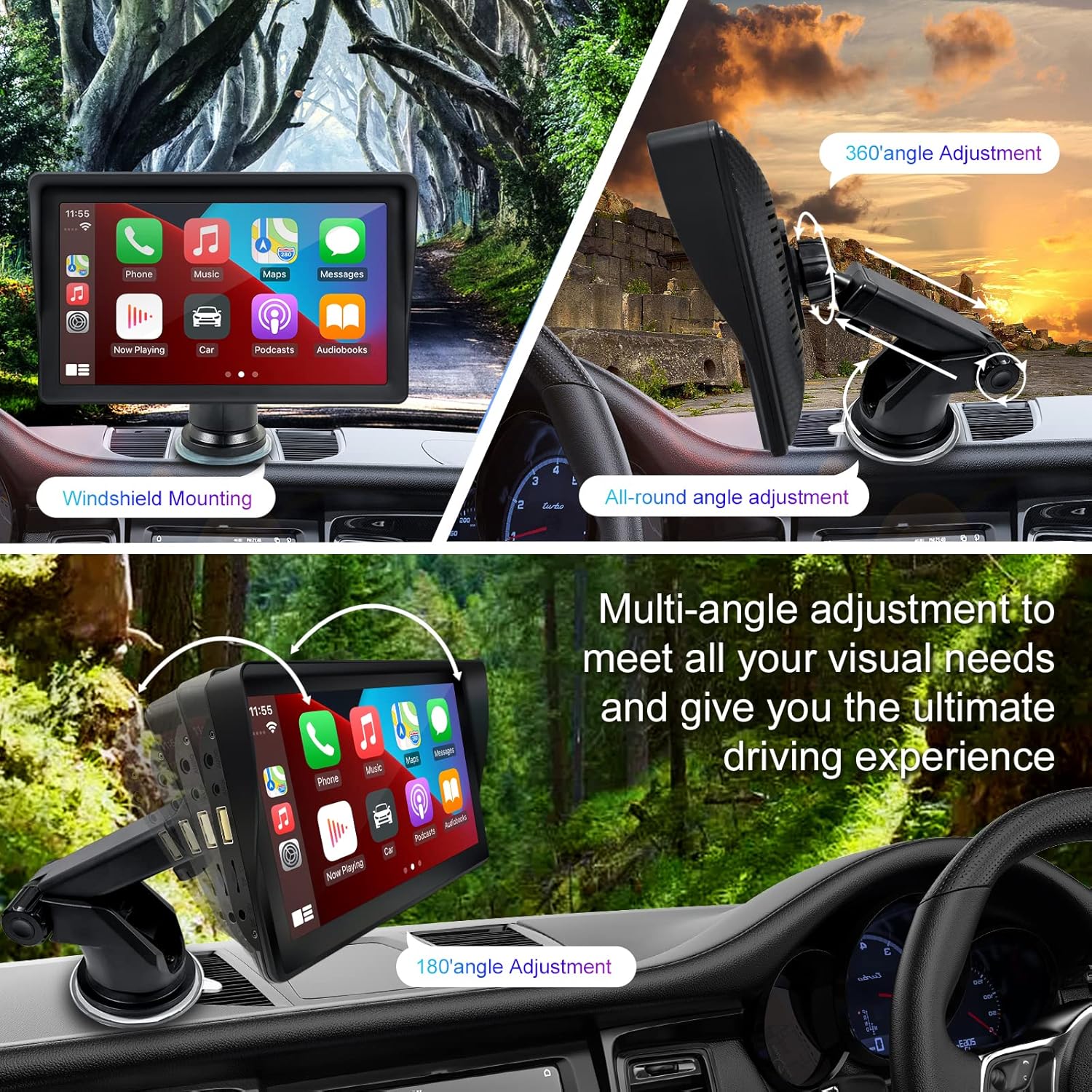
Figure 1: Mounting options and angle adjustments for the portable car stereo.
ການເຊື່ອມຕໍ່ພະລັງງານ
Connect the provided car charger to the device's power input port and then into your vehicle's 12V power outlet (cigarette lighter socket). The device supports 12-24V power input.
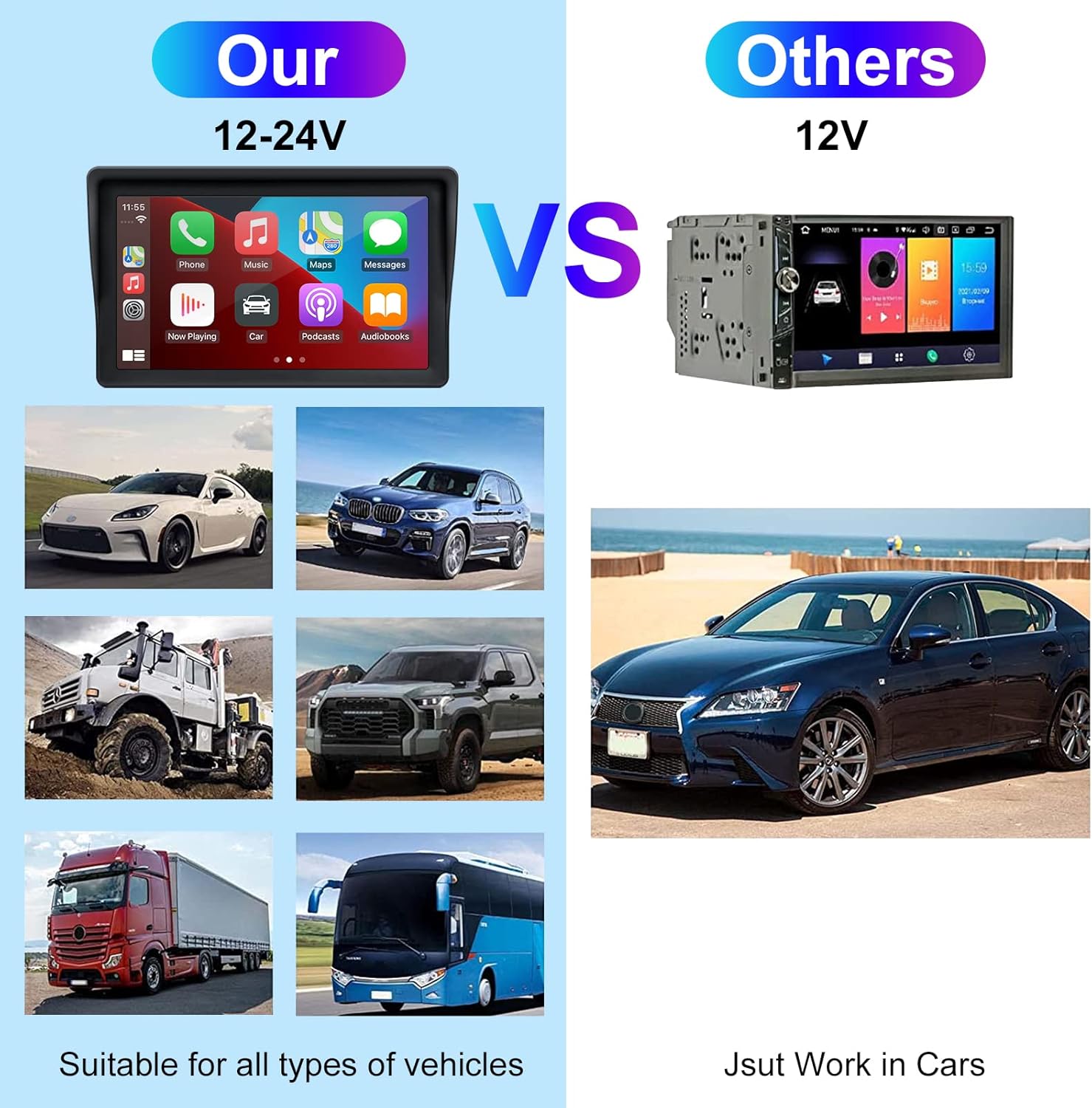
Figure 2: The EZoneTronics unit is compatible with 12-24V vehicle power systems.
ຄໍາແນະນໍາການດໍາເນີນງານ
Initial Power On and Interface
Once powered, the device will boot up and display the main interface. This interface provides access to Apple CarPlay, Android Auto, and other functions.

Figure 3: Main interface displaying Apple CarPlay.
Connecting to Apple CarPlay or Android Auto
The device supports wireless connection for both Apple CarPlay and Android Auto.
- ເປີດໃຊ້ງານ Bluetooth ແລະ Wi-Fi: On your smartphone, ensure both Bluetooth and Wi-Fi are enabled.
- ຈັບຄູ່ອຸປະກອນ: On the car stereo, navigate to the Bluetooth settings and pair with your smartphone.
- ການເຊື່ອມຕໍ່ອັດຕະໂນມັດ: Once paired, the device should automatically prompt you to connect to Apple CarPlay or Android Auto. Follow the on-screen instructions on both the car stereo and your phone to complete the setup.
- ການເຊື່ອມຕໍ່ກັບກະຈົກ: For devices not supporting CarPlay or Android Auto, or if you prefer, you can use the Mirror Link function to display your phone's screen on the unit.

Figure 4: Wireless connection for Apple CarPlay and Android Auto.
Audio Output (FM Transmitter / AUX Out)
To output audio from the car stereo to your vehicle's sound system, you have two primary options:
- ເຄື່ອງສົ່ງສັນຍານ FM:
- On the EZoneTronics unit, select the FM Transmitter function.
- Choose an unused FM frequency.
- Tune your vehicle's FM radio to the same frequency. Audio from the portable stereo will now play through your car's speakers.
- AUX ອອກ:
- Connect an AUX cable from the AUX Out port on the EZoneTronics unit to your vehicle's AUX In port.
- Select AUX input on your vehicle's audio system.


Figure 5: FM Transmitter and other core functions.
Voice Control (Siri / Google Assistant)
Once connected to Apple CarPlay or Android Auto, you can activate your smartphone's voice assistant (Siri or Google Assistant) for hands-free control. This allows you to make calls, send messages, get directions, and play music using voice commands.
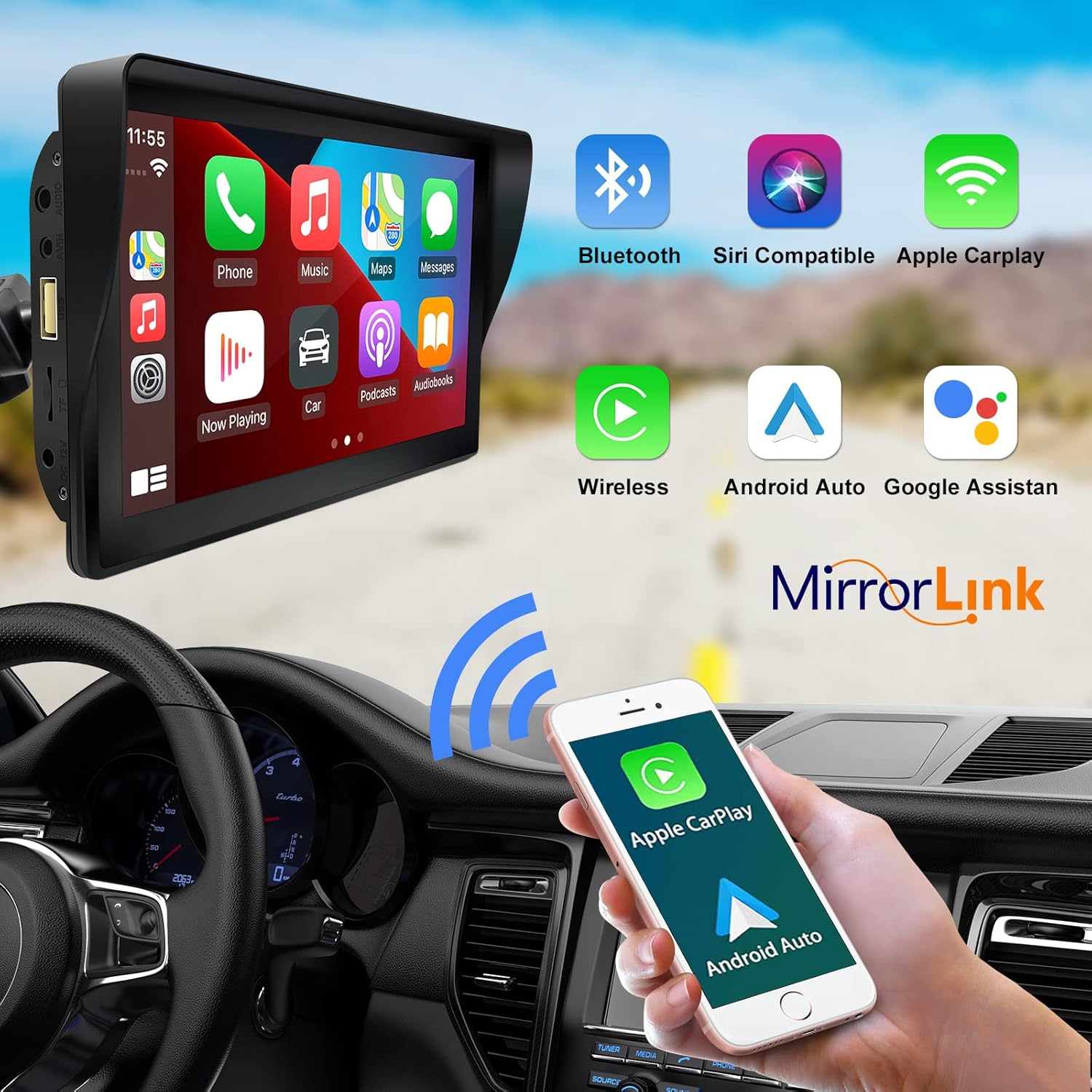
Figure 6: Voice control and connectivity features.
Media Playback (SD Card / USB)
The unit supports media playback from SD cards and USB devices.
- Insert an SD card into the designated slot or a USB drive into the USB port.
- Navigate to the media player application on the car stereo.
- ເລືອກສຽງ ຫຼື ວິດີໂອທີ່ຕ້ອງການ files ສໍາລັບການຫຼິ້ນ.


Figure 7: USB and SD card media playback options.
ການແກ້ໄຂບັນຫາ
If you encounter issues with your EZoneTronics PCD001, refer to the following common problems and solutions:
| ບັນຫາ | ສາເຫດ / ການແກ້ໄຂທີ່ເປັນໄປໄດ້ |
|---|---|
| ອຸປະກອນບໍ່ເປີດ. |
|
| Cannot connect to Apple CarPlay / Android Auto wirelessly. |
|
| No audio output from car speakers. |
|
| ໜ້າຈໍສຳຜັດບໍ່ຕອບສະໜອງ. |
|
| GPS navigation is inaccurate or not working. |
|
ຂໍ້ມູນຈໍາເພາະ
| ຄຸນສົມບັດ | ລາຍລະອຽດ |
|---|---|
| ຊື່ຕົວແບບ | PCD001 |
| ຍີ່ຫໍ້ | EZoneTronics |
| ຂະໜາດໜ້າຈໍ | 7 ນິ້ວ |
| ປະເພດການສະແດງ | IPS |
| ປະເພດຫນ້າຈໍສໍາຜັດ | Capacitive |
| ລະບົບປະຕິບັດການ | Android (Internal OS for unit functions, supports CarPlay/Android Auto) |
| ເຕັກໂນໂລຊີການເຊື່ອມຕໍ່ | Wireless CarPlay, Wireless Android Auto, Bluetooth, FM Transmitter, AUX Out |
| ຮູບແບບການອອກສຽງ | AUX, ສະເຕີລິໂອ |
| ຮອງຮັບລະບົບນຳທາງດາວທຽມ | GPS (via connected smartphone) |
| ປະເພດການຕິດຕັ້ງ | ຕິດຕັ້ງເທິງແຜງໜ້າປັດ, ຕິດຕັ້ງເທິງກະຈົກໜ້າລົດ |
| ອຸປະກອນທີ່ເຂົ້າກັນໄດ້ | Smartphones (Apple iOS and Android) |
| ປະເພດການບໍລິການພາຫະນະ | Car (Universal 12-24V compatibility) |
ບໍາລຸງຮັກສາ
Proper maintenance ensures the longevity and optimal performance of your EZoneTronics PCD001.
- ທໍາຄວາມສະອາດຫນ້າຈໍ: ໃຊ້ຜ້າທີ່ອ່ອນນຸ່ມ, ບໍ່ມີສານດ່າງເພື່ອເຊັດໜ້າຈໍຢ່າງຄ່ອຍໆ. ສໍາລັບ smudges stubborn, ເລັກນ້ອຍ dampໃສ່ຜ້າດ້ວຍນ້ໍາຫຼືເຄື່ອງເຮັດຄວາມສະອາດຫນ້າຈໍທີ່ປອດໄພ. ຫຼີກເວັ້ນການສານເຄມີທີ່ຮຸນແຮງຫຼືວັດສະດຸຂັດ.
- ການຄຸ້ມຄອງສາຍໄຟ: Ensure all cables are neatly routed and secured to prevent entanglement or damage.
- ອຸນຫະພູມ: ຫຼີກເວັ້ນການເປີດເຜີຍອຸປະກອນກັບອຸນຫະພູມທີ່ຮຸນແຮງ, ທັງຮ້ອນແລະເຢັນ, ສໍາລັບໄລຍະເວລາທີ່ຍາວນານ.
- ອັບເດດຊອບແວ: ກວດສອບຜູ້ຜະລິດເປັນໄລຍະ website or device settings for any available software updates to improve performance and add features.
ການຮັບປະກັນແລະການສະຫນັບສະຫນູນ
ຂໍ້ມູນການຮັບປະກັນ
The EZoneTronics PCD001 Portable Wireless Car Stereo comes with a ການຮັບປະກັນຫນຶ່ງປີ from the date of purchase. This warranty covers manufacturing defects and malfunctions under normal use. It does not cover damage caused by misuse, accidents, unauthorized modifications, or improper installation.
ກະລຸນາຮັກສາຫຼັກຖານການຊື້ຂອງທ່ານສໍາລັບການຮຽກຮ້ອງການຮັບປະກັນ.
ການຊ່ວຍເຫຼືອລູກຄ້າ
For technical assistance, warranty claims, or further inquiries, please contact EZoneTronics customer support:
- Webເວັບໄຊ: www.ezonetronics.com
- ອີເມວ: support@ezonetronics.com
When contacting support, please provide your product model (PCD001) and a detailed description of the issue.