
1. ບົດແນະນຳ
The Maxcom MM724 is a simple mobile phone designed for ease of use, featuring straightforward software and practical functions. It is particularly suitable for users who prefer a device without complicated menus. Key features include an emergency SOS button, a built-in flashlight, and Bluetooth connectivity for hearing aid compatibility.
2. ເນື້ອໃນຊຸດ
ກະລຸນາກວດເບິ່ງກ່ອງສໍາລັບລາຍການຕໍ່ໄປນີ້:
- 1 Maxcom MM724 Mobile Phone
- 1 Desktop Charger
- 1 Matching Cords (for charger)
- 1 ຄູ່ມືຜູ້ໃຊ້ (ເອກະສານນີ້)
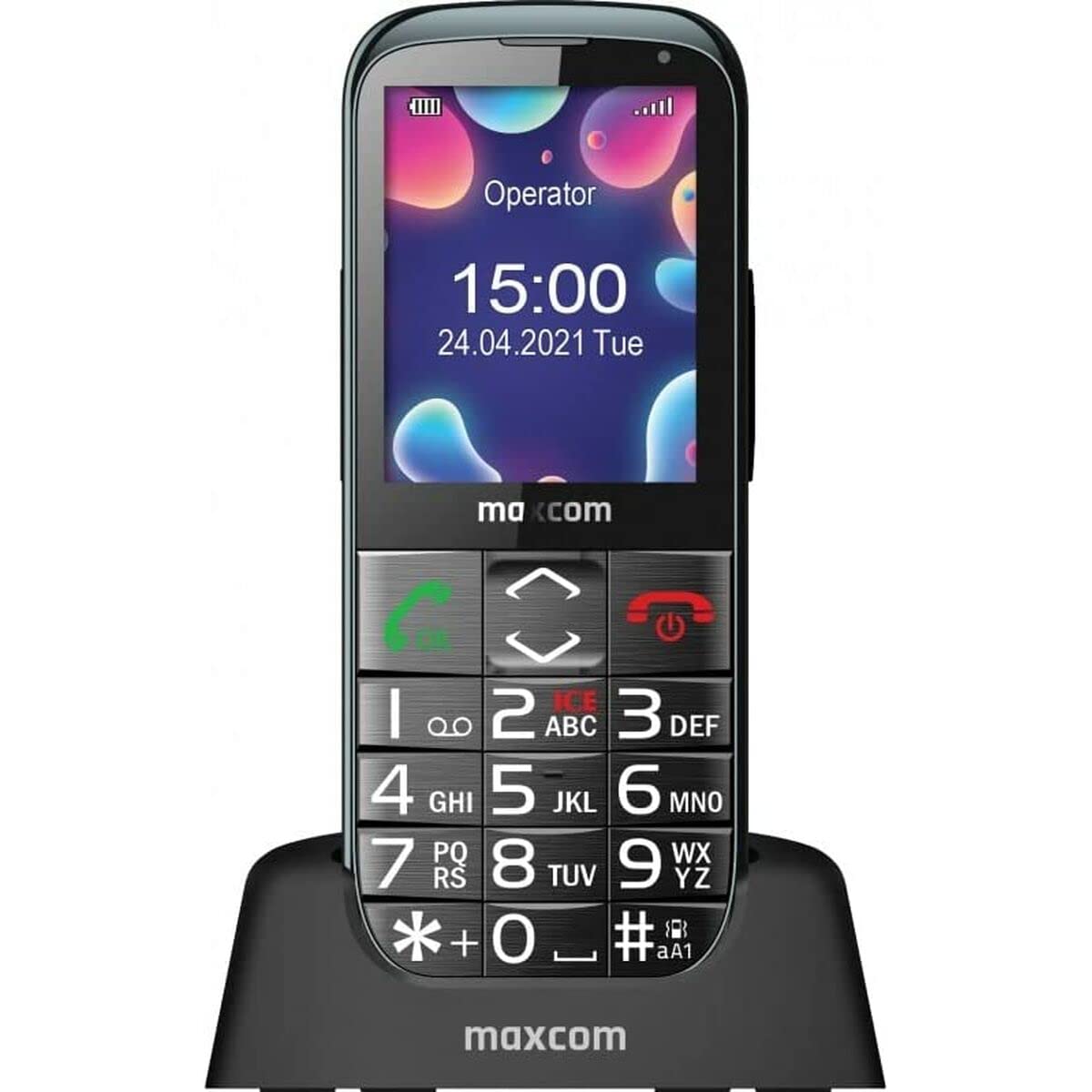
Image: The Maxcom MM724 simple mobile phone, typically black, with a clear display and large buttons.
3. ຕັ້ງຄ່າ
3.1. ການໃສ່ຊິມກາດ ແລະ ແບັດເຕີຣີ
- ເອົາຝາປິດຫຼັງຂອງໂທລະສັບອອກຢ່າງລະມັດລະວັງ.
- Insert your SIM card(s) into the designated slot(s) with the gold contacts facing down.
- ໃສ່ແບັດເຕີລີ, ຮັບປະກັນວ່າລາຍຊື່ຕິດຕໍ່ຖືກສອດຄ່ອງ.
- ປ່ຽນຝາຫຼັງໃໝ່ຈົນກວ່າມັນຈະກົດເຂົ້າທີ່ປອດໄພ.
3.2. ການສາກອຸປະກອນ
The Maxcom MM724 uses a convenient desktop charger. To charge your phone:
- Connect the charger cord to a power outlet.
- Place the phone upright into the desktop charging cradle.
- Ensure the charging indicator on the phone or cradle illuminates, indicating that charging has begun.
- For optimal battery life, keep the phone in the cradle when not in use to ensure it is always charged.
4. ຄໍາແນະນໍາການດໍາເນີນງານ
4.1. ເປີດ / ປິດພະລັງງານ
- ເພື່ອເປີດເຄື່ອງ: ກົດປຸ່ມເປີດ/ປິດການໂທຄ້າງໄວ້ (ໂດຍປົກກະຕິແລ້ວເປັນສີແດງ) ຈົນກວ່າໜ້າຈໍຈະສະຫວ່າງຂຶ້ນ.
- ປິດເຄື່ອງ: Press and hold the Power/End Call button until the power-off options appear, then confirm.
4.2. ເຮັດ ແລະ ຮັບສາຍ
- ໂທອອກ: Dial the number using the keypad and press the Call button (usually green).
- ເພື່ອຮັບສາຍ: Press the Call button when the phone rings. The phone is designed to ring very loudly to ensure calls are not missed.
- ເພື່ອວາງສາຍ: ກົດປຸ່ມເປີດ/ປິດການໂທ.
4.3. ການສົ່ງ ແລະ ຮັບຂໍ້ຄວາມ
Navigate to the 'Messages' menu to compose new SMS messages or read incoming ones. Use the keypad to type your message.
4.4. ການໃຊ້ປຸ່ມ SOS
The SOS button is located on the back of the phone and is designed for emergencies.
- ຕັ້ງຄ່າ: Access the phone's settings to pre-define a list of emergency contacts.
- ການເປີດໃຊ້ງານ: In an emergency, press and hold the SOS button. The phone will automatically call the pre-defined contacts in sequence until one answers.
4.5. ການເປີດໃຊ້ໄຟສາຍ
The phone features a dedicated button for the flashlight, making it easy to activate when needed. Refer to your phone's specific button layout for its location.
4.6. Bluetooth and Hearing Aid Compatibility
The Maxcom MM724 supports Bluetooth connectivity, allowing it to pair with compatible devices, including certain hearing aids. This enables hands-free calling.
- ການຈັບຄູ່: Go to the Bluetooth settings on your phone and enable Bluetooth. Put your hearing aid into pairing mode (consult your hearing aid's manual). Select your hearing aid from the list of available devices on the phone to pair.
- ໝາຍເຫດ: Compatibility with hearing aids depends on the hearing aid's features. Consult your audiologist for specific compatibility information. The phone also features a ring line and additional gain for improved audio performance with or without hearing aids.
5. ບໍາລຸງຮັກສາ
- ທໍາຄວາມສະອາດ: ໃຊ້ຜ້າປຽກແຫ້ງເພື່ອເຮັດຄວາມສະອາດໜ້າຈໍ ແລະຕົວເຄື່ອງຂອງໂທລະສັບ. ຫຼີກເວັ້ນການນໍາໃຊ້ເຄື່ອງເຮັດຄວາມສະອາດຂອງແຫຼວຫຼືວັດສະດຸຂັດ.
- ການດູແລຫມໍ້ໄຟ: Keep the battery charged regularly. Avoid extreme temperatures, which can affect battery performance and lifespan.
- ການເກັບຮັກສາ: ເກັບຮັກສາໂທລະສັບໄວ້ໃນບ່ອນທີ່ເຢັນ, ແຫ້ງ, ເມື່ອບໍ່ໄດ້ໃຊ້ເປັນເວລາດົນ.
6. ການແກ້ໄຂບັນຫາ
- ໂທລະສັບບໍ່ເປີດ: Ensure the battery is correctly inserted and charged. Connect the phone to the charger and try again.
- ບໍ່ມີສັນຍານເຄືອຂ່າຍ: Check if the SIM card is properly inserted. Move to an area with better network coverage. Contact your service provider if the issue persists.
- ບໍ່ສາມາດໂທ/ຮັບສາຍ: Verify that you have sufficient credit or an active plan. Check network signal strength.
- ບັນຫາການຈັບຄູ່ Bluetooth: Ensure both devices are in pairing mode and within range. Try restarting both the phone and the Bluetooth device.
7. ຂໍ້ມູນຈໍາເພາະ
| ຍີ່ຫໍ້ | Maxcom |
| ຊື່ຕົວແບບ | MM724 |
| ລະບົບປະຕິບັດການ | Android |
| ຂະໜາດໜ້າຈໍ | 3 ນິ້ວ |
| ເຕັກໂນໂລຊີການເຊື່ອມຕໍ່ | Bluetooth |
| ເຕັກໂນໂລຊີໂທລະສັບມືຖື | 4G |
| ເທັກໂນໂລຢີເຄືອຂ່າຍໄຮ້ສາຍ | GSM |
| ສີ | ດຳ |
| ນ້ໍາຫນັກລາຍການ | 85 ກຣາມ |
| ຜູ້ໃຫ້ບໍລິການໄຮ້ສາຍ | ປົດລັອກແລ້ວ |
8. ການຮັບປະກັນແລະການສະຫນັບສະຫນູນ
Warranty information for the Maxcom MM724 mobile phone is typically provided with your purchase documentation or can be found on the official Maxcom website. For technical support or service inquiries, please refer to the contact information provided by your retailer or the manufacturer.