
ແນະນຳ
This manual provides detailed instructions for the safe and effective use of your MiLESEEY D5 70M-BT Laser Distance Meter. This device is designed for precise distance measurements up to 70 meters, featuring an electronic angle sensor, various measurement modes, and smartphone application connectivity for enhanced functionality.
ຂໍ້ມູນຄວາມປອດໄພ
ກະລຸນາອ່ານ ແລະ ເຂົ້າໃຈຄຳແນະນຳດ້ານຄວາມປອດໄພທັງໝົດກ່ອນທີ່ຈະໃຊ້ງານອຸປະກອນ. ການບໍ່ປະຕິບັດຕາມຄຳແນະນຳເຫຼົ່ານີ້ອາດຈະເຮັດໃຫ້ເກີດການສຳຜັດກັບລັງສີເລເຊີ, ໄຟຟ້າຊັອດ, ໄຟໄໝ້ ຫຼື ການບາດເຈັບສາຫັດ.
- Laser Class II Product: This device emits Class II laser radiation. Do not stare into the laser beam. Avoid direct eye exposure.
- ປະເພດເລເຊີ: 635nm <1mW.
- ຢ່າພະຍາຍາມດັດແປງ ຫຼື ຖອດອຸປະກອນອອກ. ການສ້ອມແປງຄວນປະຕິບັດໂດຍພະນັກງານບໍລິການທີ່ໄດ້ຮັບອະນຸຍາດເທົ່ານັ້ນ.
- ຮັກສາອຸປະກອນໃຫ້ໄກຈາກເດັກນ້ອຍ.
- Do not operate the device in explosive atmospheres or near flammable liquids and gases.
- Use only specified batteries (2 x 1.5V AAA alkaline batteries).
ເນື້ອໃນຊຸດ
ກວດສອບວ່າລາຍການທັງຫມົດແມ່ນມີຢູ່ໃນຊຸດ:
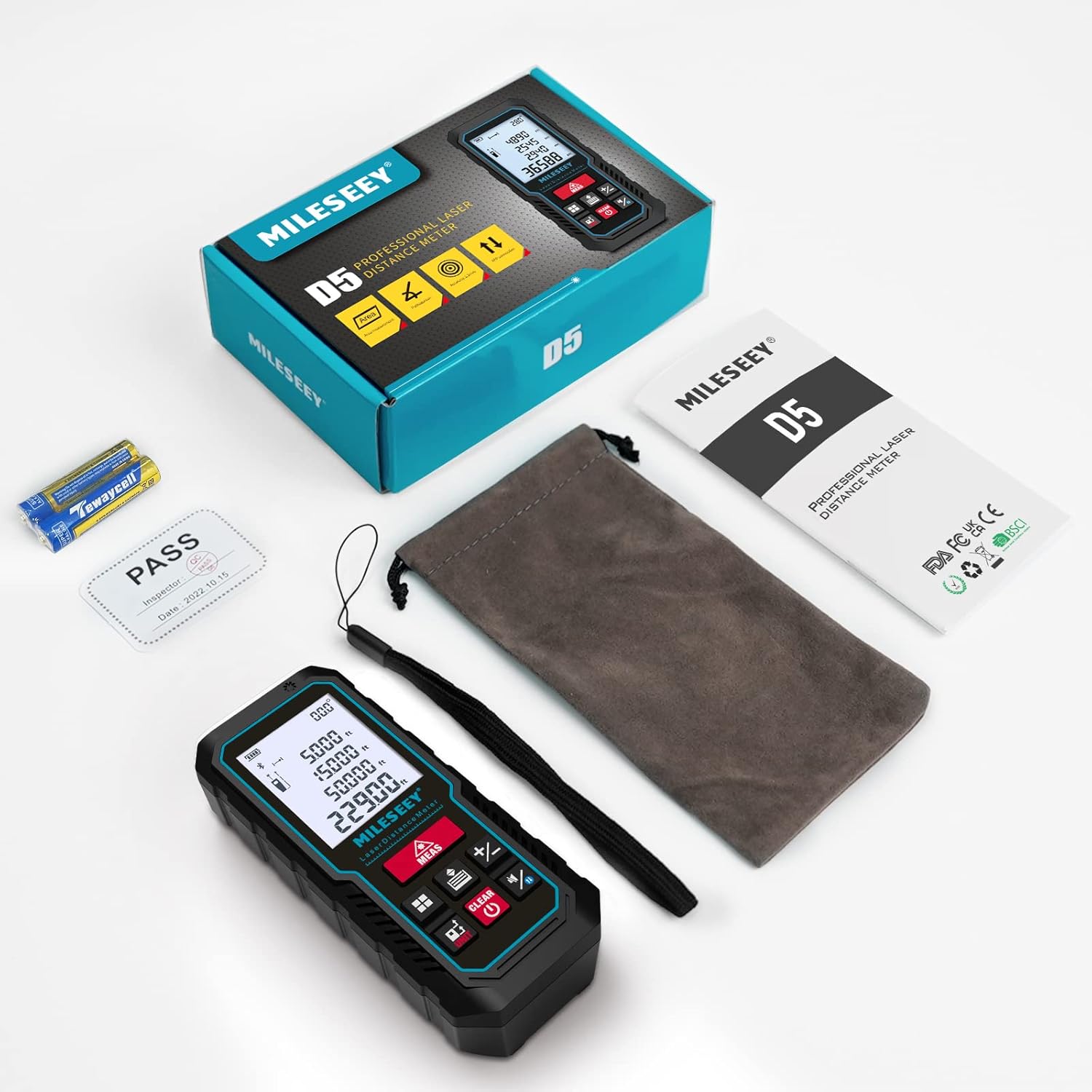
- 1 x MiLESEEY D5 Laser Distance Meter
- ແບັດເຕີຣີ 2 x 1.5V AAA
- 1 x ຄູ່ມືຜູ້ໃຊ້
- ກະເປົາເປ້ 1 x
- 1 x ສາຍຮັດມື

ສິນຄ້າເກີນview
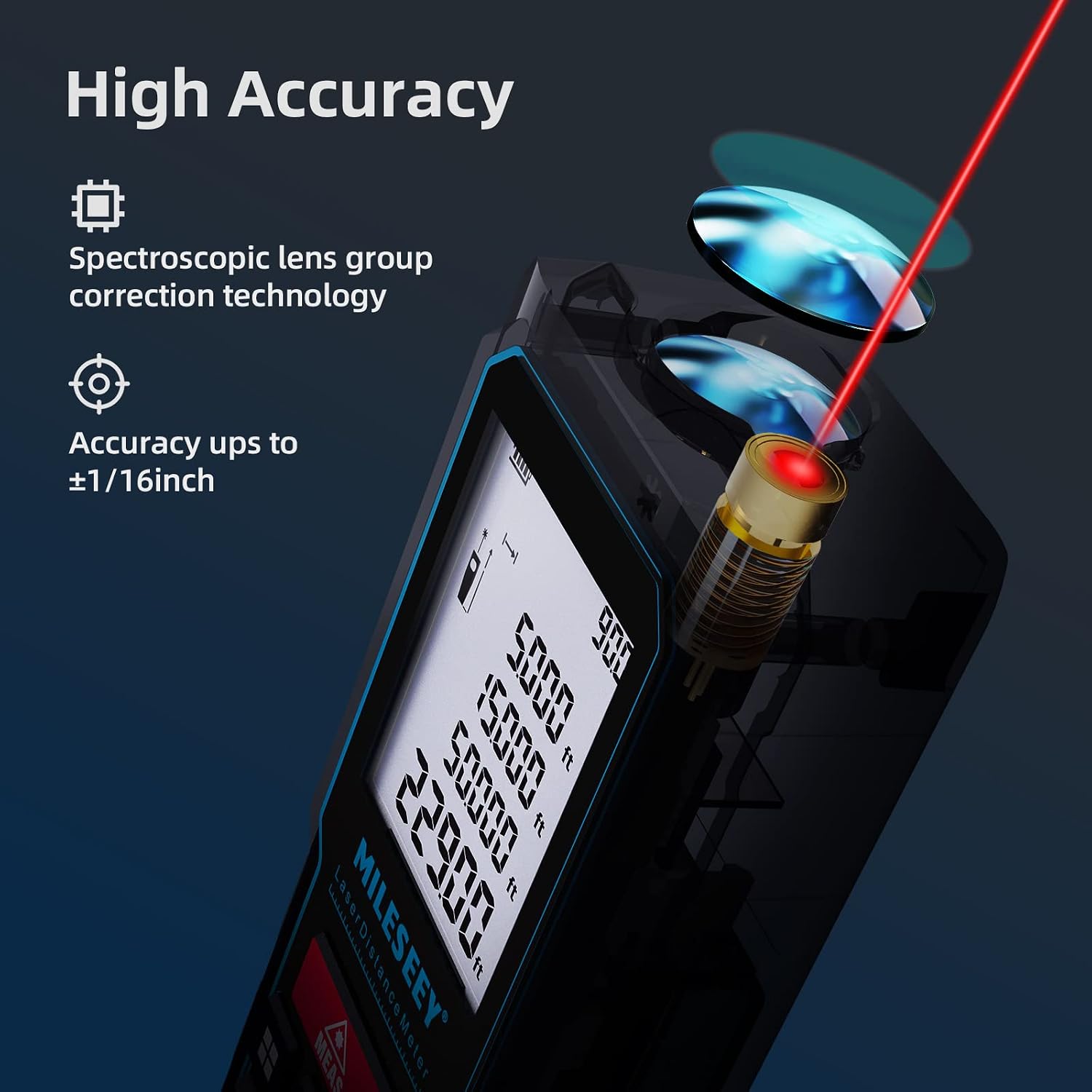
The MiLESEEY D5 70M-BT features a robust design with an easy-to-read LCD display and intuitive controls, offering high accuracy for various measurement tasks.
ອົງປະກອບຫຼັກປະກອບມີ:
- Laser Emitter/Receiver: Located at the top for accurate measurements.
- ຈໍ LCD: 2-inch screen with backlight for clear visibility of measurements and settings.
- Measurement Button (MEAS): ເລີ່ມການວັດແທກ.
- ປຸ່ມຟັງຊັນ: For selecting measurement modes (distance, area, volume, Pythagorean, etc.).
- Unit Button (UNIT): Changes measurement units (m/ft/in/ft+in).
- Reference Point Button: Switches between front and rear reference points for measurement.
- Clear/Off Button (CLEAR/OFF): ລຶບລ້າງການວັດແທກກະແສໄຟຟ້າ ຫຼື ປິດອຸປະກອນ.
ຕັ້ງຄ່າ
ການຕິດຕັ້ງຫມໍ້ໄຟ
The device requires two 1.5V AAA alkaline batteries. Ensure correct polarity when inserting the batteries.
- ເປີດຝາປິດຊ່ອງໃສ່ຫມໍ້ໄຟຢູ່ດ້ານຫຼັງຂອງອຸປະກອນ.
- Insert two AAA batteries, matching the positive (+) and negative (-) terminals as indicated.
- ປິດຝາປິດຊ່ອງໃສ່ຫມໍ້ໄຟຢ່າງປອດໄພ.
ເປີດ/ປິດ
- ເພື່ອເປີດເຄື່ອງ, ກົດປຸ່ມ MEAS ປຸ່ມ.
- ເພື່ອປິດໄຟ, ກົດປຸ່ມແລະກົດປຸ່ມ ລຶບລ້າງ/ປິດ button for a few seconds, or the device will automatically shut off after 180 seconds of inactivity to conserve energy.
ຄໍາແນະນໍາການດໍາເນີນງານ
ການວັດແທກໄລຍະທາງພື້ນຖານ
For a single distance measurement:
- ຊີ້ເລເຊີໄປທີ່ເປົ້າໝາຍ.
- ກົດ MEAS ກົດປຸ່ມໜຶ່ງຄັ້ງ. ການວັດແທກຈະຖືກສະແດງຢູ່ໜ້າຈໍພາຍໃນ 0.5 ວິນາທີ.

ການປ່ຽນແປງຫນ່ວຍງານແລະຈຸດອ້າງອີງ
The device supports multiple units and reference points.
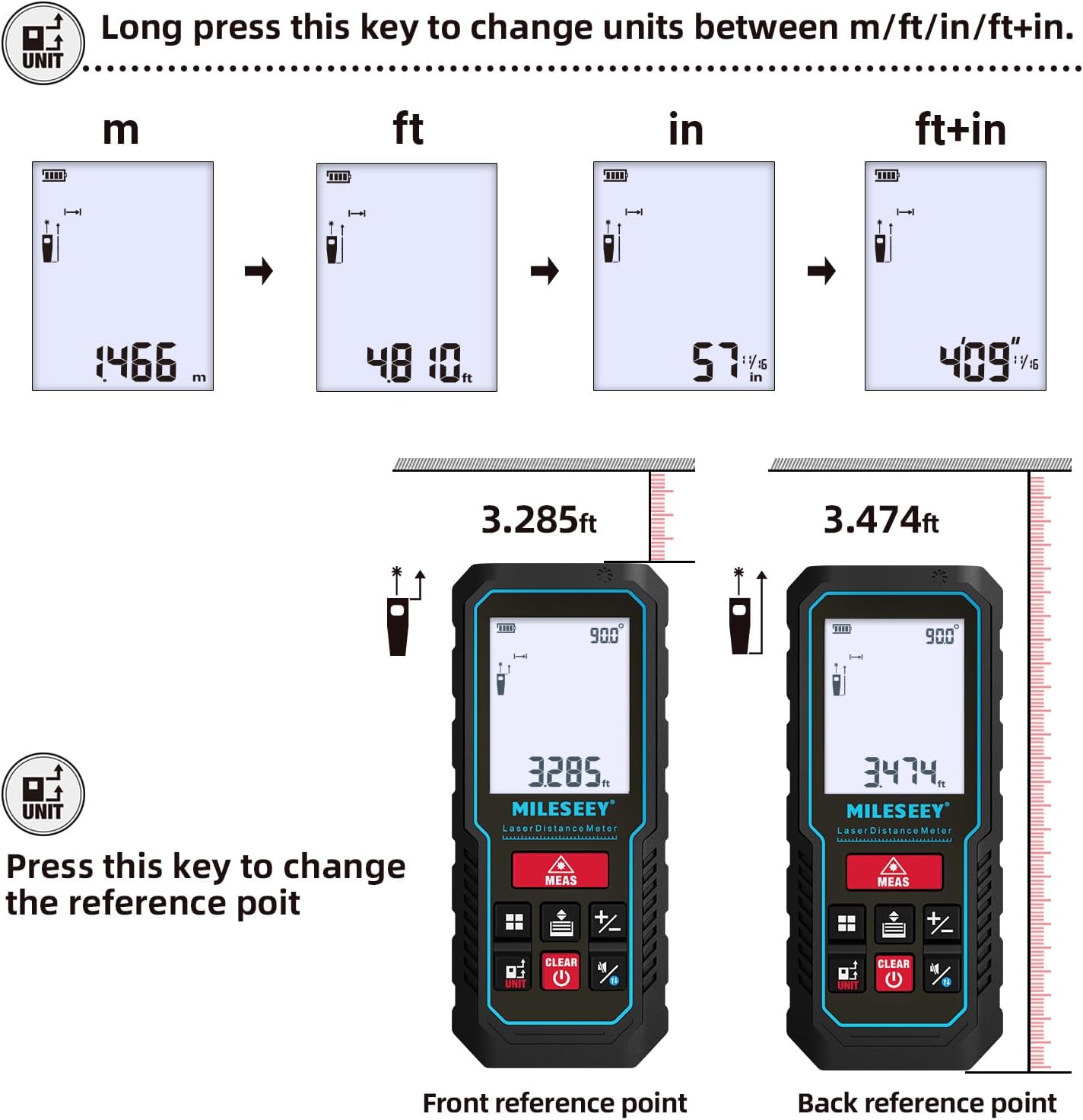
- ການປ່ຽນຫົວ ໜ່ວຍ: ກົດຄ້າງໄວ້ ໜ່ວຍ button to cycle through units: meters (m), feet (ft), inches (in), and feet + inches (ft+in).
- ຈຸດອ້າງອີງ: ກົດ ໜ່ວຍ button briefly to switch the measurement reference point between the front edge and the rear edge of the device.
ຮູບແບບການວັດແທກ
The MiLESEEY D5 offers various measurement functions:
- ການວັດແທກຢ່າງຕໍ່ເນື່ອງ: For tracking distances as you move the device.
- ການວັດແທກພື້ນທີ່: Calculates the area of a surface (length x width).
- ການວັດແທກປະລິມານ: Calculates the volume of a space (length x width x height).
- Pythagorean Method (2-point and 3-point): Indirect measurement for heights or distances where direct measurement is not possible.
- ການບວກ/ການລົບ: Add or subtract measurements.
- ລະດັບອັດຕະໂນມັດ: Automatically calculates horizontal distance.
- ຄວາມສູງອັດຕະໂນມັດ: Automatically calculates vertical height.


Smartphone App Connectivity (Smart Life App)
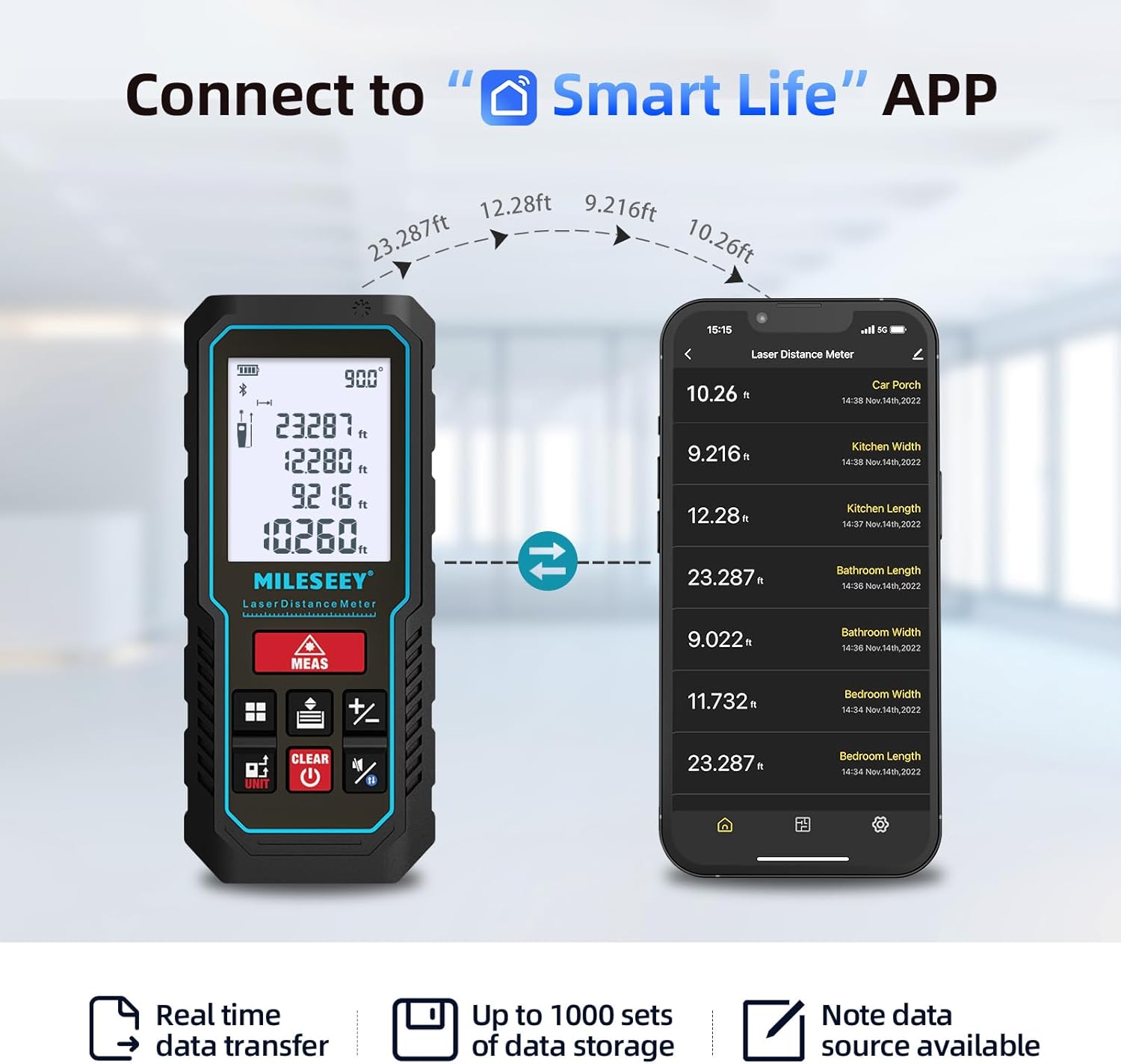
The MiLESEEY D5 70M-BT can connect wirelessly to your smartphone via the free "SMART LIFE" app, allowing for real-time data transfer, storage, and advanced functions.
- Download the "SMART LIFE" app from your device's app store (available on Google Play and Apple App Store).
- Enable Bluetooth on your smartphone and open the "SMART LIFE" app.
- Follow the in-app instructions to pair your MiLESEEY D5 device.
- Once connected, you can document measurements, create floor plans by drawing on photos or grids, and store up to 1000 sets of data.


Data Records and Mute Mode
- The device stores up to 30 data records, which can be recalled for review and calculation.
- A mute mode is available for quiet operation in sensitive environments.

ບໍາລຸງຮັກສາ
ການບຳລຸງຮັກສາທີ່ເໝາະສົມຮັບປະກັນອາຍຸການໃຊ້ງານທີ່ຍາວນານ ແລະ ຄວາມແມ່ນຍຳຂອງອຸປະກອນຂອງທ່ານ.
- ທໍາຄວາມສະອາດ: ເຊັດອຸປະກອນດ້ວຍຄວາມອ່ອນ, ງamp ຜ້າ. ຢ່າໃຊ້ເຄື່ອງເຮັດຄວາມສະອາດຂັດຫຼືສານລະລາຍ.
- ການເກັບຮັກສາ: Store the device in its portable pouch in a cool, dry place when not in use. Remove batteries if storing for extended periods.
- ການປົກປ້ອງ: The device has an IP54 rating, making it splash-resistant and dust-proof. Avoid submerging it in water. It also features 1-meter drop resistance.

ການແກ້ໄຂບັນຫາ
If you encounter issues with your MiLESEEY D5, refer to the following common problems and solutions:
| ບັນຫາ | ສາເຫດທີ່ເປັນໄປໄດ້ | ການແກ້ໄຂ |
|---|---|---|
| ອຸປະກອນບໍ່ເປີດ | ຫມໍ້ໄຟຕ່ໍາຫຼືຕາຍ; ການຕິດຕັ້ງຫມໍ້ໄຟບໍ່ຖືກຕ້ອງ. | Replace batteries with new 1.5V AAA alkaline batteries. Ensure correct polarity. |
| ການວັດແທກບໍ່ຖືກຕ້ອງ | Obstruction in laser path; unstable measuring surface; extreme temperature changes; dirty lens. | Ensure a clear path for the laser. Measure on a stable surface. Allow device to acclimate to ambient temperature. Clean the lens with a soft cloth. |
| Cannot connect to Smart Life App | Bluetooth is off; app not installed; device not in pairing mode. | Ensure Bluetooth is enabled on your phone. Download and install the "SMART LIFE" app. Follow app instructions for pairing. |
| ຂໍ້ຄວາມ "Error" ສະແດງຢູ່ໜ້າຈໍ | Measurement out of range; strong light interference; target surface not reflective enough. | Ensure target is within 0.16m - 70m range. Avoid measuring in direct sunlight or strong light. Use a reflective target plate if necessary. |
ຂໍ້ມູນຈໍາເພາະ
| ຄຸນສົມບັດ | ລາຍລະອຽດ |
|---|---|
| ຍີ່ຫໍ້ | ມິເລຊີ |
| ໝາຍເລກຕົວແບບ | D5 (70M-BT) |
| ໄລຍະການວັດແທກ | 0.16m - 70m |
| ຄວາມຖືກຕ້ອງ | ±2ມມ |
| ຊັ້ນເລເຊີ | ຫ້ອງຮຽນ II |
| ປະເພດເລເຊີ | 635nm <1mW |
| ຈໍສະແດງຜົນ | 2-inch LCD with backlight |
| Electronic Angle Sensor | Yes, ±0.3° accuracy |
| ຟັງຊັນການວັດແທກ | Distance, Continuous, Area, Volume, Pythagorean (2/3-point), Addition/Subtraction, Auto Level, Auto Height |
| ໜ່ວຍ | m / ft / in / ft+in |
| ບັນທຶກຂໍ້ມູນ | 30 (on device), up to 1000 (via app) |
| ການເຊື່ອມຕໍ່ | Bluetooth (Smart Life App) |
| ການສະຫນອງພະລັງງານ | 2 x 1.5V AAA Alkaline Batteries |
| ການປິດອັດຕະໂນມັດ | ບໍ່ມີການເຄື່ອນໄຫວ 180 ວິນາທີ |
| ການຈັດອັນດັບ IP | IP54 (Splash-resistant, Dust-proof) |
| ການຕໍ່ຕ້ານການຫຼຸດລົງ | 1 ແມັດ |
| ວັດສະດຸ | Acrylonitrile Butadiene Styrene (ABS) |
| ຂະໜາດ (L x W x H) | 15.2L x 10.1W x 4.8ຊມ |
| ນ້ໍາຫນັກລາຍການ | 220 ກຣາມ |
ການຮັບປະກັນແລະການສະຫນັບສະຫນູນ
MiLESEEY provides comprehensive support for its products.
- ການຮັບປະກັນ: The device comes with a 12-month warranty.
- ການຄໍ້າປະກັນຄືນເງິນ: ມີການຮັບປະກັນການຄືນເງິນເປັນເວລາ 90 ມື້.
- ການຊ່ວຍເຫຼືອຂະຫຍາຍ: 2 years of assistance after registration and lifetime technical support from MILESEEY.
- For technical assistance or warranty claims, please contact MILESEEY customer service through their official channels or the retailer where the product was purchased.


