
1. ບົດແນະນຳ
This manual provides detailed instructions for the installation, operation, and maintenance of your ASUS TUF Gaming GeForce RTX 4080 OC Edition Graphics Card. Please read this manual thoroughly before using the product to ensure proper functionality and to prevent damage.
2. ຂໍ້ມູນຄວາມປອດໄພ
WARNING: Always disconnect the power supply from your computer before installing or removing any components. Failure to do so may result in personal injury or damage to your system.
- ໃຫ້ແນ່ໃຈວ່າຫົວຫນ່ວຍການສະຫນອງພະລັງງານ (PSU) ຂອງທ່ານຕອບສະຫນອງວັດແທກຕໍາ່ສຸດທີ່tage requirements for this graphics card.
- ຈັບບັດກຣາບຟິກໂດຍຂອບຂອງມັນເພື່ອຫຼີກເວັ້ນການສໍາຜັດກັບອົງປະກອບທີ່ລະອຽດອ່ອນ.
- ໃສ່ສາຍແຂນຕ້ານສະຖິດ ຫຼືແຕະວັດຖຸໂລຫະທີ່ມີພື້ນດິນເລື້ອຍໆເພື່ອປ່ອຍກະແສໄຟຟ້າສະຖິດ.
- ຕິດຕັ້ງກາດກຣາບຟິກໃສ່ໃນເຄສຄອມພິວເຕີທີ່ມີລະບາຍອາກາດດີເພື່ອປ້ອງກັນການຮ້ອນເກີນໄປ.
3. ເນື້ອໃນຊຸດ
ກວດສອບວ່າລາຍການທັງຫມົດແມ່ນມີຢູ່ໃນຊຸດຜະລິດຕະພັນຂອງທ່ານ:
- ASUS TUF-RTX4080-O16G-GAMING Graphics card
- Collection card; TUF Velcro Hook & Loop
- TUF Graphics card holder; Speedsetup Manual
- ສາຍອະແດັບເຕີ
- ບັດຂອບໃຈ
4. ຜະລິດຕະພັນເກີນview
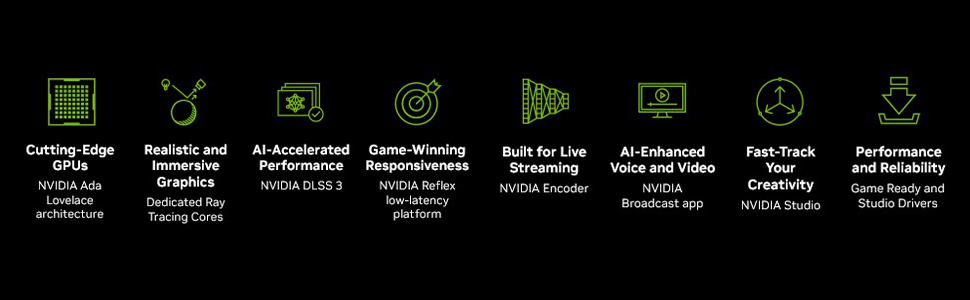
The ASUS TUF Gaming GeForce RTX 4080 OC Edition Graphics Card is designed for high-performance gaming and demanding applications. It features NVIDIA's Ada Lovelace architecture, offering significant improvements in performance and power efficiency.

ດ້ານໜ້າ view of the ASUS TUF Gaming GeForce RTX 4080 OC Edition Graphics Card, showcasing its triple Axial-tech fan design.
ເກີນview of NVIDIA Ada Lovelace architecture features, including streaming multiprocessors, Tensor Cores, and RT Cores.
ຄຸນນະສົມບັດທີ່ສໍາຄັນ:
- NVIDIA Ada Lovelace Streaming Multiprocessors: ເຖິງ 2x ປະສິດທິພາບແລະປະສິດທິພາບພະລັງງານ.
- ແກນ Tensor ລຸ້ນທີ 4: ປະສິດທິພາບສູງສຸດ 2X AI.
- 3rd Generation RT Cores: ເຖິງ 2X ray tracing ປະສິດທິພາບ.
- ພັດລົມ Axial-tech: ຂະຫຍາຍຂຶ້ນເພື່ອໃຫ້ກະແສລົມເພີ່ມຂຶ້ນ 23%.
- ລູກປືນພັດລົມຄູ່: ໃຊ້ໄດ້ເຖິງສອງເທົ່າຂອງການອອກແບບແບບດັ້ງເດີມ.
- Military-grade Capacitors: Rated for 20K hours at 105C, enhancing GPU power rail durability.
- ໂຄງກະດູກພາຍນອກໂລຫະ: Adds structural rigidity and vents to increase heat dissipation.
- GPU Tweak III software: ສະຫນອງການປັບແຕ່ງປະສິດທິພາບ intuitive, ການຄວບຄຸມຄວາມຮ້ອນ, ແລະການຕິດຕາມລະບົບ.

ຫລັງ view showing the display output interfaces, including DisplayPort and HDMI ports.
5. ການຕິດຕັ້ງ
Follow these steps to install your graphics card:
- ກະກຽມລະບົບຂອງທ່ານ: Turn off your computer and disconnect the power cable. Open your computer case.
- ຊອກຫາສະລັອດຕິງ PCIe: ຊອກຫາຊ່ອງສຽບ PCI Express x16 ທີ່ມີຢູ່ໃນເມນບອດຂອງທ່ານ.
- ເອົາຝາປິດສະລັອດຕິງອອກ: Remove the necessary expansion slot covers from your computer case. Note that this card is large (13.7"L x 5.9"W) and may require multiple slots.
- ຕິດຕັ້ງບັດກາຟິກ: Carefully align the graphics card with the PCIe slot and press it down firmly until it is securely seated.
- ຮັບປະກັນບັດ: ຍຶດບັດກຣາບຟິກເຂົ້າກັບເຄສດ້ວຍສະກູ.
- ເຊື່ອມຕໍ່ພະລັງງານ: Connect the appropriate power cables from your power supply to the graphics card. Ensure all connections are secure.
- ປິດກໍລະນີ: ປິດເຄສຄອມພິວເຕີຂອງທ່ານແລ້ວເຊື່ອມຕໍ່ສາຍໄຟຄືນໃໝ່.
- ເຊື່ອມຕໍ່ຈໍສະແດງຜົນ: ເຊື່ອມຕໍ່ຈໍພາບຂອງທ່ານກັບຊ່ອງສຽບ DisplayPort ຫຼື HDMI ຂອງກາດກຣາບຟິກ.
Video demonstrating the installation and features of the ASUS TUF Gaming RTX 4080 graphics card.
6. Software Installation & Configuration
After physical installation, install the necessary drivers and utility software:
- ການຕິດຕັ້ງໄດເວີ: Download the latest NVIDIA GeForce drivers from the official NVIDIA webເວັບໄຊ (www.nvidia.com/drivers). ປະຕິບັດຕາມຄໍາແນະນໍາໃນໜ້າຈໍສໍາລັບການຕິດຕັ້ງ.
- ASUS GPU Tweak III: Install the ASUS GPU Tweak III software from the ASUS support webເວັບໄຊ (www.asus.com/support/Download-Center/). This utility allows for performance tweaking, thermal control, and system monitoring.
7. ການດໍາເນີນງານຂອງກາດກຣາຟິກ
Your ASUS TUF Gaming GeForce RTX 4080 OC Edition is designed for optimal performance and cooling. Here are some operational aspects:
ລະບົບເຮັດຄວາມເຢັນ:
The card features advanced cooling technologies to maintain stable temperatures during heavy loads.

Close-up of the Axial-tech fan, designed for increased airflow and reduced noise.

Illustration of optimized fan rotation for enhanced cooling efficiency.

View of the large heatsink, contributing to efficient heat dissipation.
RGB Lighting (Aura Sync):
The card features customizable ARGB lighting via ASUS Aura Sync. You can synchronize lighting effects with other Aura Sync compatible components in your system.

Example of customizable ARGB lighting on the graphics card.
AI Features and Technologies:
The NVIDIA GeForce RTX 4080 leverages AI for enhanced performance and new capabilities.
ວິດີໂອ showcasing NVIDIA's AI technologies, including generative AI and DLSS, and their applications in gaming and creative workflows.
8. ບໍາລຸງຮັກສາ
ການບຳລຸງຮັກສາເປັນປະຈຳຊ່ວຍຮັບປະກັນອາຍຸການໃຊ້ງານທີ່ຍາວນານ ແລະ ປະສິດທິພາບທີ່ດີທີ່ສຸດຂອງກາດກຣາບຟິກຂອງທ່ານ:
- ການກຳຈັດຂີ້ຝຸ່ນ: Periodically clean dust from the fans and heatsink using compressed air. Ensure the fans are not spinning during cleaning.
- ອັບເດດໄດເວີ: Keep your graphics drivers updated to the latest version for performance improvements and bug fixes.
- ການຕິດຕາມອຸນຫະພູມ: Use GPU Tweak III or other monitoring software to keep an eye on GPU temperatures, especially during intensive tasks.
9. ການແກ້ໄຂບັນຫາ
ຖ້າທ່ານພົບບັນຫາກັບກາດກຣາບຟິກຂອງທ່ານ, ໃຫ້ລອງຂັ້ນຕອນການແກ້ໄຂບັນຫາຕໍ່ໄປນີ້:
- ບໍ່ມີການສະແດງຜົນອອກ:
- ກວດໃຫ້ແນ່ໃຈວ່າສາຍຂອງຈໍພາບຖືກເຊື່ອມຕໍ່ຢ່າງປອດໄພກັບທັງບັດກາຟິກ ແລະຈໍພາບ.
- ກວດສອບວ່າບັດກາຟິກໄດ້ນັ່ງຢູ່ໃນຊ່ອງ PCIe ຢ່າງເຕັມທີ່.
- Check that all power connectors are properly attached to the graphics card.
- ທົດສອບດ້ວຍສາຍສະແດງຜົນອື່ນ ຫຼືຈໍພາບຖ້າເປັນໄປໄດ້.
- ລະບົບບໍ່ສະຖຽນ/ຂັດຂ້ອງ:
- ຮັບປະກັນວ່າໄດເວີກຣາຟິກຂອງທ່ານອັບເດດແລ້ວ.
- ຕິດຕາມອຸນຫະພູມ GPU. ຄວາມຮ້ອນເກີນໄປສາມາດເຮັດໃຫ້ເກີດຄວາມບໍ່ໝັ້ນຄົງໄດ້.
- Verify your power supply unit (PSU) is sufficient for the graphics card's power requirements.
- ປະສິດທິພາບບໍ່ດີ:
- ຮັບປະກັນວ່າໄດເວີກຣາຟິກຂອງທ່ານອັບເດດແລ້ວ.
- Check in-game settings; reduce graphics quality if necessary.
- ປິດແອັບພລິເຄຊັນພື້ນຫຼັງທີ່ບໍ່ຈໍາເປັນ.
10. ຂໍ້ມູນຈໍາເພາະ
| ຄຸນສົມບັດ | ຂໍ້ມູນຈໍາເພາະ |
|---|---|
| Graphics Coprocessor | NVIDIA GeForce RTX 4080 |
| ຍີ່ຫໍ້ | ASUS |
| ຂະຫນາດ RAM ຮູບພາບ | 16 GB |
| ຄວາມໄວໂມງ GPU | 4000 MHz |
| ການໂຕ້ຕອບຜົນຜະລິດວິດີໂອ | DisplayPort, HDMI |
| ປະເພດກາຟິກ RAM | GDDR6X |
| ອຸປະກອນທີ່ເຂົ້າກັນໄດ້ | PC |
| ການສະແດງຄວາມລະອຽດສູງສຸດ | 7680x4320 |
| ການໂຕ້ຕອບບັດກາຟິກ | PCI Express |
| ຄວາມໄວໂມງຄວາມຈຳ | 4000 MHz |
| ຈຳ ນວນແຟນ | 3 |
| ຂະໜາດລາຍການ L x W | 13.7"L x 5.9"ວ |
| ໂຮງງານຜະລິດວິດີໂອ | NVIDIA |
| ຊື່ຕົວແບບ | Gaming GeForce RTX 4080 16GB GDDR6X OC Edition Graphic Card |
| ນ້ໍາຫນັກລາຍການ | 4.2 ປອນ |
11. ການຮັບປະກັນແລະການສະຫນັບສະຫນູນ
Your ASUS TUF Gaming GeForce RTX 4080 OC Edition Graphics Card comes with a 3-year warranty. For warranty claims, technical support, or further assistance, please visit the official ASUS support webເວັບໄຊ ຫຼືຕິດຕໍ່ບໍລິການລູກຄ້າຂອງເຂົາເຈົ້າ.
ຮອງຮັບ ASUS Webເວັບໄຊ: www.asus.com/support/