
ແນະນຳ
Thank you for choosing the Dpofirs Portable MP3 Player. This device is designed to provide high-quality, lossless audio playback in a compact and durable form factor. This manual will guide you through the setup, operation, and maintenance of your new MP3 player.
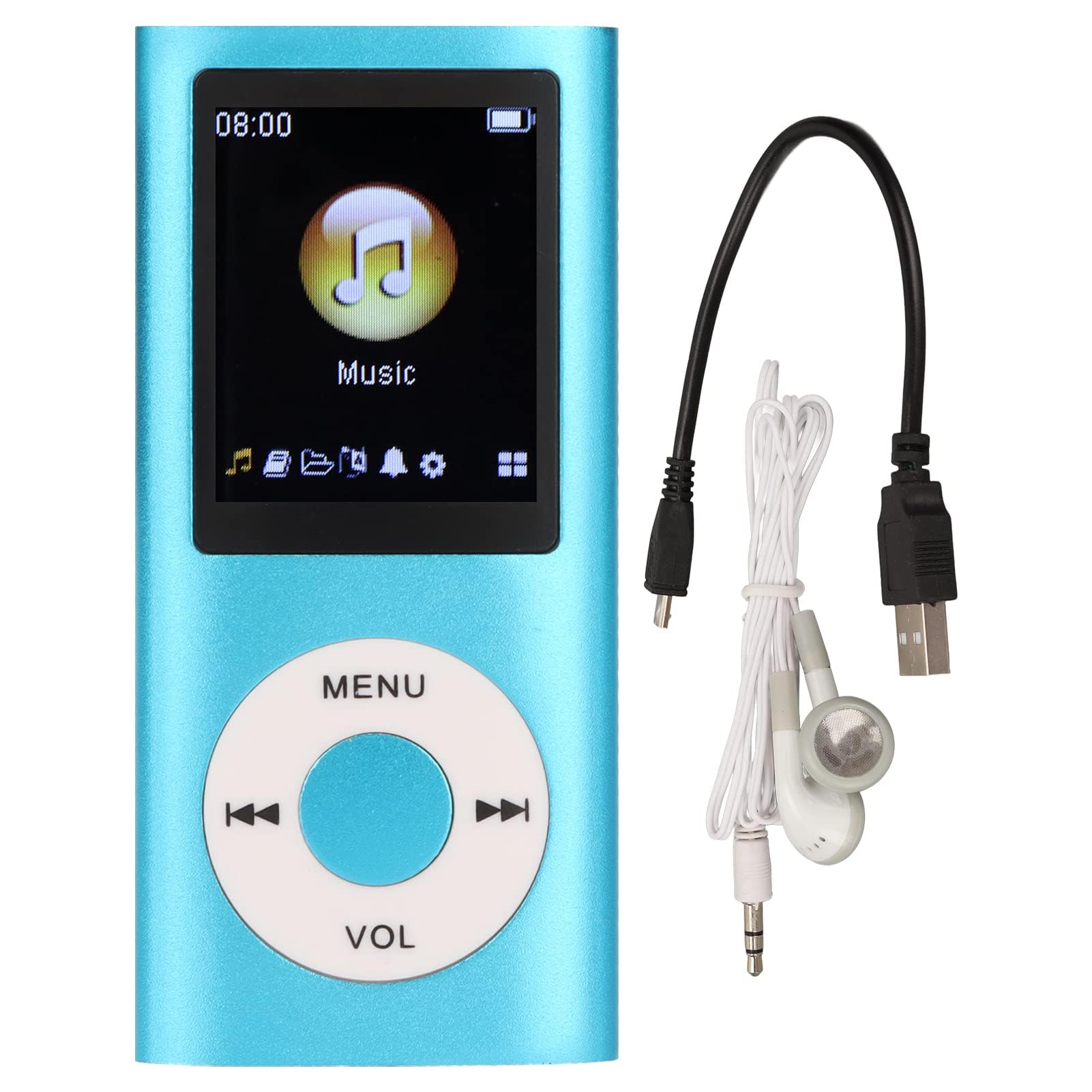
Image: The Dpofirs Portable MP3 Player, featuring a blue aluminum alloy casing and a circular control pad. A person is visible in the background, enjoying music with headphones.
ເນື້ອໃນຊຸດ
ກະລຸນາກວດເບິ່ງຊຸດສຳລັບລາຍການຕໍ່ໄປນີ້:
- 1 x Dpofirs MP3 Player
- 1 x ສາຍສາກ
- ຫູຟັງ 1 x
ຄຸນນະສົມບັດທີ່ສໍາຄັນ
- ຄຸນນະພາບສຽງທີ່ບໍ່ມີການສູນເສຍ: Supports MP3, WMA, FLAC, APE, AAC, OGG, and ACELP audio formats.
- ໜ່ວຍຄວາມຈຳທີ່ຂະຫຍາຍໄດ້: Supports up to 64GB memory card (not included). MYMAHDI memory cards are recommended.
- ການໂຕ້ຕອບຜູ້ເປັນມິດ: Easy navigation for selecting songs, creating playlists, and managing playback.
- ຊີວິດຫມໍ້ໄຟຍາວ: ຫຼິ້ນຕໍ່ເນື່ອງໄດ້ເຖິງ 8 ຊົ່ວໂມງດ້ວຍການສາກເຕັມ.
- ການອອກແບບທົນທານ: Constructed from premium aluminum alloy for enhanced durability.
- ໂໝດການຫຼິ້ນ: Supports sequential and random playback, and sleep shutdown function.
ຕັ້ງຄ່າ
1. ການສາກອຸປະກອນ
ກ່ອນການນຳໃຊ້ຄັ້ງທຳອິດ, ໃຫ້ສາກໄຟເຄື່ອງຫຼິ້ນ MP3 ຂອງທ່ານໃຫ້ເຕັມ.
- Connect the provided charging cable to the MP3 player's charging port.
- ເຊື່ອມຕໍ່ອີກສົ້ນຂອງສາຍກັບອະແດັບເຕີໄຟ USB (ບໍ່ລວມ) ຫຼືພອດ USB ຂອງຄອມພິວເຕີ.
- The device will indicate charging status. A full charge typically takes approximately 2 hours.
ສຳຄັນ: Ensure the charging cable is functioning correctly. If the device does not charge, try a different USB port or adapter.
2. ການໃສ່ກາດຫນ່ວຍຄວາມຈໍາ
The MP3 player requires a memory card for storing music.
- Locate the memory card slot on the side of the MP3 player.
- Gently insert a microSD card (up to 64GB, not included) into the slot until it clicks into place.
- ເພື່ອເອົາອອກ, ຍູ້ບັດເຂົ້າເລັກນ້ອຍຈົນກ່ວາມັນອອກມາ.
ໝາຍເຫດ: A memory card is not included with the player. MYMAHDI brand memory cards are recommended for optimal performance.
3. ການເຊື່ອມຕໍ່ຫູຟັງ
Connect the provided earphones or your preferred 3.5mm audio headphones to the headphone jack on the MP3 player.
ຄໍາແນະນໍາການດໍາເນີນງານ
1. ເປີດ/ປິດ
- To power on, press and hold the power button (usually the Play/Pause button or a dedicated power button) until the screen lights up.
- ເພື່ອປິດເຄື່ອງ, ໃຫ້ກົດປຸ່ມເປີດປິດຄ້າງໄວ້ອີກຄັ້ງຈົນກວ່າໜ້າຈໍຈະປິດ.
2. ການນໍາທາງພື້ນຖານ
The MP3 player features a circular control pad with several buttons:
- ເມນູ: Access the main menu or go back to the previous screen.
- VOL (+/-): ປັບລະດັບສຽງ.
- ຫຼິ້ນ/ຢຸດ: ເລີ່ມ ຫຼືຢຸດການຫຼິ້ນຊົ່ວຄາວ.
- ຕໍ່ໄປ/ກ່ອນໜ້າ: Skip to the next track or go back to the previous track. Long press to fast forward/rewind.
3. ການຖ່າຍໂອນດົນຕີ Files
To transfer music to your MP3 player:
- Connect the MP3 player to your computer using the charging cable.
- The player should appear as a removable disk drive on your computer.
- ລາກແລະວາງເພງຂອງທ່ານ files (MP3, WMA, FLAC, APE, AAC, OGG, ACELP) into the player's memory card folder.
- ຖອດອຸປະກອນອອກຈາກຄອມພິວເຕີຂອງທ່ານຢ່າງປອດໄພກ່ອນທີ່ຈະຕັດການເຊື່ອມຕໍ່ສາຍ.
4. ການຫຼິ້ນດົນຕີ
- ຈາກເມນູຫຼັກ, ໄປຫາພາກສ່ວນ "ດົນຕີ" ຫຼື "ສຽງ".
- ເລືອກເພງຂອງທ່ານຕາມສິລະປິນ, ອາລະບໍາ, ປະເພດ ຫຼື ເພງທັງໝົດ.
- ເລືອກເພງເພື່ອເລີ່ມຫຼິ້ນຄືນ.
- Use the Play/Pause, Next/Previous, and VOL buttons to control playback.
5. Playback Options
- ລາຍການຫຼິ້ນ: Create and manage custom playlists directly on the device.
- ຊับ/ຫຼິ້ນຊ້ຳ: Toggle between sequential playback, shuffle, and repeat modes.
- Sleep Shutdown: Set a timer for the device to automatically power off.
ບໍາລຸງຮັກສາ
- ຮັກສາອຸປະກອນໃຫ້ແຫ້ງ. ຄວາມຊຸ່ມສາມາດທຳລາຍວົງຈອນພາຍໃນໄດ້.
- ຫຼີກເວັ້ນອຸນຫະພູມທີ່ຮຸນແຮງ.
- Clean the device with a soft, dry cloth. Do not use harsh chemicals or cleaning agents.
- ປົກປ້ອງໜ້າຈໍຈາກຮອຍຂີດຂ່ວນ.
- ເກັບຮັກສາອຸປະກອນໄວ້ໃນບ່ອນທີ່ປອດໄພເມື່ອບໍ່ໄດ້ໃຊ້.
ການແກ້ໄຂບັນຫາ
ອຸປະກອນບໍ່ເປີດ:
- Ensure the battery is charged. Connect the player to a power source and allow it to charge for at least 30 minutes.
- Try pressing and holding the power button for an extended period (5-10 seconds).
Cannot hear any sound:
- Check if the earphones are properly connected to the headphone jack.
- Increase the volume using the VOL+ button.
- Test with a different pair of earphones to rule out faulty headphones.
- ຮັບປະກັນສຽງ files are not corrupted and are in a supported format.
ດົນຕີ files are not recognized:
- Ensure the memory card is properly inserted and recognized by the device.
- ກວດສອບວ່າດົນຕີ files are in one of the supported formats (MP3, WMA, FLAC, APE, AAC, OGG, ACELP).
- Try reformatting the memory card (this will erase all data) and re-transferring the music.
- Ensure the memory card is not full.
ອຸປະກອນຄ້າງ ຫຼື ບໍ່ຕອບສະໜອງ:
- ກົດປຸ່ມເປີດປິດຄ້າງໄວ້ປະມານ 10-15 ວິນາທີເພື່ອບັງຄັບໃຫ້ຣີສະຕາດ.
- If available, use a small pin to press the reset button (if present on the device).
ຂໍ້ມູນຈໍາເພາະ
| ຍີ່ຫໍ້ | Dpofirs |
| ໝາຍເລກຕົວແບບ | Dpofirs5yhtvp70d23123-13 |
| ວັດສະດຸ | ໂລຫະປະສົມອາລູມິນຽມ |
| ແບັດເຕີຣີ | ແບດເຕີຣີ້ມາດຕະຖານ Lithium 200 mAh ໃນຕົວ |
| ເວລາສາກໄຟ | ປະມານ. 2 ຊົ່ວໂມງ |
| ເວລາຫຼິ້ນ | ສູງສຸດ 8 ຊົ່ວໂມງ (ສາກເຕັມ) |
| ຮອງຮັບກາດຫນ່ວຍຄວາມຈໍາ | Up to 64GB (microSD, not included) |
| ຮູບແບບສຽງທີ່ຮອງຮັບ | MP3, WMA, FLAC, APE, AAC, OGG, ACELP |
| ເຕັກໂນໂລຊີການເຊື່ອມຕໍ່ | ຕົວຊ່ວຍ, Bluetooth, Wi-Fi (Note: Bluetooth/Wi-Fi functionality not detailed in product description, focusing on core MP3 player features) |
| ສີ | ສີຟ້າ |
| ປະເທດຕົ້ນກໍາເນີດ | ຈີນ |
ການຮັບປະກັນແລະການສະຫນັບສະຫນູນ
Specific warranty information for this product is not provided in the available documentation. Please refer to the retailer's return policy or contact the seller directly for details regarding warranty coverage.
For technical support or further assistance, please contact Dpofirs customer service through the platform where you purchased the product.