
ແນະນຳ
This manual provides detailed instructions for setting up, operating, and maintaining your Echo Dot (5th Gen) Kids Owl Edition and Echo Glow bundle. This smart speaker and multicolor smart lamp combination is designed to provide a fun and engaging experience for children, with robust parental controls and access to age-appropriate content.
The Echo Dot Kids offers an improved speaker for clearer vocals and vibrant sound, while the Echo Glow provides customizable lighting to enhance routines and playtime. Both devices integrate seamlessly with Alexa for voice-controlled interactions.
ແມ່ນຫຍັງຢູ່ໃນກ່ອງ
- Echo Dot (5th Gen) Kids Owl Edition
- Echo Glow multicolor smart lamp
- ອະແດບເຕີໄຟຟ້າສີຂາວ Glacier (15W)
- ຄູ່ມືເລີ່ມຕົ້ນດ່ວນ
- Alexa Guide for kids
ຕັ້ງຄ່າ
Follow these steps to set up your Echo Dot Kids and Echo Glow.
ເປີດເຄື່ອງເບື້ອງຕົ້ນ
- Plug the power adapter into your Echo Dot (5th Gen) Kids.
- Plug the power adapter into a wall outlet. The light ring on the Echo Dot will turn blue, then orange, indicating it's ready for setup.
- Repeat the process for the Echo Glow.
ກຳລັງເຊື່ອມຕໍ່ກັບ Wi-Fi
- Download the Amazon Alexa app on your smartphone or tablet.
- Open the Alexa app and sign in with your Amazon account.
- Follow the on-screen instructions to add your new Echo Dot Kids device. The app will guide you through connecting it to your Wi-Fi network.
- Ensure your Wi-Fi network supports 802.11a/b/g/n/ac (2.4 and 5 GHz) networks. Ad-hoc networks are not supported.
Pairing Echo Glow
Once your Echo Dot Kids is set up, you can pair the Echo Glow:
- In the Alexa app, navigate to 'Devices'.
- ແຕະທີ່ໄອຄອນ '+' ເພື່ອເພີ່ມອຸປະກອນໃໝ່.
- Select 'Light' and then 'Amazon Echo Glow'.
- Follow the app's instructions to discover and pair your Echo Glow.

Image: The Echo Dot (5th Gen) Kids Owl Edition and the Echo Glow lamp, ready for setup.

Image: The Echo Dot Kids Owl Edition and Echo Glow on a surface, with a speech bubble showing the command "Alexa, set a Rainbow Timer for 30 minutes on Charlie's lamp." This illustrates the voice control functionality for the Echo Glow.
ຄໍາແນະນໍາການດໍາເນີນງານ
Your Echo Dot Kids and Echo Glow are designed for intuitive voice control through Alexa.
ຄຳສັ່ງສຽງ
To interact with your Echo Dot Kids, simply say the wake word "Alexa" followed by your command or question. Alexa will automatically provide kid-friendly responses and filter explicit content.
- ດົນຕີ: "Alexa, play music." (Streams from Amazon Music, Apple Music, Spotify, etc.)
- ເລື່ອງ: "Alexa, read a bedtime story."
- ຄຳຖາມ: "Alexa, how far away is the sun?"
- ສິ່ງທີ່ເຮັດປະຈຳ: "Alexa, good night." (Can be configured to trigger bedtime routines like dimming lights or playing soothing sounds.)
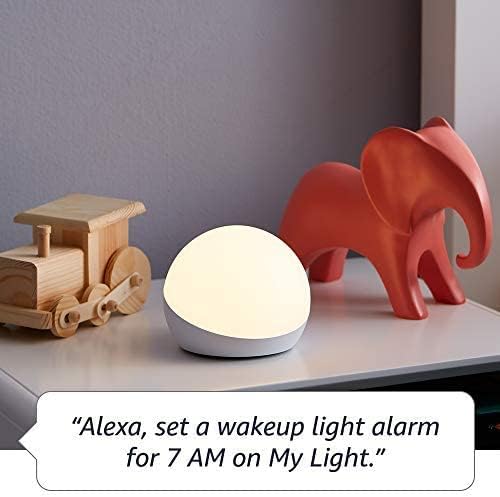
- Timers/Alarms: "Alexa, set a Rainbow Timer for 30 minutes on Charlie's lamp." or "Alexa, set a wakeup light alarm for 7 AM on My Light."
- ໂທ: Kids can call parent-approved friends and family.

Image: The Echo Dot Kids Dragon Edition on a surface, with a speech bubble showing the command "Alexa, play music." This demonstrates the device's ability to stream audio content.

Image: The Echo Dot Kids Owl Edition on a desk, with a speech bubble showing the command "Alexa, how far away is the sun?" This highlights the device's capability to answer questions and provide information.
ການຄວບຄຸມຂອງພໍ່ແມ່
Manage your child's experience through the Amazon Parent Dashboard. Here you can:
- ກຳນົດເວລາປະຈຳວັນສຳລັບການໃຊ້ອຸປະກອນ.
- Review ບັນທຶກການເຄື່ອນໄຫວ.
- Approve contacts for calls.
- Filter explicit songs and content.
Amazon Kids+ Features
Your bundle includes 1 year of Amazon Kids+, a digital subscription for kids aged 3-12. This provides access to:
- Kid-friendly Audible books.
- Interactive games.
- Fun Morning Routines.
- Educational Alexa skills.

Image: A graphic displaying icons for various age-appropriate content available through Amazon Kids+, including Barbie, Disney, Frozen, and Nat Geo Kids. This illustrates the diverse range of content accessible to children.
ບໍາລຸງຮັກສາ
ທໍາຄວາມສະອາດ
To clean your Echo Dot Kids and Echo Glow, use a soft, dry, lint-free cloth. Do not use abrasive cleaners or sprays directly on the devices.
ອັບເດດຊອບແວ
Your Echo Dot Kids receives automatic software security updates. Ensure your device is connected to Wi-Fi to receive these updates, which improve performance and add new features.
ຄຸນສົມບັດຄວາມເປັນສ່ວນຕົວ
The Echo Dot Kids is designed with multiple layers of privacy controls:
- ປຸ່ມປິດໄມໂຄຣໂຟນ: Press the microphone off button on the top of the device to electronically disconnect the microphones. The light ring will turn red when the microphone is off.
- ເຕັກໂນໂລຊີ Wake Word: Alexa devices are designed to detect the wake word only.
- ຕົວຊີ້ບອກການຖ່າຍທອດ: Visual indicators show when Alexa is streaming audio to the cloud.
- ການຈັດການການບັນທຶກສຽງ: ທ່ານມີຄວາມສາມາດ view and delete your voice recordings through the Alexa app or Amazon Privacy Hub.
ຮູບພາບ: ດ້ານເທິງ view of the Echo Dot Kids Owl Edition, with a red line through a microphone icon, indicating the microphone is turned off. Below it, text reads: "Press the mic off button to disconnect the microphones."
ການແກ້ໄຂບັນຫາ
ບັນຫາທົ່ວໄປແລະການແກ້ໄຂ
- ອຸປະກອນບໍ່ຕອບສະໜອງ: Ensure the device is plugged in and the light ring is active. Try unplugging and re-plugging the power adapter.
- ບໍ່ມີການເຊື່ອມຕໍ່ Wi-Fi: Check your Wi-Fi router and ensure it's working. Re-run the Wi-Fi setup process in the Alexa app. Ensure your device is within range of your Wi-Fi network.
- Alexa not hearing commands: Ensure the microphone is not muted (red light ring indicates mute). Speak clearly and at a normal volume.
- Echo Glow not responding: Verify it's plugged in and paired correctly in the Alexa app. Try unpairing and re-pairing if issues persist.
- Content not playing: Verify your Amazon Kids+ subscription is active. Check internet connection.
ຂໍ້ມູນຈໍາເພາະ
| ຄຸນສົມບັດ | ລາຍລະອຽດ |
|---|---|
| ຂະໜາດ | 3.9" x 3.9" x 3.5" (100 mm x 100 mm x 89 mm) |
| ນ້ຳໜັກ | 10.7 ອໍ (304g) |
| ສຽງ | ລຳໂພງໄຟທາງໜ້າ 1.73” (44 ມມ) ຄວາມລະອຽດສູງ Lossless |
| ການເຊື່ອມຕໍ່ Wi-Fi | Dual-band Wi-Fi ຮອງຮັບເຄືອຂ່າຍ 802.11a/b/g/n/ac (2.4 ແລະ 5 GHz). ບໍ່ຮອງຮັບເຄືອຂ່າຍໂຄສະນາ. |
| ການເຊື່ອມຕໍ່ Bluetooth | A2DP support for audio streaming, AVRCP for voice control of connected mobile devices. |
| ໂປຣໂຕຄອນອັດສະລິຍະ | Wi-Fi, Bluetooth Low Energy Mesh. |
| ຄວາມຕ້ອງການລະບົບ | Alexa app compatible with Fire OS, Android, and iOS devices, or via web ຕົວທ່ອງເວັບ. |
| ລຸ້ນ | Echo Dot (5th Gen) Kids - ປ່ອຍ 2022 |
| ພາສາ | Alexa speaks English and Spanish. Spanish is not available in Amazon Kids. |
| ຊ່ວງອາຍຸ | ອາຍຸ 3 ປີຂຶ້ນໄປ. ຄຳເຕືອນ: ອັນຕະລາຍຈາກການສຳຜັດ – ຊິ້ນສ່ວນນ້ອຍໆ. ບໍ່ແມ່ນສຳລັບເດັກນ້ອຍຕ່ຳກວ່າ 3 ປີ. |
| ການສະໝັກໃຊ້ | ລວມມີ 1 ປີຂອງ Amazon Kids+. |
ການຮັບປະກັນແລະການສະຫນັບສະຫນູນ
ຂໍ້ມູນການຮັບປະກັນ
Your Echo Dot (5th Gen) Kids and Echo Glow bundle comes with a 2-year worry-free guarantee. This warranty covers defects in materials and workmanship under normal use. For detailed terms and conditions, please refer to the warranty information provided with your product or visit the Amazon webເວັບໄຊ.
ການຊ່ວຍເຫຼືອລູກຄ້າ
ສຳລັບການຊ່ວຍເຫຼືອເພີ່ມເຕີມ, ການແກ້ໄຂບັນຫາ ຫຼື ການຮຽກຮ້ອງການຮັບປະກັນ, ກະລຸນາເຂົ້າເບິ່ງທີ່ຝ່າຍສະໜັບສະໜູນລູກຄ້າຂອງ Amazon website or contact Amazon customer service directly. You can also find more information and FAQs on the Amazon product page for the Echo Dot (5th Gen) Kids and Echo Glow.
ການປັບປຸງຄວາມປອດໄພຂອງຊອບແວແມ່ນຮັບປະກັນຢ່າງຫນ້ອຍສີ່ປີຫຼັງຈາກອຸປະກອນສຸດທ້າຍສໍາລັບການຊື້ເປັນຫນ່ວຍງານໃຫມ່ໃນ Amazon webສະຖານທີ່.