
1. ບົດແນະນຳ
This manual provides instructions for the WIWU Detachable Wireless Keyboard Case with Trackpad, designed to enhance your iPad experience by transforming it into a versatile workstation. This accessory combines a protective case with a detachable keyboard and a precision trackpad, offering multiple modes for typing, viewing, sketching, and reading.

The WIWU keyboard case offers a laptop-like experience for your iPad.
2. ຄວາມເຂົ້າກັນໄດ້
This keyboard case is compatible with the following Apple iPad models:
- Apple iPad Pro 11-inch (1st generation)
- Apple iPad Pro 11-inch (2nd generation)
- Apple iPad Pro 11-inch (3rd generation)
- Apple iPad Pro 11-inch (4th generation)
- Apple iPad Air (4th generation)
- Apple iPad Air (5th generation)
- Apple iPad (10th generation)
3. ເນື້ອໃນຊຸດ
ຊຸດປະກອບມີ:
- WIWU iPad Pro 11 Inch Keyboard Case
- ສາຍສາກ USB-C
- ຄູ່ມືຜູ້ໃຊ້
4. ຄຸນລັກສະນະຂອງຜະລິດຕະພັນ
- ແປ້ນພິມໄຮ້ສາຍທີ່ສາມາດຖອດອອກໄດ້: Easily attach or detach the keyboard from the case for flexible use.
- Integrated Trackpad: Supports multi-touch gestures for precise navigation.
- 7-Color Adjustable Backlight: Customize your typing experience with various backlight colors and brightness levels.
- Full Protection Case: Durable design provides comprehensive protection for your iPad.
- Built-in Apple Pencil Holder: Securely store and charge your Apple Pencil.
- Kickstand ທີ່ສາມາດປັບໄດ້: ສະເຫນີຫຼາຍ viewing angles (90°-135°) for comfort.
- ແບດເຕີຣີທີ່ຍາວນານ: Up to 150 days standby time and 90 days of typing on a single charge.
- ການດູດຊຶມແມ່ເຫຼັກ: Strong magnets ensure secure attachment of the iPad and keyboard.
- Auto-sleep Mode: Conserves battery life by automatically putting the iPad to sleep when closed.

Key features of the WIWU keyboard case.

The keyboard features 7-color adjustable backlighting.
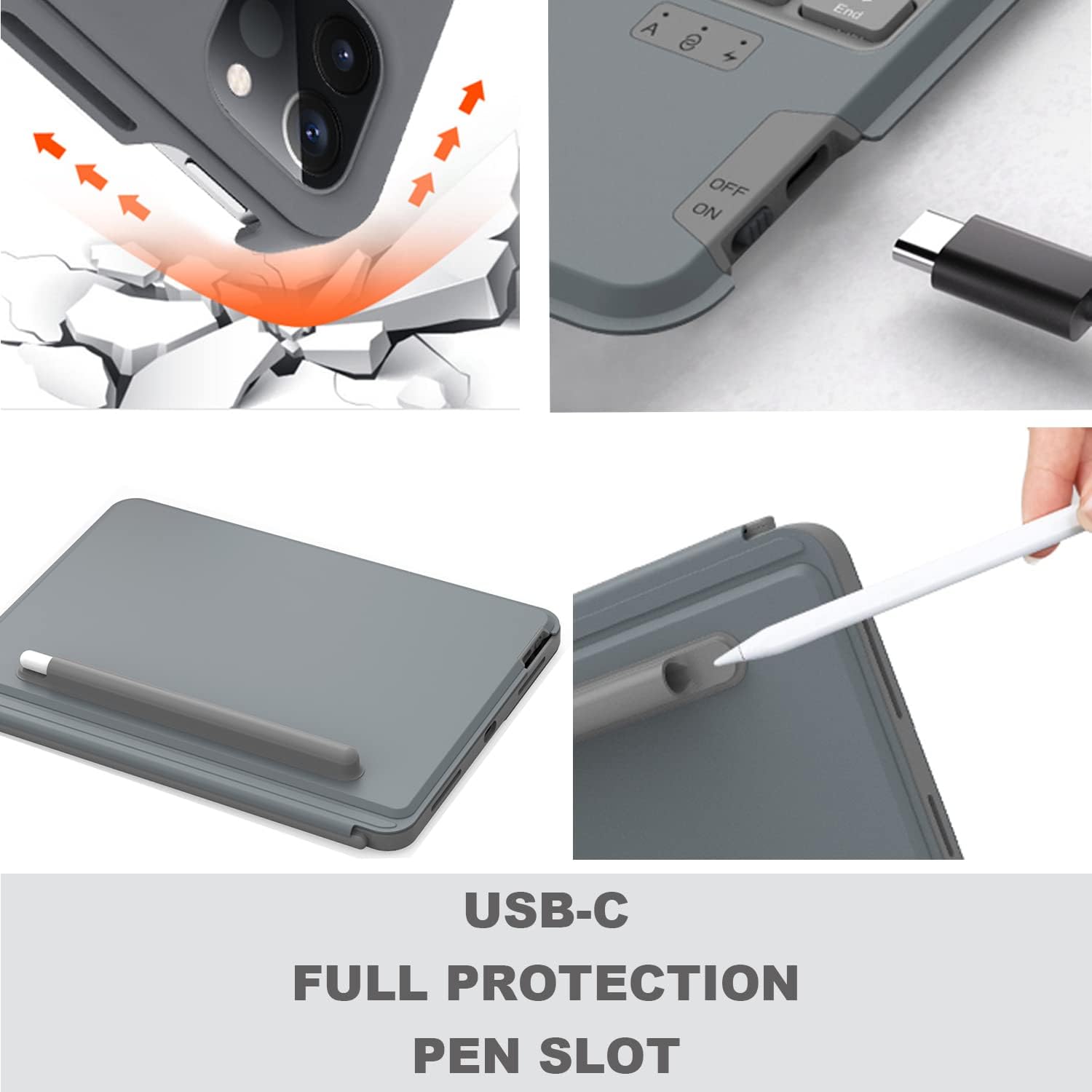
Details on USB-C charging, full protection, and the pen slot.

The keyboard offers extended battery life for prolonged use.
5. ຄໍາແນະນໍາການຕິດຕັ້ງ
5.1 ການສາກແປ້ນພິມ
Before first use, fully charge the keyboard using the provided USB-C cable. Connect the USB-C end to the keyboard's charging port and the other end to a USB power adapter (not included).
5.2 Inserting Your iPad
- ຄ່ອຍໆຈັດ iPad ຂອງທ່ານໃຫ້ກົງກັບເຄສປ້ອງກັນ.
- Gently press the iPad into the case, ensuring all edges are securely fitted.
- Ensure the camera protection cover pieces are correctly placed if applicable for your iPad model.

The keyboard magnetically attaches to the iPad case.
5.3 ການຈັບຄູ່ Bluetooth
- ເປີດແປ້ນພິມໂດຍໃຊ້ສະວິດໄຟທີ່ຢູ່ດ້ານຂ້າງ.
- ກົດ Fn + Del keys simultaneously on the keyboard to enter Bluetooth pairing mode. The Bluetooth indicator light will flash.
- ໃນ iPad ຂອງທ່ານ, ໄປທີ່ ການຕັ້ງຄ່າ > Bluetooth ແລະເປີດ Bluetooth.
- Select "WIWU Keyboard" (or similar name) from the list of available devices.
- Once connected, the Bluetooth indicator light on the keyboard will stop flashing.
6. ຄໍາແນະນໍາການດໍາເນີນງານ
6.1 ການໃຊ້ແປ້ນພິມ
The keyboard functions like a standard QWERTY keyboard. Use it for typing documents, emails, and navigating your iPad.
6.2 Trackpad Gestures
The integrated trackpad supports various multi-touch gestures for efficient navigation:
- ເປີດສູນຄວບຄຸມ: Use one finger to move the pointer to select the status icons at the top right, then click. Alternatively, swipe up with one finger from the bottom right corner.
- View ເລື່ອນຜ່ານ: ໃຊ້ນິ້ວດຽວເພື່ອປັດຕົວຊີ້ຜ່ານຂອບຂວາຂອງໜ້າຈໍ. ເພື່ອເຊື່ອງ Slide Over, ປັດຂວາອີກຄັ້ງ.
- ເລື່ອນຊ້າຍຫລືຂວາ: ປັດນິ້ວມືສອງເບື້ອງຊ້າຍຫລືຂວາ.

Common trackpad gestures for iPad navigation.
6.3 ການປັບແສງໄຟພື້ນຫຼັງ
To adjust the keyboard backlight color and brightness:
- ກົດ ປຸ່ມໄອຄອນດອກໄຟ ເພື່ອໝຸນວຽນລະດັບຄວາມສະຫວ່າງ.
- ກົດ Fn + PgUp or Fn + PgDn to change backlight colors.
6.4 ການປັບຕົວ Viewໃນ Angles
The case features an adjustable kickstand that allows you to set your iPad at various angles between 90° and 135° for optimal viewຄວາມສະດວກສະບາຍໃນການພິມ ແລະ ການພິມ.

The kickstand provides flexible viewມຸມ.
6.5 ຮູບແບບການນຳໃຊ້ຫຼາຍຮູບແບບ
The detachable design and adjustable kickstand allow for various modes:
- ໂໝດພິມ: iPad attached to the keyboard, propped up for typing.
- Viewໂໝດ: Keyboard detached, iPad propped up for watching videos or video calls.
- Sketching/Reading Mode: Keyboard detached, iPad laid flat or held for drawing or reading.

The case supports multiple modes for different activities.

The case allows for both vertical and landscape orientations.
Official video demonstrating the WIWU Detachable Wireless Keyboard Case features and usage.
7. ບໍາລຸງຮັກສາ
- ທໍາຄວາມສະອາດ: ໃຊ້ອ່ອນ, ງamp cloth to clean the case and keyboard. Avoid harsh chemicals.
- ການດູແລຫມໍ້ໄຟ: To prolong battery life, avoid fully discharging the keyboard frequently. Charge it regularly.
- ການເກັບຮັກສາ: ເມື່ອບໍ່ໄດ້ໃຊ້ເປັນເວລາດົນ, ໃຫ້ເກັບຮັກສາກ່ອງແປ້ນພິມໄວ້ໃນບ່ອນທີ່ເຢັນແລະແຫ້ງ.
8. ການແກ້ໄຂບັນຫາ
- ແປ້ນພິມບໍ່ໄດ້ເຊື່ອມຕໍ່ຜ່ານ Bluetooth:
- ໃຫ້ແນ່ໃຈວ່າແປ້ນພິມໄດ້ສາກໄຟ ແລະ ເປີດຢູ່.
- ກວດສອບວ່າ Bluetooth ຖືກເປີດໃຊ້ງານຢູ່ໃນ iPad ຂອງທ່ານແລ້ວ.
- Try re-pairing the keyboard by pressing Fn + Del.
- ເລີ່ມຕົ້ນ iPad ແລະແປ້ນພິມຂອງທ່ານຄືນໃໝ່.
- Trackpad not responding or erratic cursor:
- Ensure the keyboard is fully charged. Low battery can affect trackpad performance.
- ຕັດການເຊື່ອມຕໍ່ ແລະເຊື່ອມຕໍ່ Bluetooth ຄືນໃໝ່.
- ທຳຄວາມສະອາດໜ້າຜິວຂອງແຜ່ນຕິດຕາມເພື່ອກຳຈັດສິ່ງເສດເຫຼືອຕ່າງໆ.
- Check iPad settings for trackpad sensitivity.
- ປຸ່ມບໍ່ຕອບສະໜອງ:
- Ensure the keyboard is connected and charged.
- Test individual keys. If only some keys are affected, contact support.
9. ຂໍ້ມູນຈໍາເພາະ
| ຄຸນສົມບັດ | ລາຍລະອຽດ |
|---|---|
| ຍີ່ຫໍ້ | WIWU |
| ໝາຍເລກຕົວແບບ | 6936686404181 |
| ເຕັກໂນໂລຊີການເຊື່ອມຕໍ່ | Bluetooth, USB (ສຳລັບການສາກໄຟ) |
| ຄຳອະທິບາຍແປ້ນພິມ | Ergonomic |
| ແຫຼ່ງພະລັງງານ | ພະລັງງານຫມໍ້ໄຟ |
| ປະເພດສະຫຼັບ | Scissor-Switch |
| ຮູບແບບແປ້ນພິມ | QWERTY |
| ຈໍານວນກະແຈ | 78 |
| ນ້ໍາຫນັກລາຍການ | 400 ກຣາມ |
10. ການຮັບປະກັນແລະການສະຫນັບສະຫນູນ
For any product inquiries, technical assistance, or warranty information, please contact WIWU customer support. WIWU offers 7x24-hour online support to assist you with any issues or questions you may have regarding your keyboard case.
Please refer to your purchase documentation or the official WIWU webເວັບໄຊທ໌ສຳລັບເງື່ອນໄຂການຮັບປະກັນສະເພາະ ແລະ ລາຍລະອຽດການຕິດຕໍ່.