
1. Introduction to the ESP32-WROVER-IE Module
The EBYTE ESP32-WROVER-IE is a versatile Wi-Fi module designed for a wide range of applications, including low-power sensor networks, wearable electronic devices, and demanding tasks such as speech encoding, audio streaming, and MP3 decoding. It integrates the powerful ESP32-D0WD-V3 chip, featuring an Xtensa dual-core 32-bit LX6 microprocessor.
This module offers robust connectivity with IEEE802.11b/g/n protocol support, operating in the 2.4~2.5GHz frequency band. It boasts a transmission distance of up to 400 meters and an antenna output power of 20dBm, ensuring broad wireless communication range. Its low sleep current, less than 5 µA, makes it highly suitable for battery-powered applications.

Figure 1: Physical dimensions of the ESP32-WROVER-IE module, showing its compact size of approximately 31.4mm by 18mm.
ຄຸນນະສົມບັດທີ່ສໍາຄັນ:
- ການແກ້ໄຂຊິບ: ESP32-D0WD-V3 with Xtensa dual-core 32-bit LX6 microprocessor.
- ໜ່ວຍຄວາມຈຳ: 448 KB ROM, 520 KB SRAM, 16 KB RTC SRAM.
- ຄວາມຖີ່ໂມງ: Supports up to 240 MHz.
- ມາດຕະຖານໄຮ້ສາຍ: IEEE802.11b/g/n (2.4~2.5GHz).
- ການໂຕ້ຕອບການສື່ສານ: UART I/O.
- ເສົາອາກາດ: Ipex antenna for flexible integration.
- ການບໍລິໂພກພະລັງງານຕໍ່າ: Sleep current less than 5 µA, ideal for battery-powered devices.
- ການປະສົມປະສານສູງ: Excellent performance in wireless transmission distance and network connectivity.

Figure 2: Illustration highlighting the ultra-low power consumption capabilities of the ESP32 module, featuring an ultra-low power RF architecture and power-saving patents for extended battery life.
2. ຂໍ້ກໍານົດດ້ານວິຊາການ
The following table provides detailed technical specifications for the ESP32-WROVER-IE module.
| ຂໍ້ມູນຈໍາເພາະ | ມູນຄ່າ |
|---|---|
| ຍີ່ຫໍ້ | EBYTE |
| ໝາຍເລກຕົວແບບ | ESP32-WROVER-IE |
| ເຕັກໂນໂລຊີການເຊື່ອມຕໍ່ | Wi-Fi |
| ມາດຕະຖານການສື່ສານໄຮ້ສາຍ | 802.11b/g/n |
| ຈຳນວນເຄື່ອງປະມວນຜົນ | 2 (Dual-core LX6) |
| ຄວາມຖີ່ | 2.4 ~ 2.5GHz |
| ໄລຍະການສົ່ງ | ສູງເຖິງ 400 ແມັດ |
| ປະເພດເສົາອາກາດ | Ipex |
| ການໂຕ້ຕອບ | UART I/O |
| ROM | 448 KB |
| SRAM | 520 KB |
| RTC SRAM | 16 KB |
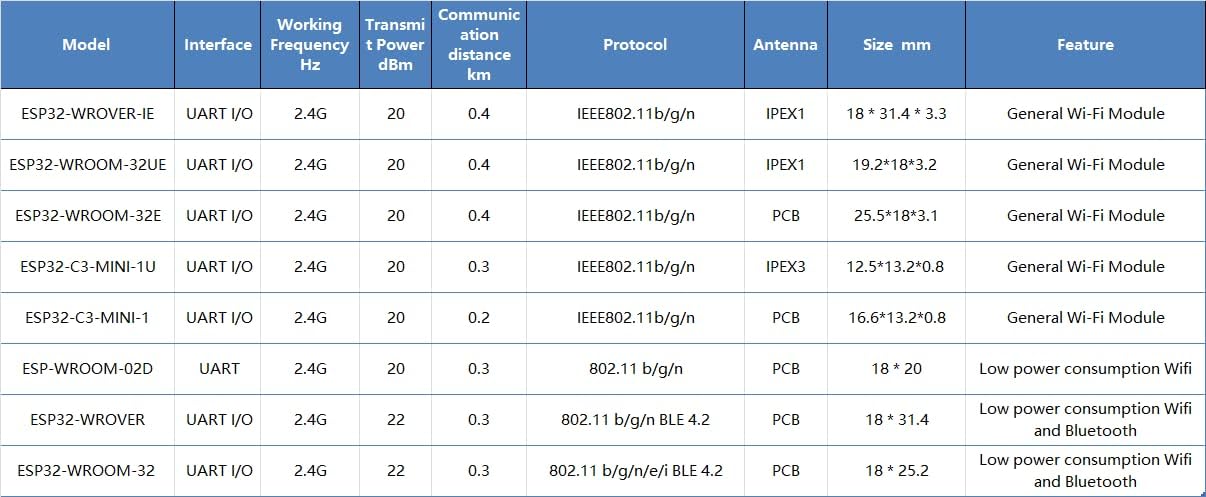
Figure 3: Detailed comparison table showing various EBYTE ESP32 modules, including their interfaces, frequencies, transmit power, communication distances, protocols, antenna types, sizes, and features.
3. ການຕິດຕັ້ງແລະການເຊື່ອມໂຍງ
The ESP32-WROVER-IE module is designed for integration into custom hardware or development boards. Proper setup is crucial for optimal performance.
3.1 ການເຊື່ອມຕໍ່ຮາດແວ
- ການສະຫນອງພະລັງງານ: ເຊື່ອມຕໍ່ໂມດູນກັບແຫຼ່ງພະລັງງານທີ່ໝັ້ນຄົງພາຍໃນລະດັບແຮງດັນທີ່ກຳນົດໄວ້tage range. Refer to the datasheet for exact voltage ຂໍ້ກໍານົດ.
- ການໂຕ້ຕອບ UART: Connect the module's UART (Universal Asynchronous Receiver/Transmitter) pins (TX, RX, GND) to your host microcontroller or development board. Ensure correct voltage levels (e.g., 3.3V).
- ການເຊື່ອມຕໍ່ເສົາອາກາດ: Attach a compatible Ipex antenna to the module's Ipex connector. Ensure the connection is secure to achieve the specified communication range.
- GPIO Pins: Utilize the available General Purpose Input/Output (GPIO) pins for connecting sensors, actuators, or other peripherals as required by your application.
3.2 ການຕັ້ງຄ່າໂປແກຼມ
- ສະພາບແວດລ້ອມການພັດທະນາ: Install the ESP-IDF (Espressif IoT Development Framework) or a compatible Arduino IDE environment with ESP32 board support.
- Firmware Upload: Use the chosen development environment to compile and upload your application firmware to the ESP32-WROVER-IE module via the UART interface.
- ການທົດສອບເບື້ອງຕົ້ນ: After uploading, perform basic tests to verify Wi-Fi connectivity and communication with your host system.
4. ການດໍາເນີນງານຂອງໂມດູນ
Once the ESP32-WROVER-IE module is integrated and programmed, its operation depends on the specific application firmware.
4.1 ການເຊື່ອມຕໍ່ Wi-Fi
- ໂໝດສະຖານີ: The module can connect to an existing Wi-Fi network (router) to access the internet or communicate with other devices on the local network.
- ໂໝດຈຸດເຂົ້າເຖິງ (AP): The module can create its own Wi-Fi network, allowing other devices to connect directly to it.
- ຮູບແບບລວມ: The module can operate as both a station and an access point simultaneously.
4.2 ການສື່ສານຂໍ້ມູນ
The module supports various communication protocols over Wi-Fi, including TCP/IP, UDP, HTTP, MQTT, and more, enabling data exchange with cloud services, local servers, or other IoT devices.

ຮູບທີ 4: ຕົວຢ່າງample of the ESP32 module's application in smart home environments, enabling wireless connectivity for various devices and systems.

ຮູບທີ 5: ຕົວຢ່າງample of the ESP32 module's application in industrial automation, contributing to reliable and efficient control systems.
5. Maintenance and Handling
To ensure the longevity and reliable operation of your ESP32-WROVER-IE module, follow these guidelines:
- ໄຟຟ້າສະຖິດ: Handle the module with care, preferably in an ESD-safe environment, to prevent damage from static discharge.
- ເງື່ອນໄຂສິ່ງແວດລ້ອມ: Operate and store the module within its specified temperature and humidity ranges. Avoid extreme conditions.
- ການປົກປ້ອງທາງດ້ານຮ່າງກາຍ: Protect the module from physical impact, excessive bending, or pressure, especially on the antenna connector and pins.
- ທໍາຄວາມສະອາດ: If necessary, clean the module gently with a dry, soft brush or compressed air. Avoid liquids or harsh chemicals.
- ການອັບເດດເຟີມແວ: Regularly check for and apply firmware updates from Espressif or EBYTE to benefit from performance improvements, bug fixes, and security enhancements.
6. ການແກ້ໄຂບັນຫາ
If you encounter issues with your ESP32-WROVER-IE module, consider the following troubleshooting steps:
- ບໍ່ມີພະລັງງານ:
- ກວດສອບການສະຫນອງພະລັງງານ voltage ແລະຄວາມສາມາດໃນປະຈຸບັນ.
- Check all power connections for proper contact.
- ບັນຫາການເຊື່ອມຕໍ່ Wi-Fi:
- ໃຫ້ແນ່ໃຈວ່າເສົາອາກາດໄດ້ເຊື່ອມຕໍ່ຢ່າງປອດໄພແລ້ວ.
- Check Wi-Fi credentials (SSID, password) in your firmware.
- Verify that the Wi-Fi network is within range and operating on the 2.4GHz band.
- Confirm that the module's firmware includes Wi-Fi functionality and is correctly initialized.
- UART Communication Problems:
- Check TX/RX connections (ensure TX of one device connects to RX of the other).
- Verify baud rate settings match between the module and the host.
- ຢືນຢັນ voltage levels are compatible (e.g., 3.3V).
- ໂມດູນບໍ່ຕອບສະໜອງ:
- Try a hard reset by cycling the power.
- Re-upload the firmware to ensure it's not corrupted.
- Check for any short circuits or incorrect wiring on your PCB.
7. ການຮັບປະກັນແລະການສະຫນັບສະຫນູນ
For specific warranty information and technical support, please refer to the official EBYTE webເວັບໄຊ ຫຼືຕິດຕໍ່ບໍລິການລູກຄ້າຂອງເຂົາເຈົ້າໂດຍກົງ. ຮັກສາໃບຮັບເງິນການຊື້ຂອງທ່ານສໍາລັບການຮ້ອງຂໍການຮັບປະກັນ.
ຜູ້ຜະລິດ: EBYTE
ຕົວແບບ: ESP32-WROVER-IE