
1. ບົດແນະນຳ
The ciciglow DC 0-60V Digital Power Meter (100A) is a versatile device designed for measuring voltage, current, power, and other electrical parameters in various DC systems. It features a large, easy-to-read display with adjustable backlight settings and a simple interface for switching between different statistical functions. This meter is suitable for applications in solar energy systems, industrial assembly lines, and automotive environments.

Image 1.1: The ciciglow DC Power Meter demonstrating its wide range of applications in solar energy, recreational vehicles, and industrial settings.
2. ຂໍ້ມູນຄວາມປອດໄພ
Please read and understand all safety instructions before operating this device. Failure to follow these instructions may result in electric shock, fire, or damage to the product.
- ຮັບປະກັນການປ້ອນຂໍ້ມູນ voltage and current do not exceed the specified limits of 0-60V DC and 100A.
- ຢ່າພະຍາຍາມຖອດປະກອບ ຫຼືດັດແປງອຸປະກອນ.
- ຮັກສາອຸປະກອນໃຫ້ຫ່າງຈາກນ້ໍາ, ຄວາມຊຸ່ມຊື່ນ, ແລະອຸນຫະພູມທີ່ສຸດ.
- Use appropriate wiring and connectors for the current and voltage levels involved.
- ຖອດສາຍໄຟອອກສະເໝີກ່ອນທີ່ຈະເຊື່ອມຕໍ່ ຫຼື ຕັດການເຊື່ອມຕໍ່.
3. ເນື້ອໃນຊຸດ
ກວດສອບວ່າລາຍການທັງຫມົດແມ່ນມີຢູ່ໃນຊຸດ:
- 1 x ciciglow DC Digital Power Meter (100A)
- 1 x ຄູ່ມືຜູ້ໃຊ້ພາສາອັງກິດ
4. ການຕິດຕັ້ງແລະການເຊື່ອມຕໍ່
The power meter is designed for inline measurement. Connect it according to the following instructions:
- Identify the 'IN' and 'OUT' terminals on the meter. The 'IN' side connects to the power source (e.g., battery, solar panel output). The 'OUT' side connects to the load (e.g., inverter, device being powered).
- Connect the positive (+) wire from your power source to the red 'IN' wire of the meter.
- Connect the negative (-) wire from your power source to the black 'IN' wire of the meter.
- Connect the red 'OUT' wire of the meter to the positive (+) input of your load.
- Connect the black 'OUT' wire of the meter to the negative (-) input of your load.
- ໃຫ້ແນ່ໃຈວ່າການເຊື່ອມຕໍ່ທັງຫມົດແມ່ນປອດໄພແລະຖືກ insulated ຢ່າງຖືກຕ້ອງ.

ຮູບພາບ 4.1: ມຸມ view of the ciciglow DC Power Meter, illustrating the 'IN' and 'OUT' connection points for power source and load.
5. ຄໍາແນະນໍາການດໍາເນີນງານ
Once connected and power is applied, the meter will automatically display real-time measurements.
5.1 ຫນ້າທີ່ສະແດງຜົນ
The large screen displays voltage (V), current (A), and power (W). The lower right section of the display shows additional statistical data.
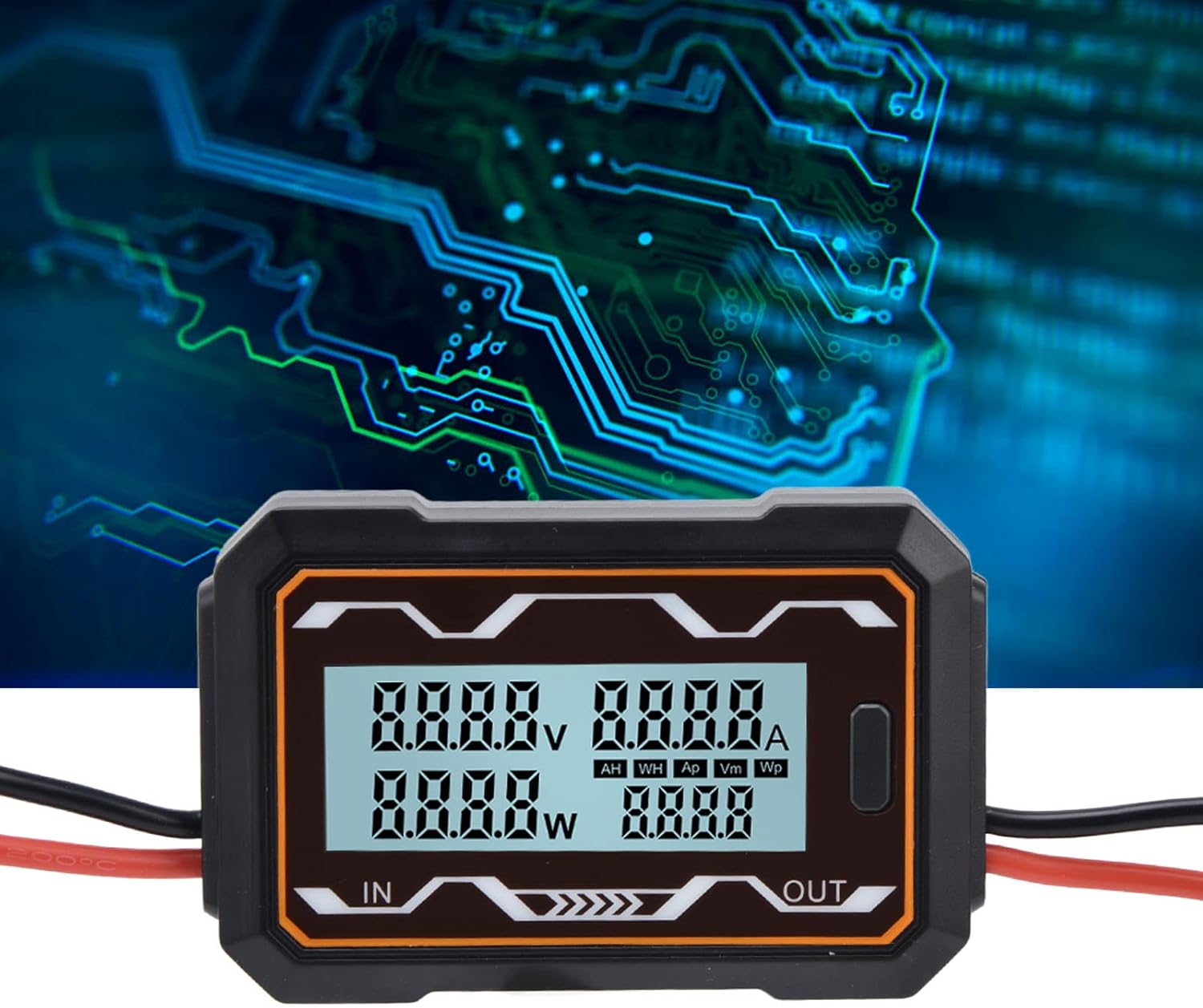
ຮູບພາບທີ 5.1: ໄລຍະໃກ້ view of the meter's digital display, highlighting the readouts for voltage, current, power, and the statistical data section.
5.2 Switching Statistical Data
A button located on the side of the meter allows you to cycle through different statistical measurements in the lower right display area. Press the button to switch between the following categories:
- AH: Ampere-hours (accumulated charge)
- WH: Watt-hours (accumulated energy)
- Ap: ສູງສຸດ Amps (maximum current recorded)
- Vm: Minimum Volts (minimum voltage recorded)
- Wp: Peak Watts (maximum power recorded)

ຮູບພາບ 5.2: ມຸມ view of the ciciglow DC Power Meter, clearly showing the function button used to cycle through display modes.
5.3 ການຕັ້ງຄ່າ Backlight
The meter's backlight can be configured. Settings for the backlight are saved even when the power is turned off, ensuring your preferences are retained.
6. ບໍາລຸງຮັກສາ
To ensure the longevity and accurate operation of your ciciglow DC Power Meter, follow these maintenance guidelines:
- ທໍາຄວາມສະອາດ: ໃຊ້ຜ້າປຽກແຫ້ງເພື່ອເຮັດຄວາມສະອາດອຸປະກອນ. ຢ່າໃຊ້ເຄື່ອງເຮັດຄວາມສະອາດຂັດຫຼືສານລະລາຍ.
- ການເກັບຮັກສາ: ເກັບຮັກສາມິເຕີໄວ້ໃນບ່ອນທີ່ເຢັນ, ແຫ້ງ, ຫ່າງຈາກແສງແດດໂດຍກົງ ແລະ ອຸນຫະພູມສູງເກີນໄປເມື່ອບໍ່ໄດ້ໃຊ້ງານ.
- ການກວດກາ: Periodically check the wiring and connections for any signs of wear, corrosion, or damage.
7. ການແກ້ໄຂບັນຫາ
If you encounter issues with your ciciglow DC Power Meter, refer to the following common troubleshooting steps:
- ບໍ່ມີການສະແດງຜົນ: Check all power connections to ensure they are secure and that the power source is active and within the specified voltage ຊ່ວງ (0-60V DC).
- ການອ່ານທີ່ບໍ່ຖືກຕ້ອງ: Verify that the meter is connected correctly (IN to source, OUT to load) and that the wires are properly seated. Ensure the load is drawing current for accurate current and power readings.
- ປຸ່ມບໍ່ຕອບສະໜອງ: Ensure the device is powered on. If the button still does not respond, try disconnecting and reconnecting power.
- ການອ່ານແບບບໍ່ຢຸດຢັ້ງ: Check for loose connections or damaged wiring. Ensure the operating environment is stable and free from excessive electrical noise.
ຖ້າບັນຫາຍັງຄົງຢູ່, ໃຫ້ຕິດຕໍ່ຝ່າຍຊ່ວຍເຫຼືອລູກຄ້າ.
8. ຂໍ້ມູນຈໍາເພາະ
| ຄຸນສົມບັດ | ຂໍ້ມູນຈໍາເພາະ |
|---|---|
| ຍີ່ຫໍ້ | ciciglow |
| ຕົວແບບ | 100A |
| ການປ້ອນຂໍ້ມູນ Voltage ຂອບເຂດ | 0-60 V ຊິງຕັນດີຊີ |
| ຊ່ວງປັດຈຸບັນ | 100 ກ |
| ວັດສະດຸ | ABS |
| ນ້ຳໜັກສິນຄ້າ | Approx. 92 Grams |
| ຂະໜາດສິນຄ້າ | ປະມານ. 9.3 x 6 x 2 cm (3.7 x 2.4 x 0.8 ນິ້ວ) |
| ແຫຼ່ງພະລັງງານ | Solar (Self-powered from DC circuit) |
| ປະເພດການວັດແທກ | ມັລຕິມີເຕີ (ແຮງດັນtage, Current, Power, Energy, Charge) |
| Operating Temperature (Upper) | 85 ອົງສາ Celsius |
| ການປະຕິບັດຕາມ | IEC 61010-1 |

Image 8.1: The ciciglow DC Power Meter with its approximate dimensions labeled for reference.

ຮູບພາບ 8.2: ດ້ານຫລັງ view of the ciciglow DC Power Meter, displaying the voltage and current range specifications.
9. ການຮັບປະກັນແລະການສະຫນັບສະຫນູນ
Specific warranty information for this product is not provided in this manual. For details regarding warranty coverage, technical support, or service, please refer to the product packaging, the seller's website, or contact ciciglow customer service directly.
You can visit the ciciglow store for more information: ciciglow Store