
ແນະນຳ
This manual provides detailed instructions for the proper use and care of your Hoco UA17 USB-C Male to USB 3.0 Female Adapter. Please read this manual thoroughly before using the product to ensure optimal performance and longevity.
ສິນຄ້າເກີນview
The Hoco UA17 is a compact and versatile adapter designed to connect USB-A devices to USB-C enabled hosts. It supports data transmission, On-The-Go (OTG) functionality, and various charging capabilities.
ຄຸນນະສົມບັດທີ່ສໍາຄັນ:
- ປະເພດຕົວເຊື່ອມຕໍ່: USB-C Male to USB 3.0 Female.
- ການສົ່ງຂໍ້ມູນ: Supports high-speed data transfer.
- ຟັງຊັນ OTG: Enables connection of peripherals like keyboards, mice, or USB drives to compatible smartphones and tablets.
- ຮອງຮັບການສາກໄຟ:
- With USB-A to Lightning cable: Charges iP interface devices at 5V/2A (does not support PD fast charging).
- With USB-A to USB-C cable: Charges USB-C interface devices with a maximum current of 4A.
- Fast Charge Compatibility: Supports fast charging for Huawei, Xiaomi, and OPPO mobile phones.
- ການອອກແບບ: Compact and portable with a matte finish.
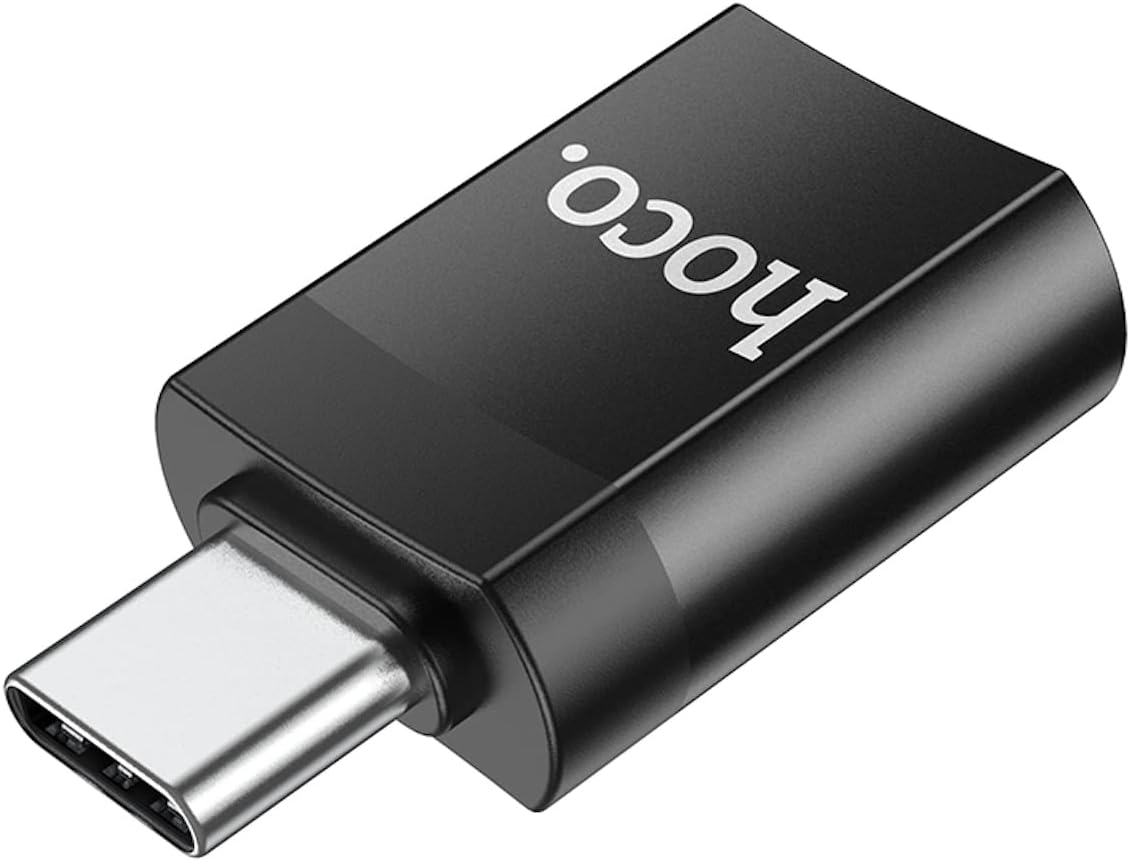
ຮູບທີ 1: ທາງເທິງ view of the Hoco UA17 adapter, highlighting its compact design and USB-C male connector.
ຕັ້ງຄ່າ
The Hoco UA17 adapter is designed for plug-and-play functionality, requiring no additional drivers or software installation.
- ກໍານົດພອດ: Locate the USB-C port on your host device (e.g., smartphone, tablet, laptop) and the USB-A port on your peripheral device (e.g., USB flash drive, keyboard, charging cable).
- Connect Adapter to Host: Insert the USB-C male connector of the Hoco UA17 adapter into the USB-C port of your host device. Ensure it is fully seated.
- ເຊື່ອມຕໍ່ອຸປະກອນພ່ວງ: Insert the USB-A male connector of your peripheral device (or USB-A end of a charging cable) into the USB 3.0 female port of the Hoco UA17 adapter.

ຮູບ 2: ຂ້າງ view of the Hoco UA17 adapter, showing the USB 3.0 female port where peripheral devices connect.
ຄໍາແນະນໍາການດໍາເນີນງານ
Data Transfer and OTG Function:
Once connected, your host device should automatically recognize the connected peripheral. For data transfer, navigate to your device's file manager to access the connected storage device. For OTG functionality, ensure your host device supports OTG and the peripheral is compatible.

Figure 3: The Hoco UA17 adapter facilitating OTG function, connecting a USB flash drive to a smartphone.
ຄຸນສົມບັດການສາກໄຟ:
The adapter supports charging for various devices. Connect the appropriate USB-A charging cable to the adapter, and then connect the other end to your device.
- For iP interface devices (e.g., iPhone, iPad): Use a USB-A to Lightning cable. The adapter will provide 5V/2A charging. Note that PD (Power Delivery) fast charging is not supported through this adapter for these devices.
- For USB-C interface devices: Use a USB-A to USB-C cable. The adapter can deliver a maximum current of 4A, supporting fast charging for compatible devices like Huawei, Xiaomi, and OPPO phones.

Figure 4: The Hoco UA17 adapter in use for charging a smartphone via a wall adapter.
ບໍາລຸງຮັກສາ
To ensure the longevity and proper functioning of your Hoco UA17 adapter, follow these maintenance guidelines:
- ທໍາຄວາມສະອາດ: Use a soft, dry cloth to wipe the adapter. Avoid using liquid cleaners or solvents, as they may damage the product.
- ການເກັບຮັກສາ: ເກັບຮັກສາອະແດບເຕີໄວ້ໃນບ່ອນທີ່ເຢັນ, ແຫ້ງ, ຫ່າງຈາກແສງແດດໂດຍກົງແລະອຸນຫະພູມທີ່ຮຸນແຮງ.
- ການຈັດການ: Avoid dropping the adapter or subjecting it to strong impacts. Do not force connectors into ports.
- ຄວາມຊຸ່ມ: Keep the adapter away from water and high humidity.
ການແກ້ໄຂບັນຫາ
If you encounter issues with your Hoco UA17 adapter, refer to the following common solutions:
- ອະແດັບເຕີບໍ່ຮັບຮູ້:
- Ensure the adapter is fully inserted into the USB-C port of your host device.
- Try connecting the adapter to a different USB-C port on your device, if available.
- Test the adapter with a different peripheral device to rule out peripheral issues.
- ຣີສະຕາດອຸປະກອນໂຮສຂອງທ່ານ.
- Peripheral Not Functioning (OTG):
- Verify that your host device supports OTG functionality.
- Ensure the peripheral device is compatible with your host device via OTG.
- Some high-power peripherals may require external power, which this adapter does not provide.
- ການສາກໄຟຊ້າ ຫຼືບໍ່ມີການສາກໄຟ:
- Check if the charging cable is securely connected to both the adapter and the device.
- Ensure the power source (wall adapter, power bank) is functioning correctly and provides sufficient power.
- Confirm that the charging cable itself is not faulty.
- Remember that PD fast charging is not supported for iP interface devices through this adapter.
ຂໍ້ມູນຈໍາເພາະ
| ຄຸນສົມບັດ | ລາຍລະອຽດ |
|---|---|
| ໝາຍເລກຕົວແບບ | UA17 |
| ປະເພດຕົວເຊື່ອມຕໍ່ | USB-C Male to USB 3.0 Female |
| ການສົ່ງຂໍ້ມູນ | ສະຫນັບສະຫນູນ |
| ຟັງຊັນ OTG | ສະຫນັບສະຫນູນ |
| ການປ້ອນຂໍ້ມູນ Voltage | 5 ໂວນ |
| ການຈັດອັນດັບປັດຈຸບັນ | ເຖິງ 4 Amps |
| ຂະໜາດສິນຄ້າ | 3.5 x 2 x 1 ຊມ (35 x 20 x 10 ມມ) |
| ນ້ໍາຫນັກລາຍການ | 3 ກຣາມ |
| ຈໍານວນພອດ | 1 (USB 3.0 Female) |
| ປະເພດສໍາເລັດຮູບ | Matte |
| ຜູ້ຜະລິດ | ໂຮໂຄ |

Figure 5: Product packaging for the Hoco UA17, displaying key features and specifications.
For more information, visit the official Hoco website or refer to the product packaging. UPC: 6931474762016
ການຮັບປະກັນແລະການສະຫນັບສະຫນູນ
For warranty information and customer support, please refer to the documentation included with your purchase or visit the official HOCO webເວັບໄຊ. ຮັກສາໃບຮັບເງິນການຊື້ຂອງທ່ານໄວ້ເປັນຫຼັກຖານການຊື້ສໍາລັບການຮຽກຮ້ອງການຮັບປະກັນໃດໆ.