
ແນະນຳ
Thank you for choosing the Vault Buds Duo Dual Driver Headphones. These in-ear headphones are engineered to deliver a rich and immersive audio experience, featuring dual dynamic drivers for enhanced sound clarity and bass. Designed for comfort and durability, they are compatible with a wide range of devices, making them ideal for everyday listening, gaming, and communication.
ສິນຄ້າເກີນview
The Vault Buds Duo headphones feature a lightweight, in-ear design with a durable cable and an integrated in-line microphone for convenient control and communication.

The Vault Buds Duo headphones, showcasing their sleek black design and in-ear form factor.

ໃກ້ຊິດ view of the dual 6mm dynamic drivers within the earbud housing, responsible for the enhanced audio quality.

The 45-degree angled gold-plated 3.5mm audio jack, designed for durability and optimal connection.
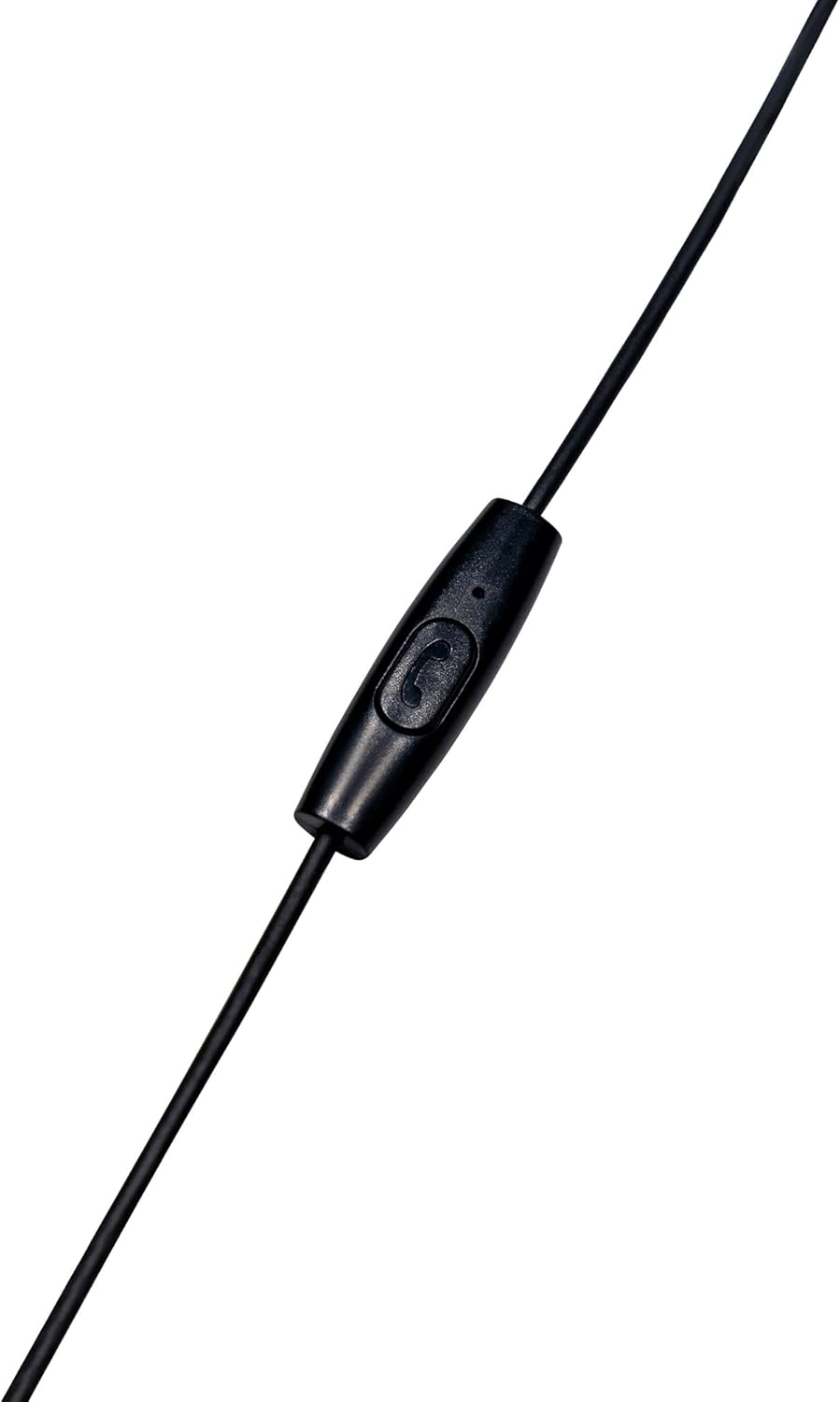
The in-line microphone and control button, allowing for hands-free calls and media management.
ວິດີໂອຜະລິດຕະພັນຢ່າງເປັນທາງການ
ວິດີໂອນີ້ໃຫ້ຫຼາຍກວ່າview of the Vault Buds Duo Dual Driver Headphones, highlighting key features and design elements.
ຕັ້ງຄ່າ
- ເລືອກເຄັດລັບຫູ: Choose the ear tip size that provides the most comfortable and secure fit for your ears. Multiple sizes are included to ensure optimal comfort and sound isolation.
- ໃສ່ຫູຟັງ: Gently insert the earbuds into your ears. Ensure a snug fit to maximize sound quality and bass response.
- ເຊື່ອມຕໍ່ຫາອຸປະກອນ: Plug the 3.5mm audio jack into the compatible audio port of your smartphone, tablet, PC, or laptop.
ຄໍາແນະນໍາການດໍາເນີນງານ
The in-line microphone and control button allow for easy management of calls and media playback.
- ຫຼິ້ນ/ຢຸດດົນຕີ: Press the control button once to play or pause audio playback.
- ຮັບ/ສາຍໂທ: Press the control button once to answer an incoming call or end an ongoing call.
- ປະຕິເສດການໂທ: Press and hold the control button for approximately 2 seconds to reject an incoming call.
- ເພງຕໍ່ໄປ: Press the control button twice quickly to skip to the next audio track.
- ຕິດຕາມກ່ອນ ໜ້າ ນີ້: Press the control button three times quickly to go back to the previous audio track.
ບໍາລຸງຮັກສາ
- ທໍາຄວາມສະອາດ: Regularly clean the ear tips with a soft, dry cloth. For deeper cleaning, remove the ear tips and wash them with mild soap and water, ensuring they are completely dry before reattaching. Do not use harsh chemicals or abrasive materials on the earbuds.
- ການເກັບຮັກສາ: When not in use, store the headphones in a clean, dry place, preferably in a protective pouch, to prevent tangling and damage to the cable or earbuds.
- ການດູແລສາຍໄຟ: Avoid excessive pulling, twisting, or bending of the cable, especially near the connectors, to prolong its lifespan.
ການແກ້ໄຂບັນຫາ
- ບໍ່ມີສຽງ:
- ກວດໃຫ້ແນ່ໃຈວ່າສຽບຊ່ອງສຽບ 3.5 ມມ ເຂົ້າໄປໃນຮູສຽບສຽງຂອງອຸປະກອນຂອງທ່ານ.
- ກວດເບິ່ງການຕັ້ງຄ່າລະດັບສຽງຂອງອຸປະກອນຂອງທ່ານ.
- ທົດສອບຫູຟັງກັບອຸປະກອນອື່ນເພື່ອແກ້ໄຂບັນຫາສະເພາະອຸປະກອນ.
- ຄຸນະພາບສຽງບໍ່ດີ:
- Ensure ear tips are correctly sized and seated for a proper seal in your ear canal.
- ທຳຄວາມສະອາດສິ່ງເສດເຫຼືອຕ່າງໆອອກຈາກແຖບຫູຟັງ.
- ໄມໂຄຣໂຟນບໍ່ເຮັດວຽກ:
- Ensure the 3.5mm jack is fully inserted. Some devices require a TRRS (Tip-Ring-Ring-Sleeve) jack for microphone functionality, which these headphones provide.
- ກວດສອບການຕັ້ງຄ່າການປ້ອນຂໍ້ມູນໄມໂຄຣໂຟນຂອງອຸປະກອນຂອງທ່ານ.
ຂໍ້ມູນຈໍາເພາະ
| ຄຸນສົມບັດ | ລາຍລະອຽດ |
|---|---|
| ຊື່ຕົວແບບ | EP-1182 |
| ປະເພດໄດເວີສຽງ | Dual Dynamic Driver |
| ຂະໜາດໄດເວີສຽງ | 2 * 6 Millimeters |
| ການຕອບສະໜອງຄວາມຖີ່ | 20Hz-20KHz |
| impedance | 32 ໂອມ |
| ເຕັກໂນໂລຊີການເຊື່ອມຕໍ່ | ມີສາຍ |
| Jack ຫູຟັງ | Jack ຂະ ໜາດ 3.5 ມມ |
| ຄຸນສົມບັດສາຍ | Durable TPE Rubber, 1.2m length |
| ປະເພດການຄວບຄຸມ | Media Control (In-line microphone) |
| ອຸປະກອນທີ່ເຂົ້າກັນໄດ້ | Smartphones, Tablets, PC, Laptop (with 3.5mm audio input) |
| ນ້ໍາຫນັກລາຍການ | 1.13 ອອນ |
ການຮັບປະກັນ & ສະຫນັບສະຫນູນ
This Vault Buds Duo Dual Driver Headphones product comes with a ຮັບປະກັນ 2 ປີ from Vault, covering damages and defects. For further assistance, troubleshooting, or warranty claims, please refer to the contact information provided on the product packaging or visit the official Vault webເວັບໄຊ.
For additional information and support, please visit the product detail page on Amazon: ຫນ້າຜະລິດຕະພັນ Amazon