
1. ບົດແນະນຳ
This manual provides essential information for the safe and efficient operation of your TechniSat DIGITRADIO 370 IR. Please read these instructions carefully before using the device and retain them for future reference.
2. ຄໍາແນະນໍາຄວາມປອດໄພ
- ຫ້າມບໍ່ໃຫ້ອຸປະກອນຖືກຝົນ ຫຼື ຄວາມຊຸ່ມຊື້ນ ເພື່ອປ້ອງກັນໄຟໄໝ້ ຫຼື ໄຟຟ້າຊອດ.
- ຢ່າອຸດຕັນຊ່ອງລະບາຍອາກາດ. ຮັບປະກັນໃຫ້ມີພື້ນທີ່ພຽງພໍອ້ອມຮອບອຸປະກອນເພື່ອໃຫ້ມີການໄຫຼວຽນຂອງອາກາດທີ່ເໝາະສົມ.
- ໃຊ້ພຽງແຕ່ອະແດບເຕີພະລັງງານທີ່ໃຫ້ມາກັບອຸປະກອນ.
- ຫຼີກລ້ຽງການວາງອຸປະກອນໄວ້ໃກ້ກັບແຫຼ່ງຄວາມຮ້ອນເຊັ່ນ: ລັງສີ, ເຄື່ອງບັນທຶກຄວາມຮ້ອນ, ເຕົາຫຼືອຸປະກອນອື່ນໆ (ລວມທັງ. amplifiers) ທີ່ຜະລິດຄວາມຮ້ອນ.
- ປົກປ້ອງສາຍໄຟຈາກການຖືກສຽບ ຫຼື ສຽບ, ໂດຍສະເພາະຢູ່ປລັກສຽບ, ກ່ອງຮັບສະດວກ, ແລະຈຸດທີ່ພວກມັນອອກຈາກອຸປະກອນ.
- ຖອດອຸປະກອນນີ້ອອກໃນລະຫວ່າງການມີພາຍຸຟ້າຜ່າ ຫຼືເມື່ອບໍ່ໄດ້ໃຊ້ເປັນເວລາດົນນານ.
- ອ້າງອີງການບໍລິການທັງໝົດໃຫ້ກັບພະນັກງານບໍລິການທີ່ມີຄຸນວຸດທິ. ການບໍລິການແມ່ນຕ້ອງການເມື່ອອຸປະກອນໄດ້ຮັບຄວາມເສຍຫາຍໃນທາງໃດກໍ່ຕາມເຊັ່ນ: ສາຍໄຟຫຼືປລັກສຽບຖືກເສຍຫາຍ, ແຫຼວຮົ່ວໄຫຼຫຼືສິ່ງຂອງຕົກເຂົ້າໄປໃນອຸປະກອນ, ອຸປະກອນຖືກຝົນຫຼືຄວາມຊຸ່ມຊື່ນ, ບໍ່ເຮັດວຽກຕາມປົກກະຕິ. , ຫຼືໄດ້ຖືກຫຼຸດລົງ.
3. ເນື້ອໃນຊຸດ
ກວດສອບວ່າລາຍການທັງຫມົດແມ່ນມີຢູ່ໃນຊຸດ:
- TechniSat DIGITRADIO 370 IR (Black)
- ການຄວບຄຸມໄລຍະໄກ
- Power Adapter
- ຄູ່ມືຜູ້ໃຊ້ (ເອກະສານນີ້)
4. ການຄວບຄຸມແລະການເຊື່ອມຕໍ່

ຮູບທີ 4.1: ແຜງດ້ານໜ້າເກີນview
The image above displays the front panel of the DIGITRADIO 370 IR, featuring the central display, volume and tuning/OK rotary knobs, and various control buttons such as Power, Mode, Preset, Scan, and Back.
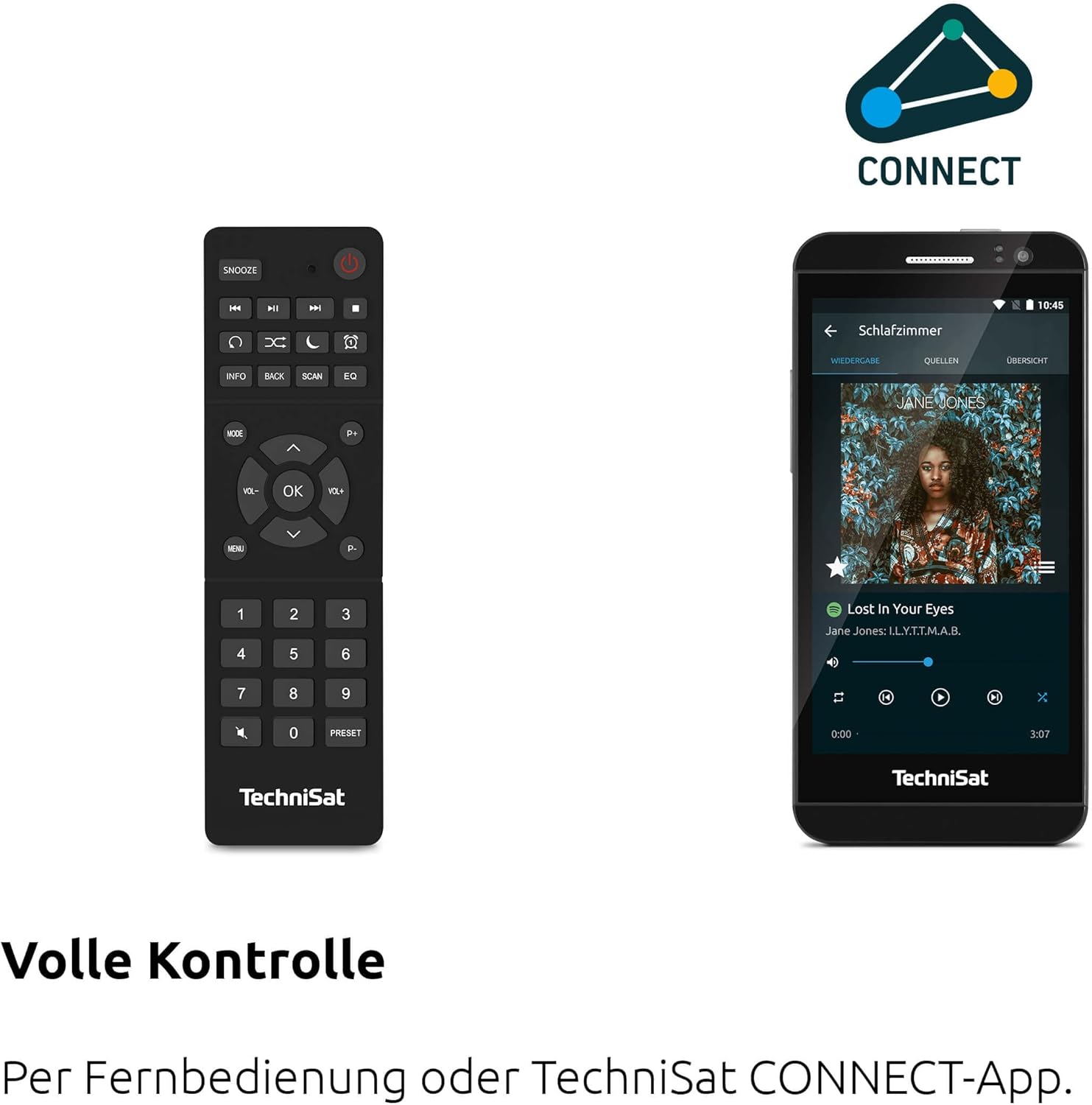
ຮູບທີ 4.2: ການຄວບຄຸມໄລຍະໄກ ແລະ ອິນເຕີເຟດແອັບ
This image shows the included remote control with buttons for power, snooze, mode, info, scan, EQ, preset numbers, volume, and navigation. It also illustrates the TechniSat CONNECT app interface on a smartphone, providing an alternative control method.
ແຜງຄວບຄຸມດ້ານໜ້າ:
- ປຸ່ມເປີດປິດ: ເປີດ/ປິດອຸປະກອນ.
- ປຸ່ມໂໝດ: Switches between DAB+, FM, Internet Radio, Bluetooth, AUX, and USB modes.
- ປຸ່ມຕັ້ງລ່ວງໜ້າ: Accesses stored radio station presets.
- ປຸ່ມລະດັບສຽງ: ປັບລະດັບສຽງອອກ.
- Tuning/OK Knob: ນຳທາງເມນູ ແລະຢືນຢັນການເລືອກ.
- ປຸ່ມສະແກນ: Initiates station scanning in radio modes.
- ປຸ່ມກັບຄືນ: ກັບຄືນໄປຫາເມນູ ຫຼືໜ້າຈໍກ່ອນໜ້າ.
- ຈໍສະແດງຜົນ: 2.4-inch TFT color display for information and menu navigation.
ການເຊື່ອມຕໍ່ແຜງດ້ານຫຼັງ:
- ການປ້ອນຂໍ້ມູນພະລັງງານ: ເຊື່ອມຕໍ່ອຸປະກອນໄຟຟ້າທີ່ສະ ໜອງ ໃຫ້.
- AUX-IN: Jack 3.5mm ສໍາລັບການເຊື່ອມຕໍ່ອຸປະກອນສຽງພາຍນອກ.
- ຫູຟັງ Jack: Jack 3.5mm ສໍາລັບການຟັງສ່ວນຕົວ.
- ພອດ USB: For MP3 playback from USB drives and charging external devices.
5. ຕັ້ງຄ່າ
5.1 ການເປີດພະລັງງານເບື້ອງຕົ້ນ
- Place the DIGITRADIO 370 IR on a stable, flat surface.
- Extend the telescopic antenna for optimal DAB+ and FM reception.
- Connect the power adapter to the DC IN port on the rear of the radio and then to a wall outlet.
- Press the Power button on the front panel or remote control to turn on the device.
- ປະຕິບັດຕາມຄຳແນະນຳໃນໜ້າຈໍສຳລັບການຕັ້ງຄ່າເບື້ອງຕົ້ນ, ລວມທັງການເລືອກພາສາ ແລະ ການຕັ້ງຄ່າເຄືອຂ່າຍ.
5.2 Network Configuration (WLAN)
To access Internet Radio and app control, the device must be connected to a Wi-Fi network.
- Navigate to the 'Settings' menu using the Tuning/OK knob.
- Select 'Network' and then 'Wi-Fi Setup'.
- The radio will scan for available networks. Select your desired network from the list.
- Enter the Wi-Fi password using the on-screen keyboard and the Tuning/OK knob.
- ຢືນຢັນການເຊື່ອມຕໍ່. ເມື່ອເຊື່ອມຕໍ່ແລ້ວ, ໄອຄອນ Wi-Fi ຈະປາກົດຢູ່ໜ້າຈໍ.
6. ຄໍາແນະນໍາການດໍາເນີນງານ

Figure 6.1: Radio Diversity
This image highlights the multiple radio reception options available: DAB+ Digital Radio, Internet Radio via WLAN, and UKW/FM analog radio.
6.1 DAB+ ວິທະຍຸ
- Press the 'Mode' button until 'DAB+' is selected.
- The radio will automatically scan for available DAB+ stations during the first use. To initiate a scan manually, press the 'Scan' button.
- Use the Tuning/OK knob to scroll through the list of available stations. Press the knob to select a station.
- To save a station as a preset, press and hold the 'Preset' button, then select a preset number and confirm.
ວິທະຍຸ 6.2 FM
- Press the 'Mode' button until 'FM' is selected.
- Press the 'Scan' button to automatically search for and store FM stations.
- Alternatively, use the Tuning/OK knob to manually tune to a frequency.
- To save a station as a preset, press and hold the 'Preset' button, then select a preset number and confirm.
6.3 ວິທະຍຸອິນເຕີເນັດ
Ensure the radio is connected to a Wi-Fi network (see Section 5.2).
- ກົດປຸ່ມ 'ໂໝດ' ຈົນກວ່າ 'ວິທະຍຸອິນເຕີເນັດ' ຈະຖືກເລືອກ.
- ທ່ານສາມາດເບິ່ງສະຖານີຕ່າງໆໄດ້ຕາມສະຖານທີ່, ປະເພດ ຫຼື ຄົ້ນຫາສະຖານີສະເພາະ.
- Use the Tuning/OK knob to navigate and select stations.
- To save a station as a preset, press and hold the 'Preset' button, then select a preset number and confirm.
6.4 ການຖ່າຍທອດສຽງ Bluetooth

Figure 6.2: Bluetooth Audio Streaming
This image demonstrates a smartphone wirelessly streaming music to the radio via Bluetooth, indicating the device's capability for wireless music enjoyment.
- Press the 'Mode' button until 'Bluetooth' is selected. The radio will enter pairing mode.
- ໃນໂທລະສັບສະຫຼາດ ຫຼື ອຸປະກອນ Bluetooth ອື່ນຂອງທ່ານ, ເປີດໃຊ້ Bluetooth ແລະ ຄົ້ນຫາອຸປະກອນທີ່ມີຢູ່.
- Select 'DIGITRADIO 370 IR' from the list to pair.
- ເມື່ອຈັບຄູ່ແລ້ວ, ທ່ານສາມາດຫຼິ້ນສຽງຈາກອຸປະກອນຂອງທ່ານຜ່ານວິທະຍຸໄດ້.
6.5 ການຫຼິ້ນ ແລະສາກ USB

Figure 6.3: USB Playback and Charging Function
This image illustrates the dual functionality of the USB port: connecting USB storage devices for MP3 playback and using the port to charge compatible devices like smartphones.
- ໃສ່ USB flash drive ທີ່ບັນຈຸ MP3 files into the USB port on the rear of the radio.
- ກົດປຸ່ມ 'ໂໝດ' ຈົນກວ່າ 'USB' ຈະຖືກເລືອກ.
- Use the Tuning/OK knob to navigate through folders and select tracks for playback.
- The USB port can also be used to charge compatible smartphones and other devices. Connect your device's charging cable to the USB port.
6.6 ການສາກໄຟໄຮ້ສາຍ

Figure 6.4: Wireless Charging Function
This image shows a hand placing a smartphone on the top surface of the radio, demonstrating the wireless charging capability for compatible smartphones.
The DIGITRADIO 370 IR features a wireless charging surface on its top panel.
- Ensure your smartphone or device supports Qi wireless charging.
- Place your compatible device centrally on the designated wireless charging area on top of the radio.
- The device should indicate that charging has begun.
6.7 Alarm Clock, Sleep Timer, and Snooze
The radio includes an alarm clock, sleep timer, and snooze function.
- ໂມງປຸກ: Set up to two independent alarms with customizable sources (buzzer, DAB+, FM, Internet Radio) and volume. Access via the 'Settings' menu.
- ເຄື່ອງຈັບເວລານອນ: Allows the radio to turn off automatically after a set period (e.g., 15, 30, 60 minutes). Access via the 'Settings' menu.
- ປິດສຽງເຕືອນຊົ່ວຄາວ: When an alarm sounds, press the 'Snooze' button on the remote control to temporarily pause the alarm.
6.8 App Control (UNDOK App)
The DIGITRADIO 370 IR can be controlled via the UNDOK app on your smartphone or tablet.
- Download the 'UNDOK' app from your device's app store.
- ໃຫ້ແນ່ໃຈວ່າໂທລະສັບສະຫຼາດ/ແທັບເລັດ ແລະ ວິທະຍຸຂອງທ່ານເຊື່ອມຕໍ່ກັບເຄືອຂ່າຍ Wi-Fi ດຽວກັນ.
- Open the UNDOK app; it should automatically detect your DIGITRADIO 370 IR.
- You can now control all major functions of the radio, including mode selection, station tuning, volume, and presets, directly from the app.
7. ບໍາລຸງຮັກສາ
7.1 ການທໍາຄວາມສະອາດ
- ຖອດປລັກອຸປະກອນອອກຈາກປລັກສຽບໄຟກ່ອນທຳຄວາມສະອາດທຸກຄັ້ງ.
- ໃຊ້ຜ້າປຽກອ່ອນໆເຊັດພື້ນຜິວພາຍນອກ.
- ຢ່າໃຊ້ເຄື່ອງເຮັດຄວາມສະອາດຂອງແຫຼວ, ເຄື່ອງເຮັດຄວາມສະອາດ aerosol, ຫຼືສານລະລາຍສານເຄມີທີ່ເຂັ້ມແຂງ, ເພາະວ່າສິ່ງເຫຼົ່ານີ້ອາດຈະທໍາລາຍການສໍາເລັດຮູບ.
7.2 ການເກັບຮັກສາ
ຖ້າເກັບຮັກສາອຸປະກອນໄວ້ເປັນເວລາດົນ, ໃຫ້ຖອດປລັກອອກຈາກແຫຼ່ງພະລັງງານ ແລະ ເກັບຮັກສາໄວ້ໃນບ່ອນທີ່ເຢັນ, ແຫ້ງ, ຫ່າງຈາກແສງແດດໂດຍກົງ ແລະ ອຸນຫະພູມສູງສຸດ.
8. ການແກ້ໄຂບັນຫາ
| ບັນຫາ | ສາເຫດທີ່ເປັນໄປໄດ້ | ການແກ້ໄຂ |
|---|---|---|
| ບໍ່ມີພະລັງງານ | ສາຍໄຟບໍ່ໄດ້ເຊື່ອມຕໍ່; ປລັກສຽບໄຟມີບັນຫາ | Check power cable connection; Try a different power outlet. |
| ບໍ່ມີສຽງ | Volume too low; Mute activated; Incorrect source selected | Increase volume; Check if mute is active; Select the correct input source (DAB+, FM, Internet, Bluetooth, USB, AUX). |
| ການຮັບວິທະຍຸບໍ່ດີ (DAB+/FM) | ເສົາອາກາດບໍ່ໄດ້ຂະຫຍາຍ; ສັນຍານອ່ອນ; ແຊກແຊງ | Fully extend the telescopic antenna; Reposition the radio; Avoid placing near other electronic devices. |
| ວິທະຍຸອິນເຕີເນັດບໍ່ເຮັດວຽກ | No Wi-Fi connection; Incorrect Wi-Fi password; Router issue | Check Wi-Fi connection in settings; Re-enter Wi-Fi password; Restart your Wi-Fi router. |
| ການຈັບຄູ່ Bluetooth ລົ້ມເຫລວ | Radio not in pairing mode; Device too far; Bluetooth off on source device | Ensure radio is in Bluetooth mode; Move devices closer; Enable Bluetooth on your source device. |
| ການສາກໄຟໄຮ້ສາຍບໍ່ເຮັດວຽກ | Device not Qi-compatible; Device not placed correctly; Phone case too thick | Verify device supports Qi charging; Adjust device position on charging pad; Remove thick phone cases. |
9. ຂໍ້ມູນຈໍາເພາະ
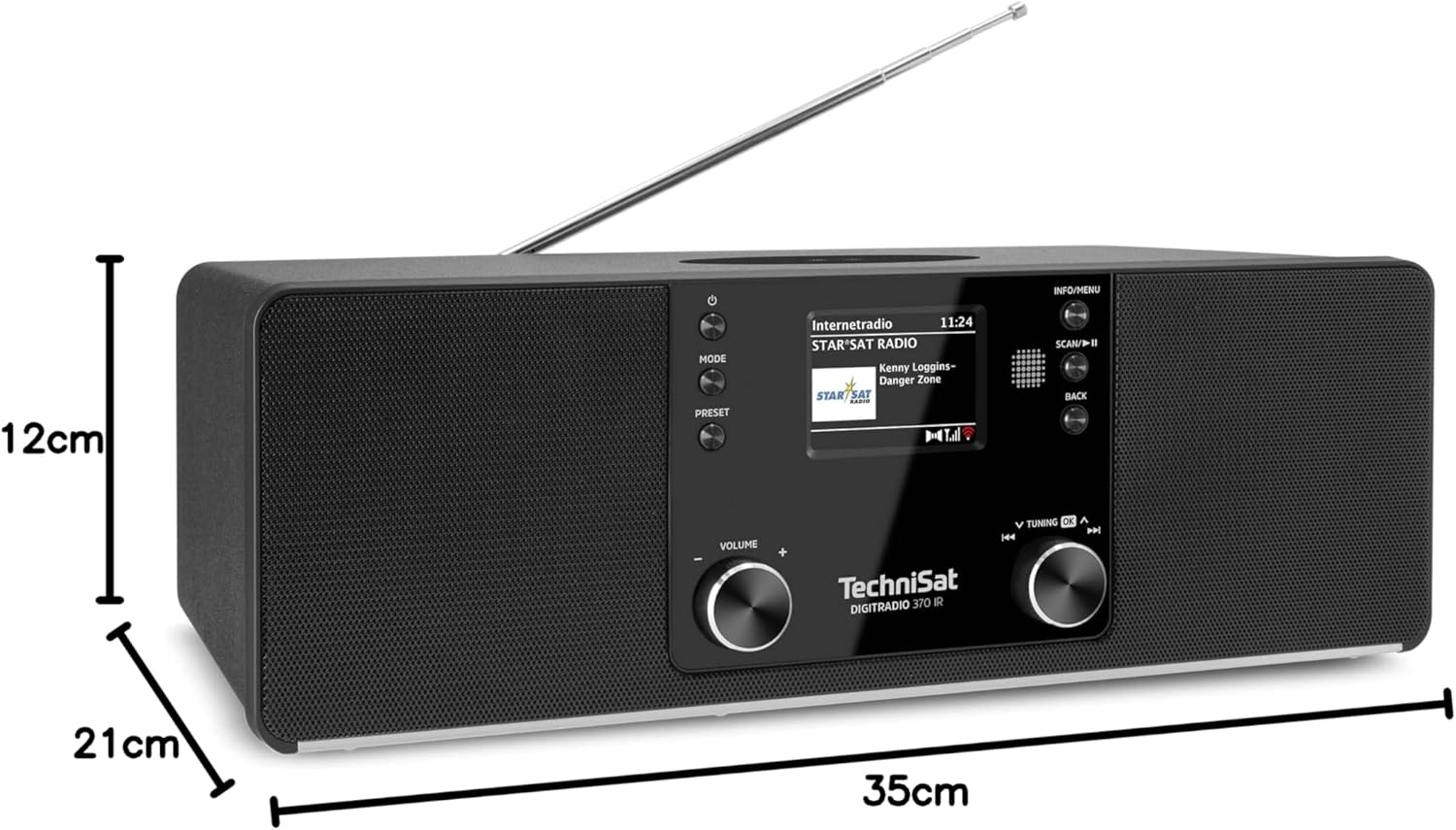
ຮູບທີ 9.1: ຂະໜາດຜະລິດຕະພັນ
This image provides a visual representation of the radio's dimensions: 35 cm (length), 12 cm (height), and 21 cm (depth).
| ຄຸນສົມບັດ | ລາຍລະອຽດ |
|---|---|
| ໝາຍເລກຕົວແບບ | 0000/3971 |
| ຍີ່ຫໍ້ | TechniSat |
| ແຖບວິທະຍຸສະຫນັບສະຫນູນ | DAB+, FM, ວິທະຍຸອິນເຕີເນັດ |
| ເຕັກໂນໂລຊີການເຊື່ອມຕໍ່ | Bluetooth, USB, Wireless-Charging, WLAN (2.4 GHz & 5 GHz) |
| ຄຸນນະສົມບັດພິເສດ | Wireless Charging, Bluetooth Audio Streaming, USB Playback & Charging, Alarm Clock, Sleep Timer, Snooze, App Control (UNDOK) |
| ຮູບແບບການອອກສຽງ | ສະເຕຣິໂອ |
| ລຳໂພງກຳລັງອອກ | 2 x 5 Watts RMS (10 Watts total) |
| ປະເພດການສະແດງ | ຈໍ LCD ສີ TFT ຂະໜາດ 2.4 ນິ້ວ |
| ແຫຼ່ງພະລັງງານ | Electric Cord (230 Volts, 60 Hz) |
| ຂະໜາດ (L x W x H) | 35 x 21 x 12 cm |
| ນ້ຳໜັກ | 2.7 ກິໂລກຣາມ |
| ວັດສະດຸທີ່ຢູ່ອາໄສ | ໄມ້ |
| ອຸປະກອນທີ່ເຂົ້າກັນໄດ້ | Smartphone, MP3 player, tablet, laptop, headphones |
| ການໂຕ້ຕອບ | 3.5 mm Audio (AUX-IN), USB 2.0, 3.5 mm Headphone |
10. ການຮັບປະກັນແລະການສະຫນັບສະຫນູນ
10.1 ຂໍ້ມູນການຮັບປະກັນ
This product comes with a 2-year warranty (Gewährleistung) from the date of purchase. Please retain your proof of purchase for any warranty claims. The warranty covers manufacturing defects and malfunctions under normal use. It does not cover damage caused by misuse, accidents, unauthorized modifications, or normal wear and tear.
10.2 ສະຫນັບສະຫນູນລູກຄ້າ
For technical assistance, troubleshooting beyond this manual, or warranty inquiries, please contact TechniSat customer support. Refer to the TechniSat official webເວັບໄຊສໍາລັບລາຍລະອຽດການຕິດຕໍ່ສະເພາະກັບພາກພື້ນຂອງທ່ານ.
ຊັບພະຍາກອນອອນໄລນ໌: ເຂົ້າເບິ່ງ TechniSat ຢ່າງເປັນທາງການ website for updated manuals, FAQs, and support information.