
1. ບົດແນະນຳ
Thank you for choosing the ASHATA 95 Keys Wired Mechanical Gaming Keyboard. This compact and versatile keyboard is designed for both gaming and office use, offering a comfortable typing experience with its durable mechanical switches and plug-and-play functionality. This manual provides essential information for setting up, operating, and maintaining your new keyboard.
2. ຄຸນລັກສະນະຂອງຜະລິດຕະພັນ
- 95-ໂຄງຮ່າງຫຼັກ: Compact design with a full set of essential keys, available with English and Arabic keycaps.
- ການເຊື່ອມຕໍ່ແບບມີສາຍ: Reliable USB-A connection for stable performance.
- ສະວິດກົນຈັກ: Provides tactile feedback and durability for an enhanced typing and gaming experience.
- ສຽບ ແລະ ຫຼິ້ນ: No complex driver installation required; simply connect and use.
- ການອອກແບບທົນທານ: Features legible, fade-resistant key printing for long-lasting use.
- ການພິມທີ່ສະດວກສະບາຍ: Ergonomically designed for extended use in office or home environments.
- ການອອກແບບອັດຕະໂນມັດ: Approximately 60% size of a standard keyboard, saving desk space.
- ຄວາມທົນທານສູງ: Rated for over 10 million keystrokes life.
- ບາງ ແລະ Portable: With a thickness of approximately 1 cm, it is easy to transport.
- ການອອກແບບງຽບ: Equipped with quality silicone keys for a quiet typing environment.
- Independent Multimedia Buttons: Dedicated buttons for quick access to media controls.

ຮູບພາບ: ຫຼາຍກວ່າview of the ASHATA Wired Keyboard highlighting its features.

ຮູບພາບ: ໃກ້ຊິດ view of the comfortable 95-key layout.

ຮູບພາບ: Side profile illustrating the thin and portable design.

Image: Detail of a keycap, demonstrating the silent design feature.
3. ເນື້ອໃນຊຸດ
ໃຫ້ແນ່ໃຈວ່າທຸກລາຍການຢູ່ໃນຊຸດ:
- 1 x ແປ້ນພິມແບບມີສາຍ
4. ຄໍາແນະນໍາການຕິດຕັ້ງ
The ASHATA 95 Keys Wired Mechanical Gaming Keyboard is designed for simple plug-and-play operation.
- ຖອດແປ້ນພິມ: ເອົາແປ້ນພິມອອກຈາກເຄື່ອງຫຸ້ມຫໍ່ຂອງມັນຢ່າງລະມັດລະວັງ.
- ເຊື່ອມຕໍ່ກັບອຸປະກອນຂອງທ່ານ: Locate an available USB-A port on your computer (desktop, laptop, etc.). Insert the USB connector of the keyboard cable into the USB-A port.
- ການຮັບຮູ້ອັດຕະໂນມັດ: Your operating system (e.g., Windows) will automatically detect and install the necessary drivers. This process usually takes a few seconds.
- ເລີ່ມຕົ້ນການນໍາໃຊ້: ເມື່ອຮັບຮູ້ແລ້ວ, ແປ້ນພິມຈະພ້ອມທີ່ຈະໃຊ້ງານໄດ້ທັນທີ.

Image: The keyboard with its integrated USB cable, approximately 1.5m long.

Image: USB interface for plug and play functionality, with cable length of 1.5m.

Image: Keyboard connected and ready for use with a desktop computer.
5. ຄໍາແນະນໍາການດໍາເນີນງານ
This keyboard functions like a standard QWERTY keyboard with additional multimedia controls.
5.1 ການພິມພື້ນຖານ
Simply press the desired keys to input characters. The keyboard supports both English and Arabic characters, depending on the specific model and your operating system's language settings.
5.2 ປຸ່ມມັນຕິມີເດຍ
The keyboard features dedicated multimedia buttons located above the function keys (F1-F12) for quick access to media controls. These buttons allow you to:
- Adjust Volume (Volume Up, Volume Down, Mute)
- Control Media Playback (Play/Pause, Previous Track, Next Track)
- Open Default Media Player
- Open Default Web ຕົວທ່ອງເວັບ
- ເປີດອີເມວລູກຄ້າ
- ຟັງຊັນຄົ້ນຫາ
Image: Detail of the independent multimedia buttons for quick access to functions.
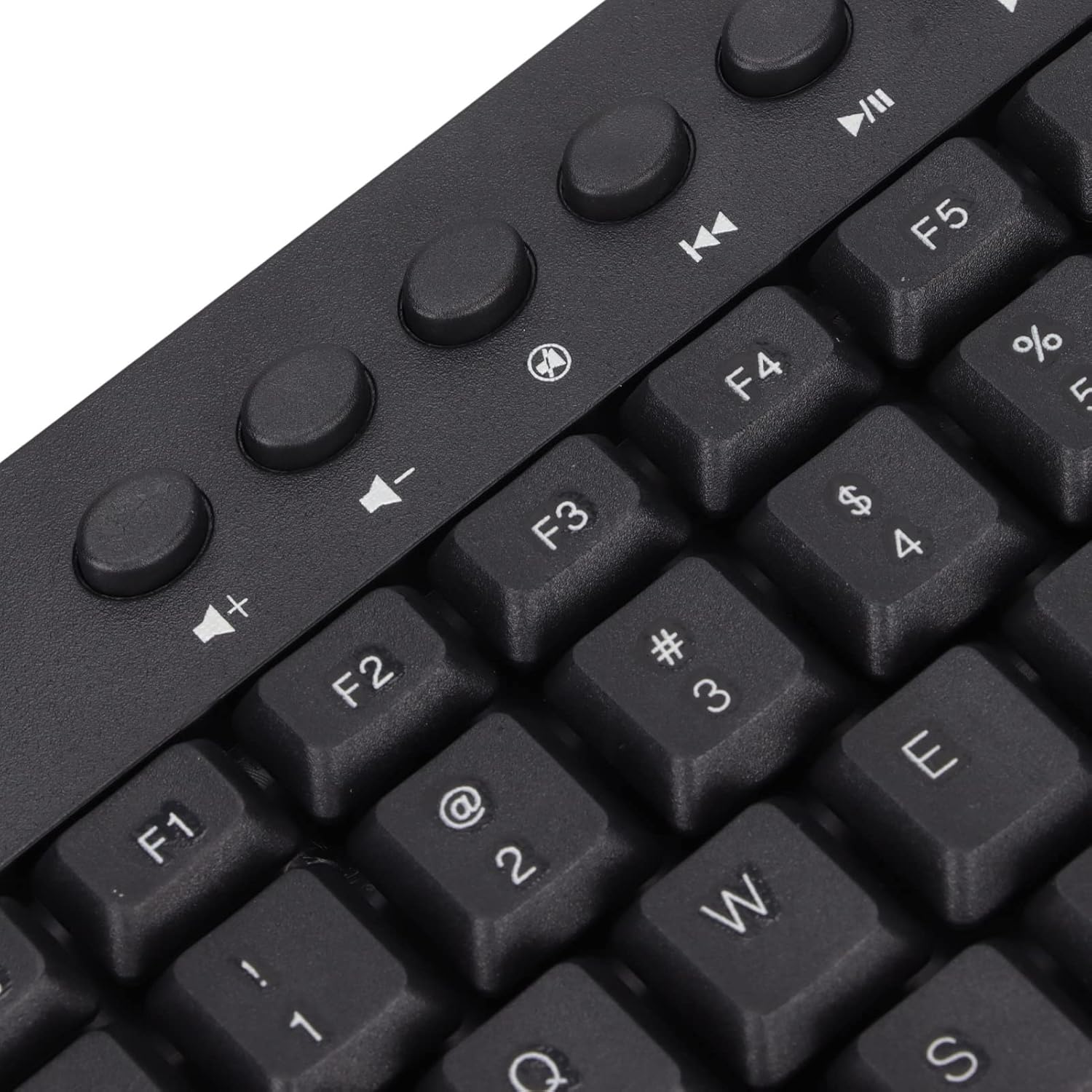
ຮູບພາບ: ໃກ້ຊິດ view of the dedicated multimedia control keys.

Image: Detail of the right-side keys, including navigation and control keys.
6. ບໍາລຸງຮັກສາ
To ensure the longevity and optimal performance of your ASHATA keyboard, follow these maintenance guidelines:
- ທໍາຄວາມສະອາດ: Use a soft, dry cloth to wipe the surface of the keyboard. For deeper cleaning, you may use a slightly damp cloth with a mild cleaning solution, ensuring no liquid enters the key switches or internal components.
- ການກຳຈັດຂີ້ຝຸ່ນ: ໃຊ້ອາກາດບີບອັດເພື່ອເອົາຝຸ່ນ ແລະສິ່ງເສດເຫຼືອອອກຈາກລະຫວ່າງປຸ່ມກົດ.
- ຫຼີກລ້ຽງການຂອງແຫຼວ: ຢ່າຮົ່ວຂອງແຫຼວໃສ່ແປ້ນພິມ. ຖ້າການຮົ່ວໄຫຼເກີດຂຶ້ນ, ໃຫ້ຖອດແປ້ນພິມອອກຈາກຄອມພິວເຕີຂອງທ່ານທັນທີ ແລະປ່ອຍໃຫ້ມັນແຫ້ງໝົດກ່ອນທີ່ຈະເຊື່ອມຕໍ່ຄືນໃໝ່.
- ການເກັບຮັກສາ: ເກັບຮັກສາແປ້ນພິມໄວ້ໃນບ່ອນທີ່ເຢັນ, ແຫ້ງ, ຫ່າງຈາກແສງແດດໂດຍກົງແລະອຸນຫະພູມທີ່ຮຸນແຮງ.
7. ການແກ້ໄຂບັນຫາ
ຖ້າທ່ານພົບບັນຫາກັບແປ້ນພິມຂອງທ່ານ, ໃຫ້ອ້າງອີງເຖິງບັນຫາ ແລະ ວິທີແກ້ໄຂທົ່ວໄປຕໍ່ໄປນີ້:
7.1 ແປ້ນພິມບໍ່ຕອບສະໜອງ
- ກວດເບິ່ງການເຊື່ອມຕໍ່ USB: Ensure the USB cable is securely plugged into a working USB-A port on your computer. Try a different USB port.
- ປິດເປີດຄອມພິວເຕີຄືນໃໝ່: ບາງຄັ້ງ, ການຣີສະຕາດຄອມພິວເຕີແບບງ່າຍໆສາມາດແກ້ໄຂບັນຫາການເຊື່ອມຕໍ່ໄດ້.
- ທົດສອບໃນອຸປະກອນອື່ນ: Connect the keyboard to another computer to determine if the issue is with the keyboard or your original device.
7.2 ປຸ່ມບໍ່ເຮັດວຽກຢ່າງຖືກຕ້ອງ
- ກະແຈທີ່ສະອາດ: Check for any debris or foreign objects lodged under the non-functioning keys. Use compressed air to clear them.
- ຂໍ້ຂັດແຍ່ງຊອບແວ: Ensure no conflicting software or drivers are installed that might interfere with keyboard input.
7.3 ປຸ່ມມັນຕິມີເດຍບໍ່ເຮັດວຽກ
- ການຕັ້ງຄ່າລະບົບປະຕິບັດການ: Verify that your operating system's media key settings are configured correctly.
- ຄວາມເຂົ້າກັນໄດ້ຂອງແອັບພລິເຄຊັນ: Some applications may not fully support universal multimedia keys.
ຖ້າຂັ້ນຕອນເຫຼົ່ານີ້ບໍ່ສາມາດແກ້ໄຂບັນຫາໄດ້, ກະລຸນາຕິດຕໍ່ຝ່າຍສະໜັບສະໜູນລູກຄ້າເພື່ອຂໍຄວາມຊ່ວຍເຫຼືອເພີ່ມເຕີມ.
8. ຂໍ້ມູນຈໍາເພາະ
| ຄຸນສົມບັດ | ລາຍລະອຽດ |
|---|---|
| ຍີ່ຫໍ້ | ASHATA |
| ໝາຍເລກຕົວແບບ | ASHATA8x4ni917wp552-12 |
| ເຕັກໂນໂລຊີການເຊື່ອມຕໍ່ | USB-A (ມີສາຍ) |
| ຈໍານວນກະແຈ | 95 |
| ປະເພດສະຫຼັບ | ກົນຈັກ |
| ວັດສະດຸ | ພາດສະຕິກ |
| ສີ | Black (Arabic layout) |
| ອຸປະກອນທີ່ເຂົ້າກັນໄດ້ | PC (Desktop, Laptop) |
| ລະບົບປະຕິບັດການທີ່ເຂົ້າກັນໄດ້ຄອບຄົວ | Windows |
| ຄວາມຍາວສາຍ | Approx. 1.5m / 1.6yd |
| ຄຸນນະສົມບັດພິເສດ | ປຸ່ມມັນຕິມີເດຍເອກະລາດ |

ຮູບພາບ: ລຸ່ມ view of the keyboard, displaying regulatory information and adjustable feet.
9. ການຮັບປະກັນແລະການສະຫນັບສະຫນູນ
ສຳລັບຂໍ້ມູນການຮັບປະກັນ ແລະ ການສະໜັບສະໜູນລູກຄ້າ, ກະລຸນາອ້າງອີງເອກະສານທີ່ມາພ້ອມກັບການຊື້ຂອງທ່ານ ຫຼື ຕິດຕໍ່ຜູ້ຂາຍຍ່ອຍ/ຜູ້ຜະລິດໂດຍກົງ. ເກັບຮັກສາຫຼັກຖານການຊື້ຂອງທ່ານໄວ້ສຳລັບການຮຽກຮ້ອງການຮັບປະກັນໃດໆ.