
1. ບົດແນະນຳ
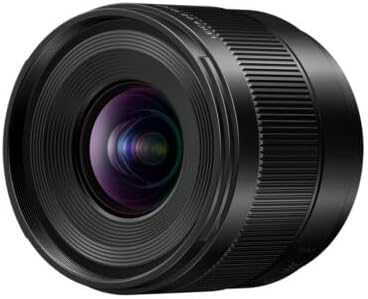
This manual provides instructions for the Panasonic LUMIX Leica DG SUMMILUX 9mm F1.7 ASPH lens (Model H-X09). This ultra-wide-angle prime lens is designed for Micro Four Thirds cameras, offering a large F1.7 aperture for excellent low-light performance and shallow depth of field. It is suitable for both still photography and video recording, featuring advanced optical design and robust construction.

Figure 1: Panasonic LUMIX Leica DG SUMMILUX 9mm F1.7 ASPH Lens (Model H-X09).
2. ຕັ້ງຄ່າ
2.1 ການຕິດເລນ
- ກວດໃຫ້ແນ່ໃຈວ່າທັງກ້ອງຖ່າຍຮູບ ແລະເລນປິດຢູ່.
- ຖອດຝາປິດກ້ອງຫຼັງອອກຈາກເລນ ແລະຝາປິດຕົວອອກຈາກກ້ອງ.
- Align the mounting index (red dot) on the lens with the mounting index on the camera body.
- ໃສ່ເລນເຂົ້າໄປໃນຕົວຍຶດເລນຂອງກ້ອງຖ່າຍຮູບ ແລະ ໝຸນມັນຕາມເຂັມໂມງຈົນກວ່າມັນຈະຄລິກເຂົ້າທີ່. ຢ່າບັງຄັບເລນ.

Figure 2: The H-X09 lens mounted on a Micro Four Thirds camera body.
2.2 ການຖອດເລນ
- ໃຫ້ແນ່ໃຈວ່າກ້ອງຖ່າຍຮູບປິດຢູ່.
- While pressing the lens release button on the camera body, turn the lens counter-clockwise until it stops.
- ເອົາເລນອອກຈາກຕົວກ້ອງຖ່າຍຮູບຢ່າງລະມັດລະວັງ.
- Attach the rear lens cap to the lens and the body cap to the camera to protect the sensors and optics.
2.3 ການຕິດຝາ Lens Hood
The lens hood helps to block unwanted light and protect the front element of the lens. Align the lens hood with the front of the lens and turn it until it locks into place. Ensure it is securely attached.
3. ການດໍາເນີນງານ
3.1 ການສຸມໃສ່
The H-X09 lens supports both autofocus (AF) and manual focus (MF). The focus mode is typically controlled via your camera body settings.
- ໂຟກັສອັດຕະໂນມັດ: The lens is designed for smooth, silent operation with the camera's high-speed, high-precision contrast AF system.
- ໂຟກັສດ້ວຍມື: For precise control, switch your camera to manual focus mode. The focus ring on the lens allows for direct adjustment. For non-linear settings, focus shifts variably with rotation speed. For linear settings, focus shifts with a designated amount per rotational quantum.
ຮູບ 3: ຂ້າງ view of the H-X09 lens, highlighting the focus ring and markings.
3.2 ການຄວບຄຸມ Aperture
The lens features a large F1.7 maximum aperture, allowing for excellent performance in low-light conditions and the creation of beautiful bokeh (background blur). Aperture control is managed through your camera body. The 7-blade circular aperture diaphragm contributes to smooth, pleasing out-of-focus areas.
3.3 Video Recording Performance
This lens excels in video recording with features designed to enhance video quality:
- Minimal Focus Breathing: A mechanism suppresses focus breathing, ensuring stable framing when adjusting focus during video capture.
- Smooth Aperture Control: Micro-step aperture control allows for seamless exposure changes, preventing abrupt shifts in brightness during recording.
3.4 Understanding Focal Length
The H-X09 is a 9mm prime lens. On a Micro Four Thirds system, this provides an equivalent focal length of 18mm in 35mm format, making it an ultra-wide-angle lens. This is ideal for landscapes, architecture, street photography, and vlogging where a wide field of view ຕ້ອງການ.
4. ບໍາລຸງຮັກສາ
4.1 ການເຮັດຄວາມສະອາດເລນ
- Use a lens blower brush to remove dust and loose particles from the lens surface.
- For smudges or fingerprints, use a clean, soft microfiber cloth specifically designed for optics, along with a small amount of lens cleaning solution. Apply the solution to the cloth, not directly to the lens.
- ເຊັດຄ່ອຍໆເປັນວົງມົນຈາກກາງອອກໄປຂ້າງນອກ.
- Avoid touching the lens surface with your fingers.
4.2 Dust/Splash-Resistant Design
The LEICA DG SUMMILUX 9mm F1.7 features a rugged dust/splash-resistant design, allowing for use in challenging conditions, including temperatures down to -10 degrees Celsius. However, dust and splash resistance does not guarantee that damage will not occur if this lens is subjected to direct contact with dust and water. Always exercise caution when using the lens in adverse weather conditions.

Figure 4: Illustration of the lens's dust, splash, and freeze-resistant construction.
4.3 ການເກັບຮັກສາ
When not in use, store the lens with both front and rear caps attached in a dry, cool place away from direct sunlight and extreme temperatures. Consider using a dehumidifying cabinet if you live in a humid environment.
5. ການແກ້ໄຂບັນຫາ
| ບັນຫາ | ສາເຫດທີ່ເປັນໄປໄດ້ | ການແກ້ໄຂ |
|---|---|---|
| ກ້ອງບໍ່ສາມາດຮັບຮູ້ເລນໄດ້. | Improperly mounted lens, dirty electrical contacts. | Ensure the lens is securely attached. Clean the electrical contacts on both the lens and camera with a clean, dry cloth. |
| ໂຟກັສອັດຕະໂນມັດຊ້າ ຫຼື ບໍ່ຖືກຕ້ອງ. | Low light conditions, subject lacks contrast, camera settings. | Ensure adequate lighting. Focus on areas with clear contrast. Check camera's AF mode and settings. |
| ຮູບພາບແມ່ນມົວ. | Incorrect focus, camera shake, dirty lens element. | Verify focus. Use a faster shutter speed or tripod to prevent camera shake. Clean the lens elements. |
| ຝາປິດເລນຕິດບໍ່ໄດ້ຢ່າງແໜ້ນໜາ. | Misalignment, debris in mounting groove. | Ensure correct alignment. Check for and remove any debris from the mounting groove. |
6. ຂໍ້ມູນຈໍາເພາະ
| ຄຸນສົມບັດ | ລາຍລະອຽດ |
|---|---|
| ຍີ່ຫໍ້ | Panasonic |
| ຊື່ຕົວແບບ | H-X09 |
| ຄວາມຍາວໂຟກັສ | 9mm (18mm equivalent on 35mm format) |
| ຮູຮັບແສງສູງສຸດ | F1.7 |
| Aperture ຂັ້ນຕ່ ຳ | F16 |
| ປະເພດເລນ | Wide Angle Prime Lens |
| ການຕິດຕັ້ງທີ່ເຂົ້າກັນໄດ້ | ຈຸນລະພາກສີ່ສ່ວນສາມ |
| ການກໍ່ສ້າງເລນ | 12 elements in 9 groups (2 Aspherical, 2 ED, 1 UHR) |
| ຈໍານວນຂອງແຜ່ນໃບຄ້າຍຄື Diaphragm | 7 (circular aperture diaphragm) |
| ໄລຍະການໂຟກັສຕໍ່າສຸດ | 0.095m (0.31ft) |
| ການຂະຫຍາຍສູງສຸດ | 0.25x (35mm camera equivalent: 0.5x) |
| ຂະໜາດຕົວກອງ | 55 ມມ |
| ນ້ໍາຫນັກລາຍການ | ປະມານ 130 ກຣາມ (0.29 ປອນ) |
| Dust/Splash/Freeze-Resistant | Yes (down to -10°C) |
| ປະເພດຈຸດສຸມ | ໂຟກັສອັດຕະໂນມັດ |
| ລາຍລະອຽດການເຄືອບເລນ | ການເຄືອບ fluorine |

Figure 5: H-X09 Lens Construction Diagram.

Figure 6: H-X09 MTF Chart (9mm F1.7).
7. ການຮັບປະກັນແລະການສະ ໜັບ ສະ ໜູນ
7.1 ຂໍ້ມູນການຮັບປະກັນ
This Panasonic LUMIX Leica DG SUMMILUX 9mm F1.7 ASPH lens (Model H-X09) comes with a ການຮັບປະກັນຂອງຜູ້ຜະລິດ 1 ປີ. Please retain your proof of purchase for warranty claims. For detailed terms and conditions, refer to the warranty card included with your product or visit the official Panasonic support webເວັບໄຊ.
7.2 ສະຫນັບສະຫນູນລູກຄ້າ
For further assistance, technical support, or service inquiries, please contact Panasonic customer support. You can find contact information and additional resources on the official Panasonic webເວັບໄຊ: www.panasonic.com/us/support.


