
1. ຂໍ້ມູນຄວາມປອດໄພທີ່ສໍາຄັນ
ອ່ານ ແລະເຂົ້າໃຈທຸກຄຳເຕືອນຄວາມປອດໄພ, ຄຳແນະນຳ, ຮູບປະກອບ, ແລະຂໍ້ມູນສະເພາະທີ່ສະໜອງໃຫ້ກັບເຄື່ອງມືພະລັງງານນີ້. ການບໍ່ປະຕິບັດຕາມຄໍາແນະນໍາທັງຫມົດທີ່ລະບຸໄວ້ຂ້າງລຸ່ມນີ້ອາດຈະເຮັດໃຫ້ໄຟຟ້າຊ໊ອກ, ໄຟໄຫມ້, ແລະ / ຫຼືການບາດເຈັບທີ່ຮ້າຍແຮງ. ບັນທຶກຄໍາເຕືອນແລະຄໍາແນະນໍາທັງຫມົດສໍາລັບການອ້າງອີງໃນອະນາຄົດ.
- ຄວາມປອດໄພໃນພື້ນທີ່ເຮັດວຽກ: Keep your work area clean and well-lit. Cluttered or dark areas invite accidents. Do not operate power tools in explosive atmospheres, such as in the presence of flammable liquids, gases, or dust. Power tools create sparks which may ignite the dust or fumes.
- ຄວາມປອດໄພທາງໄຟຟ້າ: ປລັກເຄື່ອງມືໄຟຟ້າຕ້ອງກົງກັບປລັກສຽບໄຟ. ບໍ່ເຄີຍດັດແປງປລັກສຽບໃນທາງໃດກໍ່ຕາມ. ຫ້າມໃຊ້ປລັກສຽບອະແດບເຕີໃດໆກັບເຄື່ອງມືໄຟຟ້າທີ່ມີພື້ນດິນ. ປລັກສຽບແລະປລັກສຽບທີ່ບໍ່ໄດ້ດັດແປງຈະຫຼຸດຜ່ອນຄວາມສ່ຽງຕໍ່ການຊ໊ອກໄຟຟ້າ.
- ຄວາມປອດໄພສ່ວນຕົວ: Always wear eye protection. Use safety glasses or goggles. Wear hearing protection when operating the tool for extended periods. Dress properly. Do not wear loose clothing or jewelry. Keep your hair and clothing away from moving parts.
- ການນໍາໃຊ້ແລະການດູແລເຄື່ອງມື: ຢ່າບັງຄັບເຄື່ອງມືໄຟຟ້າ. ໃຊ້ເຄື່ອງມືໄຟຟ້າທີ່ຖືກຕ້ອງສຳລັບການນຳໃຊ້ຂອງທ່ານ. ເຄື່ອງມືໄຟຟ້າທີ່ຖືກຕ້ອງຈະເຮັດວຽກໄດ້ດີກວ່າ ແລະ ປອດໄພກວ່າໃນອັດຕາທີ່ມັນຖືກອອກແບບມາ. ໃຫ້ຖອດປລັກອອກຈາກແຫຼ່ງພະລັງງານ ແລະ/ຫຼື ຖອດຊຸດແບັດເຕີຣີອອກ (ຖ້າສາມາດຖອດອອກໄດ້) ອອກຈາກເຄື່ອງມືໄຟຟ້າກ່ອນທີ່ຈະເຮັດການປັບ, ປ່ຽນອຸປະກອນເສີມ ຫຼື ເກັບຮັກສາເຄື່ອງມືໄຟຟ້າ.
- ການນໍາໃຊ້ແລະການດູແລເຄື່ອງມືຫມໍ້ໄຟ: ເຕີມເງິນດ້ວຍເຄື່ອງສາກທີ່ລະບຸໂດຍຜູ້ຜະລິດເທົ່ານັ້ນ. ເຄື່ອງສາກທີ່ເໝາະສົມກັບແບັດເຕີລີຊະນິດໜຶ່ງອາດເຮັດໃຫ້ເກີດຄວາມສ່ຽງໄຟໄໝ້ເມື່ອໃຊ້ກັບແບັດເຕີລີຊຸດອື່ນ. ໃຊ້ເຄື່ອງມືພະລັງງານກັບຊຸດຫມໍ້ໄຟສະເພາະ. ການນໍາໃຊ້ຫມໍ້ໄຟອື່ນໆອາດຈະສ້າງຄວາມສ່ຽງຕໍ່ການບາດເຈັບແລະໄຟໄຫມ້.
2. ຜະລິດຕະພັນເກີນview
The DCK 20V Brushless Hammer Drill (Model KDJZ05-13) is a versatile tool designed for drilling into wood, metal, masonry, and for driving screws. It features a brushless motor for enhanced efficiency and durability, a 1/2-inch keyless all-metal chuck, and multiple speed and torque settings.

Image: The DCK 20V Brushless Hammer Drill kit, including the drill, battery, charger, various drill bits, screwdriver bits, and a carry bag.
3. ຕັ້ງຄ່າ
3.1 ການຫຸ້ມຫໍ່ແລະເນື້ອໃນ
Carefully remove all items from the packaging. Inspect the contents to ensure all parts are present and undamaged. The kit typically includes:
- Brushless Hammer Drill (x1)
- 20V 4.0Ah Lithium-Ion Battery (x1)
- ເຄື່ອງສາກ 20V (x1)
- 15-piece Drilling Bits (for metal & wood) (x1)
- 32-piece Screwdriver Bits with Plastic Case (x1)
- Belt Hook (x1)
- ກະເປົ໋າຫິ້ວ (x1)

Image: All components included in the DCK hammer drill kit, laid out for inspection.
3.2 ການຕິດຕັ້ງ ແລະສາກແບັດ
The 4.0Ah Lithium-Ion battery provides extended runtime. Ensure the battery is fully charged before first use.
- ກຳລັງສາກແບັດເຕີຣີ: Connect the charger to a standard power outlet. Slide the battery pack onto the charger until it clicks into place. The charger's indicator light will show the charging status. A red light typically indicates charging, and a green light indicates a full charge.
- ການຕິດຕັ້ງຫມໍ້ໄຟ: Align the battery pack with the base of the drill handle. Slide the battery into the handle until it locks securely into place. Ensure it is firmly seated before operation.
- ກຳ ຈັດແບັດເຕີຣີ: Press the battery release button (usually located on the front or sides of the battery pack) and slide the battery out of the drill handle.

Image: A diagram illustrating the battery charging indicator lights: red for charging, green for complete, flashing lights for abnormality or high temperature.
3.3 ການເຮັດວຽກຂອງຈັກ ແລະ ການຕິດຕັ້ງບິດ
The drill features a 1/2-inch keyless all-metal chuck for quick and secure bit changes.
- ການເປີດ Chuck: Grasp the rear part of the chuck with one hand and rotate the front part counter-clockwise until the chuck jaws are open wide enough to insert the desired bit.
- ການໃສ່ບິດ: Insert the drill bit or screwdriver bit into the chuck jaws as far as it will go.
- Tightening the Chuck: Grasp the rear part of the chuck and rotate the front part clockwise until the bit is securely clamped. Ensure the bit is centered and tight to prevent slippage during operation.

Image: A three-panel image demonstrating the self-locking spindle mechanism for quick and easy bit replacement by rotating the chuck.

Image: A comparison showing the robust 1/2-inch all-metal chuck of the DCK drill versus a smaller, less durable 3/8-inch plastic chuck.
4. ຄໍາແນະນໍາການດໍາເນີນງານ
4.1 ການເລືອກໂໝດ
This hammer drill offers three operating modes: drilling, hammer drilling, and screw driving. Select the appropriate mode using the mode selector ring located behind the chuck.
- ຮູບແບບການເຈາະ (ໄອຄອນເຈາະ): For drilling into wood, metal, plastics, and other non-masonry materials.
- Hammer Drilling Mode (ໄອຄອນຄ້ອນ): For drilling into hard materials such as brick, concrete, and masonry. This mode combines rotation with a hammering action.
- Screw Driving Mode (ໄອຄອນ Screw): For driving and removing screws. Use the torque clutch settings in this mode to prevent over-driving or damaging screw heads.
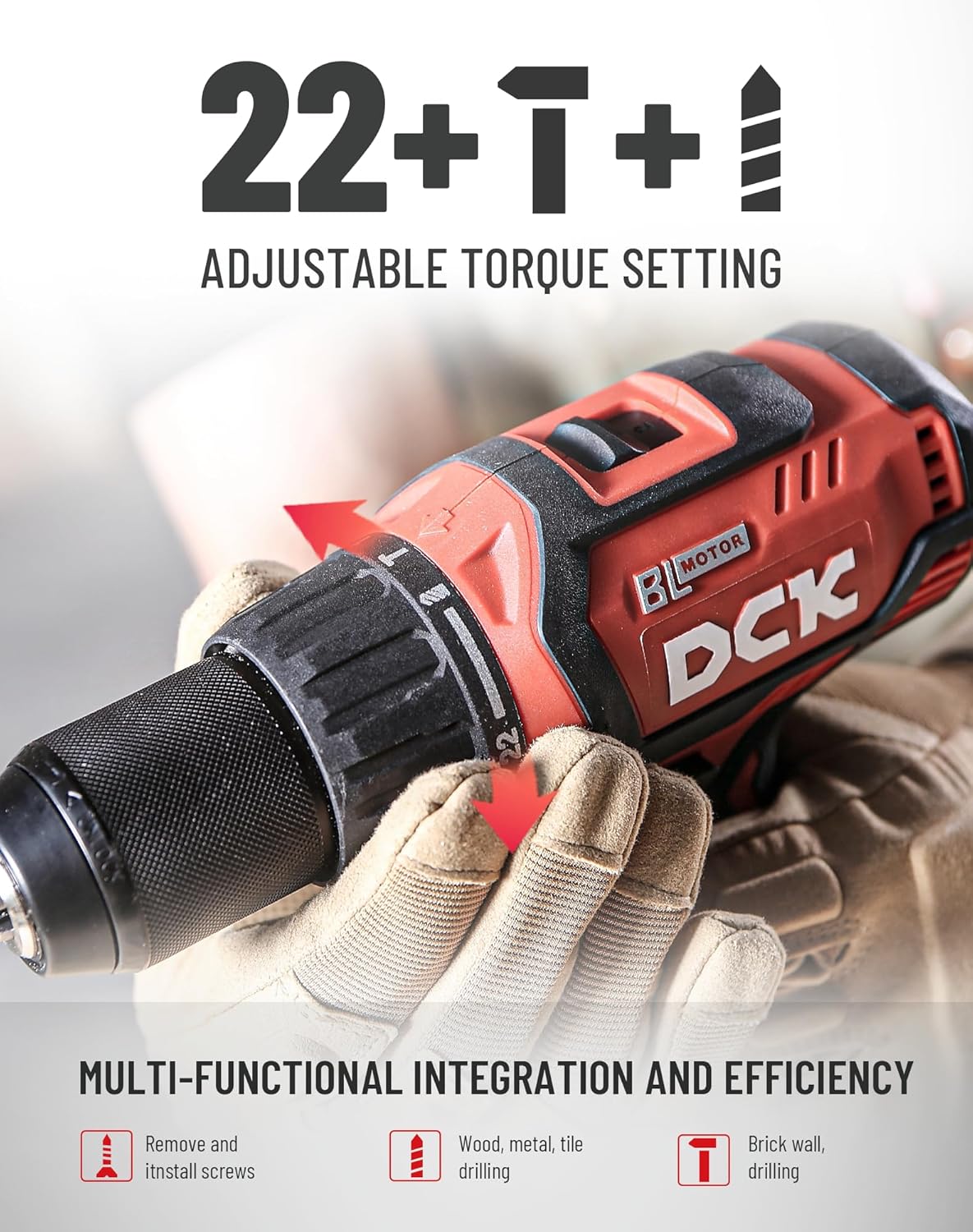
Image: The drill's chuck area showing the 22+1+1 adjustable torque setting and icons for screw driving, drilling (wood, metal, tile), and hammer drilling (brick wall).
4.2 ການຕັ້ງຄ່າຄວາມໄວ ແລະແຮງບິດ
The drill features a 2-speed transmission and a 22+1+1 torque clutch for precise control.
- ຕົວເລືອກຄວາມໄວ: Use the slide switch on top of the drill to select between two speed ranges:
ເກຍ 1 (0-550 RPM): Low speed, high torque for heavy-duty applications like driving large screws or drilling large holes in tough materials.
ເກຍ 2 (0-2200 RPM): High speed, lower torque for fast drilling in softer materials or smaller holes. - Torque Clutch (22+1+1 Settings): The torque ring allows you to set the amount of torque before the clutch disengages. This prevents over-driving screws and damaging the workpiece. The '1' setting is for maximum torque in drilling mode, and the '+1' is for hammer drilling mode.

Image: A close-up of the drill showing the 2-speed transmission selector switch on top, indicating low speed (0-550 RPM) and high speed (0-2200 RPM).
4.3 ໄຟ LED ເຮັດວຽກ
The built-in LED light automatically illuminates the work area when the trigger is pressed, improving visibility in dimly lit spaces.
4.4 ເຕັກນິກການຂຸດເຈາະແລະຂັບລົດ
- ທົ່ວໄປ: Always hold the drill firmly with both hands. Apply steady, even pressure.
- Drilling Wood/Metal: Select drilling mode. Use a lower speed for larger bits or harder materials, and a higher speed for smaller bits or softer materials.
- Hammer Drilling Masonry: Select hammer drilling mode. Use appropriate masonry bits. Apply firm, consistent pressure.
- Screw Driving: Select screw driving mode and adjust the torque clutch to prevent over-driving. Start with a lower torque setting and increase if needed.

Image: A person using the DCK hammer drill to create a hole in a metal square tube, demonstrating its capability for metal drilling.

Image: A person using the DCK hammer drill to create a hole in a wooden board, highlighting its wood drilling capability.

Image: A person using the DCK hammer drill to drive a screw into a wooden beam, illustrating its screw driving function.
5. ບໍາລຸງຮັກສາ
5.1 ການທໍາຄວາມສະອາດ
Regular cleaning helps maintain tool performance and extends its lifespan.
- ຖອດແບັດເຕີລີທຸກຄັ້ງກ່ອນທຳຄວາມສະອາດ.
- ໃຊ້ອ່ອນ, ງamp ຜ້າເຊັດອອກດ້ານນອກຂອງເຄື່ອງມື. ຢ່າໃຊ້ສານເຄມີທີ່ຮຸນແຮງຫຼືເຄື່ອງເຮັດຄວາມສະອາດຂັດ.
- ລ້າງຂີ້ຝຸ່ນ ຫຼືສິ່ງເສດເຫຼືອອອກຈາກຊ່ອງລະບາຍອາກາດ ໂດຍໃຊ້ອາກາດອັດແໜ້ນ ຫຼືແປງອ່ອນໆ.
- Clean the chuck jaws regularly to ensure proper bit gripping.
5.2 ການເກັບຮັກສາ
When not in use, store the drill and its accessories in a clean, dry place, out of reach of children.
- Store the tool in its carry bag to protect it from dust and damage.
- ໃຫ້ແນ່ໃຈວ່າແບດເຕີຣີຖືກສາກເປັນບາງສ່ວນ (ປະມານ 50%) ກ່ອນການເກັບຮັກສາໃນໄລຍະຍາວ.
- ຫຼີກລ່ຽງການເກັບຮັກສາເຄື່ອງມືໄວ້ໃນແສງແດດໂດຍກົງ ຫຼື ອຸນຫະພູມທີ່ຮຸນແຮງ.
5.3 ການດູແລຫມໍ້ໄຟ
Proper battery care ensures optimal performance and longevity.
- ຢ່າປ່ອຍໃຫ້ແບັດເຕີລີ່ຖືກນ້ຳ ຫຼື ຄວາມຊຸ່ມຊື່ນ.
- ຢ່າເກັບຮັກສາແບັດເຕີລີ່ໄວ້ບ່ອນທີ່ອຸນຫະພູມອາດຈະຮອດ ຫຼືເກີນ 50°C (122°F).
- Do not incinerate the battery pack even if it is severely damaged or completely worn out. The battery can explode in a fire.
- Recycle used battery packs responsibly.
6. ການແກ້ໄຂບັນຫາ
This section addresses common issues you might encounter with your DCK 20V Brushless Hammer Drill.
| ບັນຫາ | ສາເຫດທີ່ເປັນໄປໄດ້ | ການແກ້ໄຂ |
|---|---|---|
| ເຈາະບໍ່ເລີ່ມຕົ້ນ | ແບັດເຕີຣີບໍ່ໄດ້ສາກ ຫຼືຕິດຕັ້ງບໍ່ຖືກຕ້ອງ. | ກວດໃຫ້ແນ່ໃຈວ່າໄດ້ສາກແບັດເຕີຣີເຕັມ ແລະໃສ່ຢ່າງຖືກຕ້ອງ. |
| ພະລັງງານຫຼືປະສິດທິພາບຫຼຸດລົງ | Low battery charge. Incorrect speed/torque setting for the task. | Recharge battery. Adjust speed and torque settings as needed. |
| ບິດບ້ຽວໃນ chuck | Chuck ບໍ່ tightened ພຽງພໍ. Bit shank ແມ່ນເປື້ອນຫຼືເສຍຫາຍ. | ຮັດຄໍໃຫ້ແໜ້ນ. ເຮັດຄວາມສະອາດຫຼືປ່ຽນບິດ. |
| ຮ້ອນເກີນໄປ | Prolonged heavy use. Blocked ventilation slots. | Allow tool to cool down. Clear ventilation slots. Reduce load. |
7. ຂໍ້ມູນຈໍາເພາະ
| ຄຸນສົມບັດ | ຂໍ້ມູນຈໍາເພາະ |
|---|---|
| ຍີ່ຫໍ້ | DCK |
| ໝາຍເລກຕົວແບບ | KDJZ05-13 (EA-02) |
| ແຫຼ່ງພະລັງງານ | ພະລັງງານຫມໍ້ໄຟ |
| ສະບັບtage | 20 ໂວນ |
| Ampອາຍຸ | 4 Amps |
| ຄວາມໄວການຫມຸນສູງສຸດ | 2200 RPM |
| ແຮງບິດສູງສຸດ | 531 ນິ້ວປອນ (60 Nm) |
| Impact Rate (Hammer Mode) | 0-36,000 IPM |
| ຂະ ໜາດ Chuck | 1/2 Inch Keyless All-Metal |
| ການຕັ້ງຄ່າແຮງບິດ | 22+1+1 |
| ຄວາມອາດສາມາດເຈາະ (ໄມ້) | 1.5 ນິ້ວ (38 ມມ) |
| ຄວາມອາດສາມາດເຈາະ (ໂລຫະ) | 0.5 ນິ້ວ (13 ມມ) |
| Drilling Capacity (Brick/Concrete) | 0.5 ນິ້ວ (13 ມມ) |
| ນ້ໍາຫນັກລາຍການ | 8.77 ປອນ (ພ້ອມແບັດເຕີຣີ) |
| ຂະໜາດສິນຄ້າ | 6"L x 6"W x 5"H (ໂດຍປະມານ) |
8. ຂໍ້ມູນການຮັບປະກັນ
DCK provides the following warranty for this product:
- Brushless Hammer Drill: ຮັບປະກັນ 2 ປີ
- ແບັດເຕີຣີແລະເຄື່ອງສາກ: ຮັບປະກັນ 1 ປີ
ກະລຸນາເກັບຫຼັກຖານການຊື້ຂອງທ່ານໄວ້ເພື່ອການຮຽກຮ້ອງການຮັບປະກັນ. ການຮັບປະກັນກວມເອົາຂໍ້ບົກຜ່ອງດ້ານວັດສະດຸ ແລະ ຝີມືການຜະລິດພາຍໃຕ້ການນຳໃຊ້ປົກກະຕິ.
9. ການຊ່ວຍເຫຼືອລູກຄ້າ
For any questions, technical assistance, or warranty claims, please contact DCK customer support.
- ຕອບກັບດ່ວນ: ພາຍໃນ 24 ຊົ່ວໂມງ
- ຮັບປະກັນເຄື່ອງທັງໝົດ: 24 ເດືອນ
- ການຮັບປະກັນແບັດເຕີຣີ ແລະເຄື່ອງສາກ: 12 ເດືອນ
- ສະຫນັບສະຫນູນດ້ານວິຊາການ: Lifetime service and technical support
Visit the official DCK website or your retailer's support page for contact details.


ຮູບພາບ: Examples of masonry, wood, and metal drill bits, illustrating the variety of bits included or compatible with the drill.