
ແນະນຳ
ຂອບໃຈສໍາລັບການຊື້asing the Max Power MPD15EQ Portable Rechargeable PA Speaker. This manual provides important information regarding the setup, operation, and maintenance of your speaker. Please read it thoroughly before using the product to ensure proper function and to maximize its lifespan.
ຄໍາແນະນໍາຄວາມປອດໄພ
- ຫ້າມບໍ່ໃຫ້ອຸປະກອນຖືກຝົນຫຼືຄວາມຊຸ່ມຊື່ນເພື່ອປ້ອງກັນອັນຕະລາຍຈາກໄຟໄຫມ້ຫຼືອາການຊ໊ອກ.
- Do not open the speaker cabinet. There are no user-serviceable parts inside. Refer all servicing to qualified personnel.
- ຮັບປະກັນການລະບາຍອາກາດທີ່ເຫມາະສົມ. ຫ້າມປິດຊ່ອງລະບາຍອາກາດໃດໆ.
- ໃຊ້ພຽງແຕ່ອະແດບເຕີໄຟທີ່ໃຫ້ມາກັບເຄື່ອງ.
- Keep the speaker away from heat sources, direct sunlight, and strong magnetic fields.
- ເຮັດຄວາມສະອາດດ້ວຍຜ້າແຫ້ງເທົ່ານັ້ນ.
ເນື້ອໃນຊຸດ
- Max Power MPD15EQ PA Speaker
- ໄມໂຄຣໂຟນທີ່ມີສາຍ
- ການຄວບຄຸມໄລຍະໄກ
- Power Adapter
- ຄູ່ມືຜູ້ໃຊ້ (ເອກະສານນີ້)
ສິນຄ້າເກີນview
Familiarize yourself with the various parts of your MPD15EQ speaker.
ແຜງໜ້າ
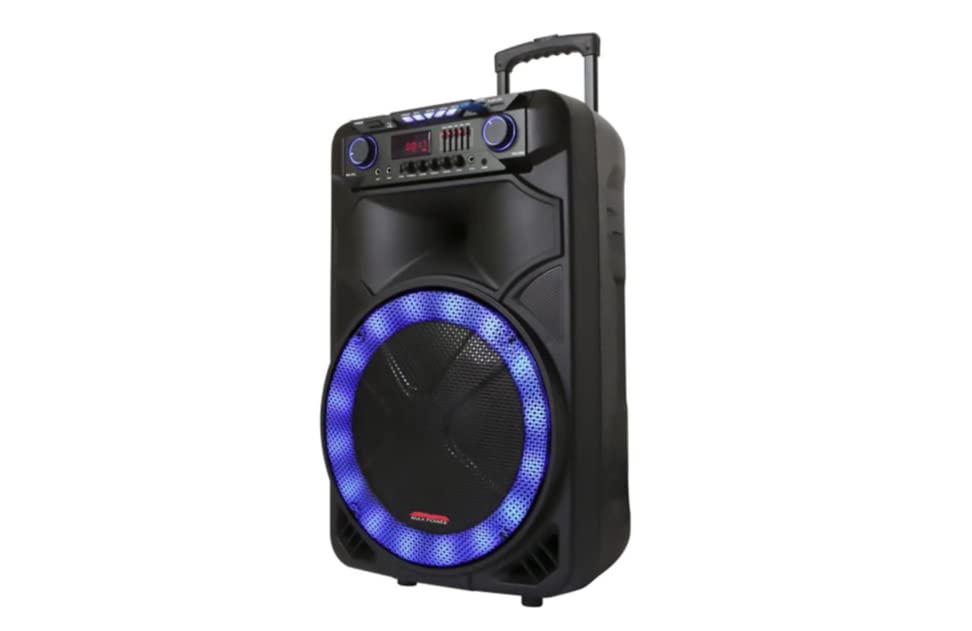
ລາຍລະອຽດຮູບພາບ: This image displays the front of the Max Power MPD15EQ speaker. It features a large 15-inch woofer at the bottom, a 5-inch horn tweeter above it, and a control panel with an LED display screen. The speaker grille covers the woofer and tweeter, and the overall design is robust and portable.
- 15" Woofer: Provides powerful bass frequencies.
- 5" Horn Tweeter: Delivers clear high frequencies.
- ຈໍສະແດງຜົນ LED: ສະແດງໂໝດປັດຈຸບັນ, ຂໍ້ມູນການຕິດຕາມ ແລະ ການຕັ້ງຄ່າຕ່າງໆ.
- ກະດານຄວບຄຸມ: Buttons and knobs for various functions (volume, EQ, mode, etc.).
- LED Light On/Off Switch: Controls the integrated LED lighting.
ແຜງດ້ານຫຼັງ (ຕົວຢ່າງample - specific details not provided in source)
The rear panel typically includes input/output ports and the power connection.
- ການປ້ອນຂໍ້ມູນພະລັງງານ: For connecting the power adapter to charge the battery or operate the unit.
- ພອດ USB: ສໍາລັບການຫຼິ້ນສຽງຈາກ USB drives.
- ຊ່ອງໃສ່ບັດ SD: For playing audio from SD cards.
- ການປ້ອນຂໍ້ມູນໄມໂຄຣໂຟນ: ສຳລັບການເຊື່ອມຕໍ່ໄມໂຄຣໂຟນແບບມີສາຍ.
- ການປ້ອນຂໍ້ມູນຊ່ວຍ: For connecting external audio devices via a 3.5mm or RCA cable.
ຕັ້ງຄ່າ
ກຳລັງສາກແບັດເຕີຣີ
The MPD15EQ features a built-in rechargeable battery. Before first use, fully charge the speaker for approximately 6-8 hours.
- Connect the supplied power adapter to the speaker's power input port.
- ສຽບອະແດບເຕີໄຟເຂົ້າໄປໃນເຕົ້າສຽບຝາມາດຕະຖານ.
- The LED display or an indicator light will show the charging status.
- ເມື່ອສາກໄຟເຕັມແລ້ວ, ໃຫ້ຖອດອະແດບເຕີໄຟອອກ.
ເປີດເຄື່ອງເບື້ອງຕົ້ນ
- Ensure the speaker is fully charged or connected to power.
- Locate the power switch (usually on the rear or control panel) and turn it to the "ON" position.
- The LED display will illuminate, indicating the speaker is ready for use.
ຄໍາແນະນໍາການດໍາເນີນງານ
ການເຊື່ອມຕໍ່ Bluetooth
- Turn on the MPD15EQ speaker.
- Press the "MODE" button on the control panel until "BLUETOOTH" or "BT" appears on the LED display.
- ເປີດໃຊ້ Bluetooth ໃນໂທລະສັບສະຫຼາດ, ແທັບເລັດ ຫຼື ອຸປະກອນສຽງອື່ນໆຂອງທ່ານ.
- ຊອກຫາ available devices and select "MPD15EQ" from the list.
- Once paired, you will hear a confirmation sound, and you can now play audio wirelessly.
ການໃຊ້ໄມໂຄຣໂຟນແບບມີສາຍ
- Connect the supplied wired microphone to the "MIC IN" port on the speaker.
- ປັບປຸ່ມປັບລະດັບສຽງໄມໂຄຣໂຟນ (ຖ້າມີ) ຢູ່ເທິງແຜງຄວບຄຸມໃຫ້ຢູ່ໃນລະດັບທີ່ທ່ານຕ້ອງການ.
- ເວົ້າໃສ່ໄມໂຄຣໂຟນ.
ການຫຼິ້ນບັດ USB/SD
- Insert a USB flash drive or SD card (pre-loaded with MP3 audio files) ເຂົ້າໄປໃນທ່າເຮືອທີ່ກ່ຽວຂ້ອງ.
- The speaker should automatically switch to USB/SD mode and begin playing. If not, press the "MODE" button.
- Use the playback controls (Play/Pause, Next, Previous) on the control panel or remote control.
5-Band Graphic EQ Adjustment
The MPD15EQ features a 5-band graphic equalizer to fine-tune your audio output.
- Locate the EQ sliders on the control panel.
- Each slider corresponds to a specific frequency band. Adjust them up or down to boost or cut those frequencies.
- Experiment with the settings to achieve your preferred sound profile.
ໄຟ LED
The speaker includes integrated LED lights. Use the "LED Light On/Off Switch" to activate or deactivate them.
ການນໍາໃຊ້ການຄວບຄຸມໄລຍະໄກ
The included remote control allows for convenient operation from a distance. It typically includes buttons for power, mode selection, volume, track control, and EQ presets.
ບໍາລຸງຮັກສາ
ທໍາຄວາມສະອາດ
- ປິດເຄື່ອງທຸກຄັ້ງ ແລະຖອດສຽບລຳໂພງອອກກ່ອນທຳຄວາມສະອາດ.
- ໃຊ້ຜ້າອ່ອນແລະແຫ້ງເຊັດພື້ນຜິວພາຍນອກ.
- Do not use liquid cleaners, aerosols, or abrasive chemicals.
ການເກັບຮັກສາ
- ເກັບຮັກສາລຳໂພງໄວ້ໃນບ່ອນທີ່ເຢັນ, ແຫ້ງ, ຫ່າງຈາກແສງແດດໂດຍກົງ ແລະ ອຸນຫະພູມທີ່ຮ້າຍກາດ.
- If storing for extended periods, charge the battery periodically (e.g., every 3 months) to maintain battery health.
ການແກ້ໄຂບັນຫາ
| ບັນຫາ | ສາເຫດທີ່ເປັນໄປໄດ້ | ການແກ້ໄຂ |
|---|---|---|
| ບໍ່ມີພະລັງງານ | Battery discharged; Power cable not connected; Power switch off. | Charge the battery; Check power cable connection; Turn power switch ON. |
| ບໍ່ມີສຽງ | ປະລິມານຕ່ໍາເກີນໄປ; ຮູບແບບການປ້ອນຂໍ້ມູນບໍ່ຖືກຕ້ອງ; ອຸປະກອນບໍ່ໄດ້ຈັບຄູ່ (Bluetooth). | Increase master volume; Select correct input mode (Bluetooth, USB, AUX); Re-pair Bluetooth device. |
| ໄມໂຄຣໂຟນບໍ່ເຮັດວຽກ | Microphone not connected; Microphone volume low; Microphone switch off. | Ensure microphone is securely plugged in; Increase microphone volume; Check microphone's ON/OFF switch. |
| ການເຊື່ອມຕໍ່ Bluetooth ບໍ່ສະຖຽນ | Device too far; Interference; Low battery. | Move device closer to speaker; Avoid obstacles; Ensure speaker battery is charged. |
ຂໍ້ມູນຈໍາເພາະ
- Woofer: Single 15"
- tweeter: Single 5" Horn
- ການຕອບສະໜອງຄວາມຖີ່: 40Hz-20KHz
- impedance: 4 ໂອມ
- ຄວາມອ່ອນໄຫວ: 93dB
- ຂະໜາດ (ກວ້າງ x ສູງ): 19" x 16.75" x 32"
- ນ້ຳໜັກ: ປະມານ 38 ປອນ
- ແບັດເຕີຣີ: ສາມາດສາກໄຟໄດ້ໃນຕົວ
- ການເຊື່ອມຕໍ່: Bluetooth, USB, SD Card, Microphone Input, Auxiliary Input
- EQ: 5 ແຖບ E Graphic EQ
- ຈໍສະແດງຜົນ: ຈໍສະແດງຜົນ LED
- ອຸປະກອນເສີມລວມ: Wired Microphone, Remote Control
ການຮັບປະກັນແລະການສະຫນັບສະຫນູນ
Max Power products are designed for reliability and performance. For warranty information or technical support, please refer to the warranty card included with your purchase or visit the official Max Power webເວັບໄຊ. ຮັກສາຫຼັກຖານການຊື້ຂອງທ່ານສໍາລັບການຮ້ອງຂໍການຮັບປະກັນ.
ຂໍ້ມູນຕິດຕໍ່: Please refer to the packaging or official website for the most up-to-date contact details for customer service.
ວິດີໂອຜະລິດຕະພັນຢ່າງເປັນທາງການ
No official product videos from the seller were available for embedding at this time. If available, they would appear here with detailed descriptions.