
ຂໍ້ມູນຄວາມປອດໄພທີ່ສໍາຄັນ
Please read these instructions carefully before installation. If you do not understand these instructions or have doubts about the safety of the installation, please contact a qualified installer. The manufacturer is not liable for damage or injury caused by incorrect assembly or use.
- ຄວາມອາດສາມາດນ້ໍາຫນັກ: Do not exceed the maximum weight capacity specified for your model. Overloading can result in serious injury or property damage.
- ໂຄງສ້າງກຳແພງ: The wall mount must be securely attached to a suitable wall structure. Do not install on drywall alone. Ensure the mounting surface can safely support the combined weight of the mount and the television.
- ຄວາມເຂົ້າກັນໄດ້ກັບ VESA: Verify your TV's VESA mounting pattern (hole spacing) is compatible with this mount.
- ເດັກນ້ອຍ: ໃຫ້ເດັກນ້ອຍຢູ່ຫ່າງຈາກພື້ນທີ່ຕິດຕັ້ງ. ຊິ້ນສ່ວນນ້ອຍໆອາດເປັນອັນຕະລາຍຕໍ່ການສຳຜັດ.
- ເຄື່ອງມື: ໃຊ້ເຄື່ອງມືທີ່ເຫມາະສົມສໍາລັບການຕິດຕັ້ງ.
ຄວາມເຂົ້າກັນໄດ້ຂອງຜະລິດຕະພັນ
This instruction manual covers two models of PERLESMITH Full Motion TV Wall Mounts, PSMFK7 and PSMFK1. Please identify your model and confirm your television's specifications before proceeding with installation.
Model PSMFK7
- ຄວາມເຂົ້າກັນໄດ້ຂອງຂະຫນາດຫນ້າຈໍ: ໂທລະພາບ 26-55 ນິ້ວສ່ວນໃຫຍ່.
- ຄວາມອາດສາມາດນ້ໍາຫນັກ: ສູງເຖິງ 70 lbs (31.7 kg).
- ຮູບແບບ VESA: 100x100mm to 400x400mm.

Figure 1: PSMFK7 Model Compatibility Overview. This image illustrates the supported screen sizes (26-55 inches), maximum weight capacity (70 lbs), and VESA mounting patterns (100x100mm to 400x400mm) for the PSMFK7 TV wall mount.
Model PSMFK1
- ຄວາມເຂົ້າກັນໄດ້ຂອງຂະຫນາດຫນ້າຈໍ: ໂທລະພາບ 26-60 ນິ້ວສ່ວນໃຫຍ່.
- ຄວາມອາດສາມາດນ້ໍາຫນັກ: ສູງເຖິງ 77 lbs (35 kg).
- ຮູບແບບ VESA: Up to 400x400mm (16x16 inches).

Figure 2: PSMFK1 Model Compatibility and Wall Types. This image details the wide compatibility of the PSMFK1 model, supporting TVs up to 60 inches and various VESA patterns. It also indicates suitability for single wood stud, brick, and concrete walls.
Confirm Before Purchase
ກ່ອນທີ່ຈະຊື້asing or installing, ensure your TV meets the following criteria:
- ນ້ຳໜັກໂທລະທັດ: Your TV's weight is within the mount's capacity (70 lbs for PSMFK7, 77 lbs for PSMFK1).
- ຂະໜາດໂທລະພາບ: Your TV's screen size is within the recommended range (26-55" for PSMFK7, 26-60" for PSMFK1).
- ຮູບແບບ VESA: Your TV's VESA mounting holes match one of the supported patterns.
- ປະເພດຝາ: Your wall is suitable for installation (single wood stud, concrete, or brick).
- Cable Blockage: Ensure the mounting holes on your TV do not block any cables or inputs.

Figure 3: Pre-Purchase Confirmation Checklist. This image provides a visual summary of essential checks to perform before installing the TV mount, including TV weight, size, VESA, wall type, and potential cable interference.
ມີຫຍັງແດ່
Carefully unpack the box and ensure all parts are present and undamaged. If any parts are missing or damaged, do not attempt to install. Contact customer service for assistance.
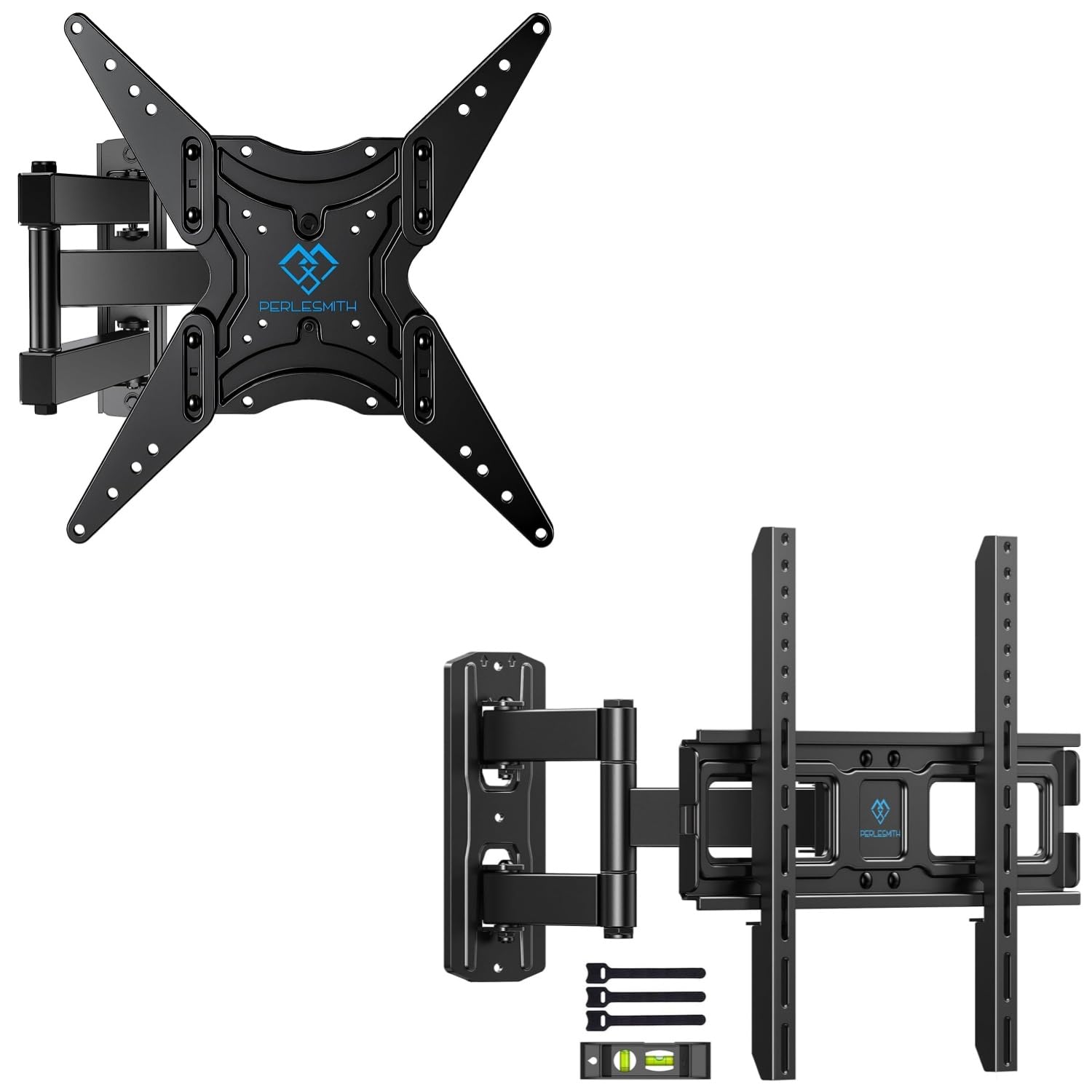
Figure 4: Package Contents. This image displays the main components of the PERLESMITH full motion TV wall mount kit, including the mount assembly, a bubble level for installation, and cable ties for cable management.
Typical Package Contents:
- ການຕິດຕັ້ງຝາຜະໜັງໂທລະພາບແບບເຄື່ອນໄຫວເຕັມຮູບແບບ
- ວົງເລັບໂທລະທັດ (x2)
- ຊຸດອຸປະກອນຕິດຕັ້ງ (ສະກູຕ່າງໆ, ເຄື່ອງຊັກຜ້າ, ຊ່ອງສຽບ, ສະມໍ)
- ລະດັບຟອງ
- ສາຍເຊືອກ (x3)
- ຄູ່ມືການສອນ
ການຕິດຕັ້ງແລະການຕິດຕັ້ງ
ການຕິດຕັ້ງທີ່ຖືກຕ້ອງແມ່ນມີຄວາມສຳຄັນຫຼາຍຕໍ່ຄວາມປອດໄພ ແລະ ຄວາມໝັ້ນຄົງຂອງໂທລະພາບຂອງທ່ານ. ໃຫ້ປະຕິບັດຕາມຂັ້ນຕອນເຫຼົ່ານີ້ຢ່າງລະມັດລະວັງ.
ກ່ອນທີ່ທ່ານຈະເລີ່ມຕົ້ນ
- Gather all necessary tools (e.g., drill, stud finder, level, screwdriver, tape measure).
- Ensure you have a clear, safe workspace.
- Confirm your TV and wall meet the compatibility requirements.
Wall Type Considerations
mount ນີ້ໄດ້ຖືກອອກແບບສໍາລັບການຕິດຕັ້ງໃນ:
- Single Wood Stud: Locate the center of the wood stud using a stud finder.
- Solid Concrete Wall: Requires a masonry drill bit and concrete anchors.
- ກໍາແພງດິນຈີ່: Requires a masonry drill bit and brick anchors.
ຄຳເຕືອນ: Do not install this TV mount on drywall alone. Drywall cannot support the weight of the mount and TV.
ຂັ້ນຕອນການຕິດຕັ້ງທົ່ວໄປ
- ຕິດວົງເລັບໂທລະທັດໃສ່ໂທລະພາບ: Secure the vertical TV brackets to the back of your television using the appropriate screws, washers, and spacers from the hardware kit. Ensure the brackets are centered and level.
- Determine Wall Plate Position: Hold the wall plate against the wall at your desired viewing height. Use the included bubble level to ensure it is perfectly horizontal. Mark the drilling locations.
- Drill Pilot Holes: Drill pilot holes at the marked locations. For wood studs, drill directly. For concrete or brick, use a masonry bit and insert concrete/brick anchors.
- ແຜ່ນຕິດຝາທີ່ປອດໄພ: Attach the wall plate to the wall using the lag bolts and washers. Tighten securely, but do not overtighten.
- ວາງໂທລະທັດໃສ່ແຜ່ນຕິດຝາ: Carefully lift the TV (with brackets attached) and hook the brackets onto the wall plate. Ensure the TV is securely seated.
- ຕິດຕັ້ງໂທລະທັດທີ່ປອດໄພ: Use the safety screws or locking mechanisms on the TV brackets to secure the TV to the wall mount, preventing accidental dislodgement.

Figure 5: Centering Your TV. This image demonstrates a TV mounted centrally on a wall, providing a visual guide for optimal placement above a feature like a fireplace.

Figure 6: Corner Mounting Example. This image illustrates how the full motion design allows for effective TV placement in a room corner, maximizing viewມຸມ.
ການປັບການດໍາເນີນງານ
The full motion design allows for flexible viewing angles. Adjustments can be made after installation.
- ອຽງ: The TV can be tilted +5° upwards to -15° downwards to reduce glare or optimize viewing from different heights. Loosen the tilt knobs on the TV brackets, adjust to the desired angle, and re-tighten.
- ໝູນ: The articulating arm allows the TV to swivel up to +/-90° (180° total range) left or right, depending on TV size and wall distance. Gently push or pull the TV to the desired angle.
- ສ່ວນຂະຫຍາຍ/ການຖອນຄືນ: The mount can extend the TV up to 19.17 inches (48.7 cm) from the wall for optimal viewing or retract it back to 3.2 inches (8.1 cm) for a low-profile ເບິ່ງ.
- ການປັບລະດັບ: After installation, the TV can be leveled +/-3° to correct any minor misalignments. Loosen the leveling screws, adjust, and re-tighten.

Figure 7: Full Motion Adjustments. This image visually explains the tilt, extension, swivel, and leveling features of the TV mount, demonstrating the range of motion available for optimal viewing.
ບໍາລຸງຮັກສາ
ການບໍາລຸງຮັກສາເປັນປົກກະຕິຮັບປະກັນອາຍຸຍືນແລະການດໍາເນີນງານທີ່ປອດໄພຂອງເຄື່ອງຕິດຝາໂທລະພາບຂອງທ່ານ.
- ທໍາຄວາມສະອາດ: ເຊັດຕົວຍຶດດ້ວຍຜ້າອ່ອນໆ, ແຫ້ງເພື່ອເອົາຝຸ່ນອອກ. ຫຼີກລ້ຽງການເຮັດຄວາມສະອາດຂັດຫຼືສານລະລາຍ.
- ກວດສອບການເຊື່ອມຕໍ່: ກວດເບິ່ງທຸກສະກູແລະການເຊື່ອມຕໍ່ເປັນໄລຍະເພື່ອຮັບປະກັນວ່າພວກມັນແຫນ້ນແຫນ້ນແລະປອດໄພ. ເຄັ່ງຄັດຄືນໃໝ່ຖ້າຈຳເປັນ.
- ກວດສອບການເສຍຫາຍ: Regularly inspect the mount for any signs of wear, corrosion, or damage. If any issues are found, discontinue use and contact customer support.
ການແກ້ໄຂບັນຫາ
ຖ້າທ່ານພົບບັນຫາໃນລະຫວ່າງ ຫຼື ຫຼັງຈາກການຕິດຕັ້ງ, ໃຫ້ອ້າງອີງເຖິງບັນຫາ ແລະ ວິທີແກ້ໄຂທົ່ວໄປຕໍ່ໄປນີ້.
| ບັນຫາ | ສາເຫດທີ່ເປັນໄປໄດ້ | ການແກ້ໄຂ |
|---|---|---|
| ໂທລະພາບບໍ່ແມ່ນລະດັບຫຼັງຈາກການຕິດຕັ້ງ. | misalignment ເລັກນ້ອຍໃນລະຫວ່າງການຕິດຕັ້ງ. | Use the +/-3° leveling adjustment feature. Loosen leveling screws, adjust, and re-tighten. |
| ຮູ້ສຶກວ່າຕົວຍຶດວ່າງ ຫຼື ບໍ່ໝັ້ນຄົງ. | Screws not fully tightened; incorrect wall anchors used; wall structure insufficient. | Ensure all mounting screws are securely tightened. Verify correct anchors for your wall type. If the wall is insufficient, consult a professional. |
| ມີຄວາມຫຍຸ້ງຍາກໃນການປັບຄວາມອຽງ ຫຼື ໝຸນ. | Adjustment knobs/bolts are too tight. | Loosen the relevant adjustment knobs or bolts slightly, make the adjustment, then re-tighten to hold the position. |
| ໂທລະພາບບໍ່ເຫມາະກັບ mount. | Incorrect TV size, weight, or VESA pattern for the mount model. | Verify your TV's specifications against the mount's compatibility (refer to Product Compatibility section). |
ຂໍ້ມູນຈໍາເພາະຂອງຜະລິດຕະພັນ
| ຄຸນສົມບັດ | PSMFK7 Model | PSMFK1 Model |
|---|---|---|
| ປະເພດການຕິດຕັ້ງ | ຕິດຝາ | |
| ປະເພດການເຄື່ອນໄຫວ | ບິດ, ໝູນ, ອຽງ | |
| ຂະໜາດໜ້າຈໍທີ່ເຂົ້າກັນໄດ້ | 26 - 55 ນິ້ວ | 26 - 60 ນິ້ວ |
| ຄວາມອາດສາມາດນ້ໍາຫນັກສູງສຸດ | 70 lbs (31.7 ກິໂລ) | 77 lbs (35 ກິໂລ) |
| ຄວາມເຂົ້າກັນໄດ້ຂອງ VESA | 100x100mm ຫາ 400x400mm | ເຖິງ 400x400mm |
| ມຸມອຽງ | +5° / -15° | |
| ມຸມຫມຸນ | +/-90° (up to 180° total, depending on TV size) | |
| ການປັບລະດັບ | +/-3° | |
| ສ່ວນຂະຫຍາຍຈາກ Wall | 3.2 ນິ້ວ (ຖອດ) ຫາ 19.17 ນິ້ວ (ຂະຫຍາຍ) | |
| ວັດສະດຸ | ເຫຼັກໂລຫະປະສົມ | |
| ປະເພດຝາທີ່ເຂົ້າກັນໄດ້ | Single Wood Stud, Solid Concrete, Brick Wall | |
ການຮັບປະກັນແລະການສະຫນັບສະຫນູນ
For warranty information or technical support, please refer to the product packaging or contact PERLESMITH customer service directly. Keep your purchase receipt for warranty claims.
If you have any questions or require assistance with installation or operation, please do not hesitate to reach out to our support team.