
Star Micronics BSH-HR2081BT BLK
Star Micronics BSH-HR2081BT Wireless Bluetooth 1D/2D Barcode Scanner User Manual
Model: BSH-HR2081BT BLK
1. ບົດແນະນຳ
This manual provides comprehensive instructions for the setup, operation, maintenance, and troubleshooting of your Star Micronics BSH-HR2081BT Wireless Bluetooth 1D/2D Barcode Scanner. Designed for efficiency and durability, this scanner is a reliable solution for various point-of-sale and inventory management applications.
The BSH-HR2081BT scanner is equipped with a high-power CPU, enabling it to effortlessly capture high-density, high-volume, and even distorted barcodes from both printed materials and digital screens. Its robust design, coupled with advanced wireless capabilities, ensures seamless integration into your workflow.
2. ຄຸນນະສົມບັດທີ່ສໍາຄັນ
- ການສະແກນປະສິດທິພາບສູງ: Powerful CPU captures high-density, high-volume, and distorted 1D/2D barcodes on paper or screen.
- ອາຍຸແບັດເຕີຣີທີ່ຂະຫຍາຍອອກ: Offers up to 12 hours of continuous operation (one scan every six seconds) with its 2200mAh battery.
- ການເຊື່ອມຕໍ່ອະເນກປະສົງ: Connects directly to the host device via Bluetooth Low Energy (BLE) or wirelessly to a Star printer using the included USB dongle.
- Reliable Wireless Range: Maintains a stable wireless connection to transmit data, with communication distances up to 50 meters (approximately 164 feet).
- ການກໍ່ສ້າງທົນທານ: Features an IP42-rated design and a drop-resistant housing, capable of withstanding drops from up to 1.2 meters (approximately 4 feet).
3. ຄູ່ມືການຕິດຕັ້ງ
3.1. Unboxing ແລະການກວດກາເບື້ອງຕົ້ນ
ເອົາສ່ວນປະກອບທັງຫມົດອອກຈາກການຫຸ້ມຫໍ່ຢ່າງລະມັດລະວັງ. ກວດສອບວ່າມີລາຍການດັ່ງຕໍ່ໄປນີ້:
- Star Micronics BSH-HR2081BT Barcode Scanner
- ສາຍສາກ USB
- USB Dongle (for wireless connection to Star printers)
- ຂາຕັ້ງເຄື່ອງສະແກນ

Figure 3.1: Barcode scanner and its USB dongle.
3.2. ການສາກໄຟເຄື່ອງສະແກນ
Before first use, fully charge the scanner. Connect the USB charging cable to the scanner's charging port (located at the bottom of the handle) and plug the other end into a USB power adapter (not included) or a computer's USB port. The charging indicator light will show the charging status.

Figure 3.2: USB charging port at the base of the scanner handle.
3.3. ການເຊື່ອມຕໍ່ເຄື່ອງສະແກນ
The BSH-HR2081BT scanner offers two primary connection methods:
3.3.1. Bluetooth Connection (Direct to Host Device)
- ກວດໃຫ້ແນ່ໃຈວ່າເຄື່ອງສະແກນເປີດຢູ່.
- On your host device (smartphone, tablet, or computer), enable Bluetooth.
- ຊອກຫາ available Bluetooth devices. The scanner should appear as "Star Micronics BSH-HR2081BT" or similar.
- Select the scanner to pair. Follow any on-screen prompts to complete the pairing process.
3.3.2. Wireless Connection (via USB Dongle to Star Printer)
- Insert the provided USB dongle into an available USB port on your compatible Star printer (e.g., mC-Print, mPOP).
- Power on the scanner. The scanner and dongle should automatically establish a connection.
- Refer to your Star printer's manual for specific instructions on connecting external devices.

Figure 3.3: Barcode scanner placed in its included stand.
4. ຄໍາແນະນໍາການດໍາເນີນງານ
4.1. Basic Scanning Operation
To scan a barcode, point the scanner's window at the barcode and press the trigger button. A successful scan will typically be indicated by an audible beep and/or a visual confirmation light.
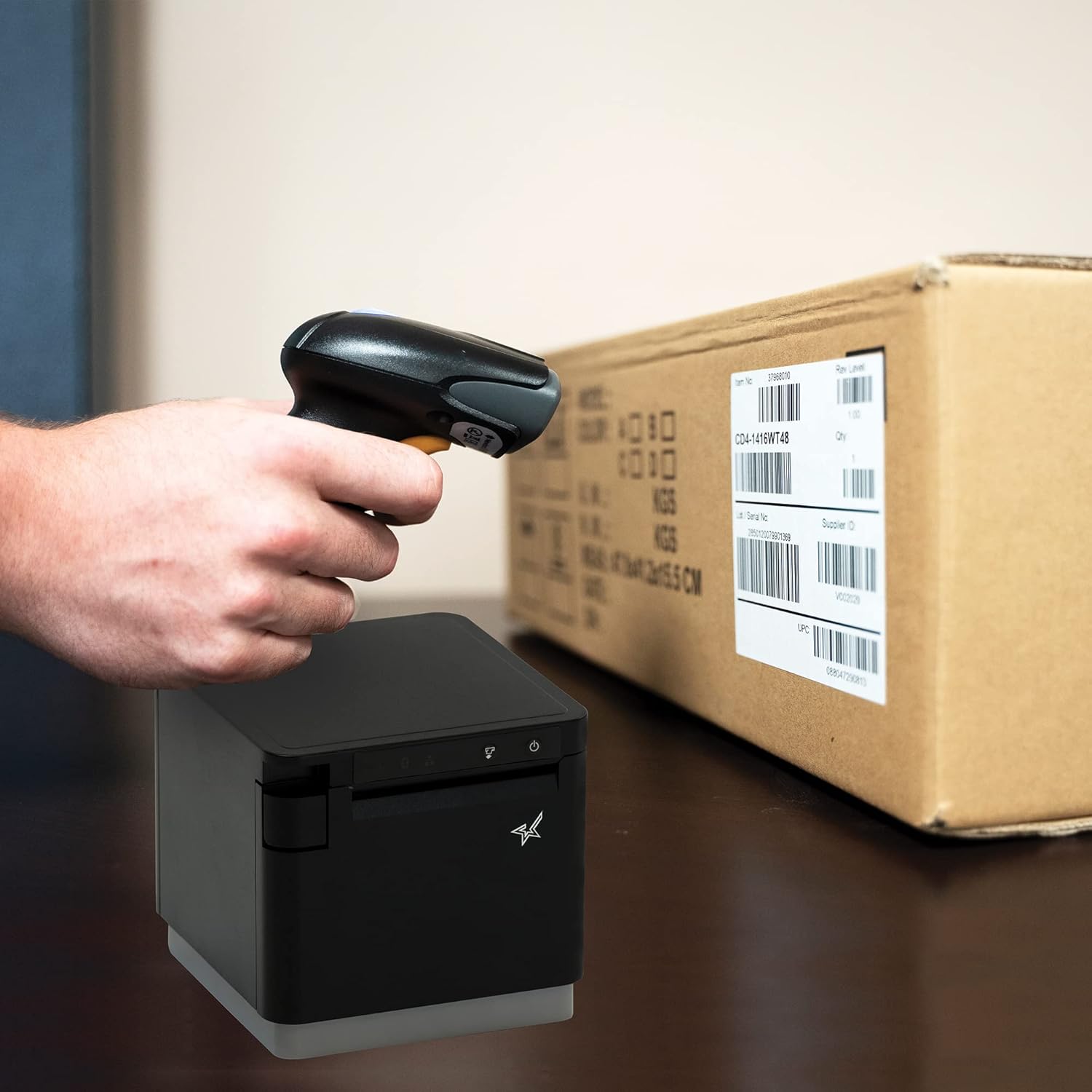
ຮູບທີ 4.1: ຕົວຢ່າງampຂອງການສະແກນບາໂຄດໃນກ່ອງສິນຄ້າ.
4.2. ໂໝດສະແກນ
The BSH-HR2081BT scanner supports six different scanning modes to accommodate various operational needs:
- ໂໝດລະດັບ: The scanner's trigger will activate the decode session.
- ໂໝດ Trigger: A trigger pull activates a decode session.
- ໂໝດຄວາມຮູ້ສຶກ: The scanner activates a decode session every time it detects a barcode.
- ໂModeດຕໍ່ເນື່ອງ: The scanner automatically starts one decode session after another.
- ໂໝດກຳມະຈອນ: When the trigger is pulled and released, scanning is activated until a barcode is decoded or the decode session timeout expires.
- ໂໝດຊຸດ: When the trigger is pulled and released, scanning is activated until the trigger is released.
Refer to the full user guide (link in Section 7) for detailed instructions on how to switch between these modes and configure specific settings.
5. ບໍາລຸງຮັກສາ
5.1. ການເຮັດຄວາມສະອາດເຄື່ອງສະແກນ
To maintain optimal performance, keep the scanner's window clean. Use a soft, lint-free cloth lightly dampened with water or a mild, non-abrasive cleaner. Do not use harsh chemicals or abrasive materials, as they may damage the scanner's surface or optical components.
5.2. ການດູແລຫມໍ້ໄຟ
The scanner is equipped with a Lithium Ion battery. To prolong battery life:
- ຫຼີກລ້ຽງການປະຈຸຫມໍ້ໄຟຢ່າງເຕັມທີ່ເລື້ອຍໆ.
- ເກັບຮັກສາເຄື່ອງສະແກນໄວ້ໃນບ່ອນທີ່ເຢັນແລະແຫ້ງເມື່ອບໍ່ໄດ້ໃຊ້ງານເປັນເວລາດົນ.
- Charge the battery regularly, even if the scanner is not in frequent use.
6. ການແກ້ໄຂບັນຫາ
6.1. ເຄື່ອງສະແກນບໍ່ໄດ້ເຊື່ອມຕໍ່
- ກວດສອບພະລັງງານ: Ensure the scanner is fully charged and powered on.
- ການຈັບຄູ່ Bluetooth: For Bluetooth connections, ensure Bluetooth is enabled on your host device and the scanner is in pairing mode. Try unpairing and re-pairing the device.
- USB Dongle: If using the USB dongle, ensure it is securely plugged into the Star printer and the printer is powered on.
- ຊ່ວງ: Ensure the scanner is within the effective communication range (up to 50m) of the host device or dongle.
6.2. ເຄື່ອງສະແກນບໍ່ໄດ້ອ່ານບາໂຄດ
- ສະພາບບາໂຄດ: ຮັບປະກັນວ່າບາໂຄດຕ້ອງຊັດເຈນ, ບໍ່ເປື້ອນ, ຂາດ ຫຼື ສະທ້ອນແສງຫຼາຍເກີນໄປ.
- ໄລຍະທາງແລະມຸມ: Adjust the distance and angle of the scanner to the barcode. Try different scanning modes if applicable.
- ແສງ: Ensure adequate lighting. Avoid direct glare on the barcode.
- Scanner Window: ທຳຄວາມສະອາດໜ້າຕ່າງການອ່ານຂອງເຄື່ອງສະແກນຕາມທີ່ໄດ້ອະທິບາຍໄວ້ໃນພາກການບຳລຸງຮັກສາ.
6.3. ຊີວິດຫມໍ້ໄຟສັ້ນ
- ຄ່າບໍລິການເຕັມ: Ensure the scanner is charged until the indicator shows a full charge.
- Usage Pattern: Continuous heavy usage will deplete the battery faster.
- ອາຍຸຫມໍ້ໄຟ: Over time, rechargeable batteries naturally lose capacity.
7. ຂໍ້ກໍານົດດ້ານວິຊາການ
| ຂໍ້ມູນຈໍາເພາະ | ລາຍລະອຽດ |
|---|---|
| ຂະໜາດສິນຄ້າ | 5.7 x 4 x 2.7 ນິ້ວ |
| ນ້ໍາຫນັກລາຍການ | 1.06 ປອນ |
| ໝາຍເລກຕົວແບບ | BSH-HR2081BT BLK |
| ໝໍ້ໄຟ | 1 ຫມໍ້ໄຟ Lithium Ion ຕ້ອງການ (ລວມ) |
| ຜູ້ຜະລິດ | Star Micronics |
| ອຸປະກອນທີ່ເຂົ້າກັນໄດ້ | ໂທລະສັບສະຫຼາດ, ແທັບເລັດ |
| ແຫຼ່ງພະລັງງານ | ພະລັງງານຫມໍ້ໄຟ |
| ເຕັກໂນໂລຊີການເຊື່ອມຕໍ່ | Bluetooth, ສາຍ USB |
| ການຈັດອັນດັບ IP | IP42 |
| ການຕໍ່ຕ້ານການຫຼຸດລົງ | ເຖິງ 1.2 ແມັດ |
8. ການຮັບປະກັນແລະການສະຫນັບສະຫນູນ
For warranty information and technical support, please contact Star Micronics directly or visit their official webເວັບໄຊ. ຮັກສາໃບຮັບເງິນການຊື້ຂອງທ່ານໄວ້ເປັນຫຼັກຖານການຊື້ສໍາລັບການຮ້ອງຂໍການຮັບປະກັນ.
ຄູ່ມືຜູ້ໃຊ້ລະອຽດໃນຮູບແບບ PDF ສາມາດດາວໂຫຼດໄດ້:
Ask a question about this manual
Ask about setup, troubleshooting, compatibility, parts, safety, or missing instructions. Manuals+ will review the question and use this page’s manual context to help answer it.