
ແນະນຳ
The Naxa NSH-3001 Wi-Fi Smart Camera provides reliable home security monitoring with 24/7 HD recording capabilities. This camera allows you to check in on your home remotely from anywhere using your smartphone. It features motion detection, two-way audio communication, night vision, and customizable activity alerts.
This manual provides detailed instructions for setting up, operating, and maintaining your Naxa NSH-3001 Wi-Fi Smart Camera to ensure optimal performance and security.
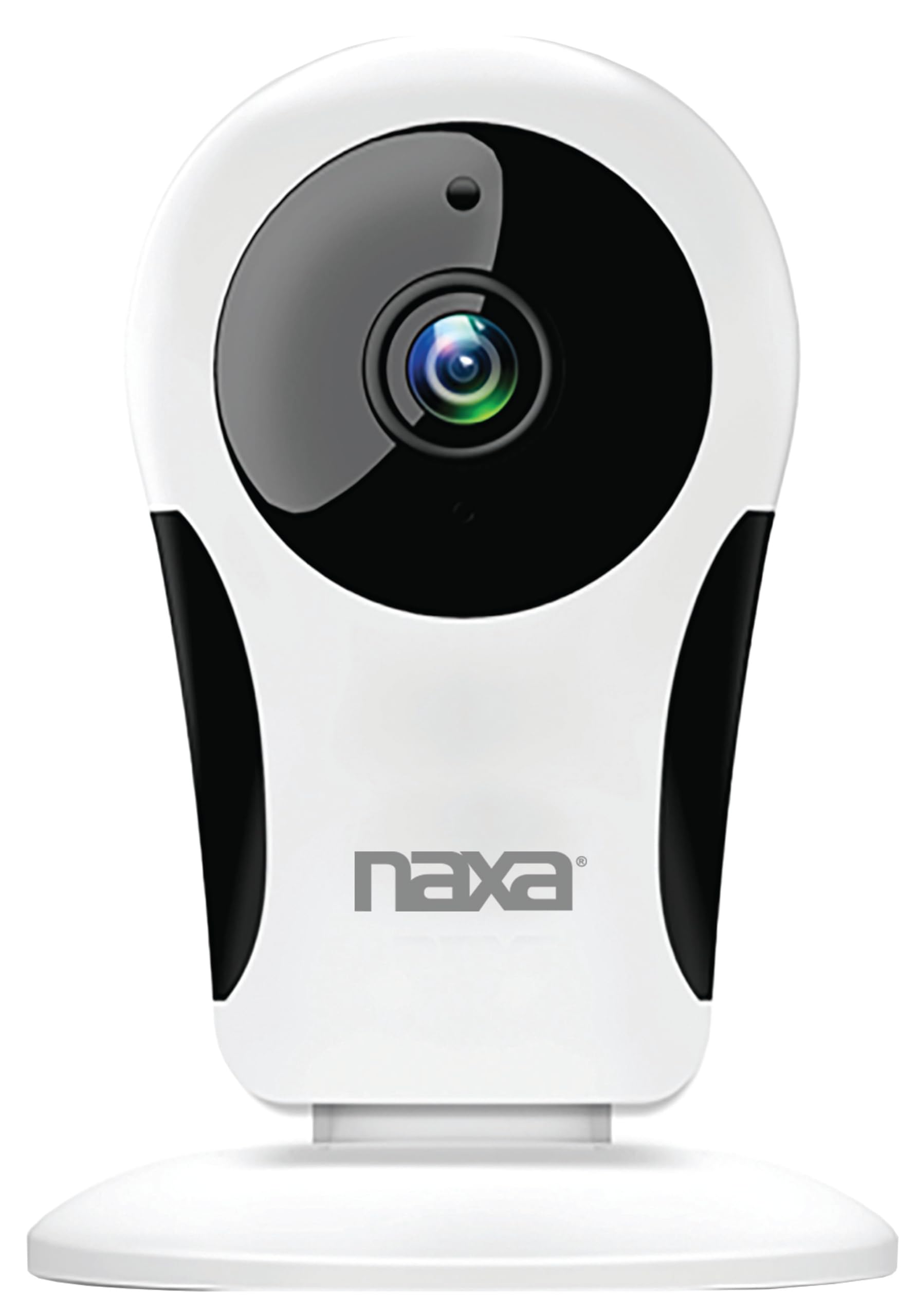
ຮູບພາບ: ທາງຫນ້າ view of the Naxa NSH-3001 Wi-Fi Smart Camera, showing the lens and Naxa logo.
ແມ່ນຫຍັງຢູ່ໃນກ່ອງ
Upon unpacking your Naxa NSH-3001 Wi-Fi Smart Camera, please ensure all the following components are present:
- ກ້ອງອັດສະລິຍະ Wi-Fi
- ເຄື່ອງປັບໄຟຟ້າ AC
- ສາຍ USB
- ຄູ່ມືຜູ້ໃຊ້ (ເອກະສານນີ້)
ສິນຄ້າເກີນview
Familiarize yourself with the main components of your Naxa NSH-3001 Wi-Fi Smart Camera.

Image: The Naxa NSH-3001 Wi-Fi Smart Camera displayed alongside icons representing its key features: HD Resolution, Encrypted ID, 2-Way Audio, Cloud Service, Motion Detection, IR Night Vision, Time Scheduling, and Hotspot capability.
- ເລນກ້ອງຖ່າຍຮູບ: ບັນທຶກວິດີໂອ footage.
- Infrared (IR) LEDs: ສະຫນອງຄວາມສາມາດໃນການເບິ່ງເຫັນໃນຕອນກາງຄືນ.
- ໄມໂຄຣໂຟນ: ສໍາລັບການປ້ອນຂໍ້ມູນສຽງແລະການສື່ສານສອງທາງ.
- ລໍາໂພງ: ສໍາລັບຜົນຜະລິດສຽງແລະການສື່ສານສອງທາງ.
- ພອດ Micro USB: ສໍາລັບການເຊື່ອມຕໍ່ພະລັງງານ.
- ປຸ່ມຣີເຊັດ: ໃຊ້ເພື່ອຣີເຊັດກ້ອງຖ່າຍຮູບເປັນການຕັ້ງຄ່າໂຮງງານ.
- ຊ່ອງໃສ່ Micro SD Card: For local storage of recorded footage (Micro SD card not included).
ຄູ່ມືການຕິດຕັ້ງ
1. ກຳລັງເປີດກ້ອງ
- Connect the provided USB cable to the camera's Micro USB port.
- ເຊື່ອມຕໍ່ອີກສົ້ນຂອງສາຍ USB ກັບອະແດັບເຕີໄຟ AC.
- ສຽບອະແດບເຕີໄຟ AC ເຂົ້າໄປໃນເຕົ້າສຽບໄຟຟ້າມາດຕະຖານ.
- The camera will power on, and an indicator light will show its status (refer to the camera's LED indicator guide for specific light patterns).
2. Downloading the Smart Life App
The Naxa NSH-3001 camera is controlled via the Smart Life app. Download it to your smartphone:
- For iOS devices, search for "Smart Life" in the Apple App Store.
- For Android devices, search for "Smart Life" in the Google Play Store.
- ຕິດຕັ້ງແອັບ ແລະ ສ້າງບັນຊີຖ້າທ່ານຍັງບໍ່ມີ.

Image: The Naxa NSH-3001 Wi-Fi Smart Camera shown with the Smart Life app logo and icons for the Apple App Store and Google Play, indicating app compatibility.
3. ການເຊື່ອມຕໍ່ Wi-Fi
Ensure your smartphone is connected to a 2.4 GHz Wi-Fi network. The NSH-3001 camera only supports 2.4 GHz Wi-Fi.
- Open the Smart Life app and tap "Add Device" or the "+" icon.
- ເລືອກ "ຄວາມປອດໄພ ແລະ ການເຝົ້າລະວັງວິດີໂອ" ແລະ ຈາກນັ້ນ "ກ້ອງຖ່າຍຮູບອັດສະລິຍະ".
- Follow the on-screen instructions in the app to connect your camera to your Wi-Fi network. This typically involves scanning a QR code generated by the app with the camera's lens.
- Once connected, the camera's indicator light will change (refer to the LED indicator guide), and you will see the camera added to your app.
4. ການຕິດຕັ້ງກ້ອງຖ່າຍຮູບ
The NSH-3001 camera is designed for wall mount installation, but can also be placed on a flat surface. Choose a location that provides the desired viewing angle (105 degrees) and is within range of your Wi-Fi signal.

Image: The Naxa NSH-3001 Wi-Fi Smart Camera positioned on a nightstand in a bedroom, demonstrating a typical indoor placement.
- For wall mounting, use appropriate screws and anchors (not included) to secure the camera's base to the wall.
- ປັບມຸມກ້ອງໃຫ້ກວມເອົາພື້ນທີ່ທີ່ຕ້ອງການ.
ຄໍາແນະນໍາການດໍາເນີນງານ
ດໍາລົງຊີວິດ View ແລະ ການເຂົ້າເຖິງຈາກໄລຍະໄກ
Once connected, you can access your camera's live feed from anywhere using the Smart Life app on your smartphone.
- Open the Smart Life app and select your NSH-3001 camera from the device list.
- The live video stream will appear.
ການສື່ສານທາງສຽງສອງທາງ
The camera supports two-way audio, allowing you to hear and speak through the camera.
- ໃນສົດ view interface of the app, tap the microphone icon to speak.
- ແຕະທີ່ໄອຄອນລຳໂພງເພື່ອຟັງສຽງຈາກທີ່ຕັ້ງຂອງກ້ອງ.
ກວດຈັບການເຄື່ອນໄຫວ ແລະການແຈ້ງເຕືອນ
The camera can detect motion and send real-time push notifications to your phone.
- Navigate to the camera settings within the Smart Life app.
- ເປີດໃຊ້ "ການກວດຈັບການເຄື່ອນໄຫວ" ແລະ ປັບລະດັບຄວາມອ່ອນໄຫວຕາມຄວາມຕ້ອງການ.
- Configure alert schedules and notification preferences.
ວິໄສທັດກາງຄືນ
The NSH-3001 features an IR-cut filter for clear night vision, automatically switching between day and night modes based on ambient light.
- Night mode activates automatically in low-light conditions.
- The IR-cut filter ensures optimal clarity in both day and night recordings.
ການບັນທຶກວິດີໂອແລະການເກັບຮັກສາ
The camera supports 24/7 HD recording. Footage can be stored locally or via cloud service (subscription may be required).
- ບ່ອນຈັດເກັບຂໍ້ມູນ Micro SD: Insert a compatible Micro SD card (up to 128GB, not included) into the camera's SD card slot for continuous or event-based recording.
- Cloud Storage: Check the Smart Life app for available cloud storage options and subscription details.
- Review ບັນທຶກ footage directly through the Smart Life app.
Video Tuning
Adjust video parameters directly from your smartphone for optimal image quality.
- Within the Smart Life app, access video settings to adjust contrast, brightness, saturation, and sharpness.
ການກຳນົດເວລາ
Set schedules for camera operation, recording, or alerts.
- Use the Smart Life app's scheduling feature to define specific times for motion detection, recording, or other functions.
ບໍາລຸງຮັກສາ
Proper maintenance ensures the longevity and optimal performance of your Naxa NSH-3001 Wi-Fi Smart Camera.
- ທໍາຄວາມສະອາດ: ເຊັດເລນກ້ອງຖ່າຍຮູບ ແລະ ຮ່າງກາຍດ້ວຍຜ້າອ່ອນ ແລະ ແຫ້ງ. ຫຼີກເວັ້ນການນໍາໃຊ້ສານເຄມີທີ່ຮຸນແຮງຫຼືເຄື່ອງເຮັດຄວາມສະອາດຂັດ.
- ອັບເດດຊອບແວ: Regularly check the Smart Life app for firmware updates for your camera. Keeping the firmware updated ensures you have the latest features and security enhancements.
- ການຈັດວາງ: Ensure the camera is placed in a stable location and protected from extreme temperatures, direct sunlight, and moisture.
ການແກ້ໄຂບັນຫາ
If you encounter issues with your Naxa NSH-3001 Wi-Fi Smart Camera, refer to the following common solutions:
| ບັນຫາ | ການແກ້ໄຂທີ່ເປັນໄປໄດ້ |
|---|---|
| ກ້ອງຖ່າຍຮູບບໍ່ໄດ້ເຊື່ອມຕໍ່ກັບ Wi-Fi |
|
| No video feed in the app |
|
| ບໍ່ໄດ້ຮັບການແຈ້ງເຕືອນການເຄື່ອນໄຫວ |
|
| ສຽງສອງທາງບໍ່ເຮັດວຽກ |
|
If problems persist, please contact Naxa customer support.
ຂໍ້ມູນຈໍາເພາະ
| ຄຸນສົມບັດ | ລາຍລະອຽດ |
|---|---|
| ຊື່ຕົວແບບ | NSH-3001 |
| ຍີ່ຫໍ້ | ນາຊາ |
| ເຕັກໂນໂລຊີການເຊື່ອມຕໍ່ | Wi-Fi (2.4 GHz) |
| ຄວາມລະອຽດການຖ່າຍວິດີໂອ | 720p |
| Viewໃນມຸມ | 105 ອົງສາ |
| ຄຸນນະສົມບັດພິເສດ | ເຊັນເຊີກວດຈັບການເຄື່ອນໄຫວ, ວິໄສທັດກາງຄືນ, ສຽງສອງທາງ |
| ການນຳໃຊ້ພາຍໃນ/ນອກ | Indoor, Outdoor (Note: IP54 rating suggests splash resistance, not full outdoor weatherproofing) |
| ແຫຼ່ງພະລັງງານ | ໄຟຟ້າສາຍ |
| ອຸປະກອນທີ່ເຂົ້າກັນໄດ້ | Smartphone (via Smart Life App) |
| ປະເພດການຕິດຕັ້ງ | ຕິດຝາ |
| ການເກັບຮັກສາ | ບັດ Micro SD (ສູງສຸດ 128GB, ບໍ່ລວມ), ບ່ອນເກັບຂໍ້ມູນໃນຄລາວ (ທາງເລືອກ) |
| ຂະໜາດ (L x W x H) | 3.2 x 3.2 x 4.3 ນິ້ວ |
| ນ້ໍາຫນັກລາຍການ | 3.2 ອອນ |
| ວັດສະດຸ | ພາດສະຕິກ |
| ການຈັດອັນດັບການປົກປ້ອງສາກົນ | IP54 |
ການຮັບປະກັນແລະການສະຫນັບສະຫນູນ
Naxa Electronics, Inc. manufactures the NSH-3001 Wi-Fi Smart Camera. For specific warranty information, please refer to the warranty card included with your product or visit the official Naxa webເວັບໄຊ.
For technical support, troubleshooting assistance beyond this manual, or inquiries about your product, please contact Naxa customer service. Contact details can typically be found on the Naxa webສະຖານທີ່ຫຼືຢູ່ໃນການຫຸ້ມຫໍ່ຜະລິດຕະພັນ.
Naxa Official Webເວັບໄຊ: www.naxa.com