
ProForm 325 CSX
ຄູ່ມືການໃຊ້ລົດຖີບອອກກຳລັງກາຍ ProForm 325 CSX
Model: 325 CSX
ແນະນຳ
This manual provides essential information for the safe and effective use, assembly, operation, and maintenance of your ProForm 325 CSX Exercise Bike. Please read this manual thoroughly before using the equipment and retain it for future reference.

Image: The ProForm 325 CSX Exercise Bike, showcasing its full design including the console, seat, and pedals.
ການຕິດຕັ້ງແລະການປະກອບ
Before assembly, ensure all parts are present and undamaged. Assembly typically requires two people. Refer to the included assembly guide for detailed, step-by-step instructions and diagrams.
ການຫຸ້ມຫໍ່ ແລະການຈັດວາງ:
- ເອົາສ່ວນປະກອບທັງຫມົດອອກຈາກການຫຸ້ມຫໍ່ຢ່າງລະມັດລະວັງ.
- Place the exercise bike on a level surface with adequate clearance around it for safe operation and maintenance.
- Ensure the area is free from obstructions and has proper ventilation.
ຂັ້ນຕອນການປະກອບເບື້ອງຕົ້ນ:
- ແນບຕົວກັນສັ່ນດ້ານໜ້າ ແລະດ້ານຫຼັງໃສ່ກັບກອບຫຼັກ.
- Secure the seat post and seat assembly.
- Install the console mast and handlebars.
- Attach the pedals, ensuring they are tightened securely (left pedal is reverse-threaded).
- Connect any necessary wiring for the console.
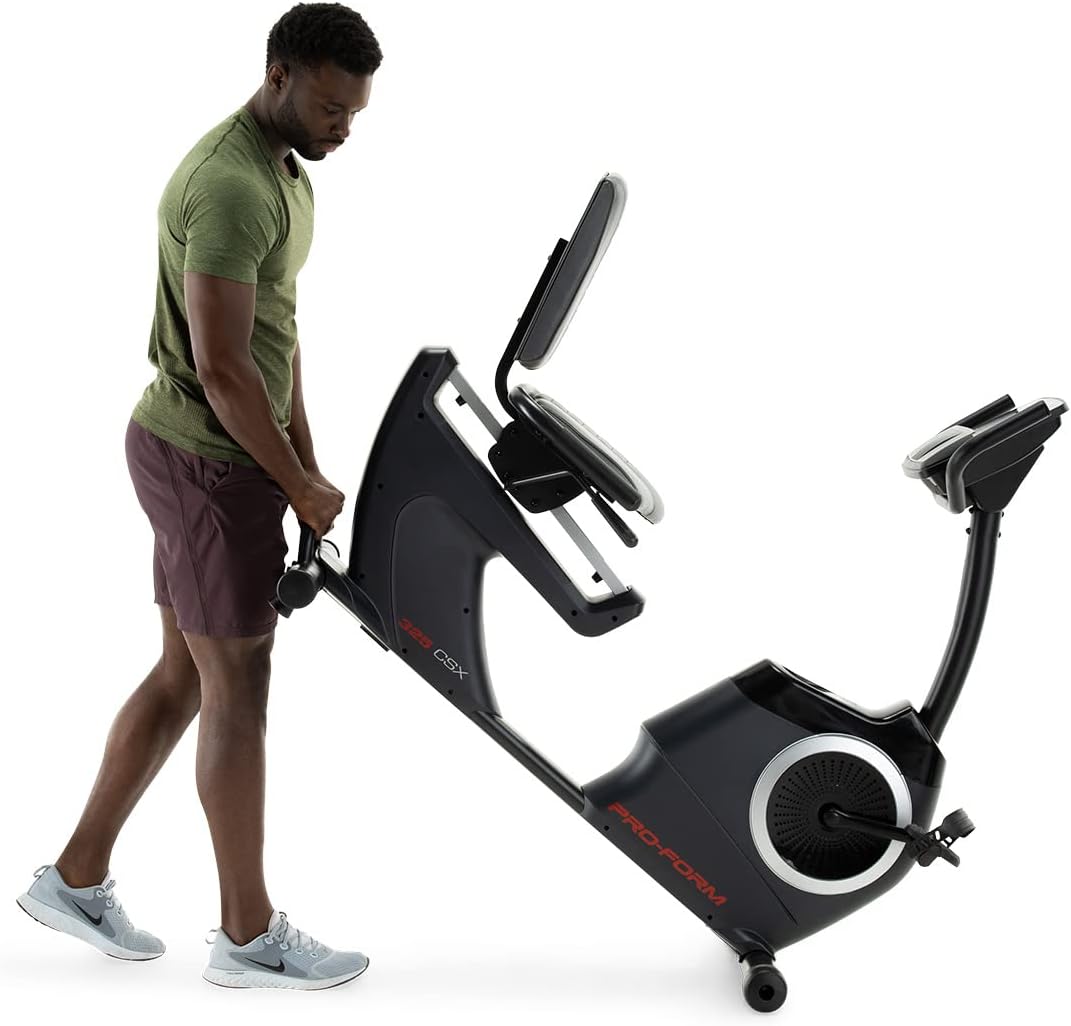
Image: Moving the exercise bike. The bike features transport wheels for easier relocation after assembly.
ຄໍາແນະນໍາການດໍາເນີນງານ
ການປັບທີ່ນັ່ງ:
The cushioned seat is adjustable to accommodate various user heights. To adjust, locate the adjustment lever beneath the seat. Pull the lever, slide the seat to the desired position, and release the lever to lock it in place. Ensure the seat is securely locked before use.

Image: A user demonstrating the correct riding position on the ProForm 325 CSX Exercise Bike, highlighting the adjustable seat.
Console Features and iFIT Connectivity:
The 5-inch high-contrast display provides real-time workout statistics. The bike features 22 digital resistance levels, allowing for precise intensity control. The console also supports iFIT connectivity for interactive workouts.
- ເປີດ: Press any button on the console or begin pedaling to activate the display.
- ການປັບຄວາມຕ້ານທານ: Use the '+' and '-' buttons on the console to increase or decrease resistance. Quick resistance buttons (2, 4, 6, etc.) are also available.
- ໂຄງການອອກກໍາລັງກາຍ: Select from 24 built-in workout programs. Refer to the console manual for navigation.
- iFIT Connection: Connect your own device (tablet/smartphone) via Bluetooth to access iFIT's global outdoor workouts and hands-free intensity adjustments. A 30-day iFIT membership is typically included with purchase.

ຮູບພາບ: ລາຍລະອຽດ view of the console, showing the digital display, resistance controls, and integrated fan.

Image: A user engaging with the iFIT application on a tablet, demonstrating the bike's connectivity features.

Image: An illustration of the iFIT connection, highlighting how a personal device can enhance the workout experience.
ບໍາລຸງຮັກສາ
ການບຳລຸງຮັກສາເປັນປະຈຳຮັບປະກັນອາຍຸການໃຊ້ງານທີ່ຍາວນານ ແລະ ປະສິດທິພາບທີ່ດີທີ່ສຸດຂອງລົດຖີບອອກກຳລັງກາຍຂອງທ່ານ.
- ທໍາຄວາມສະອາດ: ເຊັດລົດຖີບຫຼັງຈາກໃຊ້ແຕ່ລະຄັ້ງດ້ວຍໂຄສະນາamp ຜ້າເພື່ອເອົາເຫື່ອແລະຝຸ່ນ. ຫຼີກລ້ຽງການເຮັດຄວາມສະອາດຂັດ.
- ການກວດກາ: Periodically check all bolts and nuts for tightness. Retighten as necessary.
- pedals: Ensure pedals are securely attached and spin freely.
- ການລະບາຍສີ: The internal magnetic resistance system and belt drive are generally maintenance-free and do not require lubrication.
ການແກ້ໄຂບັນຫາ
| ບັນຫາ | ສາເຫດທີ່ເປັນໄປໄດ້ | ການແກ້ໄຂ |
|---|---|---|
| ຄອນໂຊນບໍ່ສະແດງຂໍ້ມູນ. | Loose wire connection; batteries low/dead (if applicable). | Check all console wire connections. Replace console batteries if battery-powered. |
| ຄວາມຕ້ານທານບໍ່ປ່ຽນແປງ. | Loose connection to resistance motor; console malfunction. | Ensure all connections are secure. If using iFIT, ensure the app is properly connected and controlling the bike. |
| ສິ່ງລົບກວນຜິດປົກກະຕິໃນລະຫວ່າງການປະຕິບັດງານ. | Loose hardware; component friction. | Inspect all bolts and nuts and tighten any loose ones. Ensure no parts are rubbing. |
| Pedals feel loose or wobbly. | Pedals not tightened sufficiently. | Retighten pedals. Remember the left pedal is reverse-threaded. |
ຂໍ້ມູນຈໍາເພາະ
| ຄຸນສົມບັດ | ລາຍລະອຽດ |
|---|---|
| ຊື່ຕົວແບບ | 325 CSX |
| ຍີ່ຫໍ້ | ແບບຟອມ |
| ສີ | ດຳ |
| ກົນໄກການຕໍ່ຕ້ານ | ແມ່ເຫຼັກ |
| ຈໍານວນລະດັບຄວາມຕ້ານທານ | 22 Digital Levels |
| ລະບົບຂັບ | ສາຍແອວ |
| ນ້ໍາຫນັກຜູ້ໃຊ້ສູງສຸດ | 300 ປອນ (ປະມານ 136 ກິໂລ) |
| ນ້ໍາຫນັກລາຍການ | 50.8 ກິໂລກຣາມ (ປະມານ 112 lbs) |
| ວັດສະດຸ | ເຫຼັກໂລຫະປະສົມ |
| ແຫຼ່ງພະລັງງານ | Pedal-powered (non-electric for main operation, console may use batteries) |
| ການນໍາໃຊ້ທີ່ແນະນໍາ | ພາຍໃນ |
| ຈໍສະແດງຜົນ Console | 5-inch High-Contrast Display |
| ການເຊື່ອມຕໍ່ | iFIT (Bluetooth compatible) |
| UPC | 043619106961 |
| ຜູ້ຜະລິດ | iFIT Health & Fitness |
ການຮັບປະກັນແລະການສະຫນັບສະຫນູນ
ProForm products are manufactured with high-quality materials and craftsmanship. For specific warranty details, please refer to the warranty card included with your product or visit the official ProForm website. Warranty coverage typically includes the frame, parts, and labor for a specified period from the date of purchase.
For technical assistance, replacement parts, or customer service inquiries, please contact ProForm customer support. Have your model number (325 CSX) and serial number ready when contacting support.
You may also find helpful resources and FAQs on the ProForm Store on Amazon ຫຼືເຈົ້າຫນ້າທີ່ຂອງຜູ້ຜະລິດ webເວັບໄຊ.
Ask a question about this manual
Ask about setup, troubleshooting, compatibility, parts, safety, or missing instructions. Manuals+ will review the question and use this page’s manual context to help answer it.