
PALOVUE iSound
PALOVUE Wireless Earbuds User Manual
Model: iSound
Your guide to setting up, operating, and maintaining your PALOVUE iSound Wireless Earbuds.
1. ບົດແນະນຳ
The PALOVUE iSound Wireless Earbuds are designed to provide a superior audio experience with advanced features for daily use. Equipped with Qualcomm CSR and Bluetooth 5.0 technology, these earbuds offer a stable and crystal-clear connection, supporting aptX HD sound quality. The CVC 8.0 Noise Cancelling technology with 4 built-in microphones ensures clear calls by effectively reducing ambient noise. Their ergonomic design and multiple ear-tip sizes provide a comfortable and secure fit for extended wear.
The iSound earbuds feature convenient one-step reconnection and intuitive one-touch operation. With up to 24 hours of playtime using the compact charging case, they are ideal for on-the-go listening. Further customization and control are available through the PALOVUE iSound APP.

Image: PALOVUE iSound Wireless Earbuds resting in their open charging case, showcasing ການອອກແບບສີດໍາ sleek ຂອງເຂົາເຈົ້າ.
2. ສິ່ງທີ່ຢູ່ໃນກ່ອງ
Upon opening your PALOVUE iSound package, you will find the following components:
- ກໍລະນີສາກໄຟໄຮ້ສາຍ
- PALOVUE iSound Earbuds (Left and Right)
- Ear Tips (multiple sizes for a customizable fit)
- ສາຍສາກ (USB-C)
- ສາຍສາກ
- ກ່ອງບັນຈຸ
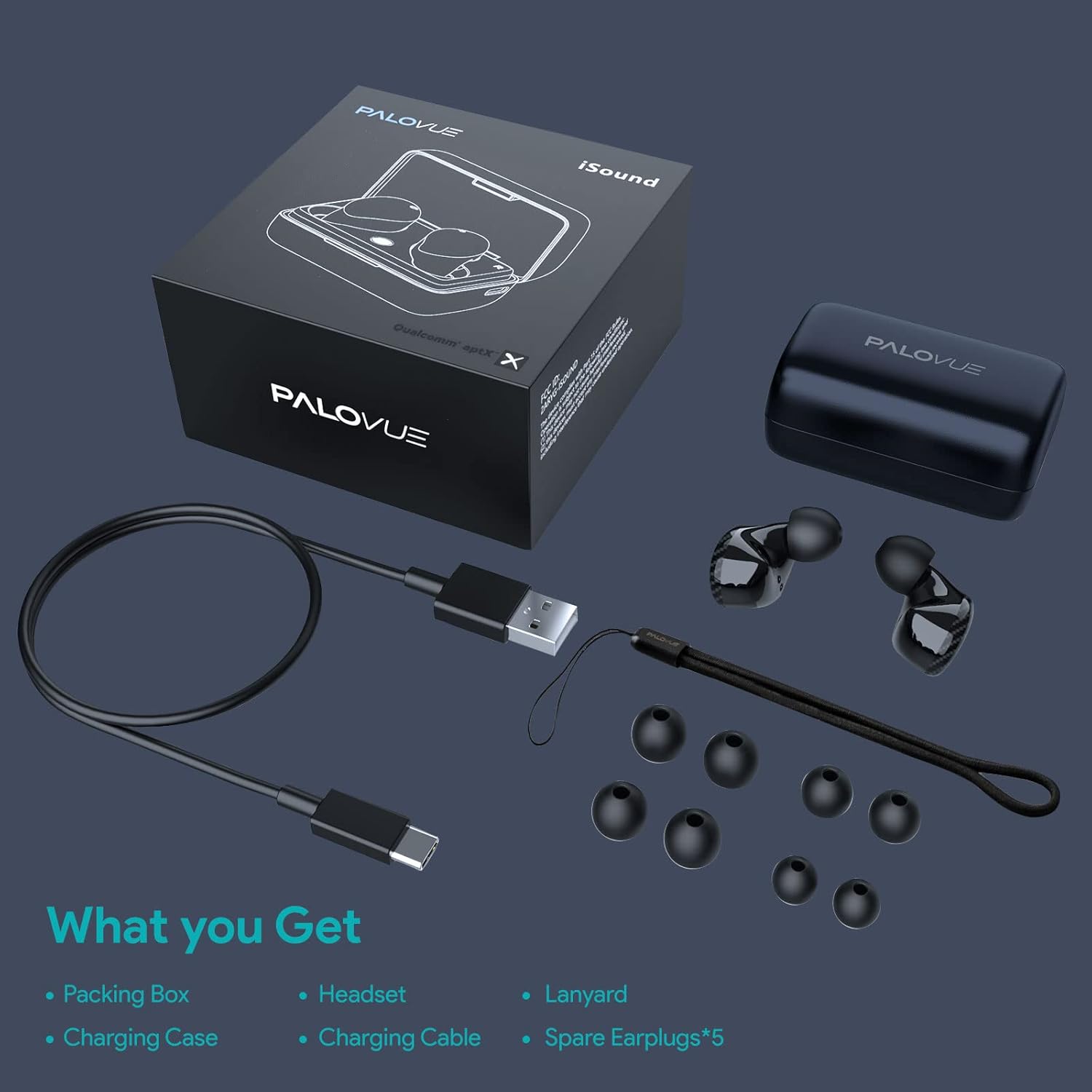
Image: A flat lay showing all items included in the PALOVUE iSound package: the packing box, charging case, earbuds, charging cable, lanyard, and five pairs of spare ear tips.
3. ຄູ່ມືການຕິດຕັ້ງ
3.1 ການສາກໄຟເບື້ອງຕົ້ນ
Before first use, ensure both the earbuds and the charging case are fully charged. Place the earbuds into the charging case. Connect the provided USB-C cable to the charging case and a power source. The indicator lights on the case will show charging status. A full charge typically takes approximately 2 hours for the case.
3.2 ການຈັບຄູ່ກັບອຸປະກອນຂອງທ່ານ
The PALOVUE iSound earbuds feature one-step reconnection for convenience.
- ເປີດກ່ອງສາກໄຟ. ຫູຟັງເອຍບັດຈະເປີດເຄື່ອງອັດຕະໂນມັດ ແລະເຂົ້າສູ່ໂໝດຈັບຄູ່.
- ໃນສະມາດໂຟນ ຫຼືອຸປະກອນທີ່ເປີດໃຊ້ Bluetooth ຂອງທ່ານ, ໃຫ້ໄປທີ່ການຕັ້ງຄ່າ Bluetooth.
- ຊອກຫາ "PALOVUE iSound" in the list of available devices and select it to connect.
- ເມື່ອເຊື່ອມຕໍ່ແລ້ວ, ທ່ານຈະໄດ້ຍິນສຽງຢືນຢັນ, ແລະຫູຟັງເອຍບັດຈະພ້ອມໃຫ້ໃຊ້.
- ສຳລັບການນຳໃຊ້ຄັ້ງຕໍ່ໄປ, ພຽງແຕ່ເປີດກ່ອງສາກໄຟ, ແລະຫູຟັງຈະເຊື່ອມຕໍ່ກັບອຸປະກອນທີ່ຈັບຄູ່ຄັ້ງສຸດທ້າຍໂດຍອັດຕະໂນມັດ.
Video: A detailed guide demonstrating the connection and operation of the PALOVUE iSound earbuds, including initial pairing steps and touch control functions.
4. ປະຕິບັດການຫູຟັງຂອງທ່ານ
4.1 ແຕະການຄວບຄຸມ
The PALOVUE iSound earbuds feature intuitive touch controls on each earbud. The specific functions can be customized via the PALOVUE iSound APP.
| ການປະຕິບັດ | Earbud ຊ້າຍ | Earbud ສິດ |
|---|---|---|
| ແຕະຄັ້ງດຽວ | ປະລິມານລົງ | ປະລິມານຂຶ້ນ |
| ແຕະສອງເທື່ອ | ຫຼິ້ນ/ຢຸດເພງ, ຮັບສາຍ/ວາງສາຍ | ຫຼິ້ນ/ຢຸດເພງ, ຮັບສາຍ/ວາງສາຍ |
| ກົດຍາວ | Previous Song, Reject Call | Next Song, Reject Call |
Video: A short demonstration of the touch controls for the PALOVUE iSound earbuds, showing how to adjust volume, skip tracks, and manage calls.
4.2 Using the PALOVUE iSound APP
Enhance your experience by downloading the PALOVUE iSound APP. The app allows you to:
- Customize touch control functions (e.g., volume, track control, call management).
- Adjust equalizer (EQ) settings for personalized sound profiles (Male Vocals, Electronic, Jazz, Rock, Classical, Female Vocals, Original, Customize).
- Check battery levels of each earbud.
- Access device information and firmware updates.

Image: A woman wearing PALOVUE iSound earbuds, illustrating their comfortable fit and suitability for daily use.

ຮູບພາບ: ລະເບີດ view diagram of the PALOVUE iSound earbud, detailing its internal structure and emphasizing Qualcomm AptX and Deep Bass sound capabilities.
5. ບໍາລຸງຮັກສາ
To ensure the longevity and optimal performance of your PALOVUE iSound Wireless Earbuds, follow these maintenance guidelines:
- ທໍາຄວາມສະອາດ: ອະນາໄມຫູຟັງຫູຟັງ ແລະກະເປົ໋າສາກໄຟເປັນປະຈຳດ້ວຍຜ້າແພທີ່ອ່ອນ, ແຫ້ງ, ບໍ່ມີສານຂັດ. ຢ່າໃຊ້ເຄື່ອງເຮັດຄວາມສະອາດຂັດຫຼືສານລະລາຍ. ຄ່ອຍໆເອົາຂີ້ຫູ ຫຼືສິ່ງເສດເຫຼືອອອກຈາກປາຍຫູ ແລະຕາໜ່າງລຳໂພງ ໂດຍໃຊ້ແປງນ້ອຍໆ ຫຼືຜ້າຝ້າຍ.
- ການເກັບຮັກສາ: ເມື່ອບໍ່ໄດ້ໃຊ້, ໃຫ້ເກັບຮັກສາຫູຟັງໃສ່ໃນກ່ອງສາກເພື່ອປົກປ້ອງພວກມັນຈາກຂີ້ຝຸ່ນ, ຝຸ່ນ ແລະຄວາມເສຍຫາຍທາງຮ່າງກາຍ.
- ການດູແລຫມໍ້ໄຟ: Avoid fully depleting the battery frequently. For long-term storage, charge the earbuds and case to about 50% to preserve battery health.
- ຄວາມຕ້ານທານນ້ໍາ: The earbuds are rated IPX4 for water resistance, meaning they are protected against splashing water from any direction. They are designed for sports and can withstand sweat and light rain, but they are not suitable for swimming or submersion in water. Ensure the earbuds are dry before placing them back in the charging case.
Video: A short promotional video highlighting the compact size and powerful features of the iSound True Wireless Earbuds, including their IPX4 water resistance.
6. ການແກ້ໄຂບັນຫາ
If you encounter issues with your PALOVUE iSound Wireless Earbuds, try the following solutions:
6.1 ບັນຫາການຈັບຄູ່
- ຫູຟັງບໍ່ເຊື່ອມຕໍ່: Ensure Bluetooth is enabled on your device. Place earbuds back in the case, close it, wait a few seconds, then open it again to re-initiate pairing mode.
- ຫູຟັງຫູຟັງອັນດຽວທີ່ເຮັດວຽກ: Try placing both earbuds back in the charging case, closing the lid, and then reopening it. Ensure both earbuds have sufficient charge.
- Earbuds not appearing in Bluetooth list: Turn off Bluetooth on your device, then turn it back on. Restart your device if necessary.
6.2 ບັນຫາຄຸນນະພາບສຽງ
- ລະດັບສຽງຕໍ່າ: Increase the volume on both your earbuds (via touch control) and your connected device.
- ສຽງທີ່ບິດເບືອນ: Ensure the earbuds are within Bluetooth range of your device. Check for obstructions between the earbuds and your device.
- ຄຸນນະພາບການໂທບໍ່ດີ: Ensure the microphones are not obstructed. CVC 8.0 Noise Cancelling technology helps, but extreme noise environments can still affect clarity.
6.3 Battery and Charging Issues
- ຫູຟັງບໍ່ສາກ: Ensure the charging contacts on the earbuds and inside the case are clean and dry. Try a different charging cable or power adapter.
- ກໍລະນີບໍ່ໄດ້ສາກໄຟ: ກວດສອບວ່າສາຍສາກ ແລະແຫຼ່ງໄຟໃຊ້ງານໄດ້ຖືກຕ້ອງ.
6.4 How to Reset Your Earbuds
If you experience persistent issues, a factory reset may resolve them:
- ວາງຫູຟັງເອຍບັດທັງສອງໃສ່ໃນກ່ອງສາກ.
- Press and hold the reset button on the charging case (usually located inside or near the charging port) until the indicator lights on the earbuds flash red and green alternately.
- Release the button and wait until only the green light flashes, indicating the reset is complete.
- ເອົາຫູຟັງອອກຈາກກ່ອງແລະລອງຈັບຄູ່ກັບອຸປະກອນຂອງທ່ານຄືນໃໝ່.
Refer to the "PALOVUE iSound Connection operation guide" video in the Setup section for a visual demonstration of the reset process.
7. ຂໍ້ມູນຈໍາເພາະ
| ຄຸນສົມບັດ | ລາຍລະອຽດ |
|---|---|
| ຍີ່ຫໍ້ | PALOVUE |
| ຊື່ຕົວແບບ | iSound |
| ເຕັກໂນໂລຊີການເຊື່ອມຕໍ່ | ໄຮ້ສາຍ (Bluetooth 5.0) |
| ເຕັກໂນໂລຊີການສື່ສານໄຮ້ສາຍ | Bluetooth |
| ຊິບເຊັດ | Qualcomm CSR QCC3020 |
| ການຄວບຄຸມສິ່ງລົບກວນ | CVC 8.0 Noise Cancellation (for calls) |
| ໄມໂຄຣໂຟນ | 4 ໄມ |
| ປະເພດການຄວບຄຸມ | ແຕະການຄວບຄຸມ |
| ການຈັດວາງຫູ | ໃນຫູ |
| ປັດໄຈແບບຟອມ | ໃນຫູ |
| ອາຍຸແບັດເຕີຣີ (ຫູຟັງ) | ສູງສຸດ 6 ຊົ່ວໂມງ (ປະມານ) |
| ເວລາຫຼິ້ນທັງໝົດ (ພ້ອມກໍລະນີ) | ສູງສຸດ 24 ຊົ່ວໂມງ |
| ເວລາສາກໄຟ (ກໍລະນີ) | 2 ຊົ່ວໂມງ |
| ຊ່ວງ Bluetooth | ສູງສຸດ 10 ແມັດ (32.8 ຟຸດ) |
| ລະດັບຄວາມຕ້ານທານນ້ໍາ | IPX4 (ກັນນໍ້າກະແຈກກະຈາຍ) |
| ວັດສະດຸ | Silicone (Ear Tips) |
| ນ້ໍາຫນັກລາຍການ | 1.76 ອອນ |
| ອຸປະກອນທີ່ເຂົ້າກັນໄດ້ | Smartphones, Tablets, Laptops, Desktops, Smart TVs, Car Audio Systems |
8. ການຮັບປະກັນແລະການສະຫນັບສະຫນູນ
PALOVUE products typically come with a manufacturer's warranty. Please refer to the warranty card included in your product packaging for specific terms and conditions, including warranty period and coverage details. For technical support, troubleshooting assistance, or warranty claims, please contact PALOVUE customer service through their official webເວັບໄຊ ຫຼືຂໍ້ມູນຕິດຕໍ່ທີ່ສະໜອງໃຫ້ຢູ່ໃນເອກະສານຜະລິດຕະພັນຂອງທ່ານ.
You can also visit the official PALOVUE store on Amazon for more information and support: PALOVUE Amazon Store.