
ແນະນຳ
This instruction manual provides essential information for the safe and efficient use of your tectake Electric Height Adjustable Desk Stand, Model 404315. This versatile desk stand is designed to offer a smooth transition between sitting and standing positions, promoting a healthier work environment. It features a sturdy metal frame, an electric height adjustment mechanism, and an intelligent anti-collision system for enhanced safety.
Please read this manual thoroughly before assembly and operation to ensure proper installation and to maximize the lifespan of your product.
ຄຳເຕືອນຄວາມປອດໄພ
ການບໍ່ປະຕິບັດຕາມຄໍາແນະນໍາດ້ານຄວາມປອດໄພເຫຼົ່ານີ້ອາດຈະເຮັດໃຫ້ເກີດການບາດເຈັບຫຼືຄວາມເສຍຫາຍຕໍ່ຜະລິດຕະພັນ.
- Ensure the desk stand is properly assembled according to the provided instructions.
- Do not exceed the maximum weight limit of 100 kg (220 lbs) on the desk stand.
- Exercise caution with sharp edges during assembly and handling.
- Properly adjust the height-adjustable plastic feet to ensure the desk's stability on uneven surfaces.
- Avoid touching electrical components or motors during operation.
- Ensure the desktop is firmly grounded to prevent electrical hazards.
- ໃຫ້ເດັກນ້ອຍ ແລະ ສັດລ້ຽງຢູ່ຫ່າງຈາກໂຕະໃນລະຫວ່າງການປັບຄວາມສູງ.
ເນື້ອໃນຊຸດ
ກວດສອບວ່າອົງປະກອບທັງຫມົດແມ່ນມີຢູ່ກ່ອນທີ່ຈະເລີ່ມຕົ້ນການປະກອບ. ຖ້າພາກສ່ວນໃດຂາດຫາຍໄປຫຼືເສຍຫາຍ, ກະລຸນາຕິດຕໍ່ຝ່າຍຊ່ວຍເຫຼືອລູກຄ້າ.
- Electric Height Adjustable Desk Stand Frame
- Mounting Material (screws, tools, etc.)
- ຄໍາແນະນໍາຂອງສະພາແຫ່ງ
Note: A tabletop is not included with this desk stand and must be purchased separately.
ການຕິດຕັ້ງແລະການປະກອບ
Follow the detailed assembly instructions provided in the package. The general steps are outlined below:
- Unpack ອົງປະກອບ: ເອົາຊິ້ນສ່ວນທັງໝົດອອກຈາກເຄື່ອງຫຸ້ມຫໍ່ຢ່າງລະມັດລະວັງ ແລະ ວາງອອກເທິງພື້ນຜິວທີ່ສະອາດ, ອ່ອນນຸ້ມເພື່ອປ້ອງກັນຮອຍຂີດຂ່ວນ.
- ກອບປະກອບ: Connect the lifting columns, crossbars, and feet according to the assembly manual. Ensure all screws are tightened securely.
- ຄັດຕິດໂຕະໂຕະ: Place your chosen tabletop onto the assembled frame. Secure the tabletop to the frame using the provided mounting hardware. Ensure the tabletop is centered and stable.
- ເຊື່ອມຕໍ່ພະລັງງານ: Plug the power cable into the control box, and then plug the control box into a standard electrical outlet. Ensure the cable is routed safely to avoid tripping hazards.
- ປັບຕີນ: Level the desk by adjusting the plastic feet at the bottom of the stand. This ensures stability and prevents wobbling.
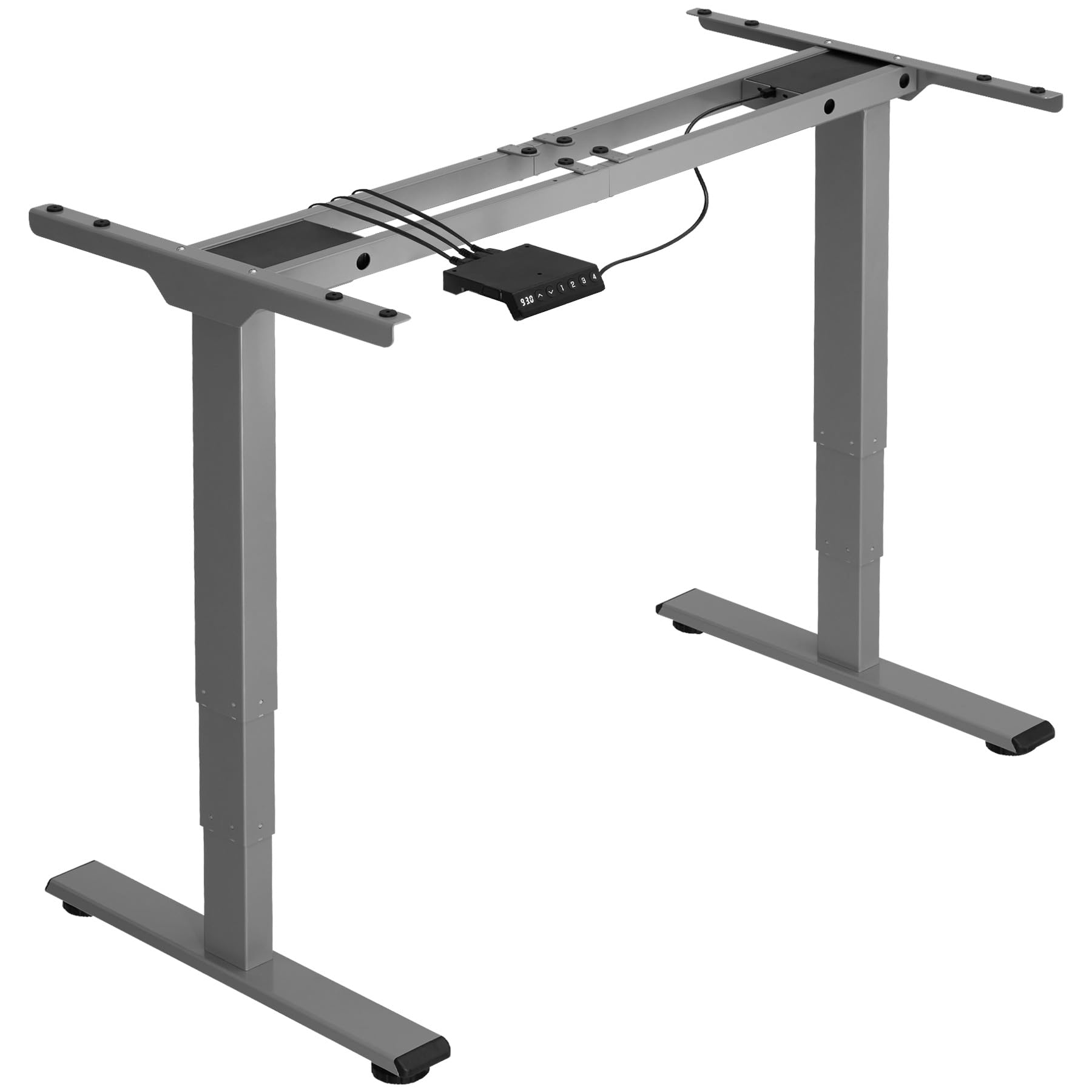
Image: An assembled tectake electric height adjustable desk stand in grey, ready for use. This image illustrates the sturdy metal frame and the overall structure of the product.
ຄໍາແນະນໍາການດໍາເນີນງານ
Your tectake Electric Height Adjustable Desk Stand is designed for intuitive operation.
- ການປັບຄວາມສູງ: Use the control panel (usually located on the front edge of the tabletop) to raise or lower the desk. Typically, there are 'Up' and 'Down' buttons. Press and hold the desired button until the desk reaches your preferred height. The electric motor operates quietly and smoothly.
- ລະບົບຕ້ານການ collision: The desk stand is equipped with an intelligent anti-collision system. If the desk encounters an obstacle (e.g., a chair, cabinet, or wall) during height adjustment, the motor will automatically stop and slightly reverse direction to prevent damage.
- Memory Presets (if applicable): Some models may include memory preset buttons. Refer to your specific control panel instructions for programming and using these presets to save your favorite sitting and standing heights.
Regularly changing between sitting and standing positions can help reduce strain and improve comfort during long working hours.
ບໍາລຸງຮັກສາ
Proper maintenance ensures the longevity and optimal performance of your desk stand.
- ທໍາຄວາມສະອາດ: Wipe the metal frame and tabletop (if applicable) with a soft, damp ຜ້າ. ຫຼີກເວັ້ນການໃຊ້ເຄື່ອງເຮັດຄວາມສະອາດຂັດຫຼືສານລະລາຍທີ່ສາມາດທໍາລາຍການສໍາເລັດຮູບ.
- ກວດສອບການເຊື່ອມຕໍ່: Periodically inspect all screws and bolts to ensure they remain tight. Re-tighten if necessary.
- ການຄຸ້ມຄອງສາຍໄຟ: Ensure all power cables are neatly organized and not pinched or strained.
- ຈຳກັດນ້ຳໜັກ: Always adhere to the maximum load capacity of 100 kg. Overloading can damage the motor and frame.
ການແກ້ໄຂບັນຫາ
If you encounter any issues with your desk stand, refer to the following common solutions:
| ບັນຫາ | ສາເຫດທີ່ເປັນໄປໄດ້ | ການແກ້ໄຂ |
|---|---|---|
| ໂຕະບໍ່ຍ້າຍ. | ສາຍໄຟຖືກຕັດການເຊື່ອມຕໍ່, ມໍເຕີໂຫຼດເກີນ, ບັນຫາແຜງຄວບຄຸມ. | Check power connections. Unplug and replug the power cord. Reduce load if overloaded. Contact support if problem persists. |
| ລະບົບປ້ອງກັນການຊົນຈະເຮັດວຽກເລື້ອຍໆ. | Obstruction, sensitive setting. | Ensure no objects are in the path of the desk. Refer to control panel manual for sensitivity adjustment (if available). |
| ສິ່ງລົບກວນຜິດປົກກະຕິໃນລະຫວ່າງການປະຕິບັດງານ. | ອົງປະກອບທີ່ວ່າງ, ບັນຫາມໍເຕີ. | Check all screws and bolts for tightness. Ensure the desk is level. If noise persists, contact customer support. |
| Desk wobbles. | Uneven floor, loose connections. | Adjust the leveling feet at the bottom of the stand. Ensure all frame connections are tight. |
ຂໍ້ມູນຈໍາເພາະ
Key technical details for the tectake Electric Height Adjustable Desk Stand, Model 404315:
- ໝາຍເລກຕົວແບບ: 404315
- Maximum Total Dimensions (WxDxH): ຂະໜາດປະມານ 168 x 60 x 125 cm
- Minimum Total Dimensions (WxDxH): ຂະໜາດປະມານ 110 x 60 x 60 cm
- Suitable for Table Tops (WxD): Approximately 120 x 60 cm to 180 x 80 cm
- Lifting Columns per Side: 3
- Main Column (WxD): ຂະໜາດປະມານ 5 x 8 cm
- Table Top Support (WxD): ຂະໜາດປະມານ 3 x 58 cm
- Adjustable Area of Plastic Feet: ປະມານ 1.2 ຊຕມ
- Sound from Electric Motors: <50 dB
- ຄວາມໄວຍົກ: 25 ມມ/ວິນາທີ
- Power per Motor: 52.2 ວ
- ການປ້ອນຂໍ້ມູນ Voltage: 100-240 V
- ຄວາມຍາວສາຍ: ປະມານ 150 ຊຕມ
- ຄວາມອາດສາມາດໂຫຼດ: 100 ກິໂລ
- ນ້ຳໜັກ: ປະມານ 23 ກິໂລ
- ວັດສະດຸ: Powder-coated steel, ABS plastic
ການຮັບປະກັນແລະການສະຫນັບສະຫນູນ
For warranty information, please refer to the documentation included with your purchase or visit the official tectake website. If you require technical assistance, have questions about assembly, or need to report a missing/damaged part, please contact tectake customer support directly. Contact details can typically be found on the manufacturer's webເວັບໄຊ ຫຼືໃນເອກະສານການຊື້ຂອງທ່ານ.
ໃນເວລາທີ່ຕິດຕໍ່ຫາສະຫນັບສະຫນູນ, ກະລຸນາມີຕົວແບບຂອງທ່ານ (404315) ແລະວັນທີການຊື້ທີ່ມີຢູ່.