
WGP T6 Plus
ຄູ່ມືຜູ້ໃຊ້ຫູຟັງບູທູດ WGP Teleheer T6 Plus ສຳລັບລົດຈັກ
Model: T6 Plus | Brand: WGP
ແນະນຳ
This manual provides detailed instructions for the installation, operation, and maintenance of your WGP Teleheer T6 Plus Motorcycle Bluetooth Headset. Please read this manual thoroughly before using the device to ensure proper function and safety. The T6 Plus is designed for motorcycle riders, offering full-duplex Bluetooth real-time intercom communication, hands-free calling, music playback, and voice assistant integration.
ຄຸນນະສົມບັດທີ່ສໍາຄັນ
- Full Duplex Bluetooth Real-time Intercom: Stable signal transmission up to 1500 meters (93 MPH) with ceramic antenna.
- Hands-free & Multi-function Keys: Bluetooth 5.1 connectivity, supports call handling (answer/refuse/redial), music playback. Automatic switch to phone mode for incoming calls. Large button design for easy operation with gloves.
- IP65 Waterproof & Dustproof Design: Withstands various weather conditions, operational down to -15°F.
- HD Speakers & Ultra High Quality Sound: High-definition sound quality, especially for bass, with effective wind noise reduction.
- All-in-One Type-C Port: Integrated audio, data transfer, and charging.
- ຊີວິດຫມໍ້ໄຟຍາວ: 850 mAh battery providing 30 hours of continuous use and 500 hours standby.
ເນື້ອໃນຊຸດ
ກະລຸນາກວດສອບວ່າລາຍການທັງໝົດມີຢູ່ໃນຊຸດຂອງທ່ານ:
- WGP Teleheer T6 Plus Bluetooth Headset Unit (2 units for 2-pack)
- ລຳໂພງໃສ່ໝວກກັນກະທົບ
- Microphone (boom mic for open-face helmets, soft mic for full-face helmets)
- Mounting Clip (clamp and adhesive options)
- ສາຍສາກໄຟ USB Type-C
- ຄູ່ມືຜູ້ໃຊ້

Image: A detailed diagram illustrating the components of the WGP Teleheer T6 Plus headset, including the main unit with its Type-C port, indicator light, and control buttons (OFF/ON, Volume+, Volume-, Telephone, Connect). It also shows the securing clip, microphone, and trumpet (speakers), providing a clear visual guide to the parts included and their connections.
ການຕິດຕັ້ງແລະການຕິດຕັ້ງ
1. ການສາກອຸປະກອນ
Before first use, fully charge the T6 Plus headset. Connect the provided USB Type-C cable to the headset's Type-C port and the other end to a USB power adapter (not included). The indicator light will show charging status and turn off when fully charged.
- ເວລາສາກໄຟ: ປະມານ 2-3 ຊົ່ວໂມງ.
- Indicator light: Red during charging, off when fully charged.
2. Installing the Headset in Your Helmet
The T6 Plus can be installed using either the clamp mount or the adhesive mount.
- ເລືອກສະຖານທີ່ຕິດຕັ້ງ: Select a flat area on the left side of your helmet where the headset unit can be easily accessed.
- ຕິດຕັ້ງລໍາໂພງ: Attach the speakers inside the helmet's ear pockets using the adhesive pads. Ensure they are positioned directly over your ears for optimal sound quality.
- ຕິດຕັ້ງໄມໂຄຣໂຟນ:
- For full-face helmets: Use the soft wire microphone and position it inside the chin bar, close to your mouth.
- For open-face or modular helmets: Use the boom microphone and position it in front of your mouth.
- ຕິດຕັ້ງໜ່ວຍຫຼັກ:
- Clamp ພູ: ເລື່ອນ clamp between the helmet shell and the inner padding. Secure it tightly.
- ກາວ Mount: Clean the chosen surface on the helmet. Peel off the protective film from the adhesive mount and firmly press it onto the helmet for at least 30 seconds. Allow 24 hours for the adhesive to cure before use.
- ເຊື່ອມຕໍ່ສາຍ: Plug the speaker/microphone cable into the Type-C port on the main headset unit.

Image: A WGP Teleheer T6 Plus headset unit mounted on the side of a motorcycle helmet. This image demonstrates the typical installation position of the headset on a helmet, showing its compact design and how it integrates with the helmet's exterior. The control buttons are visible, indicating ease of access for the rider.
ຄໍາແນະນໍາການດໍາເນີນງານ
1. ເປີດ/ປິດ
- ເປີດ: ກົດຄ້າງໄວ້ ປຸ່ມເປີດປິດ for 3 seconds until the indicator light flashes.
- ປິດພະລັງງານ: ກົດຄ້າງໄວ້ ປຸ່ມເປີດປິດ ເປັນເວລາ 3 ວິນາທີຈົນກ່ວາໄຟຕົວຊີ້ວັດປິດ.
2. Bluetooth Pairing with Mobile Phone
- Ensure the T6 Plus is powered off.
- ກົດຄ້າງໄວ້ ປຸ່ມເປີດປິດ ເປັນເວລາປະມານ 5-7 ວິນາທີຈົນກວ່າໄຟສະແດງຈະກະພິບສີແດງ ແລະສີຟ້າສະລັບກັນ, ສະແດງເຖິງໂໝດການຈັບຄູ່.
- On your mobile phone, enable Bluetooth and search for "Teleheer T6 Plus".
- Select "Teleheer T6 Plus" from the list of available devices to connect. Once connected, the indicator light will flash blue slowly.
3. Intercom Pairing (Two Units)
To establish intercom communication between two T6 Plus units:
- Ensure both T6 Plus units are powered off.
- On Unit 1, press and hold the ປຸ່ມເປີດປິດ for 5-7 seconds until the indicator light flashes red and blue alternately.
- On Unit 2, press and hold the ປຸ່ມເປີດປິດ for 5-7 seconds until the indicator light flashes red and blue alternately.
- ຫຍໍ້ໆ ກົດເຂົ້າ ປຸ່ມເປີດປິດ on either Unit 1 or Unit 2 (one short press). The units will search for each other.
- ເມື່ອເຊື່ອມຕໍ່ແລ້ວ, ໄຟສັນຍານໃນທັງສອງໜ່ວຍຈະກະພິບສີຟ້າຊ້າໆ, ແລະ ທ່ານຈະໄດ້ຍິນສຽງຢືນຢັນ.
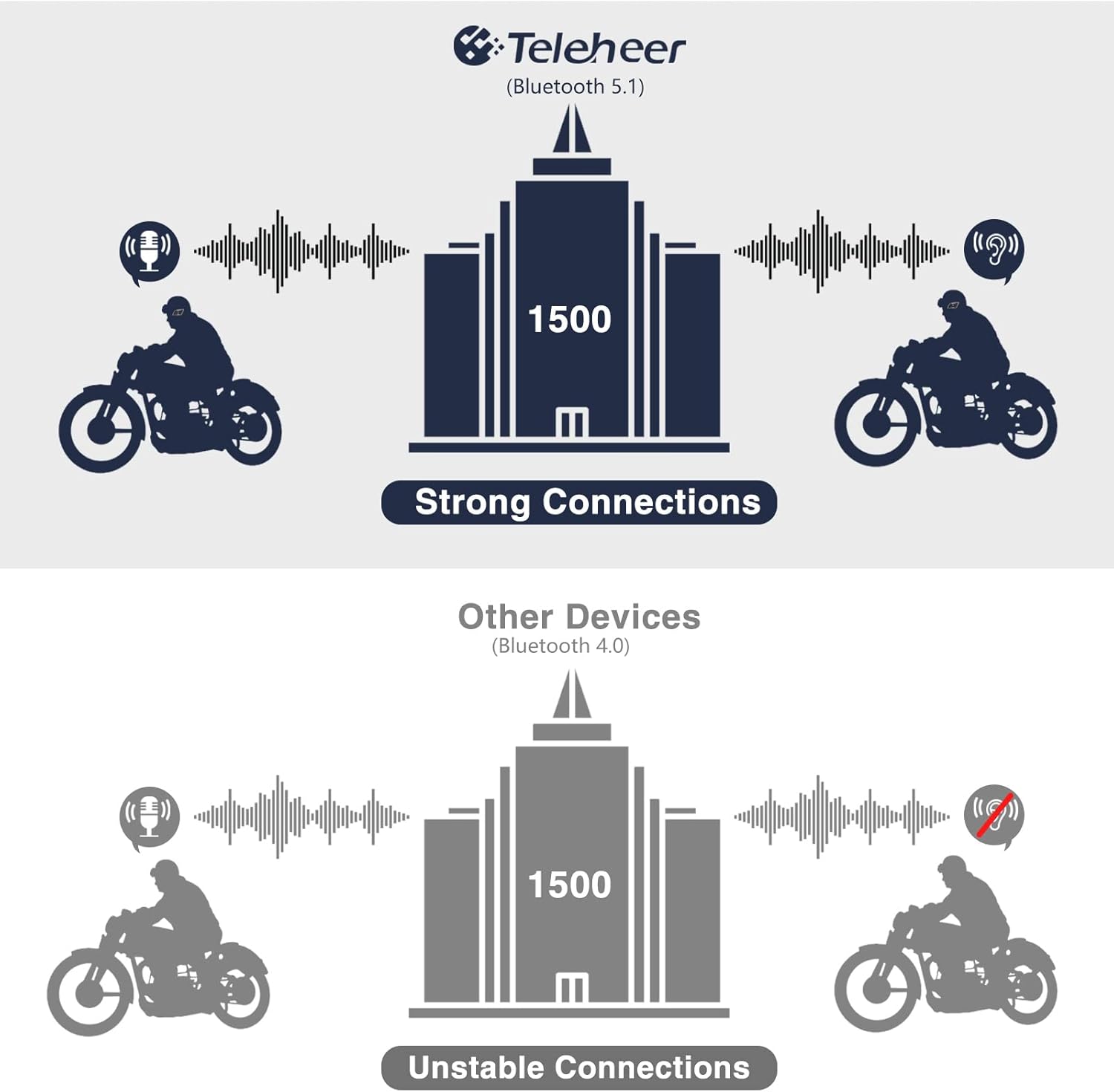
Image: A graphic illustrating the effective intercom range of the Teleheer T6 Plus (Bluetooth 5.1) compared to older Bluetooth 4.0 devices. The T6 Plus shows stable connections over 1500m, while older devices show unstable connections over shorter distances. This highlights the improved signal stability and range due to Bluetooth 5.1 and the ceramic antenna.
4. Phone Call Functions
- ຮັບສາຍ: ກົດສັ້ນ ປຸ່ມໂທລະສັບ.
- ສິ້ນສຸດການໂທ: ກົດສັ້ນ ປຸ່ມໂທລະສັບ.
- ປະຕິເສດການໂທ: ກົດຄ້າງໄວ້ ປຸ່ມໂທລະສັບ ເປັນເວລາ 2 ວິນາທີ.
- ໂທຫາເບີສຸດທ້າຍ: ກົດປຸ່ມສອງເທື່ອ ປຸ່ມໂທລະສັບ.
5. ການຫຼິ້ນເພງ
- ຫຼິ້ນ/ຢຸດ: ກົດສັ້ນ ປຸ່ມໂທລະສັບ.
- ເພງຕໍ່ໄປ: ກົດສັ້ນ ປຸ່ມ Volume Up.
- ຕິດຕາມກ່ອນ ໜ້າ ນີ້: ກົດສັ້ນ ປະລິມານລົງປຸ່ມ.
- ການປັບລະດັບສຽງ: ກົດຄ້າງໄວ້ ປຸ່ມເພີ່ມສຽງ/ປຸ່ມລົງ ເພື່ອເພີ່ມຫຼືຫຼຸດລົງປະລິມານ.
6. Voice Assistant (Siri/Google Assistant)
- ກະຕຸ້ນຜູ້ຊ່ວຍສຽງ: ກົດປຸ່ມສອງເທື່ອ ປຸ່ມເປີດປິດ.

Image: A graphic depicting the voice assistant feature of the Teleheer T6 Plus, showing a helmeted rider interacting with their phone via voice commands like "Hey Siri" or "Ok Google". This illustrates the hands-free convenience for navigation, calls, and other smartphone functions while riding.
ການບໍາລຸງຮັກສາແລະການດູແລ
- ທໍາຄວາມສະອາດ: ເຊັດຊຸດຫູຟັງດ້ວຍຜ້າອ່ອນໆ, ເຊັດໃຫ້ແຫ້ງ.amp ຜ້າ. ຢ່າໃຊ້ສານເຄມີທີ່ຮຸນແຮງຫຼືເຄື່ອງເຮັດຄວາມສະອາດຂັດ.
- ຄວາມຕ້ານທານນ້ໍາ: The device is IP65 waterproof. While it can withstand water jets, avoid submerging it in water for extended periods. Ensure the Type-C port cover is securely closed when not charging.
- ການເກັບຮັກສາ: ເກັບຮັກສາອຸປະກອນໄວ້ໃນບ່ອນທີ່ເຢັນ, ແຫ້ງເມື່ອບໍ່ໄດ້ໃຊ້. ຫຼີກເວັ້ນອຸນຫະພູມທີ່ຮຸນແຮງ.
- ການດູແລຫມໍ້ໄຟ: To prolong battery life, avoid fully discharging the battery frequently. Charge the device regularly, even if not in use for long periods.

Image: A WGP Teleheer T6 Plus headset unit partially submerged in water with splashes, demonstrating its IP65 waterproof rating. The image emphasizes the device's ability to withstand water exposure, making it suitable for various weather conditions during riding.
ການແກ້ໄຂບັນຫາ
| ບັນຫາ | ສາເຫດທີ່ເປັນໄປໄດ້ | ການແກ້ໄຂ |
|---|---|---|
| ອຸປະກອນບໍ່ເປີດ. | ແບັດເຕີຣີຕໍ່າ. | ສາກອຸປະກອນໃຫ້ເຕັມ. |
| ບໍ່ສາມາດຈັບຄູ່ກັບໂທລະສັບໄດ້. | ອຸປະກອນບໍ່ຢູ່ໃນໂໝດຈັບຄູ່; Bluetooth ປິດຢູ່ໃນໂທລະສັບ; ອຸປະກອນຈັບຄູ່ຫຼາຍເກີນໄປ. | Ensure device is in pairing mode (red/blue flashing). Turn on phone's Bluetooth. Delete old Bluetooth connections on phone. |
| Intercom connection unstable or short range. | Obstructions; out of range; interference. | Ensure clear line of sight. Stay within 1500m range. Avoid strong electromagnetic interference. |
| ບໍ່ມີສຽງຈາກລຳໂພງ. | Speakers not connected properly; volume too low. | Check speaker connection to Type-C port. Increase volume. |
| ໄມໂຄຣໂຟນຮັບສຽງບໍ່ໄດ້. | Microphone not connected properly; microphone position. | Check microphone connection. Ensure microphone is close to your mouth. |
| Wind noise during calls/intercom. | High speed; improper microphone placement. | Ensure microphone is positioned correctly to minimize wind exposure. The device has DSP noise suppression, but extreme conditions may affect performance. |
ຂໍ້ມູນຈໍາເພາະ
| ຄຸນສົມບັດ | ລາຍລະອຽດ |
|---|---|
| ຊື່ຕົວແບບ | Teleheer T6 Plus |
| ລຸ້ນ Bluetooth | Bluetooth 5.1 |
| ຊ່ວງ Intercom | Up to 1500 meters (93 MPH) |
| ຄວາມອາດສາມາດຫມໍ້ໄຟ | 850 mAh |
| ເວລາ ນຳ ໃຊ້ຢ່າງຕໍ່ເນື່ອງ | 30 ຊົ່ວໂມງ |
| ເວລາສະແຕນບາຍ | 500 ຊົ່ວໂມງ |
| ພອດສາກໄຟ | ປະເພດ-C |
| ການຕໍ່ຕ້ານນ້ໍາ | IP65 (Jet-proof) |
| ອຸນຫະພູມປະຕິບັດການ | Down to -15°F |
| ວັດສະດຸເສົາອາກາດ | ເຊລາມິກ |
| ວິທີການຄວບຄຸມ | Touch / Physical Buttons |
| ນ້ໍາຫນັກລາຍການ | 14.4 ອອນສ໌ (ປະມານ 408 ກຣາມ) |
| ຂະໜາດ (ຊຸດ) | 8.54 x 3.9 x 2.95 ນິ້ວ |
ການຮັບປະກັນແລະການສະຫນັບສະຫນູນ
For warranty information and technical support, please refer to the official WGP webເວັບໄຊ ຫຼືຕິດຕໍ່ບໍລິການລູກຄ້າຂອງເຂົາເຈົ້າໂດຍກົງ. ຮັກສາໃບຮັບເງິນການຊື້ຂອງທ່ານໄວ້ເປັນຫຼັກຖານການຊື້ສໍາລັບການຮ້ອງຂໍການຮັບປະກັນ.
ສໍາລັບການຊ່ວຍເຫຼືອເພີ່ມເຕີມ, ທ່ານສາມາດໄປຢ້ຽມຢາມໄດ້ ຫນ້າຜະລິດຕະພັນໃນ Amazon or contact the seller directly through the Amazon platform.
Ask a question about this manual
Ask about setup, troubleshooting, compatibility, parts, safety, or missing instructions. Manuals+ will review the question and use this page’s manual context to help answer it.