1. ຄໍາແນະນໍາຄວາມປອດໄພທີ່ສໍາຄັນ
Please read all instructions carefully before using the Baseus A7 Handheld Vacuum. Keep this manual for future reference.
- ຢ່າໃຊ້ເຄື່ອງດູດຝຸ່ນຢູ່ໃກ້ກັບນ້ໍາຫຼືໃນສະພາບທີ່ປຽກ.
- ຫ້າມດູດເອົາວັດຖຸໄວໄຟຫຼືໄຟໄໝ້ໄດ້, ຂີ້ເຖົ່າຮ້ອນ, ຫຼືວັດຖຸແຫຼມ.
- ຮັກສາຜົມ, ເຄື່ອງນຸ່ງວ່າງ, ນິ້ວມື, ແລະທຸກພາກສ່ວນຂອງຮ່າງກາຍໃຫ້ຫ່າງຈາກຊ່ອງເປີດ ແລະພາກສ່ວນທີ່ເຄື່ອນຍ້າຍ.
- ໃຊ້ສາຍສາກໄຟທີ່ຜູ້ຜະລິດສະໜອງໃຫ້ເທົ່ານັ້ນ.
- ຢ່າໃຊ້ເຄື່ອງດູດຝຸ່ນໃນຂະນະທີ່ສາຍໄຟ ຫຼື ປລັກທີ່ເສຍຫາຍ.
- Ensure the filter is properly installed before use.
- ເຄື່ອງໃຊ້ນີ້ບໍ່ໄດ້ມີຈຸດປະສົງເພື່ອໃຊ້ໂດຍບຸກຄົນ (ລວມທັງເດັກນ້ອຍ) ທີ່ມີຄວາມສາມາດທາງຮ່າງກາຍ, ຄວາມຮູ້ສຶກ ຫຼືຈິດໃຈທີ່ຫຼຸດລົງ, ຫຼືຂາດປະສົບການ ແລະຄວາມຮູ້, ເວັ້ນເສຍແຕ່ວ່າພວກເຂົາໄດ້ຮັບການຊີ້ນໍາ ຫຼືຄໍາແນະນໍາກ່ຽວກັບການນໍາໃຊ້ເຄື່ອງໃຊ້ໂດຍບຸກຄົນທີ່ຮັບຜິດຊອບຄວາມປອດໄພຂອງເຂົາເຈົ້າ.
- ເດັກນ້ອຍຄວນໄດ້ຮັບການເບິ່ງແຍງເພື່ອຮັບປະກັນວ່າພວກເຂົາບໍ່ໄດ້ຫຼີ້ນກັບເຄື່ອງໃຊ້.
2. ເນື້ອໃນຊຸດ
ກວດສອບວ່າລາຍການທັງຫມົດແມ່ນມີຢູ່ໃນຊຸດ:

ຮູບທີ 2.1: ອົງປະກອບລວມ
- Baseus A7 Handheld Vacuum Cleaner
- Flagship Flexible Extender Tube
- Silicone Brush / Precision Extensions (2-in-1 Crevice Tool)
- ສາຍສາກ USB-C
- Storage Cloth Bag
- ຕົວກອງ HEPA (ຕິດຕັ້ງໄວ້ລ່ວງໜ້າ ຫຼືອາໄຫຼ່)
- ຄູ່ມືຜູ້ໃຊ້
- ບັດຮັບປະກັນ
3. ຜະລິດຕະພັນເກີນview
The Baseus A7 is a portable, cordless handheld vacuum designed for efficient cleaning in various environments, including cars, carpets, and other small areas. It features two suction levels and a USB-C rechargeable battery.

ຮູບທີ 3.1: ພະລັງງານດູດ ແລະ ເວລາແລ່ນ
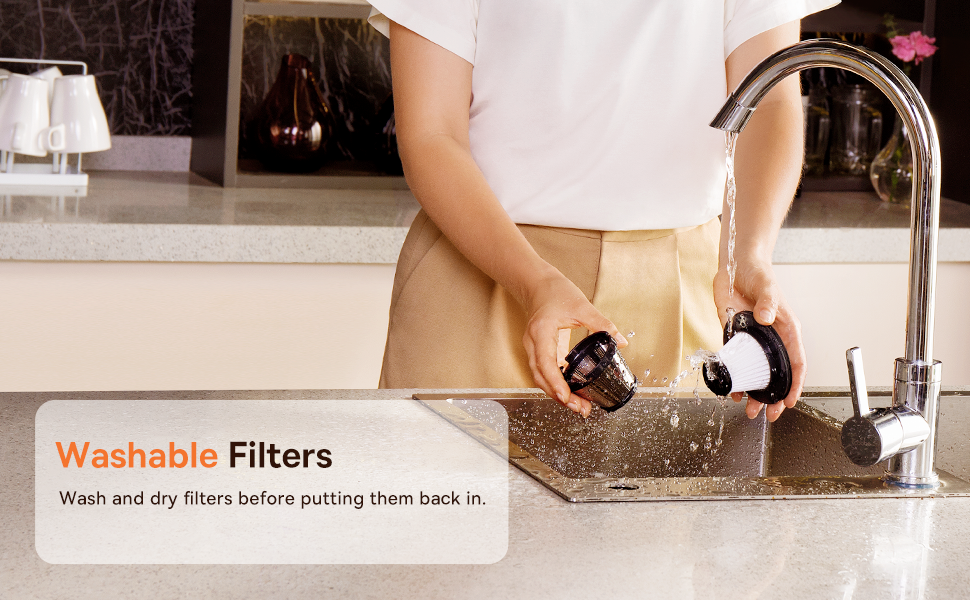
Figure 3.2: Powerful and Portable Design
ຄຸນນະສົມບັດທີ່ສໍາຄັນ:
- Cordless ແລະ Portable: Designed for easy handling and use in various locations.
- ສອງລະດັບການດູດ: Standard (4500PA) for general cleaning and High (8000PA) for tougher debris.
- USB-C ສາມາດສາກໄຟໄດ້: Convenient charging with a modern USB-C port.
- ການກັ່ນຕອງ HEPA: Captures fine dust and allergens.
- 500ml Dust Box: Large capacity for extended cleaning sessions.
4. ການຕິດຕັ້ງແລະການສາກໄຟ
4.1 ຄ່າບໍລິການເບື້ອງຕົ້ນ
Before first use, fully charge the vacuum cleaner. The charging time is approximately 3 to 3.5 hours.
ຮູບ 4.1: ການສາກ USB-C
- Connect the provided USB-C charging cable to the charging port on the vacuum cleaner.
- ສຽບສົ້ນຂອງສາຍເຄເບິ້ນໃສ່ກັບອະແດັບເຕີໄຟ USB ທີ່ເຂົ້າກັນໄດ້ (ບໍ່ລວມ) ຫຼືພອດ USB.
- The indicator light will show charging status (refer to the device for specific light patterns).
- Once fully charged, disconnect the vacuum from the power source.
4.2 ການຕິດອຸປະກອນເສີມ
Select the appropriate attachment for your cleaning task and firmly attach it to the vacuum's suction inlet.
- Flexible Extender Tube: For reaching deep or awkward spaces.
- 2-in-1 Crevice Tool (Silicone Brush/Precision Extensions): Use the narrow end for tight corners and crevices, or slide the brush attachment forward for delicate surfaces.
5. ຄໍາແນະນໍາການດໍາເນີນງານ
5.1 Power On/Off and Suction Levels
- To turn on the vacuum, press the power button. It will start in Standard suction mode (4500PA).
- Press the power button again to switch to High suction mode (8000PA).
- ກົດປຸ່ມເປີດປິດເປັນເທື່ອທີສາມເພື່ອປິດສູນຍາກາດ.
5.2 ຄໍາຮ້ອງສະຫມັກທໍາຄວາມສະອາດ
The Baseus A7 is versatile for various cleaning tasks:

Figure 5.1: Versatile Cleanups

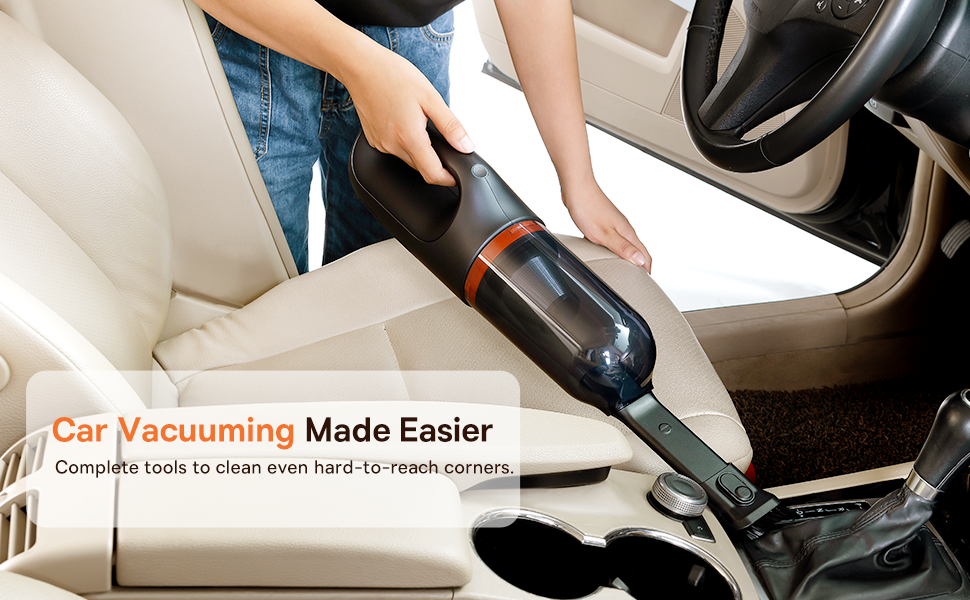
Figure 5.2: Car Vacuuming Made Easier
- ພາຍໃນລົດ: Use the crevice tool for tight spots between seats and the flexible tube for under seats.
- Household Surfaces: Effective for quick cleanups on tables, countertops, and furniture.
- ຜົມສັດລ້ຽງ: Can be used for light pet hair removal on upholstery.
- Keyboards and Electronics: Use the brush attachment for delicate cleaning.
For optimal performance, ensure the dust box is not overfilled and the filter is clean.
6. ບໍາລຸງຮັກສາ
6.1 ການລ້າງກ່ອງຂີ້ຝຸ່ນ
Empty the dust box regularly to maintain suction power and prevent blockages.
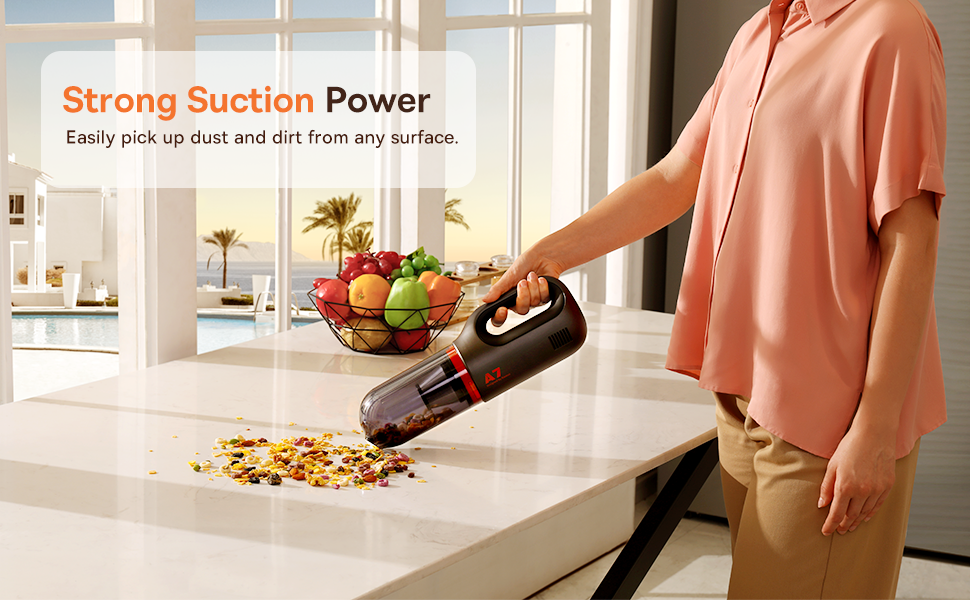
Figure 6.1: Easy to Empty Dust Box
- ໃຫ້ແນ່ໃຈວ່າສູນຍາກາດຖືກປິດ.
- Twist or unlatch the dust box from the main body of the vacuum (refer to device for specific mechanism).
- ຄ່ອຍໆຖອກສິ່ງເສດເຫຼືອທີ່ເກັບມາໄດ້ລົງໃນຖັງຂີ້ເຫຍື້ອ.
- ຕິດກ່ອງຝຸ່ນຄືນໃຫ້ແໜ້ນ.
6.2 ການເຮັດຄວາມສະອາດຕົວກອງ
The HEPA filter is washable and should be cleaned periodically to ensure efficient filtration and suction.

Figure 6.2: Washing the HEPA Filter
- Remove the dust box and then carefully remove the HEPA filter.
- Rinse the filter under cool, running water until clean. Do not use detergents.
- ປ່ອຍໃຫ້ການກັ່ນຕອງອາກາດແຫ້ງຢ່າງສົມບູນເປັນເວລາຢ່າງຫນ້ອຍ 24 ຊົ່ວໂມງກ່ອນທີ່ຈະໃສ່ມັນເຂົ້າໄປໃນສູນຍາກາດ. ຢ່າໃຊ້ສູນຍາກາດທີ່ມີການກັ່ນຕອງປຽກ.
- Ensure the filter is fully dry and properly seated before reassembling the vacuum.
7. ການແກ້ໄຂບັນຫາ
If you encounter issues with your Baseus A7 vacuum, refer to the following common problems and solutions:
| ບັນຫາ | ສາເຫດທີ່ເປັນໄປໄດ້ | ການແກ້ໄຂ |
|---|---|---|
| No power / Not turning on | ແບັດເຕີຣີໝົດ. | Charge the vacuum fully (approx. 3-3.5 hours). |
| ພະລັງງານດູດອ່ອນ | ກ່ອງຂີ້ຝຸ່ນເຕັມແລ້ວ. ການກັ່ນຕອງຖືກອຸດຕັນ. Attachment is not properly sealed. | ລ້າງກ່ອງຂີຸ້່ນ. Clean and dry the HEPA filter. Ensure attachments are firmly connected. |
| ສູນຍາກາດຢຸດໂດຍບໍ່ຄາດຄິດ | ແບັດເຕີຣີເຫຼືອໜ້ອຍ. ເປີດໃຊ້ການປ້ອງກັນຄວາມຮ້ອນເກີນແລ້ວ. | ສາກແບັດເຕີຣີຄືນໃໝ່. Turn off the vacuum and let it cool down for 30 minutes before resuming use. |
| ຕົວຊີ້ວັດການສາກໄຟບໍ່ເຮັດວຽກ | ບັນຫາສາຍສາກ ຫຼືອະແດັບເຕີ. ບັນຫາພອດສາກໄຟ. | Try a different USB-C cable and power adapter. Ensure the cable is fully inserted. If the issue persists, contact customer support. |
ຖ້າບັນຫາຍັງຄົງຢູ່ຫຼັງຈາກລອງໃຊ້ວິທີແກ້ໄຂເຫຼົ່ານີ້ແລ້ວ, ກະລຸນາຕິດຕໍ່ຫາຝ່າຍຊ່ວຍເຫຼືອລູກຄ້າຂອງ Baseus.
8. ຂໍ້ມູນຈໍາເພາະ
| ຄຸນສົມບັດ | ລາຍລະອຽດ |
|---|---|
| ຍີ່ຫໍ້ | Baseus |
| ຊື່ຕົວແບບ | A7 |
| ຄຸນນະສົມບັດພິເສດ | HEPA, Portable |
| ປະເພດການກັ່ນຕອງ | ໄສ້ຕອງ (HEPA) |
| ບໍ່ມີສາຍ | ແມ່ນແລ້ວ |
| ຄວາມອາດສາມາດ | 500 ມິນລີລິດ |
| ວັດtage | 120 ວັດ |
| ເວລາສາກໄຟ | 3 - 3.5 ຊົ່ວໂມງ |
| ການນໍາໃຊ້ທີ່ແນະນໍາ | Car, Carpet, Household |
| ປັດໄຈແບບຟອມ | ມືຖື |
| ສີ | ດຳ |
| ຂະໜາດສິນຄ້າ | 4"L x 3"W x 13"H |
| ປະເພດຫມໍ້ໄຟ | Lithium-Ion (2 batteries included) |
| ລະດັບສຽງ | 75 Decibels |
| Ampອາຍຸ | 1.4 Amps |
| ຈໍານວນຄວາມໄວ | 2 |
| ນ້ໍາຫນັກລາຍການ | 3.43 ປອນ |
| ແຫຼ່ງພະລັງງານ | ພະລັງງານຫມໍ້ໄຟ |
9. ການຮັບປະກັນແລະການສະຫນັບສະຫນູນ
The Baseus A7 Handheld Vacuum comes with a warranty to ensure your satisfaction.
- ການຮັບປະກັນ: Includes a 1-year warranty card and a 3-year guarantee. Please refer to the warranty card included in your package for specific terms and conditions.
- ການຊ່ວຍເຫຼືອລູກຄ້າ: For any questions, technical assistance, or warranty claims, please contact Baseus customer support through their official webເວັບໄຊ ຫຼືຂໍ້ມູນການຕິດຕໍ່ທີ່ສະໜອງໃຫ້ຢູ່ໃນບັດຮັບປະກັນຂອງທ່ານ.
10. ວິດີໂອຜະລິດຕະພັນ
Watch the official product video for a visual guide on the Baseus A7 Handheld Vacuum's features and usage.
Video 10.1: Baseus A7 Handheld Vacuum Overview and Demonstration. This video showcases the vacuum's design, suction capabilities, and how to use its various attachments for different cleaning scenarios.


