
ແນະນຳ
Thank you for choosing the Edifier Hecate GT4 Gaming Earbuds. These true wireless earbuds are designed to provide a low-latency audio experience for gaming across multiple platforms, including PS5, PS4, Nintendo Switch, mobile phones, and PCs. Featuring Bluetooth 5.2 connectivity, an IP55 rating for dust and splash resistance, and customizable RGB lighting, the GT4 earbuds offer both performance and convenience. Please read this manual thoroughly to ensure proper use and optimal performance of your new earbuds.
ເນື້ອໃນຊຸດ
ກວດສອບວ່າລາຍການທັງຫມົດທີ່ລະບຸໄວ້ຂ້າງລຸ່ມນີ້ແມ່ນມີຢູ່ໃນຊຸດຂອງທ່ານ:
- Edifier Hecate GT4 Gaming Earbuds (Left and Right)
- ກ່ອງສາກ
- ສາຍສາກ USB-C
- Multiple Sizes of Eartips (Small, Medium, Large)
- ຄູ່ມືຜູ້ໃຊ້

Image: The Edifier Hecate GT4 earbuds, charging case, USB-C cable, and extra eartips are shown, representing the package contents.
ຕັ້ງຄ່າ
1. ການສາກຫູຟັງ ແລະ ເຄສ
Before first use, fully charge the earbuds and charging case. Place the earbuds into the charging case. Connect the USB-C charging cable to the charging port on the case and the other end to a USB power adapter (not included) or a computer's USB port. The indicator lights on the case will show charging status.
- ເວລາສາກໄຟ: ປະມານ 1.5 ຊົ່ວໂມງສຳລັບການສາກເຕັມ.
- ຊີວິດຫມໍ້ໄຟ: Up to 7 hours of playback on a single charge, with an additional 21 hours provided by the charging case.
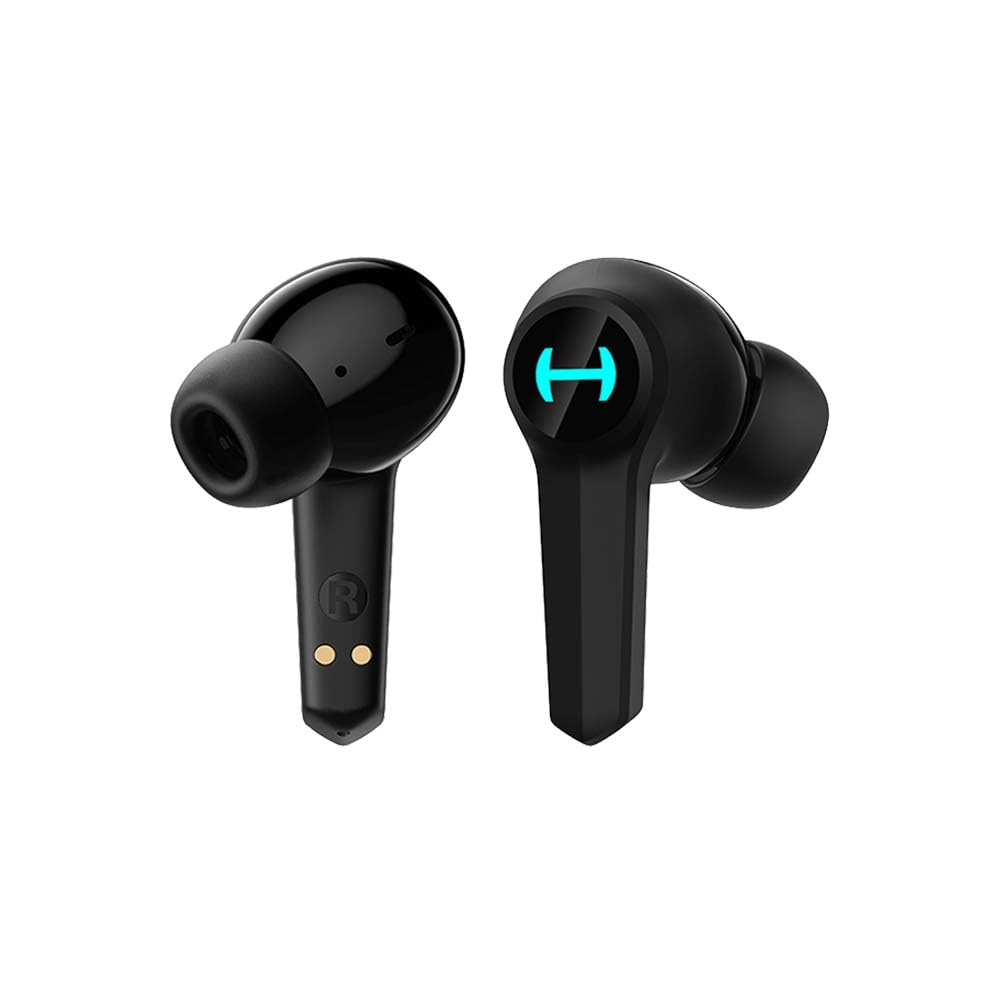
Image: The Edifier Hecate GT4 earbuds are shown inside their open charging case, with the case's RGB lights illuminated.
2. ການຈັບຄູ່ Bluetooth
- ກວດໃຫ້ແນ່ໃຈວ່າໄດ້ສາກຫູຟັງແລ້ວ.
- ເປີດກ່ອງສາກໄຟ. ຫູຟັງເອຍບັດຈະເຂົ້າສູ່ໂໝດການຈັບຄູ່ໂດຍອັດຕະໂນມັດ, ສະແດງໂດຍໄຟກະພິບ.
- On your device (phone, PC, console), enable Bluetooth and search for new devices.
- Select "EDIFIER HECATE GT4" from the list of available devices to connect.
- Once connected, the earbud lights will stop flashing or show a steady light.
The earbuds support Bluetooth 5.2 for a stable and efficient connection.
ຄໍາແນະນໍາການດໍາເນີນງານ
1. ເປີດ/ປິດ
- ເປີດ: Open the charging case, or take the earbuds out of the case. They will power on automatically.
- ປິດພະລັງງານ: ວາງຫູຟັງເອຍບັດໃສ່ໃນກ່ອງສາກ ແລະປິດຝາປິດ. ພວກເຂົາເຈົ້າຈະປິດອັດຕະໂນມັດ.
2. ແຕະການຄວບຄຸມ
The Edifier Hecate GT4 earbuds feature touch-sensitive controls on each earbud. Refer to the diagram below for touch panel location.

Image: A finger is shown touching the outer surface of an earbud, indicating the smart touch control area.
| ການປະຕິບັດ | ຫູຟັງຊ້າຍ (L) | ຫູຟັງຂວາ (R) |
|---|---|---|
| ຫຼິ້ນ/ຢຸດຊົ່ວຄາວ | ແຕະສອງເທື່ອ | ແຕະສອງເທື່ອ |
| ຕິດຕາມຕໍ່ໄປ | ທໍ່ສາມ | ທໍ່ສາມ |
| ຕອບ/ວາງສາຍ | ແຕະສອງເທື່ອ | ແຕະສອງເທື່ອ |
| ປະຕິເສດການໂທ | ກົດຄ້າງໄວ້ (2ວິ) | ກົດຄ້າງໄວ້ (2ວິ) |
| ເປີດໃຊ້ໂໝດເກມ | ກົດຄ້າງໄວ້ (2ວິ) | ກົດຄ້າງໄວ້ (2ວິ) |
| Deactivate Game Mode | ກົດຄ້າງໄວ້ (2ວິ) | ກົດຄ້າງໄວ້ (2ວິ) |
ໝາຍເຫດ: ການຄວບຄຸມລະດັບສຽງອາດຈະຕ້ອງຖືກປັບໂດຍກົງຢູ່ໃນອຸປະກອນທີ່ເຊື່ອມຕໍ່ຂອງທ່ານ.
3. Game Mode (45ms Low-Latency)
The Edifier Hecate GT4 features a dedicated Game Mode to reduce audio latency to as low as 45ms, providing a synchronized audio-visual experience crucial for gaming. To activate or deactivate Game Mode, long press either earbud for 2 seconds. You will hear an audio prompt indicating the mode change.

Image: An illustration depicting the low latency feature of the earbuds, highlighting the 45ms response time.
ວິດີໂອ: ວິດີໂອຜະລິດຕະພັນຢ່າງເປັນທາງການasing the features of the EDIFIER HECATE GT4 Gaming Earbuds, including low latency and ergonomic design.
4. ໄຟ RGB
The charging case and earbuds feature RGB lighting. The lighting indicates various statuses such as charging, pairing, and game mode activation. The specific patterns and colors are pre-set and provide visual feedback on the earbuds' operational status.

Image: The Edifier Hecate GT4 charging case is shown with its red RGB lighting illuminated, indicating its gaming aesthetic.
ບໍາລຸງຮັກສາ
- ທໍາຄວາມສະອາດ: Use a soft, dry cloth to clean the earbuds and charging case. Do not use liquid cleaners or abrasive materials.
- ຄວາມຕ້ານທານນ້ໍາ: The earbuds have an IP55 rating, meaning they are protected against dust and low-pressure water jets. Avoid submerging them in water or exposing them to heavy rain. Dry them thoroughly if they get wet.
- ການເກັບຮັກສາ: ເມື່ອບໍ່ໄດ້ໃຊ້, ໃຫ້ເກັບຫູຟັງເອຍບັດໃສ່ໃນກະເປົ໋າສາກໄຟເພື່ອປົກປ້ອງພວກມັນ ແລະ ສືບຕໍ່ສາກໄຟ. ເກັບຮັກສາໄວ້ໃນບ່ອນທີ່ເຢັນ, ແຫ້ງ, ຫ່າງຈາກອຸນຫະພູມທີ່ສຸດ.

Image: An Edifier Hecate GT4 earbud is shown with water splashing around it, illustrating its water-resistant feature.
ການແກ້ໄຂບັນຫາ
| ບັນຫາ | ສາເຫດທີ່ເປັນໄປໄດ້ | ການແກ້ໄຂ |
|---|---|---|
| ຫູຟັງບໍ່ເປີດ. | ແບັດເຕີຣີຕໍ່າ. | ສາກຫູຟັງຫູຟັງ ແລະກະເປົ໋າສາກເຕັມ. |
| ບໍ່ສາມາດຈັບຄູ່ກັບອຸປະກອນໄດ້. | Bluetooth not enabled, earbuds not in pairing mode, or device too far. | Ensure Bluetooth is enabled on your device. Place earbuds in case, close, then open to re-enter pairing mode. Keep devices within 10 meters. |
| ບໍ່ມີສຽງ ຫຼືສຽງລົບກວນ. | Earbuds not properly connected, low battery, or interference. | Check Bluetooth connection. Recharge earbuds. Move away from sources of interference (e.g., Wi-Fi routers). |
| ຫູຟັງຫູຟັງອັນໜຶ່ງບໍ່ມີສຽງ. | Individual earbud connection issue. | Place both earbuds back into the charging case, close the lid, then open it again to reset the connection. Re-pair if necessary. |
| Low latency mode not working. | Game Mode not activated. | Long press either earbud for 2 seconds to activate Game Mode. Listen for the audio prompt. |
| Cannot connect to PS4/PS5/Switch. | Console limitations or specific pairing requirements. | Some consoles may require a separate Bluetooth adapter for full compatibility or specific pairing steps. Refer to your console's manual for Bluetooth audio device connection instructions. |
ຂໍ້ມູນຈໍາເພາະ
| ຄຸນສົມບັດ | ລາຍລະອຽດ |
|---|---|
| ໝາຍເລກຕົວແບບ | GT4-BK |
| ຍີ່ຫໍ້ | Edifier |
| ເຕັກໂນໂລຊີການເຊື່ອມຕໍ່ | ໄຮ້ສາຍ (Bluetooth) |
| ລຸ້ນ Bluetooth | 5.2 |
| ການຈັດວາງຫູ | ໃນຫູ |
| ປະເພດໄດເວີສຽງ | Dynamic Driver (10mm Composite Diaphragm Unit) |
| ຊ່ວງຄວາມຖີ່ | 20Hz-20kHz |
| ການຕອບສະໜອງຕໍ່າ | 45ms (ໂໝດເກມ) |
| ອາຍຸແບັດເຕີຣີ (ຫູຟັງ) | ສູງສຸດ 7 ຊົ່ວໂມງ |
| ອາຍຸແບັດເຕີຣີທັງໝົດ (ພ້ອມກ່ອງ) | ສູງສຸດ 28 ຊົ່ວໂມງ (7 + 21 ຊົ່ວໂມງ) |
| ເວລາສາກແບັດເຕີຣີ | ປະມານ. 1.5 ຊົ່ວໂມງ |
| ວິທີການຄວບຄຸມ | ແຕະ |
| ລະດັບຄວາມຕ້ານທານນ້ໍາ | IP55 (ກັນຝຸ່ນ ແລະ ນ້ຳกระเด็น) |
| ອຸປະກອນທີ່ເຂົ້າກັນໄດ້ | PS5, PS4, Nintendo Switch, Phone (Android, iOS), PC |
| ວັດສະດຸ | ພາດສະຕິກ |
| ນ້ໍາຫນັກລາຍການ | 0.12 ກິໂລກຣາມ |
ການຮັບປະກັນແລະການສະຫນັບສະຫນູນ
ຜະລິດຕະພັນ Edifier ໄດ້ຖືກອອກແບບແລະຜະລິດຕະພັນໄດ້ມາດຕະຖານຄຸນນະພາບທີ່ສູງທີ່ສຸດ. ສໍາລັບຂໍ້ມູນກ່ຽວກັບການຄຸ້ມຄອງການຮັບປະກັນ, ກະລຸນາເບິ່ງບັດການຮັບປະກັນທີ່ມີຢູ່ໃນການຫຸ້ມຫໍ່ຜະລິດຕະພັນຂອງທ່ານຫຼືໄປຢ້ຽມຢາມ Edifier ຢ່າງເປັນທາງການ website. If you encounter any issues or have questions about your Edifier Hecate GT4 Gaming Earbuds, please contact Edifier customer support through their official channels for assistance.
Edifier ຢ່າງເປັນທາງການ Webເວັບໄຊ: www.edifier.com