
1. ບົດແນະນຳ
This manual provides detailed instructions for the safe and efficient operation of your InFocus P120 INL412 Multimedia Projector (Model INL4128). Please read this manual thoroughly before using the projector and keep it for future reference. This projector is designed for high-quality image projection, suitable for various applications including presentations, home entertainment, and gaming.
2. ຂໍ້ມູນຄວາມປອດໄພ
ໃຫ້ປະຕິບັດຕາມຂໍ້ຄວນລະວັງດ້ານຄວາມປອດໄພຕໍ່ໄປນີ້ເພື່ອປ້ອງກັນຄວາມເສຍຫາຍຕໍ່ໂປເຈັກເຕີ ແລະ ຮັບປະກັນຄວາມປອດໄພຂອງຜູ້ໃຊ້:
- ການລະບາຍອາກາດ: Ensure adequate ventilation around the projector. Do not block ventilation openings. Maintain a minimum distance of 30 cm (12 inches) from walls or other objects.
- ແຫຼ່ງພະລັງງານ: ໃຊ້ພຽງແຕ່ການສະຫນອງພະລັງງານທີ່ກໍານົດໄວ້ແລະ voltage. Connect the power cord securely.
- ຄວາມຮ້ອນ: The projector generates heat during operation. Do not touch the projector's vents or exhaust areas directly after use.
- ແສງອອກ: ຢ່າເບິ່ງໂດຍກົງໃນເລນໂປເຈັກເຕີເມື່ອ lamp ເປີດຢູ່, ເນື່ອງຈາກແສງໄຟຮຸນແຮງສາມາດເຮັດໃຫ້ເກີດຄວາມເສຍຫາຍຕໍ່ຕາ.
- ການຈັດວາງ: Place the projector on a stable, level surface. Avoid placing it in direct sunlight, near heat sources, or in areas with high humidity or dust.
- ທໍາຄວາມສະອາດ: ຖອດສາຍໄຟອອກກ່ອນທຳຄວາມສະອາດ. ໃຊ້ຜ້າອ່ອນ, ແຫ້ງ. ຫ້າມໃຊ້ນໍ້າສະອາດ ຫຼື ແອໂຣໂຊລ.
- ການບໍລິການ: Do not attempt to service the projector yourself. Refer all servicing to qualified service personnel.
3. ຜະລິດຕະພັນເກີນview
3.1 Top Panel and Lens Area
The top panel features the control buttons for basic operation and the lens area with focus and zoom adjustments.

ຮູບທີ 3.1: ທາງເທິງ view of the InFocus P120 INL412 projector, highlighting the control panel on the right and the lens adjustment area on the left. The InFocus logo is visible on the top surface.
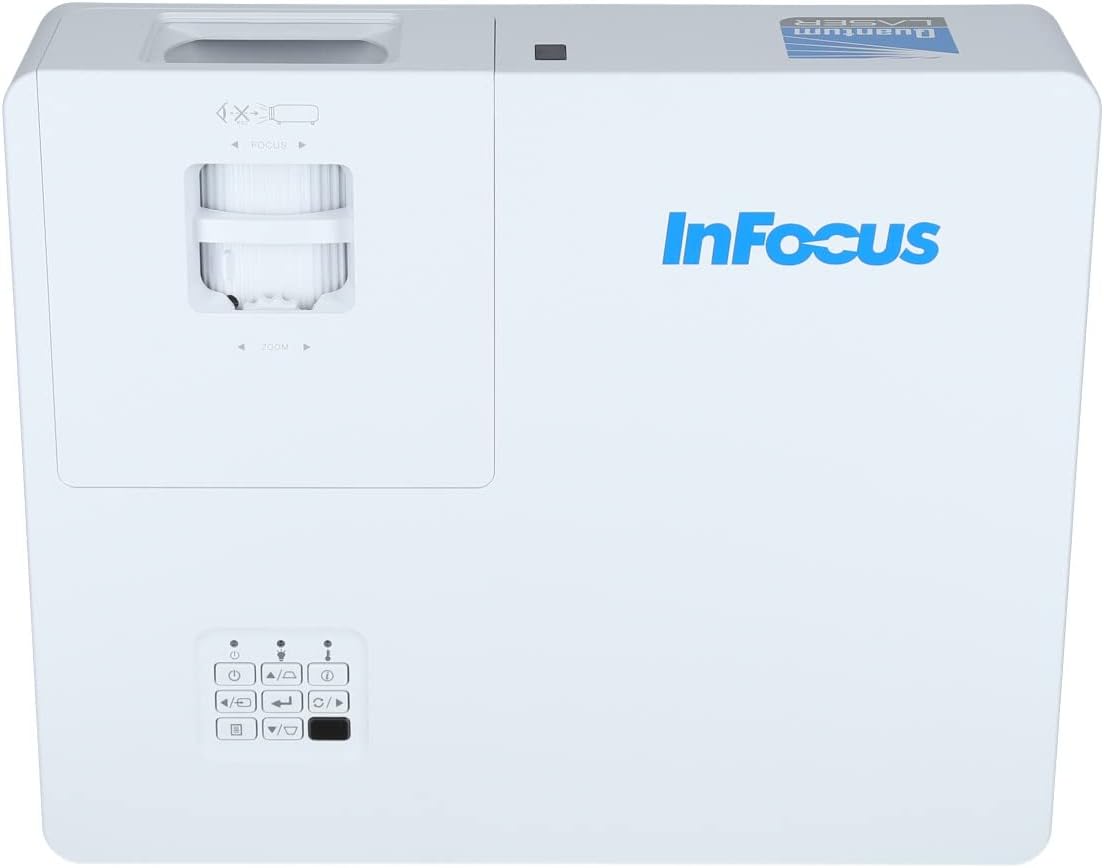
ຮູບທີ 3.2: A ໃກ້ຊິດ view of the projector's top panel, showing the focus and zoom rings near the lens opening and the array of control buttons for power, menu, source selection, and navigation.
3.2 ການເຊື່ອມຕໍ່ແຜງດ້ານຫລັງ
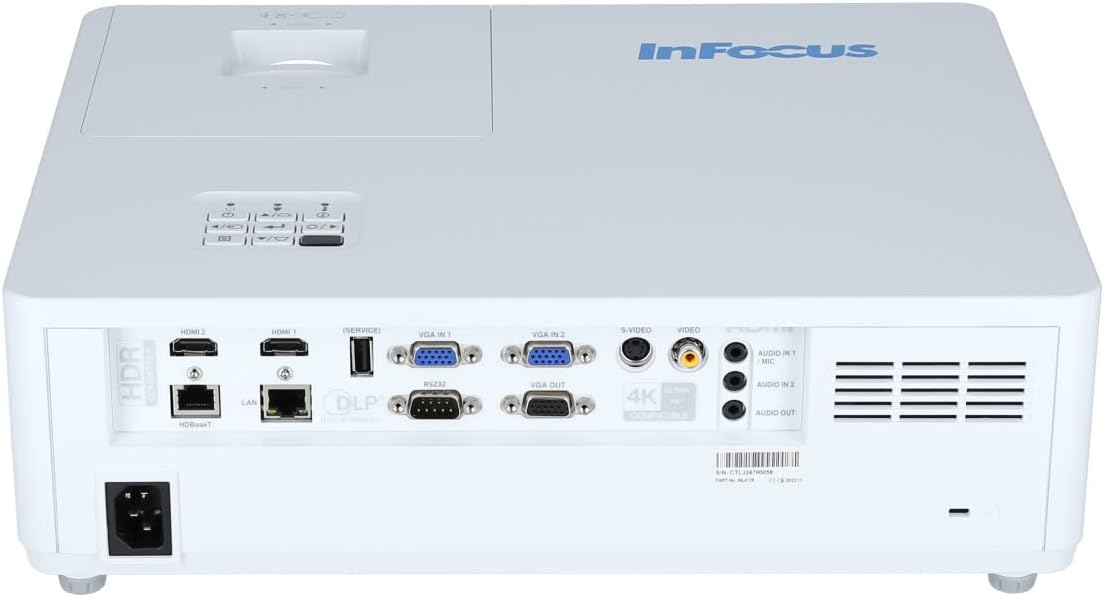
ແຜງດ້ານຫລັງສະຫນອງການປ້ອນຂໍ້ມູນແລະຜອດອອກຕ່າງໆສໍາລັບການເຊື່ອມຕໍ່ອຸປະກອນພາຍນອກ.

Figure 3.3: Rear panel of the InFocus P120 INL412 projector, displaying a comprehensive array of connectivity options including HDMI (x2), USB, S-Video, Ethernet (LAN), VGA In (x2), VGA Out, RS232, and Audio In/Out ports. The power input is located on the bottom left.
Key ports include:
- HDMI 1 ແລະ 2: For connecting high-definition digital video and audio sources.
- USB: For connecting USB devices, potentially for media playback or firmware updates.
- S-Video: For connecting older video sources.
- VGA IN 1 & 2: For connecting computers or other devices with VGA output.
- VGA ອອກ: For connecting to an external monitor.
- ອີເທີເນັດ (LAN): ສໍາລັບການເຊື່ອມຕໍ່ເຄືອຂ່າຍແລະການຄວບຄຸມ.
- Audio IN 1 & 2 / Audio OUT: ສໍາລັບການເຊື່ອມຕໍ່ສຽງອະນາລັອກ.
- RS232: ສໍາລັບການຄວບຄຸມ serial.
- ການປ້ອນຂໍ້ມູນພະລັງງານ: ສໍາລັບການເຊື່ອມຕໍ່ສາຍໄຟ AC.
3.3 Front and Side Panels
The front panel houses the projection lens and front ventilation, while the side panels feature additional ventilation grilles.

ຮູບ 3.4: ດ້ານຫນ້າ view of the InFocus P120 INL412 projector, displaying the main projection lens on the right and the extensive front ventilation grille on the left, crucial for heat dissipation.
ຮູບ 3.5: ຂ້າງ view of the InFocus P120 INL412 projector, illustrating the side ventilation grilles that contribute to maintaining optimal operating temperature.
4. ຕັ້ງຄ່າ
4.1 ການຈັດວາງໂປຣເຈັກເຕີ
Position the projector on a stable, flat surface or mount it securely. Ensure the projector is within the optimal projection distance for your screen size. Maintain clear space around the projector for proper ventilation.
4.2 ອຸປະກອນເຊື່ອມຕໍ່
Before connecting any cables, ensure the projector and all source devices are powered off.
- ການເຊື່ອມຕໍ່ HDMI: Connect an HDMI cable from your source device (e.g., laptop, Blu-ray player, gaming console) to either the HDMI 1 or HDMI 2 port on the projector.
- ການເຊື່ອມຕໍ່ VGA: Connect a VGA cable from your computer to either VGA IN 1 or VGA IN 2. For audio, connect a separate audio cable from your computer's audio output to the corresponding Audio IN port on the projector.
- ການເຊື່ອມຕໍ່ USB: Insert a USB drive into the USB port for media playback (if supported by firmware) or service functions.
- ການເຊື່ອມຕໍ່ອີເທີເນັດ (LAN): Connect an Ethernet cable to the LAN port for network control or updates.
- ສຽງອອກ: If using external speakers, connect an audio cable from the Audio OUT port on the projector to your audio system.
4.3 ການເຊື່ອມຕໍ່ພະລັງງານ
Connect the power cord to the projector's power input and then plug the other end into a grounded electrical outlet.
5. ຄໍາແນະນໍາການດໍາເນີນງານ
5.1 ການເປີດ/ປິດ
- ເປີດ: ກົດ ພະລັງງານ ປຸ່ມຢູ່ເທິງແຜງຄວບຄຸມຂອງໂປເຈັກເຕີ ຫຼື ຣີໂໝດຄວບຄຸມ. ໄຟສະແດງພະລັງງານຈະປ່ຽນ.
- ປິດພະລັງງານ: ກົດ ພະລັງງານ button again. A confirmation message may appear. Press the button a second time to confirm shutdown. Allow the projector to cool down before unplugging it.
5.2 ການປັບໂຟກັສ ແລະ ການຊູມ
Rotate the focus ring around the lens until the image appears sharp and clear. Use the zoom ring to adjust the image size to fit your screen.
5.3 ການເລືອກແຫຼ່ງປ້ອນຂໍ້ມູນ
ກົດ ທີ່ມາ button on the control panel or remote control to cycle through available input sources (HDMI 1, HDMI 2, VGA 1, VGA 2, S-Video, USB). Select the input corresponding to your connected device.
5.4 ການ ນຳ ທາງເມນູ
ໃຊ້ ເມນູ button to access the on-screen display (OSD) menu. Use the arrow buttons to navigate through menu options and the ເຂົ້າ ປຸ່ມເພື່ອເລືອກ. ກົດ ເມນູ ອີກເທື່ອຫນຶ່ງເພື່ອອອກຈາກ.
6. ບໍາລຸງຮັກສາ
6.1 ການເຮັດຄວາມສະອາດເລນ
Gently wipe the lens with a soft, lint-free cloth specifically designed for optical surfaces. Do not use abrasive cleaners or excessive force, as this can scratch the lens.
6.2 Cleaning the Projector Exterior
Use a soft, dry cloth to clean the projector's casing. For stubborn dirt, dampen the cloth slightly with water, then wipe dry immediately. Avoid getting liquids into the projector's openings.
6.3 Ventilation Care
Regularly check the projector's ventilation grilles for dust accumulation. Use a soft brush or a vacuum cleaner with a brush attachment to gently remove dust from the vents to ensure proper airflow and prevent overheating.
7. ການແກ້ໄຂບັນຫາ
7.1 ບໍ່ສະແດງຮູບພາບ
- ກວດໃຫ້ແນ່ໃຈວ່າໂປເຈັກເຕີເປີດຢູ່ ແລະໄຟຊີ້ບອກພະລັງງານແມ່ນແຂງ.
- Verify that the video cable (HDMI, VGA, etc.) is securely connected to both the projector and the source device.
- ກວດເບິ່ງວ່າແຫຼ່ງປ້ອນຂໍ້ມູນທີ່ຖືກຕ້ອງຖືກເລືອກຢູ່ໃນໂປເຈັກເຕີ.
- Confirm that the source device (laptop, player) is powered on and outputting a signal.
7.2 ຮູບພາບມົວ ຫຼື ຢູ່ນອກຈຸດໂຟກັສ
- ປັບວົງການໂຟກັສໃສ່ເລນໂປເຈັກເຕີຈົນກວ່າພາບຈະຄົມຊັດ.
- ໃຫ້ແນ່ໃຈວ່າໂປເຈັກເຕີຢູ່ໃນໄລຍະທີ່ຖືກຕ້ອງຈາກຫນ້າຈໍ.
- ເຮັດຄວາມສະອາດເລນໂປເຈັກເຕີຖ້າມັນເປື້ອນ.
7.3 ບໍ່ມີສຽງ
- If using HDMI, ensure the source device's audio output is set to HDMI.
- If using VGA, ensure a separate audio cable is connected from the source to the projector's Audio IN port.
- ກວດສອບການຕັ້ງຄ່າລະດັບສຽງທັງໃນໂປເຈັກເຕີ ແລະ ອຸປະກອນແຫຼ່ງທີ່ມາ.
- If using external speakers, ensure they are properly connected to the Audio OUT port and powered on.
8. ຂໍ້ມູນຈໍາເພາະ
| ຄຸນສົມບັດ | ລາຍລະອຽດ |
|---|---|
| ຍີ່ຫໍ້ | ໂຟກັສ |
| ຜູ້ຜະລິດ | ໃນຈຸດສຸມ |
| ຊື່ຕົວແບບ | P120 INL412 |
| ໝາຍເລກຕົວແບບ | INL4128 |
| ປີ | 2023 |
| ການໂຕ້ຕອບຮາດແວ | Ethernet, HDMI, S-Video, USB |
| ຈໍານວນລາຍການ | 1 |
| ອັດຕາສ່ວນ | 16:9 |
| ວັດtage | 341 ວັດ |
| ແບດເຕີລີ່ລວມ | ບໍ່ |
| ຕ້ອງໃຊ້ແບັດເຕີຣີ | ບໍ່ |
| ປັດໄຈແບບຟອມ | ເດັສທັອບ |
| ປະເພດການຕິດຕັ້ງ | ຕົວຍຶດຕາຕະລາງ |
| ການຄວບຄຸມໄລຍະໄກລວມ | ແມ່ນແລ້ວ |
| ຂະໜາດສິນຄ້າ | 56.13 x 46.48 x 25.15 cm |
| ນ້ໍາຫນັກລາຍການ | 5.5 ກິໂລ |
| ຂະໜາດຮູບພາບສູງສຸດ | 308.28 ນິ້ວ |
| ຂະຫນາດຮູບພາບຕໍາ່ສຸດທີ່ | 910.63 ມິນລິແມັດ |
| ວັນທີທີ່ມີໃຫ້ທໍາອິດ | ວັນທີ 5 ມັງກອນ 2022 |
9. ການຮັບປະກັນແລະການສະຫນັບສະຫນູນ
For warranty information and technical support, please refer to the documentation included with your purchase or visit the official InFocus webເວັບໄຊ. ຮັກສາຫຼັກຖານການຊື້ຂອງທ່ານສໍາລັບການຮ້ອງຂໍການຮັບປະກັນ.