
1. ບົດແນະນຳ
This manual provides detailed instructions for the installation, configuration, operation, and maintenance of your Ruijie Reyee Wi-Fi 6 Ceiling Access Point, model RG-RAP2260(G). Please read this manual thoroughly before using the device to ensure proper setup and optimal performance.
2. ຂໍ້ມູນຄວາມປອດໄພ
- ການສະຫນອງພະລັງງານ: Use only the specified power adapter (DC 12V/1.5A) or a Power over Ethernet (PoE) source that complies with IEEE 802.3at/af standards.
- ສະພາບແວດລ້ອມການຕິດຕັ້ງ: Install the device in a dry, well-ventilated area, away from direct sunlight, heat sources, and strong electromagnetic fields.
- ການຕິດຕັ້ງ: Ensure the device is securely mounted to a stable surface (ceiling or wall) to prevent accidental falls.
- ບໍາລຸງຮັກສາ: ຢ່າເປີດອຸປະກອນ casing. ອ້າງອີງການບໍລິການທັງໝົດໃຫ້ກັບບຸກຄະລາກອນທີ່ມີຄຸນວຸດທິ.
3. ເນື້ອໃນຊຸດ
ກວດສອບວ່າລາຍການທັງຫມົດແມ່ນມີຢູ່ໃນຊຸດ:
- 1 x Ruijie Reyee Wi-Fi 6 Ceiling Access Point (RG-RAP2260(G))
- ວົງເລັບຕິດຕັ້ງ
- ຫັນນັອດກຽວແລະWallາ
- Quick Start Guide (may be included separately)
4. ຜະລິດຕະພັນເກີນview
The Ruijie Reyee RG-RAP2260(G) is a high-performance Wi-Fi 6 (802.11ax) ceiling-mounted access point designed for robust wireless connectivity.
4.1 ແນວ ໜ້າ View
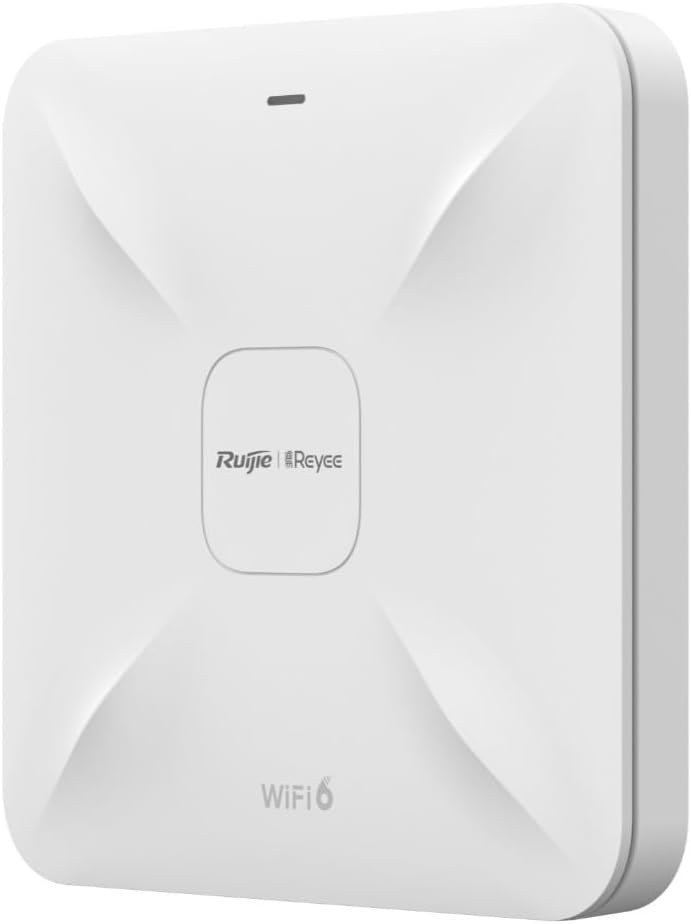
ລາຍລະອຽດຮູບພາບ: ຮູບພາບນີ້ສະແດງຢູ່ທາງຫນ້າ view of the Ruijie Reyee RG-RAP2260(G) access point. It is a square-shaped white device with a subtle X-pattern on its surface, featuring the 'Ruijie | Reyee' logo centrally and 'WiFi 6' text at the bottom. A small LED indicator is visible at the top edge.
4.2 ດ້ານຫຼັງ View ແລະພອດ

ລາຍລະອຽດຮູບພາບ: This image shows the rear panel of the Ruijie Reyee RG-RAP2260(G) access point. It features several ports and a reset button. From left to right, the ports are labeled 'RESET', 'LAN2', 'LAN1/PoE', and 'DC=12V'. There are also mounting points visible around the perimeter.
4.3 ຕົວຊີ້ວັດ LED
The LED indicator on the front of the device provides status information:
- ສີຟ້າແຂງ: ອຸປະກອນເຮັດວຽກເປັນປົກກະຕິ.
- ກະພິບສີຟ້າ: ອຸປະກອນກຳລັງເປີດເຄື່ອງ ຫຼື ອັບເກຣດເຟີມແວ.
- ສີແດງແຂງ: Device error or failure.
- ປິດ: ອຸປະກອນຖືກປິດ.
5. ຕັ້ງຄ່າ
5.1 ການຕິດຕັ້ງຈຸດເຂົ້າເຖິງ
- ເລືອກສະຖານທີ່: Select a central location on a ceiling or wall for optimal Wi-Fi coverage. Avoid obstructions.
- ຕິດຕັ້ງຕົວຍຶດຕິດ: Use the provided screws and wall plugs to securely attach the mounting bracket to the chosen surface.
- ແນບຈຸດເຂົ້າເຖິງ: Align the access point with the mounting bracket and twist it clockwise until it locks into place.
5.2 ການເປີດອຸປະກອນ
The RG-RAP2260(G) can be powered in two ways:
- ພະລັງງານຫຼາຍກວ່າ Ethernet (PoE): Connect an Ethernet cable from a PoE-enabled switch or injector to the LAN1/PoE port on the access point. This provides both power and data connectivity.
- ອະແດບເຕີໄຟຟ້າ DC: Connect a 12V/1.5A DC power adapter (sold separately) to the DC = 12V port. Then, connect an Ethernet cable from your network to either the LAN1/PoE or LAN2 port for data.
5.3 ການຕັ້ງຄ່າເບື້ອງຕົ້ນ
You can configure the access point using the Reyee Cloud App or a web ຕົວທ່ອງເວັບ.
5.3.1 Using the Reyee Cloud App
- Download the Reyee Cloud App from your mobile app store.
- Register or log in to your Reyee Cloud account.
- Tap '+' to add a new device and follow the on-screen instructions to scan the QR code on the device or manually add it.
- Configure your Wi-Fi network name (SSID) and password.
5.3.2 ການນຳໃຊ້ ກ Web ຕົວທ່ອງເວັບ
- Connect your computer to the access point's network (either directly via Ethernet or to its default Wi-Fi SSID, if broadcast).
- ເປີດ ກ web browser and enter the default IP address (refer to the Quick Start Guide or device label for the specific IP, commonly 192.168.1.1 or 192.168.120.1).
- Enter the default username and password (e.g., admin/admin or as specified on the device label).
- Follow the setup wizard to configure your network settings, including SSID, security type, and password.
6. ການເຮັດວຽກ
6.1 ການເຊື່ອມຕໍ່ອຸປະກອນກັບ Wi-Fi
Once configured, your Wi-Fi network will be broadcast. On your wireless devices (smartphones, laptops, tablets):
- Go to Wi-Fi settings.
- Select your configured Wi-Fi network name (SSID).
- ໃສ່ລະຫັດຜ່ານ Wi-Fi.
- ເຊື່ອມຕໍ່.
6.2 ເຄືອຂ່າຍແຂກ
The RG-RAP2260(G) supports a guest network feature. This allows you to provide internet access to guests without giving them access to your main network resources. This feature can be enabled and configured through the Reyee Cloud App or the web ການໂຕ້ຕອບການຄຸ້ມຄອງ.
- Enable Guest Mode.
- Set a separate SSID and password for the guest network.
- Configure bandwidth limits or access restrictions if desired.
7. ບໍາລຸງຮັກສາ
7.1 ການອັບເດດເຟີມແວ
Regularly updating the firmware ensures optimal performance, security, and access to new features. Firmware updates can typically be managed via the Reyee Cloud App or the web management interface. It is recommended to perform updates during off-peak hours.
7.2 ການທໍາຄວາມສະອາດ
To clean the device, gently wipe the exterior with a soft, dry cloth. Do not use liquid cleaners or abrasive materials, as they may damage the casing ຫຼືອົງປະກອບພາຍໃນ.
7.3 ຣີເຊັດເປັນຄ່າໂຮງງານ
To restore the access point to its factory default settings:
- ໃຫ້ແນ່ໃຈວ່າອຸປະກອນເປີດຢູ່.
- ຄົ້ນຫາສະຖານທີ່ ຣີເຊັດ button on the rear panel (refer to Section 4.2).
- Using a paperclip or a similar pointed object, press and hold the RESET button for approximately 5-10 seconds until the LED indicator changes.
- ປ່ອຍປຸ່ມ. ອຸປະກອນຈະຣີບູດດ້ວຍການຕັ້ງຄ່າເລີ່ມຕົ້ນຈາກໂຮງງານ.
8. ການແກ້ໄຂບັນຫາ
8.1 ບໍ່ມີພະລັງງານ
- Check if the power adapter is securely connected to the DC=12V port and a power outlet, or if the PoE source is active and connected to the LAN1/PoE port.
- ກວດສອບວ່າປ່ຽງໄຟແມ່ນເຮັດວຽກໄດ້.
8.2 No Wi-Fi Signal
- Ensure the device is powered on and the LED indicator is solid blue.
- Check if the Ethernet cable is properly connected to the LAN1/PoE or LAN2 port and to your network.
- Verify Wi-Fi settings (SSID, password) in the configuration interface.
- ຣີສະຕາດຈຸດເຂົ້າເຖິງ.
8.3 ຄວາມໄວ Wi-Fi ຊ້າ
- ກວດສອບການລົບກວນຈາກອຸປະກອນໄຮ້ສາຍ ຫຼື ເຄືອຂ່າຍອື່ນໆ.
- Ensure the access point is placed in an optimal location, free from obstructions.
- ຢືນຢັນຄວາມໄວຂອງຜູ້ໃຫ້ບໍລິການອິນເຕີເນັດຂອງທ່ານ.
- Update the access point's firmware to the latest version.
9. ຂໍ້ມູນຈໍາເພາະ
| ຄຸນສົມບັດ | ຂໍ້ມູນຈໍາເພາະ |
|---|---|
| ຍີ່ຫໍ້ | ຣູຈີ |
| ຊື່ຕົວແບບ | RG-RAP2260(G) |
| ມາດຕະຖານ Wi-Fi | 802.11ac, 802.11ax (Wi-Fi 6) |
| ຫ້ອງຮຽນແຖບຄວາມຖີ່ | ແຖບຄູ່ |
| ເຕັກໂນໂລຊີການເຊື່ອມຕໍ່ | Wi-Fi |
| ຄຸນນະສົມບັດພິເສດ | ໂໝດແຂກ |
| ປະເພດເສົາອາກາດ | ພາຍໃນ |
| ສີ | ສີຂາວ |
| ອຸປະກອນທີ່ເຂົ້າກັນໄດ້ | All compatible devices |
| ສ່ວນປະກອບລວມ | 1 Reyee WiFi 6 Dual Band 1775 Mbps Ceiling Access Point - White |
10. ການຮັບປະກັນແລະການສະຫນັບສະຫນູນ
10.1 ຂໍ້ມູນການຮັບປະກັນ
This product comes with a standard manufacturer's warranty. Please refer to the warranty card included in your product packaging or visit the official Ruijie webເວັບໄຊສໍາລັບເງື່ອນໄຂການຮັບປະກັນລາຍລະອຽດສະເພາະກັບພາກພື້ນຂອງທ່ານ.
10.2 ສະຫນັບສະຫນູນດ້ານວິຊາການ
For technical assistance, troubleshooting, or further inquiries, please contact Ruijie Networks customer support. Support resources, including FAQs and contact details, are available on the official Ruijie webເວັບໄຊ:
- Webເວັບໄຊ: www.ruijienetworks.com
- ອີເມວ/ໂທລະສັບ: ອ້າງເຖິງ webສະຖານທີ່ສໍາລັບຂໍ້ມູນຕິດຕໍ່ພາກພື້ນ.