
1. ບົດແນະນຳ
ຂອບໃຈສໍາລັບການຊື້asing the TURBOX Giantpeak Mechanical Feel RGB Gaming Keyboard. This manual provides essential information for setting up, operating, and maintaining your new keyboard. Please read this manual carefully before use to ensure optimal performance and longevity of your device.
2. ຂໍ້ມູນຄວາມປອດໄພ
- Keep the keyboard away from excessive heat, direct sunlight, and moisture.
- Although the keyboard is spill-resistant, avoid intentionally exposing it to large amounts of liquid. In case of spills, disconnect the keyboard immediately and allow it to dry completely before reconnecting.
- Do not attempt to disassemble or modify the keyboard. This will void the warranty and may cause damage.
- Use only with compatible devices and power sources as specified.
- ຮັກສາໃຫ້ໄກຈາກເດັກນ້ອຍ.
3. ເນື້ອໃນຊຸດ
ກະລຸນາກວດເບິ່ງຊຸດສຳລັບລາຍການຕໍ່ໄປນີ້:
- TURBOX Giantpeak Mechanical Feel RGB Gaming Keyboard
- ຄູ່ມືຜູ້ໃຊ້ (ເອກະສານນີ້)
4. ຜະລິດຕະພັນເກີນview
The TURBOX Giantpeak keyboard is designed for gaming, featuring a mechanical feel, customizable RGB lighting, and macro capabilities. It also includes a convenient mobile device holder.
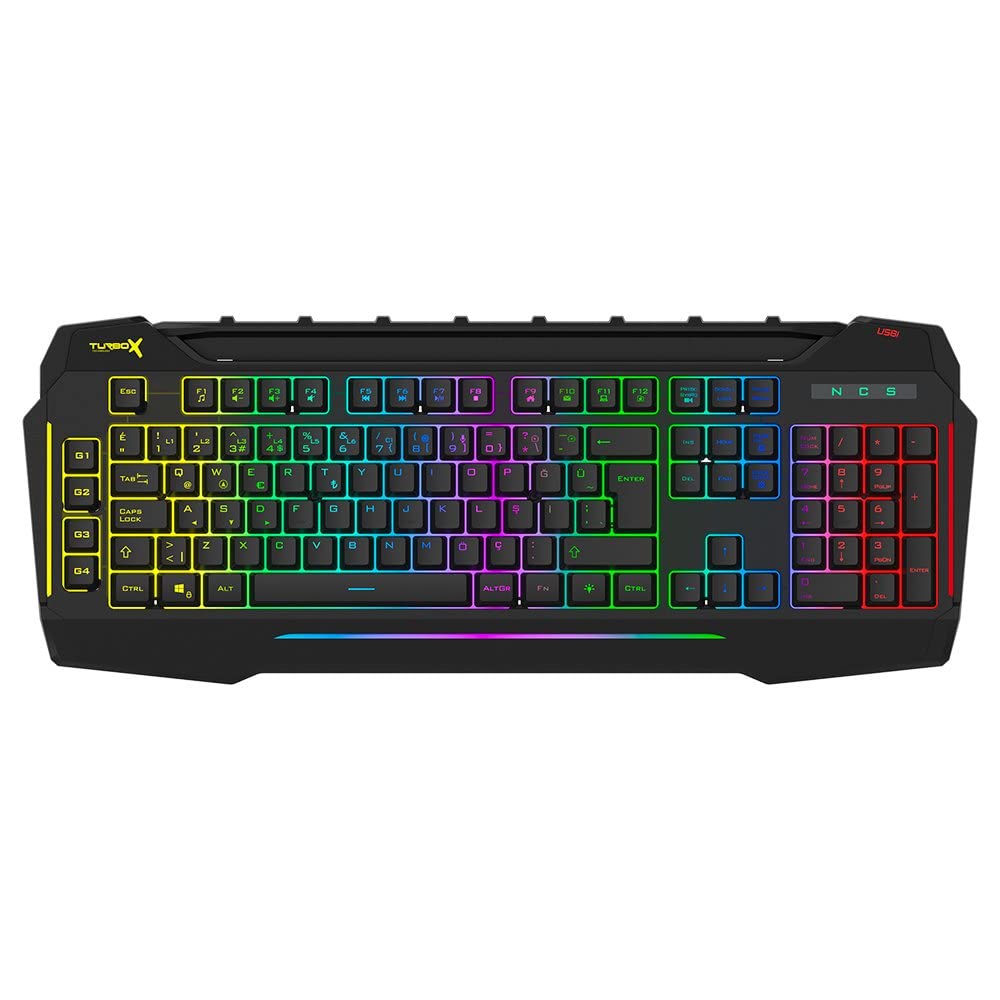
Figure 4.1: TURBOX Giantpeak keyboard with integrated mobile device stand.
This full-size keyboard offers a standard Q layout, providing a comfortable and responsive typing experience for both gaming and general use.

ຮູບທີ 4.2: ທາງເທິງ view of the TURBOX Giantpeak keyboard.
The keyboard features vibrant RGB backlighting that can be customized to various effects, including sound-sensitive modes. Its spill-resistant design provides added durability.

ຮູບທີ 4.3: ມຸມ view showing RGB lighting.
Dedicated macro keys (G1-G4) are located on the left side, allowing for quick execution of complex commands or sequences.

Figure 4.4: Close-up of programmable G-keys.
The keyboard also includes a full numeric keypad for data entry and additional functions.

Figure 4.5: Numeric keypad detail.
Connectivity is provided via a durable USB cable, ensuring a stable and responsive connection to your computer.

ຮູບ 4.6: ຂ້າງ view ດ້ວຍສາຍ USB.
5. ຕັ້ງຄ່າ
Follow these steps to set up your TURBOX Giantpeak keyboard:
- ຖອດແປ້ນພິມ: Carefully remove the keyboard and any packaging materials from the box.
- ເຊື່ອມຕໍ່ກັບຄອມພິວເຕີ: Plug the USB connector of the keyboard into an available USB port on your desktop or laptop computer.
- ການຕິດຕັ້ງໄດເວີ: Your operating system (Windows, macOS, etc.) should automatically detect and install the necessary drivers. This process may take a few moments.
- ກວດສອບການທໍາງານ: Once drivers are installed, test the keyboard by typing in a text editor or browser to ensure all keys are functioning correctly. The RGB lighting should also illuminate.
6. ຄໍາແນະນໍາການດໍາເນີນງານ
6.1 ຟັງຊັນແປ້ນພິມພື້ນຖານ
The TURBOX Giantpeak keyboard operates like a standard Q-layout keyboard. All standard keys (alphanumeric, function keys, numeric keypad, navigation keys) function as expected.
6.2 ການຄວບຄຸມແສງ RGB
The keyboard features customizable RGB backlighting with 7 different color options and sound-sensitive modes. Specific key combinations are used to cycle through lighting effects and adjust brightness:
- ປ່ຽນໂໝດແສງ: ໃຊ້ Fn + ເລື່ອນລັອກ keys to cycle through various lighting effects.
- ປັບຄວາມສະຫວ່າງ: ໃຊ້ Fn + ຫນ້າຂຶ້ນ (ເພີ່ມຂຶ້ນ) ຫຼື Fn + ຫນ້າລົງ (decrease) keys to adjust the brightness level of the backlighting.
- Sound-Sensitive Mode: The keyboard supports sound-sensitive lighting. Refer to specific software or key combinations (if available) for activation. (Note: Specific key combinations for sound-sensitive mode may vary or require software.)
6.3 Macro Programming (G1-G4 Keys)
The TURBOX Giantpeak keyboard includes 4 programmable macro keys (G1, G2, G3, G4) for executing custom commands or sequences. Follow these general steps for macro recording:
- ເຂົ້າສູ່ໂໝດການບັນທຶກມາໂຄຣ: ກົດ MR key (Macro Record, usually near the G-keys). The keyboard's indicator light may flash to indicate recording mode.
- Select Macro Key: Press one of the G-keys (G1, G2, G3, or G4) where you want to save the macro.
- ລຳດັບການບັນທຶກ: Type the sequence of keys you wish to record. This can include multiple keystrokes, delays, and modifier keys.
- Exit Macro Recording Mode: ກົດ MR key again to save the macro and exit recording mode. The indicator light should stop flashing.
- ປະຕິບັດມາໂຄຣ: To use the recorded macro, simply press the assigned G-key.
Note: For advanced macro settings or specific software-based macro management, please check the manufacturer's website for any available utility software.
6.4 Mobile Device Holder
The integrated slot at the top of the keyboard is designed to hold smartphones or small tablets, providing a convenient viewing angle while gaming or working.
7. ບໍາລຸງຮັກສາ
To ensure the longevity and performance of your keyboard, follow these maintenance guidelines:
- ທໍາຄວາມສະອາດ: ໃຊ້ຜ້າອ່ອນໆແຫ້ງເຊັດໜ້າຜິວຂອງແປ້ນພິມ. ສຳລັບຝຸ່ນທີ່ຝັງແໜ້ນ, ໃຫ້ເຊັດອອກເລັກນ້ອຍampen ຜ້າດ້ວຍນ້ໍາຫຼືການແກ້ໄຂການທໍາຄວາມສະອາດອ່ອນໆ. ຫຼີກເວັ້ນການສານເຄມີທີ່ຮຸນແຮງຫຼືວັດສະດຸຂັດ.
- ການກຳຈັດຂີ້ຝຸ່ນ: ໃຊ້ອາກາດບີບອັດເພື່ອເອົາຝຸ່ນ ແລະສິ່ງເສດເຫຼືອອອກຈາກລະຫວ່າງປຸ່ມກົດ.
- ການຈັດການຂີ້ເຫຍື້ອ: In case of liquid spills, immediately disconnect the keyboard from your computer. Turn it upside down to drain any liquid and allow it to air dry completely for at least 24-48 hours before reconnecting.
- ການເກັບຮັກສາ: ເມື່ອບໍ່ໄດ້ໃຊ້ເປັນເວລາດົນ, ໃຫ້ເກັບຮັກສາແປ້ນພິມໄວ້ໃນສະພາບແວດລ້ອມທີ່ສະອາດ ແລະ ແຫ້ງ.
8. ການແກ້ໄຂບັນຫາ
If you encounter issues with your TURBOX Giantpeak keyboard, refer to the following common problems and solutions:
| ບັນຫາ | ການແກ້ໄຂທີ່ເປັນໄປໄດ້ |
|---|---|
| ແປ້ນພິມບໍ່ຕອບສະໜອງ. |
|
| ໄຟ RGB ບໍ່ເຮັດວຽກຫຼືຕິດຢູ່. |
|
| Macro keys (G1-G4) are not working. |
|
| ປຸ່ມໜຽວ ຫຼື ບໍ່ຕອບສະໜອງ. |
|
9. ຂໍ້ມູນຈໍາເພາະ
| ຄຸນສົມບັດ | ລາຍລະອຽດ |
|---|---|
| ຊື່ຕົວແບບ | Giantpeak |
| ເລກສ່ວນ | ID9923266 |
| ຍີ່ຫໍ້ | TURBOX |
| ເຕັກໂນໂລຊີການເຊື່ອມຕໍ່ | ມີສາຍ USB |
| ອຸປະກອນທີ່ເຂົ້າກັນໄດ້ | ແລັບທັອບ, PC |
| ປະເພດກະແຈ | Mechanical Feel (Membrane) |
| ຄຸນນະສົມບັດພິເສດ | RGB Lighting, Macro Keys (4), Sound-Sensitive Lighting, Spill-Resistant, Mobile Device Holder |
| ຈໍານວນກະແຈ | 87 (Note: Visuals suggest a full-size layout, this number may refer to a specific key group or variant.) |
| ການໂຕ້ຕອບຮາດແວ | USB |
| ຂະໜາດແພັກເກັດ | 51.2 x 22.2 x 5.2 cm |
| ນ້ໍາຫນັກລາຍການ | 1 ກິໂລກຣາມ |
10. ການຮັບປະກັນແລະການສະຫນັບສະຫນູນ
For warranty information and technical support, please refer to the warranty card included with your product or visit the official TURBOX webເວັບໄຊ. ຮັກສາຫຼັກຖານການຊື້ຂອງທ່ານສໍາລັບການຮຽກຮ້ອງການຮັບປະກັນໃດໆ.
If you require further assistance, please contact TURBOX customer support through their official channels.