

1. ບົດແນະນຳ
The ATEN 2XRT-0004G IR Emitter is designed to extend infrared remote control signals, allowing you to control devices that are out of direct line-of-sight. This manual provides essential information for the proper installation, operation, and maintenance of your IR Emitter.
2. ຂໍ້ມູນຄວາມປອດໄພ
Please read all instructions carefully before using the device. Keep this manual for future reference. Observe all warnings and instructions marked on the device.
- ຢ່າເຮັດໃຫ້ອຸປະກອນມີຄວາມຊຸ່ມຊື່ນ ຫຼືອຸນຫະພູມສູງສຸດ.
- ຢ່າພະຍາຍາມເປີດຫຼືສ້ອມແປງອຸປະກອນດ້ວຍຕົນເອງ. ອ້າງອີງການບໍລິການທັງໝົດໃຫ້ກັບບຸກຄະລາກອນທີ່ມີຄຸນວຸດທິ.
- ຮັບປະກັນການລະບາຍອາກາດທີ່ເຫມາະສົມຮອບອຸປະກອນ.
3. ເນື້ອໃນຊຸດ
Verify that all components are present in your package. If any items are missing or damaged, contact your dealer.
- 1 x ATEN 2XRT-0004G IR Emitter
- 1 x ຄູ່ມືຜູ້ໃຊ້ (ເອກະສານນີ້)
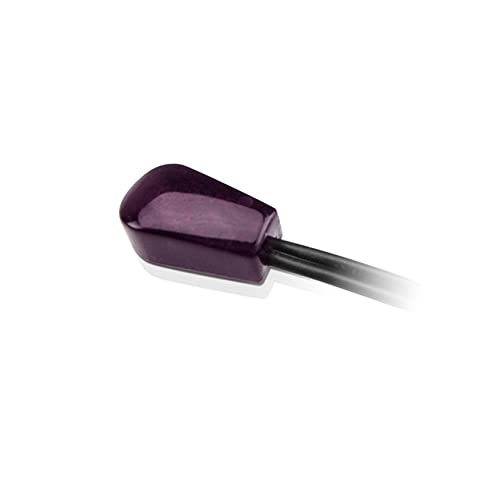
Image 1: The ATEN 2XRT-0004G IR Emitter. This image shows the compact design of the IR emitter, typically a small black or dark-colored device with a cable and a connector.
4. ຜະລິດຕະພັນເກີນview
The ATEN 2XRT-0004G is a compact IR emitter designed for reliable signal transmission. It features a male-to-female connector gender, ensuring compatibility with various IR extension systems.
ອົງປະກອບ:
- IR Emitter Head: The part that emits the infrared signal.
- ສາຍ: Connects the emitter head to the IR extension system.
- ຕົວເຊື່ອມຕໍ່: Plugs into the IR output port of your control system.
5. ຄໍາແນະນໍາການຕິດຕັ້ງ
Follow these steps to properly set up your ATEN 2XRT-0004G IR Emitter:
- Identify the IR Output Port: Locate the IR output port on your IR extender, receiver, or control system. This port is typically labeled "IR Out" or "Emitter."
- Connect the Emitter: Plug the connector of the ATEN 2XRT-0004G IR Emitter into the identified IR output port. Ensure a secure connection.
- Position the Emitter Head: Place the IR emitter head directly over or very close to the IR receiver window of the device you wish to control (e.g., TV, DVD player, cable box). The emitter head should be positioned so that its emitted IR signal can be received by the target device.
- Secure the Emitter (Optional): If the emitter head has an adhesive backing, remove the protective film and carefully attach it to the target device, ensuring it does not obstruct any vents or buttons.
- ການທໍາງານຂອງການທົດສອບ: Once connected and positioned, test the system by using your remote control. Ensure that the target device responds to commands.
6. ຄໍາແນະນໍາການດໍາເນີນງານ
The ATEN 2XRT-0004G IR Emitter operates by transmitting infrared signals from your IR extension system to your controlled devices. No direct user interaction with the emitter itself is required during operation.
- Ensure your IR extension system is powered on and functioning correctly.
- Point your remote control at the IR receiver of your IR extension system (if applicable).
- The IR emitter will then relay the signal to your target device.
7. ບໍາລຸງຮັກສາ
The ATEN 2XRT-0004G IR Emitter requires minimal maintenance.
- ທໍາຄວາມສະອາດ: Use a soft, dry cloth to gently wipe the emitter head and cable if they become dusty. Do not use liquid cleaners or abrasive materials.
- ການກວດກາ: Periodically check the cable and connectors for any signs of damage or wear.
- ຕຳແໜ່ງ: Ensure the emitter head remains securely positioned over the IR receiver window of your controlled device.
8. ການແກ້ໄຂບັນຫາ
If you experience issues with your ATEN 2XRT-0004G IR Emitter, refer to the following common problems and solutions:
| ບັນຫາ | ສາເຫດທີ່ເປັນໄປໄດ້ | ການແກ້ໄຂ |
|---|---|---|
| Device not responding to remote control. |
|
|
| ການຄວບຄຸມເປັນໄລຍະ. |
|
|
9. ຂໍ້ມູນຈໍາເພາະ
Technical specifications for the ATEN 2XRT-0004G IR Emitter:
- ຍີ່ຫໍ້: ATEN
- ຕົວແບບ: 2XRT-0004G
- ເພດຂອງຕົວເຊື່ອມຕໍ່: ຊາຍຫາຍິງ
- ຈຳນວນຫົວໜ່ວຍ: 1.0 ນັບ
- ຜູ້ຜະລິດ: ATEN
- UPC: 672792012174
- ASIN: B09KXCBX5G
10. ການຮັບປະກັນແລະການສະຫນັບສະຫນູນ
ATEN ມຸ່ງໝັ້ນທີ່ຈະສະໜອງຜະລິດຕະພັນທີ່ມີຄຸນນະພາບສູງ ແລະ ການສະໜັບສະໜູນລູກຄ້າ.
- ສະຫນັບສະຫນູນດ້ານວິຊາການ: Free technical support is available. ATEN aims to respond to customer inquiries within 4 hours.
- ບໍລິການສ້ອມແປງ: Localized repair centers are available for Return Merchandise Authorization (RMA) service.
- ການຮັບປະກັນ: Extended warranty service and variable value-added service packages may be available. Please refer to the ATEN official website or contact customer support for detailed warranty information specific to your region and product.

Image 2: Diagram illustrating ATEN's support services, including localized repair centers, extended warranty options, and free technical support with a 4-hour response time.