
BLAUX 30888
ຫູຟັງ BLX - ຫູຟັງໄຮ້ສາຍ Bluetooth 5.1 ຄູ່ມືຜູ້ໃຊ້
Model: 30888 | Brand: BLAUX
1. ບົດແນະນຳ
Thank you for choosing BLX Earbuds. These True Wireless Stereo (TWS) earbuds are designed to provide a seamless and high-quality audio experience with the convenience of Bluetooth 5.1 technology. This manual will guide you through the setup, operation, and maintenance of your new earbuds to ensure optimal performance and longevity.
2. ສິ່ງທີ່ຢູ່ໃນກ່ອງ
ກະລຸນາກວດສອບເນື້ອໃນຂອງຊຸດເພື່ອໃຫ້ແນ່ໃຈວ່າລາຍການທັງຫມົດມີຢູ່:
- BLX Wireless Earbuds (Left and Right)
- ກໍລະນີສາກໄຟໄຮ້ສາຍ
- ສາຍສາກ Micro USB
- ຈຸກຫູຊິລິໂຄນ (ຂະໜາດນ້ອຍ, ກາງ, ໃຫຍ່)
- ຄູ່ມືຜູ້ໃຊ້
3. ຜະລິດຕະພັນເກີນview
The BLX Earbuds offer a compact and ergonomic design for comfortable, all-day wear. The included charging case provides extended battery life and convenient storage.
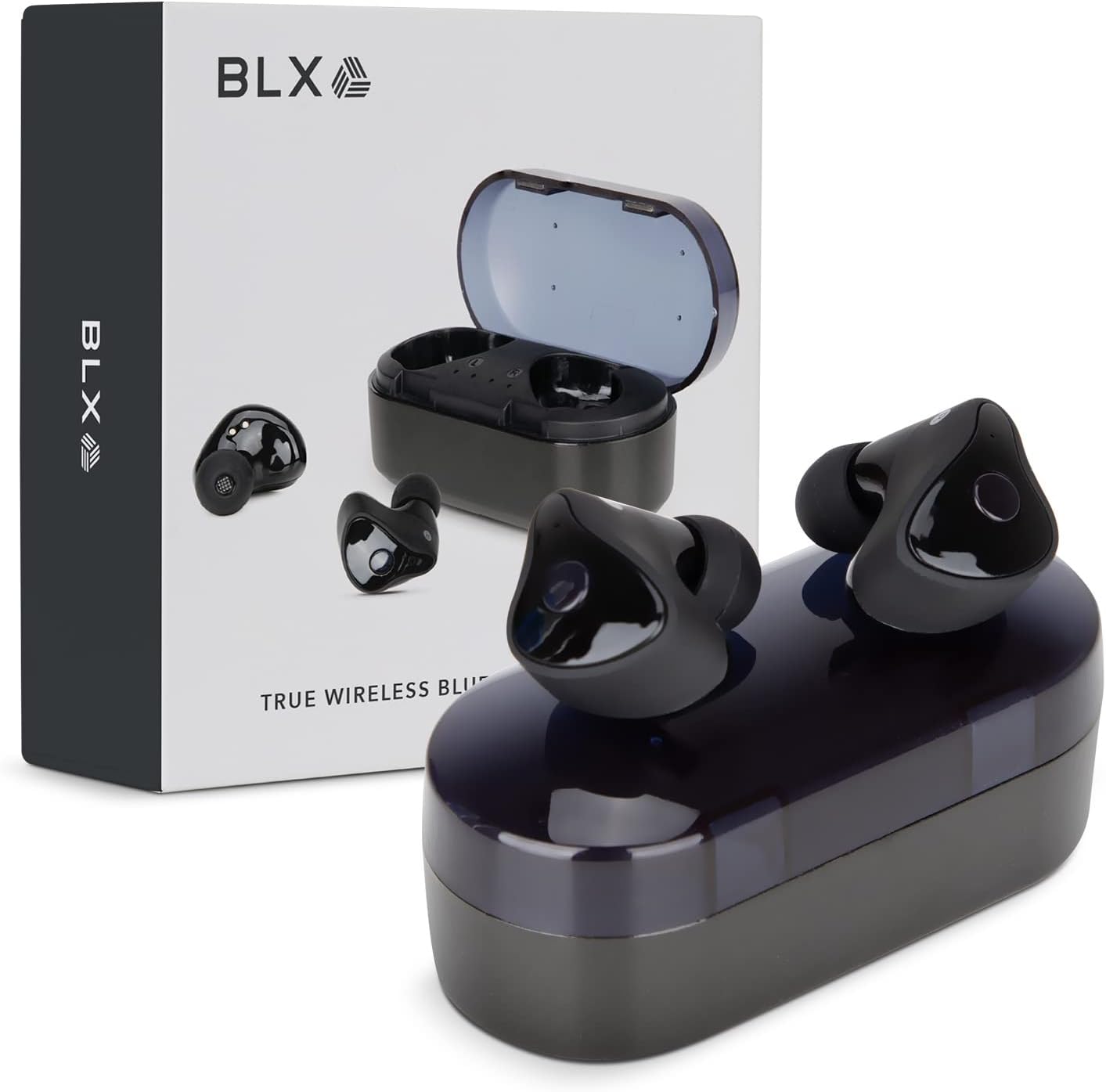
Image: BLX Earbuds, charging case, and product packaging.
3.1 ລັກສະນະທີ່ສໍາຄັນ
- True Wireless Stereo (TWS): Enjoy a completely wireless audio experience with independent earbuds.
- ເທັກໂນໂລຍີ Bluetooth 5.1: Provides a stable and efficient wireless connection with a range of up to 10 meters.
- ການຈັບຄູ່ໄວ: Earbuds automatically connect to your device once removed from the charging case.
- ການຄວບຄຸມການສໍາພັດ intuitive: Manage music playback, calls, and voice assistants with simple taps.
- IPX4 ກັນນ້ໍາ: Designed to withstand sweat and splashes, making them suitable for workouts and outdoor activities.
- ໄມໂຄຣໂຟນໃນຕົວ: Enables hands-free calling and voice assistant interaction.

Image: BLX Earbuds demonstrating true wireless freedom with Bluetooth 5.1, fast pairing, and a 10-meter range.

ຮູບພາບ: ລາຍລະອຽດ view of a BLX Earbud highlighting its smart touch control capabilities for various functions.

Image: A person running while wearing BLX Earbuds, emphasizing their IPX4 water resistance for sweat and splashes, and the portability of the compact charging case.

Image: A woman wearing a BLX Earbud, with an illustration of the three included silicone ear tip sizes (11mm, 12mm, 13mm) to help users find their perfect fit.

Image: A woman enjoying music with BLX Earbuds, illustrating the battery performance: 4.5 hours of listening time, up to 18 hours with the charging case, and a 1-hour full charge time for the case.

Image: A close-up of a BLX Earbud, emphasizing its clear immersive audio quality with a frequency response range of 20Hz to 20KHz.

Image: BLX Earbuds depicted with icons for Google Assistant and Siri, along with a built-in microphone icon, indicating hands-free voice assistant capabilities.
4. ຕັ້ງຄ່າ
4.1 ການສາກຫູຟັງ ແລະ ເຄສ
Before first use, fully charge the BLX Earbuds and their charging case.
- ວາງຫູຟັງໃສ່ກະເປົ໋າສາກໄຟ. ໃຫ້ແນ່ໃຈວ່າພວກເຂົານັ່ງຢ່າງຖືກຕ້ອງຢູ່ໃນຊ່ອງຂອງເຂົາເຈົ້າ (L ສໍາລັບຊ້າຍ, R ສໍາລັບຂວາ).
- Connect the Micro USB charging cable to the charging port on the case and the other end to a USB power source (e.g., computer, wall adapter).
- The indicator lights on the charging case will illuminate to show charging status. A full charge for the case takes approximately 1 hour.
- Once fully charged, disconnect the charging cable. The earbuds will charge automatically when placed in the powered case.
4.2 ການຈັບຄູ່ກັບອຸປະກອນຂອງທ່ານ
BLX Earbuds feature auto-pairing technology for quick and easy connection.
- ໃຫ້ແນ່ໃຈວ່າກ່ອງສາກໄຟໄດ້ຖືກສາກແລ້ວ ແລະ Bluetooth ຂອງອຸປະກອນຂອງທ່ານຖືກເປີດໃຊ້ງານແລ້ວ.
- ເປີດກ່ອງສາກໄຟ. ຫູຟັງເອຍບັດຈະເປີດເຄື່ອງອັດຕະໂນມັດ ແລະເຂົ້າສູ່ໂໝດຈັບຄູ່.
- On your device (smartphone, tablet, laptop), go to the Bluetooth settings and search for available devices.
- Select "BLX Earbuds" from the list of found devices.
- Once connected, your device will confirm the pairing, and the earbuds will be ready for use.
- ສໍາລັບການນໍາໃຊ້ຕໍ່ໄປ, ຫູຟັງເອຍບັດຈະເຊື່ອມຕໍ່ກັບອຸປະກອນທີ່ຈັບຄູ່ສຸດທ້າຍໂດຍອັດຕະໂນມັດເມື່ອເອົາອອກຈາກເຄສ.
4.3 Finding the Perfect Fit
A proper fit is crucial for sound quality and comfort. Experiment with the included silicone ear tips (Small, Medium, Large) to find the size that best seals your ear canal.
- ສຽບຫູຟັງໃສ່ຊ່ອງຫູຂອງເຈົ້າຄ່ອຍໆ.
- Twist slightly to secure it in place. The earbud should feel snug and comfortable without causing pressure.
- If the sound quality is poor or the earbuds feel loose, try a different size ear tip.
5. Operating Your BLX Earbuds
The BLX Earbuds utilize touch controls for easy management of audio and calls.
5.1 ເປີດ/ປິດ
- ເປີດ: ເປີດກ່ອງສາກ, ແລະຫູຟັງເອຍບັດຈະເປີດອັດຕະໂນມັດ.
- ປິດພະລັງງານ: ວາງຫູຟັງເອຍບັດໃສ່ໃນກ່ອງສາກ ແລະປິດຝາປິດ. ພວກເຂົາຈະປິດອັດຕະໂນມັດ ແລະເລີ່ມສາກໄຟ.
5.2 ການຫລີ້ນດົນຕີ
| ການປະຕິບັດ | ການຄວບຄຸມ |
|---|---|
| ຫຼິ້ນ/ຢຸດຊົ່ວຄາວ | ແຕະເທື່ອດຽວໃສ່ຫູຟັງຫູຟັງ |
| ຕິດຕາມຕໍ່ໄປ | ແຕະສອງເທື່ອໃສ່ຫູຟັງເບື້ອງຂວາ |
| ເພງກ່ອນໜ້າ | ແຕະສອງເທື່ອໃສ່ຫູຟັງທາງຊ້າຍ |
5.3 ການຄຸ້ມຄອງການໂທ
| ການປະຕິບັດ | ການຄວບຄຸມ |
|---|---|
| ຕອບ/ວາງສາຍ | ແຕະເທື່ອດຽວໃສ່ຫູຟັງຫູຟັງ |
| ປະຕິເສດການໂທ | ກົດຫູຟັງອັນໃດອັນໜຶ່ງຄ້າງໄວ້ 2 ວິນາທີ |
5.4 ຜູ້ຊ່ວຍສຽງ
| ການປະຕິບັດ | ການຄວບຄຸມ |
|---|---|
| ເປີດໃຊ້ຜູ້ຊ່ວຍສຽງ (Siri, Google Assistant, ແລະອື່ນໆ) | ແຕະສາມເທື່ອໃສ່ຫູຟັງຫູຟັງ |
5.5 ການຄວບຄຸມປະລິມານ
Volume control is managed directly through your connected device (phone, tablet, laptop).
6. ບໍາລຸງຮັກສາ
Proper care and maintenance will extend the life of your BLX Earbuds.
6.1 ການທໍາຄວາມສະອາດ
- ໃຊ້ຜ້າແພທີ່ອ່ອນ, ແຫ້ງ, ບໍ່ມີເສັ້ນດ່າງເພື່ອທຳຄວາມສະອາດຫູຟັງຫູຟັງ ແລະ ກ່ອງສາກ.
- ສໍາລັບຄໍາແນະນໍາຫູ, ເອົາພວກມັນອອກຈາກຫູຟັງແລະເຮັດຄວາມສະອາດດ້ວຍນ້ໍາສະບູອ່ອນໆຖ້າຈໍາເປັນ, ຫຼັງຈາກນັ້ນລ້າງອອກຢ່າງລະອຽດແລະແຫ້ງຫມົດກ່ອນທີ່ຈະຕິດໃຫມ່.
- ຢ່າໃຊ້ເຄື່ອງເຮັດຄວາມສະອາດຂັດ, ເຫຼົ້າ, ຫຼືສານລະລາຍສານເຄມີ.
- ກວດໃຫ້ແນ່ໃຈວ່າລາຍຊື່ຜູ້ຕິດຕໍ່ທີ່ສາກໄຟຢູ່ທັງຫູຟັງເອຍບັດ ແລະເຄສແມ່ນສະອາດ ແລະບໍ່ມີສິ່ງເສດເຫຼືອ.
6.2 ການເກັບຮັກສາ
ເມື່ອບໍ່ໄດ້ໃຊ້, ໃຫ້ເກັບຮັກສາຫູຟັງໃສ່ໃນກະເປົ໋າສາກໄຟສະເໝີເພື່ອປົກປ້ອງພວກມັນຈາກຂີ້ຝຸ່ນ, ຄວາມເສຍຫາຍ, ແລະ ເພື່ອຮັກສາສາຍສາກ.
6.3 ກັນນ້ຳ (IPX4)
Your BLX Earbuds are rated IPX4, meaning they are resistant to splashing water from any direction. This makes them suitable for:
- Sweaty workouts
- Light rain or splashes
ໝາຍເຫດສຳຄັນ:
- IPX4 rating does NOT mean the earbuds are waterproof. Do not submerge them in water.
- Do not wear them while swimming, showering, or in heavy rain.
- If the earbuds get wet, wipe them dry immediately before placing them back in the charging case.
7. ການແກ້ໄຂບັນຫາ
If you encounter issues with your BLX Earbuds, try the following solutions:
7.1 ຫູຟັງບໍ່ຈັບຄູ່ ຫຼື ບໍ່ເຊື່ອມຕໍ່
- ກວດໃຫ້ແນ່ໃຈວ່າໄດ້ສາກຫູຟັງທັງສອງອັນແລ້ວ.
- ໃຫ້ແນ່ໃຈວ່າ Bluetooth ຖືກເປີດໃຊ້ຢູ່ໃນອຸປະກອນຂອງທ່ານ.
- ໃສ່ຫູຟັງເອຍບັດກັບຄືນໃນເຄສ, ປິດຝາ, ລໍຖ້າສອງສາມວິນາທີ, ຈາກນັ້ນເປີດຝາອີກຄັ້ງເພື່ອເຂົ້າສູ່ໂໝດຈັບຄູ່ຄືນໃໝ່.
- Forget/delete "BLX Earbuds" from your device's Bluetooth list and try pairing again.
- ຍ້າຍຫູຟັງເອຍບັດໃຫ້ໃກ້ກັບອຸປະກອນຂອງທ່ານຫຼາຍຂຶ້ນ (ພາຍໃນ 10 ແມັດ).
7.2 ບໍ່ມີສຽງຫຼືສຽງຕ່ໍາ
- ກວດເບິ່ງລະດັບສຽງໃນອຸປະກອນທີ່ເຊື່ອມຕໍ່ຂອງທ່ານ.
- ກວດໃຫ້ແນ່ໃຈວ່າຫູຟັງເອຍບັດຖືກເຊື່ອມຕໍ່ຢ່າງຖືກຕ້ອງກັບອຸປະກອນຂອງທ່ານ.
- ອະນາໄມສິ່ງເສດເຫຼືອຕ່າງໆອອກຈາກຕາໜ່າງລຳໂພງຫູຟັງ.
- ລອງຫຼິ້ນສຽງຈາກແອັບພລິເຄຊັນ ຫຼືແຫຼ່ງອື່ນ.
7.3 ຫູຟັງໜຶ່ງໜ່ວຍບໍ່ເຮັດວຽກ
- ວາງຫູຟັງຫູຟັງທັງສອງໃສ່ໃນກະເປົ໋າສາກໄຟ, ປິດຝາປິດແລ້ວເປີດມັນອີກຄັ້ງ.
- ກວດໃຫ້ແນ່ໃຈວ່າໄດ້ສາກຫູຟັງທັງສອງອັນແລ້ວ.
- ລອງຣີເຊັດຫູຟັງຫູຟັງ (ເບິ່ງຈາກຜູ້ຜະລິດ website or support for specific reset instructions if needed).
7.4 Charging Case Not Charging
- ໃຫ້ແນ່ໃຈວ່າສາຍສາກໄດ້ເຊື່ອມຕໍ່ຢ່າງປອດໄພກັບທັງກໍລະນີ ແລະແຫຼ່ງພະລັງງານ.
- ລອງໃຊ້ພອດ USB ຫຼືອະແດັບເຕີຝາອື່ນ.
- ໃຫ້ແນ່ໃຈວ່າສາຍສາກບໍ່ເສຍຫາຍ.
8. ຂໍ້ມູນຈໍາເພາະ
| ຄຸນສົມບັດ | ລາຍລະອຽດ |
|---|---|
| ຊື່ຕົວແບບ | 30888 |
| ເຕັກໂນໂລຊີການເຊື່ອມຕໍ່ | ໄຮ້ສາຍ (Bluetooth 5.1) |
| Range ໄຮ້ສາຍ | ເຖິງ 10 ແມັດ |
| ການຕອບສະໜອງຄວາມຖີ່ | 20 Hz - 20,000 Hz |
| ອາຍຸແບັດເຕີຣີ (ຫູຟັງ) | Approx. 4.5 Hours (listening time) |
| ອາຍຸແບັດເຕີຣີ (ພ້ອມກ່ອງສາກ) | Approx. 18 Hours total |
| ເວລາສາກໄຟ (ກໍລະນີ) | ປະມານ. 1 ຊົ່ວໂມງ |
| ລະດັບຄວາມຕ້ານທານນ້ໍາ | IPX4 (ກັນນໍ້າ) |
| ໄມໂຄຣໂຟນ | Built-In, Bidirectional |
| ປະເພດການຄວບຄຸມ | ແຕະການຄວບຄຸມ |
| ອຸປະກອນທີ່ເຂົ້າກັນໄດ້ | Cellphones, Tablets, Laptops (iOS, Android, PC) |
| ວັດສະດຸ | ພາດສະຕິກ |
| ນ້ໍາຫນັກລາຍການ | 44 ກຣາມ |
| ຂະໜາດສິນຄ້າ | 9.9 x 9.9 x 3.8 cm |
9. ການຮັບປະກັນແລະການສະ ໜັບ ສະ ໜູນ
BLAUX products are manufactured to high standards and undergo rigorous testing. For information regarding warranty coverage, technical support, or service inquiries, please visit the official BLAUX webເວັບໄຊ ຫຼືຕິດຕໍ່ບໍລິການລູກຄ້າຂອງເຂົາເຈົ້າໂດຍກົງ.
ທ່ານສາມາດຊອກຫາຂໍ້ມູນເພີ່ມເຕີມ ແລະການຊ່ວຍເຫຼືອໄດ້ທີ່ BLAUX Store on Amazon.
Ask a question about this manual
Ask about setup, troubleshooting, compatibility, parts, safety, or missing instructions. Manuals+ will review the question and use this page’s manual context to help answer it.