

1. ບົດແນະນຳ
Thank you for choosing the CREATE FRYER AIR PRO 3.5L Air Fryer. This appliance uses advanced hot air technology to cook your favorite foods with little to no oil, offering a healthier alternative to traditional frying. It features a 3.5-liter capacity, a digital LCD screen, and 8 pre-installed programs for convenient cooking. Please read this manual thoroughly before first use to ensure safe and optimal performance.
2. ຄໍາແນະນໍາຄວາມປອດໄພທີ່ສໍາຄັນ
ປະຕິບັດຕາມຄວາມລະມັດລະວັງດ້ານຄວາມປອດໄພຂັ້ນພື້ນຖານສະເໝີເມື່ອໃຊ້ເຄື່ອງໃຊ້ໄຟຟ້າເພື່ອຫຼຸດຜ່ອນຄວາມສ່ຽງຕໍ່ການເກີດອັກຄີໄພ, ໄຟຟ້າຊອດ ແລະ ການບາດເຈັບ.
- ອ່ານຄໍາແນະນໍາທັງຫມົດກ່ອນທີ່ຈະນໍາໃຊ້.
- ຫ້າມຈ້ຳຫົວໜ່ວຍ, ສາຍໄຟ, ຫຼືສຽບໃສ່ນ້ຳ ຫຼື ຂອງແຫຼວອື່ນໆ.
- ຮັບປະກັນ voltage ຊີ້ບອກຢູ່ໃນເຄື່ອງໃຊ້ແມ່ນກົງກັບເຄື່ອງສາຍໃນທ້ອງຖິ່ນຂອງເຈົ້າtage.
- ການເບິ່ງແຍງຢ່າງໃກ້ຊິດແມ່ນມີຄວາມຈໍາເປັນໃນເວລາທີ່ອຸປະກອນໃດໆຖືກນໍາໃຊ້ໂດຍຫຼືຢູ່ໃກ້ກັບເດັກນ້ອຍ.
- ຖອດປລັກສຽບອອກເມື່ອບໍ່ໄດ້ໃຊ້ ແລະກ່ອນທໍາຄວາມສະອາດ. ປ່ອຍໃຫ້ເຢັນກ່ອນທີ່ຈະໃສ່ຫຼືເອົາຊິ້ນສ່ວນອອກ.
- ຫ້າມນຳໃຊ້ເຄື່ອງໃຊ້ທີ່ມີສາຍໄຟ ຫຼື ປລັກສຽບທີ່ເສຍຫາຍ, ຫຼື ຫຼັງຈາກເຄື່ອງໃຊ້ຜິດປົກກະຕິ ຫຼືໄດ້ຮັບຄວາມເສຍຫາຍໃນທຸກຮູບແບບ.
- ຢ່າໃຊ້ໄຟລ ments ແນບທີ່ບໍ່ໄດ້ແນະ ນຳ ໂດຍຜູ້ຜະລິດເຄື່ອງໃຊ້ໄຟຟ້າ.
- ຫ້າມວາງເຄື່ອງຕິດຝາ ຫຼືໃສ່ກັບເຄື່ອງໃຊ້ອື່ນໆ. ປ່ອຍພື້ນທີ່ຫວ່າງຢ່າງໜ້ອຍ 10 ຊມ ຢູ່ດ້ານຫຼັງ ແລະ ດ້ານຂ້າງ ແລະ ຊ່ອງຫວ່າງ 10 ຊມ ຂ້າງເທິງເຄື່ອງໃຊ້.
- ຢ່າວາງອັນໃດຢູ່ເທິງເຄື່ອງໃຊ້.
- ຢ່າໃຊ້ເຄື່ອງໃຊ້ເພື່ອຈຸດປະສົງອື່ນນອກເໜືອໄປຈາກທີ່ອະທິບາຍໄວ້ໃນຄູ່ມືນີ້.
- Hot air is released through the air outlet openings during hot air frying. Keep your hands and face at a safe distance from the steam and from the air outlet openings.
- The outer surfaces may become hot during use. Do not touch hot surfaces. Use handles or knobs.
- Always ensure the basket is properly inserted before operating.
3. ຜະລິດຕະພັນເກີນview ແລະອົງປະກອບ
Familiarize yourself with the main parts of your CREATE FRYER AIR PRO:
- ໜ່ວຍ ງານຫຼັກທີ່ມີແຜງຄວບຄຸມ
- ຈໍ LCD ແບບດິຈິຕອນ
- Temperature/Time Control Dial
- ກະຕ່າ Fryer ອາກາດ
- Crisper Plate (removable)
- ຈັບ
- ຊ່ອງສຽບອາກາດ
- ເຄື່ອງອອກອາກາດທາງອາກາດ

Image: A composite image displaying the CREATE FRYER AIR PRO air fryer unit alongside its separate basket and crisper plate components.
4. ການຕິດຕັ້ງແລະການນໍາໃຊ້ຄັ້ງທໍາອິດ
4.1 ການຫຸ້ມຫໍ່
Carefully remove all packaging materials, stickers, and labels from the appliance. Keep packaging for future storage or disposal.
4.2 ການທໍາຄວາມສະອາດເບື້ອງຕົ້ນ
- ເຊັດເຄື່ອງໃຊ້ພາຍນອກດ້ວຍການໂຄສະນາamp ຜ້າ.
- Clean the basket and crisper plate with hot water, dish soap, and a non-abrasive sponge. These parts are dishwasher safe.
- ໃຫ້ແນ່ໃຈວ່າທຸກພາກສ່ວນແຫ້ງຫມົດກ່ອນການນໍາໃຊ້.
4.3 ການຈັດວາງ
Place the appliance on a stable, horizontal, and heat-resistant surface. Ensure there is adequate air circulation around the unit (at least 10 cm clearance on all sides and top).
4.4 First Use (Burn-in Cycle)
It is recommended to run the air fryer empty for about 10-15 minutes at 180°C before cooking food for the first time. This helps to burn off any manufacturing residues and odors. A slight odor may be present during this process; this is normal.
5. ຄໍາແນະນໍາການດໍາເນີນງານ
5.1 ການດໍາເນີນງານພື້ນຖານ
- Plug the power cord into a grounded wall outlet. The appliance will beep, and the display will illuminate briefly.
- Pull the basket out of the air fryer. Place your ingredients into the basket, ensuring not to overfill (do not exceed the MAX line).
- ເລື່ອນກະຕ່າກັບຄືນໄປບ່ອນເຂົ້າໄປໃນເຕົາອົບອາກາດຈົນກ່ວາມັນກົດເຂົ້າໄປໃນສະຖານທີ່.
- The display will show the default temperature and time. Use the control dial to adjust the temperature (80°C to 200°C) and time (1 to 60 minutes). Press the dial to switch between temperature and time settings.
- Press the Start/Pause button (usually a play/pause icon) to begin cooking.
- During cooking, you can pull out the basket to shake or turn ingredients. The air fryer will automatically pause and resume when the basket is reinserted.
- Once the timer reaches zero, the air fryer will beep, indicating cooking is complete.
- Carefully pull out the basket and empty the cooked food. Use heat-resistant tongs or gloves.

ຮູບພາບ: A ລາຍລະອຽດ view of the CREATE FRYER AIR PRO's digital control panel, highlighting the temperature display and various cooking program icons.
5.2 ໂປຣແກຣມທີ່ຕິດຕັ້ງໄວ້ລ່ວງໜ້າ
The FRYER AIR PRO comes with 8 pre-installed programs for common dishes. To use them:
- After placing food in the basket, press the Menu button (often represented by multiple icons or a 'P' symbol) to cycle through the programs.
- Each program has a preset temperature and time. You can adjust these settings manually after selecting a program if desired.
- ກົດປຸ່ມເລີ່ມຕົ້ນ / ຢຸດຊົ່ວຄາວເພື່ອເລີ່ມຕົ້ນໂຄງການທີ່ເລືອກ.
The 8 programs include:
- Pommes Frites (Fries)
- Revben (Ribs)
- Fisk (Fish)
- Räkor (Shrimp)
- Kyckling (Chicken)
- Pajer (Pies)
- Kycklingben (Chicken Legs)
- Bröd (Bread)
5.3 ຄຳແນະນຳການປຸງອາຫານ
- ເພື່ອໃຫ້ໄດ້ຜົນດີທີ່ສຸດ, ໃຫ້ອຸ່ນໝໍ້ທອດລົມປະມານ 3-5 ນາທີກ່ອນທີ່ຈະຕື່ມອາຫານ.
- Shake the basket halfway through cooking for even browning, especially for smaller items like fries or nuggets.
- Lightly brush or spray food with oil for extra crispiness, though many foods require no added oil.
- Do not overcrowd the basket. Cook in batches if necessary to ensure proper air circulation and even cooking.
- For foods that typically require baking, the air fryer can often achieve similar results with a crispy exterior.
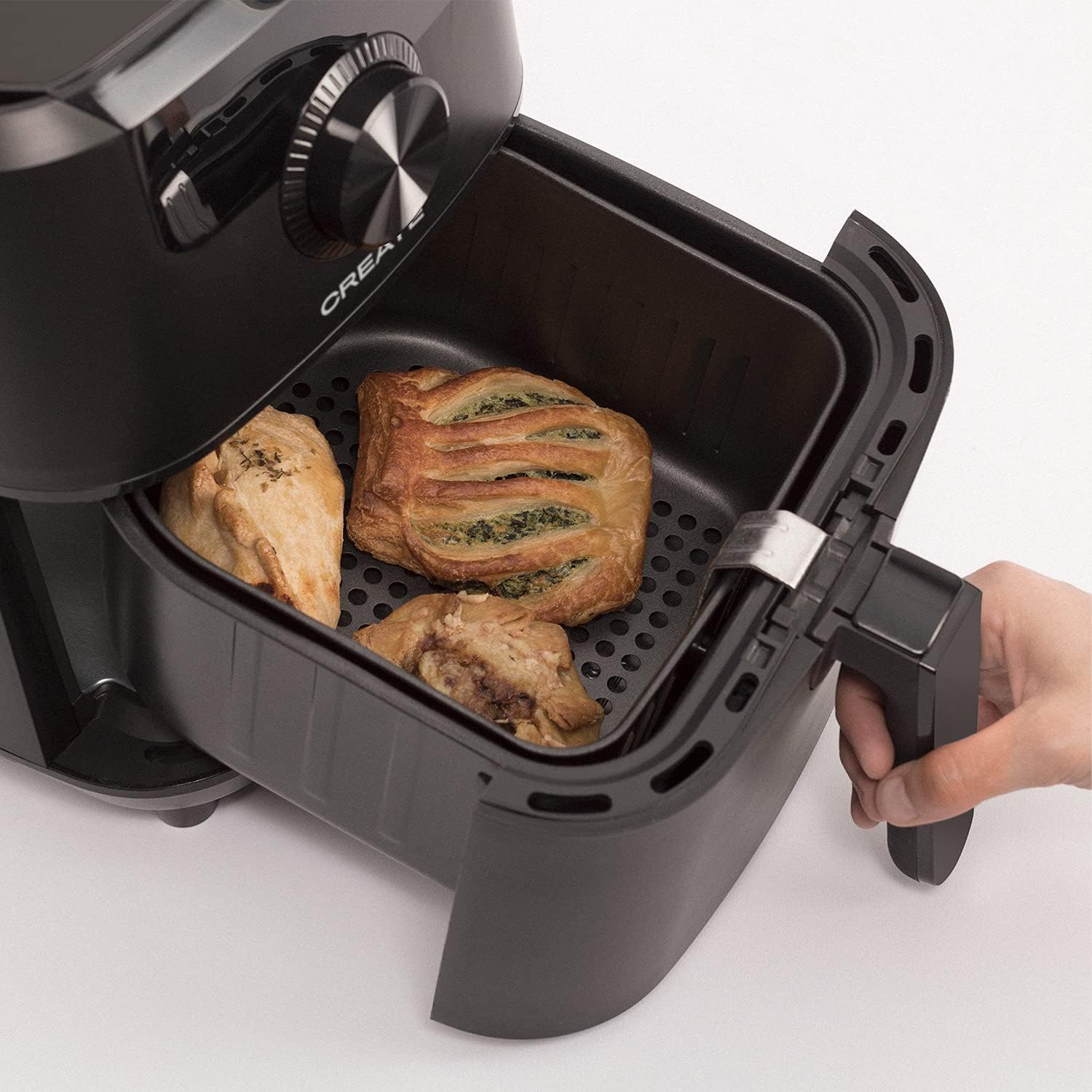
Image: The air fryer basket, pulled out from the main unit, containing cooked pastries and chicken pieces, demonstrating the cooking capacity.
6. ການບໍາລຸງຮັກສາແລະການທໍາຄວາມສະອາດ
ເຮັດຄວາມສະອາດເຕົາອົບອາກາດຫຼັງຈາກທຸກໆການນໍາໃຊ້.
- ຖອດປລັກເຄື່ອງອອກຈາກຝາຜະໜັງ ແລະປ່ອຍໃຫ້ມັນເຢັນລົງໝົດກ່ອນທຳຄວາມສະອາດ.
- ເຊັດດ້ານນອກຂອງຫນ່ວຍງານຕົ້ນຕໍດ້ວຍການໂຄສະນາamp ຜ້າ. ຢ່າໃຊ້ເຄື່ອງເຮັດຄວາມສະອາດຂັດ.
- Remove the basket and crisper plate. Wash them with hot water, dish soap, and a non-abrasive sponge. The non-stick coating makes cleaning easy. These parts are also dishwasher safe.
- For stubborn food residues, soak the basket and crisper plate in hot water with dish soap for about 10 minutes before cleaning.
- ໃຫ້ແນ່ໃຈວ່າທຸກພາກສ່ວນແຫ້ງຢ່າງລະອຽດກ່ອນທີ່ຈະປະກອບຫຼືເກັບຮັກສາເຄື່ອງໃຊ້ໃຫມ່.
- ເກັບຮັກສາເຄື່ອງຕົ້ມອາກາດໄວ້ໃນບ່ອນທີ່ເຢັນແລະແຫ້ງ.

Image: The air fryer basket, with its crisper plate, fully removed from the main unit, illustrating its readiness for cleaning.
7. ການແກ້ໄຂບັນຫາ
| ບັນຫາ | ສາເຫດທີ່ເປັນໄປໄດ້ | ການແກ້ໄຂ |
|---|---|---|
| ເຕົາອົບອາກາດບໍ່ເປີດ. | ອຸປະກອນບໍ່ໄດ້ສຽບ. | ກວດໃຫ້ແນ່ໃຈວ່າໄດ້ສຽບສາຍໄຟເຂົ້າກັບປລັກສຽບສາຍໄຟຢ່າງປອດໄພ. |
| ອາຫານບໍ່ໄດ້ຖືກປຸງແຕ່ງຢ່າງເທົ່າທຽມກັນ. | Basket is overcrowded. Food not shaken. | Cook in smaller batches. Shake the basket halfway through cooking. |
| ຄວັນສີຂາວມາຈາກເຄື່ອງໃຊ້. | ນໍ້າມັນທີ່ຕົກຄ້າງຈາກການນໍາໃຊ້ທີ່ຜ່ານມາ. | ລ້າງກະຕ່າແລະແຜ່ນ crisper ຢ່າງລະອຽດຫຼັງຈາກການນໍາໃຊ້ແຕ່ລະຄັ້ງ. |
| ອາຫານບໍ່ໜຽວ. | Too much moisture in food. Not enough oil (if desired). | Pat food dry before cooking. Lightly spray or brush with oil for extra crispiness. |
8. ຂໍ້ມູນຈໍາເພາະ
- ຊື່ຕົວແບບ: FRYER AIR PRO
- ໝາຍເລກຕົວແບບ: 52025_186434
- ຍີ່ຫໍ້: ສ້າງ
- ຄວາມອາດສາມາດ: 3.5 ລິດ
- ວັດtage: 1500 ວັດ
- ສະບັບtage: 240V
- ຊ່ວງອຸນຫະພູມ: 80°C - 200°C
- ວິທີການຄວບຄຸມ: ແຕະ, ໂທ
- ຄຸນນະສົມບັດພິເສດ: Programmable, Temperature Control, Digital Display
- ວັດສະດຸ: ພາດສະຕິກ
- ສີ: ດຳ
- ຂະໜາດ (D x W x H): 37.8ຊມ x 26.5ຊມ x 33.7ຊມ
- ການເຄືອບບໍ່ຕິດ: ແມ່ນແລ້ວ
9. ການຮັບປະກັນແລະການສະຫນັບສະຫນູນ
For warranty information, please refer to the warranty card included with your product or visit the official CREATE website. If you encounter any issues not covered in this manual, please contact CREATE customer support for assistance.
Webເວັບໄຊ: www.create.com (ຕ. ຢample link, please refer to actual manufacturer's webສະຖານທີ່)