
1. ການແນະນໍາ ແລະຫຼາຍກວ່າview
Thank you for choosing the PowerPac PPFZ99 90L Upright Freestanding Freezer. This manual provides essential information for the safe and efficient operation, installation, and maintenance of your new appliance. Please read these instructions thoroughly before using the freezer and retain them for future reference.
The PowerPac PPFZ99 is a compact 90-liter upright freestanding freezer designed for convenient storage of frozen foods. Its efficient design and reliable performance make it suitable for various household needs.
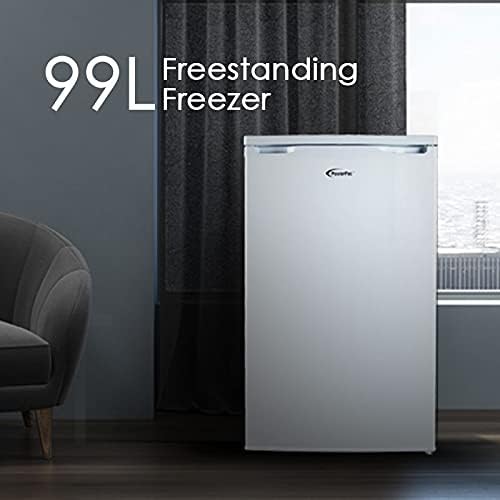
ຮູບທີ 1: The PowerPac PPFZ99 90L Upright Freestanding Freezer. This image shows the exterior of the white freestanding freezer, highlighting its compact and modern design.
2. ຂໍ້ມູນຄວາມປອດໄພ
ເພື່ອຮັບປະກັນການເຮັດວຽກທີ່ປອດໄພ, ປະຕິບັດຕາມຄວາມລະມັດລະວັງດ້ານຄວາມປອດໄພຕໍ່ໄປນີ້ສະເໝີ:
- ຄວາມປອດໄພທາງໄຟຟ້າ: ໃຫ້ແນ່ໃຈວ່າການສະຫນອງພະລັງງານກົງກັບ voltage specified on the appliance's rating label. Do not use extension cords or multiple socket adapters. Always plug the freezer into a grounded outlet.
- ການລະບາຍອາກາດ: Maintain adequate space around the freezer for proper air circulation. Blocked vents can lead to overheating and reduced efficiency.
- ວັດສະດຸທີ່ຕິດໄຟໄດ້: ຫ້າມເກັບຮັກສາສານລະເບີດ ຫຼື ວັດສະດຸໄວໄຟໄວ້ພາຍໃນ ຫຼື ໃກ້ກັບຕູ້ແຊ່ແຂງ.
- ເດັກນ້ອຍ: ເຄື່ອງໃຊ້ນີ້ບໍ່ໄດ້ມີຈຸດປະສົງເພື່ອໃຊ້ໂດຍບຸກຄົນ (ລວມທັງເດັກນ້ອຍ) ທີ່ມີຄວາມສາມາດທາງຮ່າງກາຍ, ຄວາມຮູ້ສຶກ ຫຼືຈິດໃຈທີ່ຫຼຸດລົງ, ຫຼືຂາດປະສົບການ ແລະຄວາມຮູ້, ເວັ້ນເສຍແຕ່ວ່າພວກເຂົາໄດ້ຮັບການຊີ້ນໍາ ຫຼືຄໍາແນະນໍາກ່ຽວກັບການນໍາໃຊ້ເຄື່ອງໃຊ້ໂດຍບຸກຄົນທີ່ຮັບຜິດຊອບຄວາມປອດໄພຂອງເຂົາເຈົ້າ. ເດັກນ້ອຍຄວນໄດ້ຮັບການເບິ່ງແຍງເພື່ອຮັບປະກັນວ່າພວກເຂົາບໍ່ໄດ້ຫຼີ້ນກັບເຄື່ອງໃຊ້.
- ການຫລອກລວງ: ຢ່າໃຊ້ອຸປະກອນກົນຈັກຫຼືວິທີການອື່ນໆເພື່ອເລັ່ງຂະບວນການ defrosting, ນອກເຫນືອການແນະນໍາໂດຍຜູ້ຜະລິດ.
- ບໍາລຸງຮັກສາ: ຖອດສາຍຕູ້ເຢັນອອກກ່ອນທຳຄວາມສະອາດ ຫຼືເຮັດການບຳລຸງຮັກສາ.
3. ອົງປະກອບຂອງຜະລິດຕະພັນ
The PowerPac PPFZ99 freezer features a practical design for optimal storage. Key components include:
- ຕູ້ແຊ່ແຂງ: The main storage area for frozen goods.
- Drawer Compartments: Multiple transparent drawers for organized storage and easy access to items.
- ປຸ່ມຄວບຄຸມອຸນຫະພູມ: Located externally or internally, used to adjust the freezer's temperature.
- ປະທັບຕາປະຕູ: Ensures an airtight closure to maintain internal temperature.
- ການປັບລະດັບຕີນ: Adjustable feet at the base to ensure the appliance is stable and level.

ຮູບທີ 2: ພາຍໃນ view of the freezer. This image displays the freezer's interior with its front-opening design and four clear drawer compartments, ideal for organizing various frozen items.
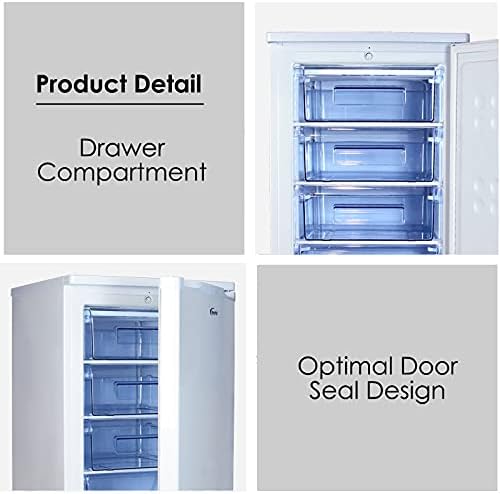
ຮູບທີ 3: Product Detail: Drawer Compartment and Optimal Door Seal Design. This image provides a closer look at the transparent drawer compartments and highlights the effective door seal, crucial for maintaining coldness.
4. ຕັ້ງຄ່າ
Follow these steps for proper installation of your freezer:
- ການຫຸ້ມຫໍ່: Carefully remove all packaging materials, including protective films and tapes. Keep packaging out of reach of children.
- ການຈັດວາງ: Choose a dry, well-ventilated location away from direct sunlight, heat sources (e.g., oven, radiator), and extreme cold. Ensure there is at least 10 cm of space around the back and sides for adequate air circulation.
- ການປັບລະດັບ: Use the adjustable levelling feet at the bottom of the freezer to ensure it stands firmly and level on the floor. A level appliance operates more efficiently and quietly.
- ທໍາຄວາມສະອາດ: ກ່ອນການນຳໃຊ້ຄັ້ງທຳອິດ, ໃຫ້ທຳຄວາມສະອາດພາຍໃນ ແລະ ພາຍນອກຂອງຕູ້ແຊ່ແຂງດ້ວຍນໍ້າຢາລ້າງຈານ.amp cloth and mild detergent. Wipe dry thoroughly.
- Initial Wait Time: After placing the freezer in its final position, wait for at least 2-4 hours before plugging it into the power outlet. This allows the refrigerant to settle.
- ການເຊື່ອມຕໍ່ພະລັງງານ: ສຽບຕູ້ແຊ່ໃສ່ບ່ອນສຽບໄຟຟ້າທີ່ມີດິນ.

ຮູບທີ 4: Product Measurement. This diagram illustrates the dimensions of the freezer: 850mm height, 525mm width, and 505mm depth, crucial for planning placement.

ຮູບທີ 5: Temperature Control and Levelling Feet. This image highlights the temperature control dial for adjusting settings and the adjustable levelling feet at the base of the freezer.
5. ຄໍາແນະນໍາການດໍາເນີນງານ
Once the freezer is set up, follow these guidelines for operation:
- ການຕັ້ງຄ່າອຸນຫະພູມ: Locate the temperature control dial (refer to Figure 5). Turn the dial to your desired setting. A colder setting is typically indicated by a higher number or a 'Max' position. Allow several hours for the freezer to reach the set temperature before loading food.
- ກຳລັງໂຫຼດອາຫານ: Do not overload the freezer. Ensure there is space for air to circulate around items. Avoid placing hot food directly into the freezer; allow it to cool down first.
- ການເປີດປະຕູ: Minimize the frequency and duration of door openings to maintain a stable internal temperature and conserve energy.
- ອາຫານສົດແຊ່ແຂງ: For optimal freezing, place fresh food in the upper compartments or directly on the shelves (if applicable) to allow for faster freezing.
6. ບໍາລຸງຮັກສາ
Regular maintenance ensures the longevity and efficiency of your freezer:
- ທໍາຄວາມສະອາດ: Unplug the freezer before cleaning. Clean the interior regularly with a solution of mild detergent and warm water. Wipe down the exterior with a damp cloth. Do not use abrasive cleaners or sharp objects.
- ການຫລອກລວງ: Over time, frost will accumulate inside the freezer. When the frost layer becomes about 5mm thick, defrost the appliance. To defrost, unplug the freezer, remove all food, and leave the door open. Place towels at the bottom to absorb melting ice. Do not use sharp objects to remove ice. Once defrosted, clean and dry the interior thoroughly before plugging it back in.
- ປະທັບຕາປະຕູ: Regularly check the door seal for any damage or gaps. A damaged seal can lead to inefficient operation. Clean the door seal with a damp ຜ້າ.
- ເຄັດລັບການປະຢັດພະລັງງານ: Keep the freezer in a cool, well-ventilated area. Avoid frequent door openings. Ensure the door seal is intact. Defrost when necessary.
7. ການແກ້ໄຂບັນຫາ
Before contacting customer service, try these simple troubleshooting steps:
| ບັນຫາ | ສາເຫດທີ່ເປັນໄປໄດ້ | ການແກ້ໄຂ |
|---|---|---|
| ຕູ້ແຊ່ເຢັນບໍ່ເຢັນ | No power; temperature setting too high; door not closed properly; excessive frost build-up. | Check power plug and outlet; adjust temperature setting; ensure door is fully closed; defrost the freezer. |
| ສຽງດັງເກີນໄປ | Freezer not level; objects touching the back of the unit; compressor noise (normal). | Adjust levelling feet; move objects away from the freezer; compressor noise is normal during operation. |
| ນ້ໍາຢູ່ເທິງພື້ນ | Defrost water not properly drained; door left open. | Ensure drain plug (if applicable) is secure; close door properly. |
8. ຂໍ້ມູນຈໍາເພາະ
Detailed specifications for the PowerPac PPFZ99 freezer:
- ຊື່ຕົວແບບ: PPFZ99
- ຍີ່ຫໍ້: PowerPac
- ຄວາມອາດສາມາດ: 90 ລິດ
- ປະເພດການຕິດຕັ້ງ: ອິດສະລະ
- ຂະໜາດສິນຄ້າ (D x W x H): 50.5D x 52.5W x 85H ຊມ
- ນ້ໍາຫນັກລາຍການ: 33 ກິໂລ
- ວັດtage: 110 ວັດ
- ປະເພດວັດສະດຸປະຕູ: ໂລຫະ
- ທິດທາງປະຕູ: ສິດ
- ສີ: Black (Note: Product title indicates White, but specifications list Black. Please verify product color upon purchase.)

ຮູບທີ 6: High Quality Compressor. This image highlights the internal compressor unit, emphasizing its quality and the associated 10-year warranty.
9. ການຮັບປະກັນແລະການສະຫນັບສະຫນູນ
Your PowerPac PPFZ99 freezer comes with a manufacturer's warranty. Please refer to the warranty card included with your purchase for specific terms and conditions.
- ການຮັບປະກັນເຄື່ອງອັດ: The high-quality compressor is covered by a ຮັບປະກັນ 10 ປີ.
- ການຮັບປະກັນທົ່ວໄປ: Other components are covered by a standard manufacturer's warranty, typically 1 year. Please check your warranty documentation for exact details.
- ການຊ່ວຍເຫຼືອລູກຄ້າ: For technical assistance, warranty claims, or spare parts, please contact PowerPac customer service through their official webເວັບໄຊ ຫຼືຂໍ້ມູນການຕິດຕໍ່ທີ່ສະໜອງໃຫ້ຢູ່ໃນເອກະສານການຮັບປະກັນຂອງທ່ານ.