
HAKRDRDO AD6
aovo Drones with Camera 4K UHD User Manual
ຮຸ່ນ: AD6
ແນະນຳ
This user manual provides detailed instructions for the safe and efficient operation of your aovo Drones with Camera 4K UHD. Designed for adults, this quadcopter features a powerful brushless motor, GPS return home functionality, and a 4K UHD camera for high-quality aerial photography and videography. Please read this manual thoroughly before operating your drone.
1. ຕັ້ງຄ່າ
1.1 Unboxing & ອົງປະກອບ
Carefully unpack all components from the carrying case. The package includes the aovo drone, remote control, and two 2500 mAh lithium batteries. Ensure all parts are present and undamaged.
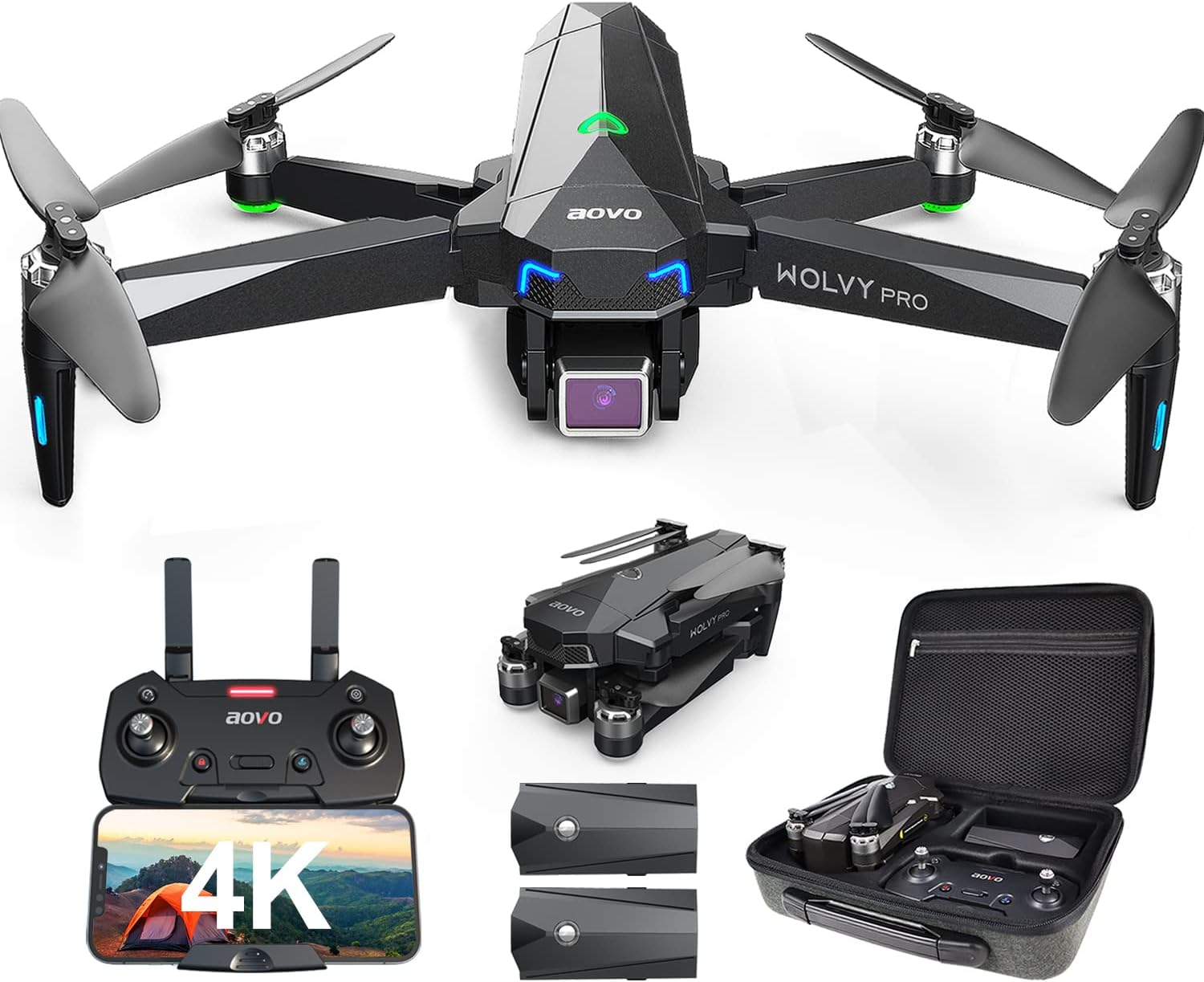
Figure 1: aovo Drone and Included Components
1.2 ການຕິດຕັ້ງຫມໍ້ໄຟ
Insert the fully charged 2500 mAh lithium battery into the designated battery compartment on the drone. Ensure it clicks securely into place.
1.3 ການຕິດຕັ້ງໃບພັດ
Unfold the drone's arms and propellers. Ensure all propellers are securely attached and free from obstruction.
1.4 ການຕັ້ງຄ່າຕົວຄວບຄຸມ
Extend the antennas on the remote control. Pull out the phone holder and securely place your smartphone. The remote control is designed for comfortable handling during flight.
1.5 ການປັບທຽບ
Before each flight, calibration is required to ensure accurate and stable operation. This includes compass and gyroscope calibration.
Video 1: aovo Drone Operation Guide. This video demonstrates the setup process including unfolding, battery installation, and calibration steps.
ການປັບທຽບເຂັມທິດ: Rotate the drone clockwise as shown in the video until the indicator lights change. This ensures accurate directional control.
ການສອບທຽບ Gyroscope: Press the gyroscope button on the remote control. The drone will perform an automatic calibration sequence to stabilize its flight.
1.6 GPS Signal Search
Ensure the GPS mode is turned on before flight. The drone will search for GPS signals to establish its position. This is crucial for features like Return Home and to prevent loss of the drone.
2. ການເຮັດວຽກ
2.1 Motors Start and Unlock
To start the motors and unlock the drone, press the designated unlock button on the remote control. The propellers will begin to spin.
2.2 One-Key Takeoff
After unlocking the aircraft, press the one-key takeoff button. The drone will automatically ascend to a safe altitude.
2.3 ການຄວບຄຸມການບິນພື້ນຖານ
- ຂຶ້ນ/ລົງ: Push the left throttle stick up or down.
- ລ້ຽວຊ້າຍ/ຂວາ: Flick the left throttle stick to the left or right.
- ໄປໜ້າ/ຖອຍຫຼັງ: Push the right direction stick up or down.
- ຖ້ຽວບິນຊ້າຍ/ຂວາ: Push the right direction stick left or right.
2.4 ການປັບມຸມກ້ອງຖ່າຍຮູບ
Use the designated controls on the remote to adjust the camera angle during flight, allowing for optimal shot composition.

Figure 2: 4K UHD Camera for high-quality imaging.
2.5 Switching Speed
The drone supports multiple speed modes. Press the speed switch button on the remote control. One beep indicates low speed, two beeps indicate high speed.
2.6 ໂໝດການບິນອັດສະລິຍະ
The aovo drone offers advanced intelligent flight modes for enhanced user experience and creative shots.
- ຕິດຕາມຂ້ອຍ: The drone uses its built-in GPS positioning system to obtain real-time location information and automatically follows the user, recording dynamic footage.
- Waypoint Flight: Draw a line on the map within the app to create a custom flight path. The drone will automatically follow this path, allowing for pre-planned aerial routes.
- ຈຸດທີ່ໜ້າສົນໃຈ: The drone can continuously circle around a preset point of interest, capturing stunning 360-degree views.
Video 2: aovo Drone with 4K UHD Camera for Adults. This video showcases the Follow Me, Waypoint Flight, and Point of Interest features.

Figure 3: GPS Assisted Features including Follow Me and Waypoint Flight.
2.7 Taking Photos & Videos
To take photos, press the camera button on the remote control. To record video, press the video button. The 4K UHD camera with wide-field and bug-eye lens provides excellent image quality.
2.8 Return Home Functions
The drone is equipped with several return home features to ensure its safe recovery.
- ກັບຄືນລະຫັດດຽວ: Press the one-key return button on the remote control, and the aircraft will automatically return to its takeoff point.
- ຕ່ ຳtage ກັບຄືນ: If the drone's battery voltage drops below a critical level, the indicator lights on the aircraft body will flash slowly, and the remote controller will beep. The drone will then automatically initiate a return to home.
- Failsafe Return: If the drone exceeds the remote control distance or the remote control signal is interrupted for 6 seconds, the aircraft will automatically return to home.
3. ບໍາລຸງຮັກສາ
3.1 ການສາກແບັດ
Connect one end of the USB charging cable to the drone battery and the other end to a 5V2A adapter. The light on the battery will flash during charging and remain solid when fully charged. The remote controller is charged using the same method.

Figure 4: Drone batteries provide up to 60 minutes of flight time.
3.2 ການເບິ່ງແຍງທົ່ວໄປ
Regularly inspect the drone for any signs of damage, especially after crashes. Keep the propellers clean and free from debris. Store the drone and batteries in a cool, dry place away from direct sunlight.
4. ການແກ້ໄຂບັນຫາ
- Drone drifts or flies erratically: Perform compass and gyroscope calibration as described in Section 1.5.
- ການສູນເສຍສັນຍານ: The drone's failsafe return function should activate, bringing it back to the takeoff point. Ensure you are within the maximum FPV distance of 2624ft.
- ເວລາບິນສັ້ນ: Ensure batteries are fully charged before each flight. Flight time is approximately 60 minutes with both included batteries.
- ຄຸນນະພາບຮູບພາບທີ່ບໍ່ດີ: Ensure the camera lens is clean and free from smudges or debris.
5. ຂໍ້ມູນຈໍາເພາະ
| ຄຸນສົມບັດ | ຂໍ້ມູນຈໍາເພາະ |
|---|---|
| ຍີ່ຫໍ້ | HAKRDRDO |
| ຊື່ຕົວແບບ | aovo Quadcopter 4K UHD |
| ໝາຍເລກຕົວແບບ | AD 6 |
| ສີ | ດຳ |
| ຊ່ວງອາຍຸ (ລາຍລະອຽດ) | ຜູ້ໃຫຍ່ |
| ຄວາມລະອຽດການຖ່າຍວິດີໂອ | 4K UHD 2.7K |
| ການແກ້ໄຂປະສິດທິພາບ | 12 MP |
| ເຕັກໂນໂລຊີການເຊື່ອມຕໍ່ | Wi-Fi |
| ອົງປະກອບລວມ | Battery, Extra Battery, Remote Control |
| ລະດັບທັກສະ | ຜູ້ເລີ່ມຕົ້ນ |
| ຄວາມອາດສາມາດຫມໍ້ໄຟ | 2500 ລ້ານamp ຊົ່ວໂມງ |
| ນ້ໍາຫນັກລາຍການ | 3.69 ປອນ |
| ຂະໜາດສິນຄ້າ | 11.2"L x 8.9"W x 3.15"H |
| ປະເພດມໍເຕີ | ມໍເຕີທີ່ບໍ່ມີແປງ |
| ເວລາບິນ | Up to 60 Minutes (with extra battery) |
| ໄລຍະທາງ FPV | ສູງສຸດ 2624ft |
6. ການຮັບປະກັນແລະການສະຫນັບສະຫນູນ
For detailed warranty information and technical support, please refer to the full user manual provided with your product or visit the official HAKRDRDO website. Contact information for customer service can typically be found in the support section of the manual or webເວັບໄຊ.
Ask a question about this manual
Ask about setup, troubleshooting, compatibility, parts, safety, or missing instructions. Manuals+ will review the question and use this page’s manual context to help answer it.